編輯:Android資訊
bitmap compress 是官方給出的圖片質量壓縮,通過試驗學習了這個壓縮的特性如下:
bitmap.compress(Bitmap.CompressFormat.JPEG, option, bos);
三個參數說明,1.圖片壓縮後的格式 2.圖片壓縮比例 3.壓縮後得到的數據
測試方法如下:
 System.out.println("bitmap=="+bitmap.getByteCount());
ByteArrayOutputStream bos = new ByteArrayOutputStream();
//通過這裡改變壓縮類型,其有不同的結果
int option = 100;
while (option > 0)
{
    bitmap.compress(Bitmap.CompressFormat.JPEG, option, bos);
    System.out.println("bos=====" + bos.size());
    option-=10;
    bos.reset();
}

System.out.println("bitmap==" + bitmap.getByteCount());
bitmap.recycle();

ByteArrayInputStream bis = new ByteArrayInputStream(bos.toByteArray());
System.out.println("bis====="+bis.available());
bitmap = BitmapFactory.decodeStream(bis);
System.out.println("bitmap=="+bitmap.getByteCount());
imageView.setImageBitmap(bitmap);
如果確實要節約內存
就是用如下方法:
ByteArrayOutputStream out = new ByteArrayOutputStream();
  image.compress(Bitmap.CompressFormat.JPEG, 100, out);
  BitmapFactory.Options newOpts =  new  BitmapFactory.Options();
  int be = 2;//壓縮比例,可以自己通過分辨率去計算需要的比例值
  newOpts.inSampleSize = be;
  ByteArrayInputStream isBm =  new  ByteArrayInputStream(out.toByteArray());
  Bitmap bitmap = BitmapFactory.decodeStream(isBm,  null ,  null );
 Android Activity的生命周期和啟動模式詳解
Activity生命周期經典圖解: 按鍵對生命周期的影響: BACK鍵: 當我們按BACK鍵時,我們這個應用程序將結束,這時候我們將先後調用onPause()-
 Android鏡子應用 一面可編程的鏡子
本文由碼農網 – 小峰原創翻譯,轉載請看清文末的轉載要求,歡迎參與我們的付費投稿計劃! 先來看看我家裡的一面搭載了Android應用的鏡子,上圖: 擁有
 如何用PHP開發Android應用程序
Google的開源Android移動操作系統正在席卷全球智能手機市場,和蘋果不一樣,它對那些想將應用程序提交到iPhone App Store的開發人員有著嚴格的
 AChartEngine:Android圖表繪制引擎
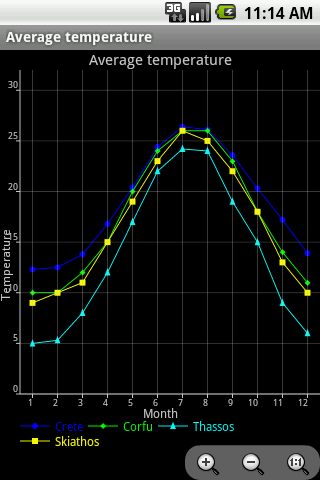
本文由碼農網 – 小峰原創,轉載請看清文末的轉載要求,歡迎參與我們的付費投稿計劃! AChartEngine是一款基於Android的圖表繪制引擎,它為A