編輯:Android資訊
單選按鈕RadioButton在Android平台上也應用的非常多,比如一些選擇項的時候,會用到單選按鈕,實現單選按鈕由兩部分組成,也就是RadioButton和RadioGroup配合使用。
RadioButton的單選按鈕;
RadioGroup是單選組合框,用於將RadioButton框起來;
在沒有RadioGroup的情況下,RadioButton可以全部都選中;
當多個RadioButton被RadioGroup包含的情況下,RadioButton只可以選擇一個;
注意:單選按鈕的事件監聽用setOnCheckedChangeListener來對單選按鈕進行監聽
例子:
一道選擇題,選擇哪個城市美女最多,當然,這個就是為了測試
RadioTest.java
package org.loulijun.radio;

import android.app.Activity;
import android.os.Bundle;
import android.view.Gravity;
import android.widget.RadioButton;
import android.widget.RadioGroup;
import android.widget.TextView;
import android.widget.Toast;

public class RadioTest extends Activity {
    /** Called when the activity is first created. */
        TextView textview;
        RadioGroup radiogroup;
        RadioButton radio1,radio2,radio3,radio4;
    @Override
    public void onCreate(Bundle savedInstanceState) {
        super.onCreate(savedInstanceState);
        setContentView(R.layout.main);
        textview=(TextView)findViewById(R.id.textview1);
        radiogroup=(RadioGroup)findViewById(R.id.radiogroup1);
        radio1=(RadioButton)findViewById(R.id.radiobutton1);
        radio2=(RadioButton)findViewById(R.id.radiobutton2);
        radio3=(RadioButton)findViewById(R.id.radiobutton3);
        radio4=(RadioButton)findViewById(R.id.radiobutton4);

        radiogroup.setOnCheckedChangeListener(new RadioGroup.OnCheckedChangeListener() {

                        @Override
                        public void onCheckedChanged(RadioGroup group, int checkedId) {
                                // TODO Auto-generated method stub
                                if(checkedId==radio2.getId())
                                {
                                        DisplayToast("正確答案:"+radio2.getText()+",恭喜你,回答正確!");
                                }else
                                {
                                        DisplayToast("請注意,回答錯誤!");
                                }
                        }
                });
    }
    public void DisplayToast(String str)
    {
            Toast toast=Toast.makeText(this, str, Toast.LENGTH_LONG);
            toast.setGravity(Gravity.TOP,0,220);
            toast.show();
    }
}
strings.xml文件
<?xml version="1.0" encoding="utf-8"?>
<resources>
    <string name="hello">哪個城市美女多?</string>
    <string name="app_name">單選按鈕測試</string>
    <string name="radiobutton1">杭州</string>
    <string name="radiobutton2">成都</string>
    <string name="radiobutton3">重慶</string>
    <string name="radiobutton4">蘇州</string>
</resources>
main.xml文件:注意,這裡面,4個RadioButton包含在RadioGroup中
<?xml version="1.0" encoding="utf-8"?>
<LinearLayout xmlns:android="http://schemas.android.com/apk/res/android"
    android:orientation="vertical"
    android:layout_width="fill_parent"
    android:layout_height="fill_parent"
    >
<TextView
    android:layout_width="fill_parent"
    android:layout_height="wrap_content"
    android:text="@string/hello"
    android:id="@+id/textview1"
    />
    <RadioGroup
            android:id="@+id/radiogroup1"
            android:layout_width="wrap_content"
            android:layout_height="wrap_content"
            android:orientation="vertical"
            android:layout_x="3px"
    >
            <RadioButton
                    android:id="@+id/radiobutton1"
                    android:layout_width="wrap_content"
                    android:layout_height="wrap_content"
                    android:text="@string/radiobutton1"
            />
            <RadioButton
                    android:id="@+id/radiobutton2"
                    android:layout_width="wrap_content"
                    android:layout_height="wrap_content"
                    android:text="@string/radiobutton2"
            />
            <RadioButton
                    android:id="@+id/radiobutton3"
                    android:layout_width="wrap_content"
                    android:layout_height="wrap_content"
                    android:text="@string/radiobutton3"
            />
            <RadioButton
                    android:id="@+id/radiobutton4"
                    android:layout_width="wrap_content"
                    android:layout_height="wrap_content"
                    android:text="@string/radiobutton4"
            />
    </RadioGroup>
</LinearLayout>
運行結果如下:
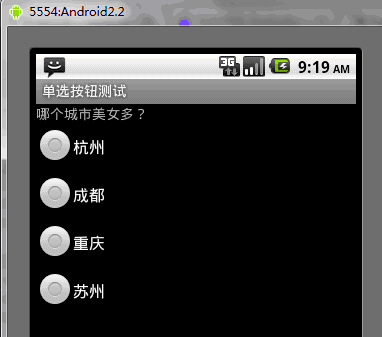
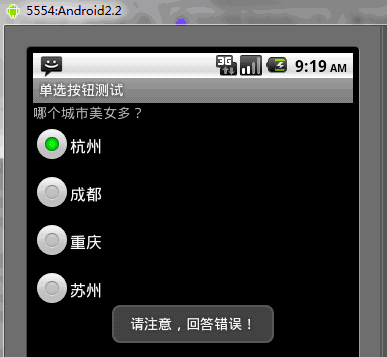
假如我們選擇杭州,會提示錯誤的Toast
再次選中成都後,會提示答案正確
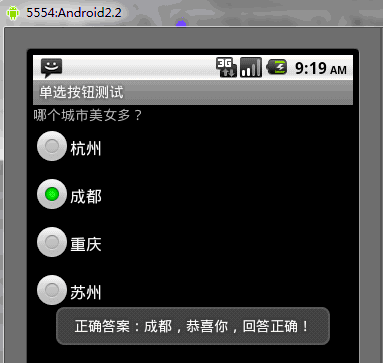
這裡就可以看到,單選按鈕的使用效果,如果只是使用RadioButton的話,把配置文件中RadioGroup去掉,當然,要重新為每個單選按鈕設置監聽,這樣,這個RadioButton就跟Button沒有什麼區別了,我們可以選中多個,所以要注意,單選按鈕要和RadioGroup一起使用,才能夠實現單選的功能。
 Android Translucent System Bar 的最佳實踐
近幾天准備抽空總結Android一些系統UI的實踐使用,於是開始動手建了一個庫 AndroidSystemUiTraining ,邊撸代碼邊寫總結 今天開寫第一篇
 Android 自定義 AlertDialog 提示框
在Android開發中,因項目需要,大部分情況下需要自定義Dialog來滿足項目需求,系統雖然也有,但是界面美觀方面,不忍直視。 下面貼出Android項目中使用
 深入理解 Android 動畫 Interpolator 類的使用
做過android動畫的人對Interpolator應該不會陌生,這個類主要是用來控制android動畫的執行速率,一般情況下,如果我們不設置,動畫都不是勻速執行
 Android UI控件系列:ImageButton(帶圖標的按鈕)
除了Android系統自帶的Button按鈕以外,還提供了帶圖標的按鈕ImageButton 要制作帶圖標的按鈕,首先要在布局文件中定義ImageButton,然