編輯:關於Android編程
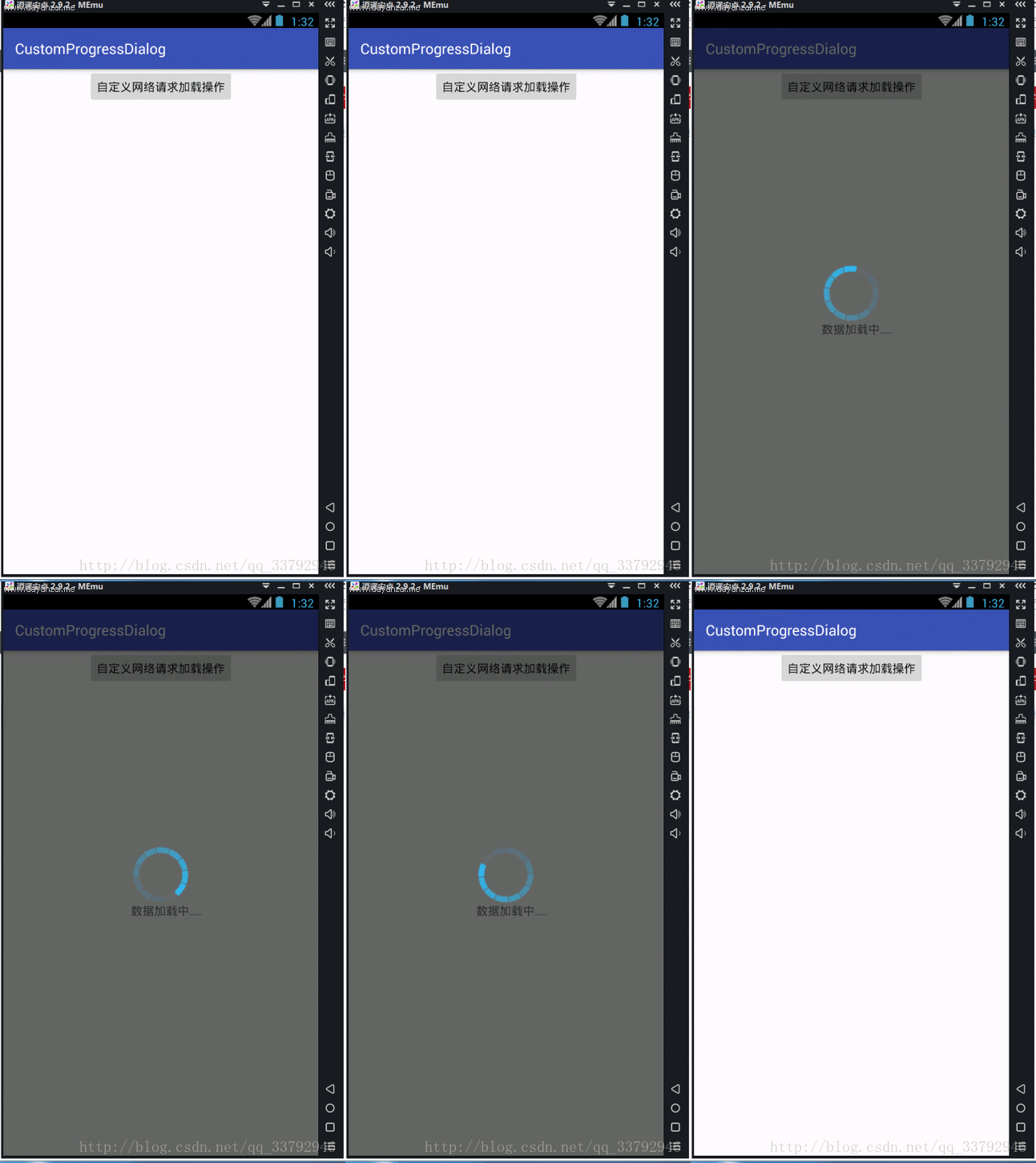
效果預覽
簡要說明
現在android程序網絡請求操作是必不可少的,然而擁有好的交互體驗的程序對網絡耗時操作的處理尤為重要。
代碼說明:
dialog_loading.xml
<?xml version="1.0" encoding="utf-8"?>
<LinearLayout xmlns:android="http://schemas.android.com/apk/res/android"
 android:id="@+id/dialog_view"
 android:orientation="vertical"
 android:layout_width="fill_parent"
 android:layout_height="fill_parent"
 android:gravity="center">
 <ImageView
 android:id="@+id/img"
 android:layout_width="wrap_content"
 android:layout_height="wrap_content"
 android:background="@android:color/transparent"
 android:src="@drawable/progress"
 />
 <TextView
 android:id="@+id/tipTextView"
 android:layout_width="wrap_content"
 android:layout_height="wrap_content"
 android:layout_marginLeft="10dp"
 android:text="數據加載中……" />
</LinearLayout>
這個布局就是我們自定義的顯示布局,比較簡單明了,最外層一個垂直排列的線性布局,裡面依次是一個imageview和textview。
loading_animation.xml
<?xml version="1.0" encoding="utf-8"?>
<set android:shareInterpolator="false" xmlns:android="http://schemas.android.com/apk/res/android">
 <rotate
 android:interpolator="@android:anim/linear_interpolator"
 android:pivotX="50%"
 android:pivotY="50%"
 android:fromDegrees="0"
 android:toDegrees="+360"
 android:duration="1500"
 android:startOffset="-1"
 android:repeatMode="restart"
 android:repeatCount="-1"/>
</set>
這個就是我們設置的旋轉的屬性動畫的基本屬性操作,這個xml存在於res下的anim文件夾下(手動創建文件夾)
CustomProgressDialog.class
package com.cc.customprogressdialog.util;
import android.app.Dialog;
import android.content.Context;
import android.graphics.Bitmap;
import android.os.Bundle;
import android.view.LayoutInflater;
import android.view.View;
import android.view.animation.Animation;
import android.view.animation.AnimationUtils;
import android.widget.ImageView;
import android.widget.LinearLayout;
import com.cc.customprogressdialog.R;
/**
 * Created by CC on 2017/2/4.
 */
public class CustomProgressDialog extends Dialog {
 Context context;
 private ImageView spaceshipImage;
 private Animation hyperspaceJumpAnimation;
 public CustomProgressDialog(Context context) {
 super(context);
 this.context = context;
 }
 public CustomProgressDialog(Context context, int theme) {
 super(context, theme);
 this.context = context;
 }
 @Override
 protected void onCreate(Bundle savedInstanceState) {
 LayoutInflater inflater = LayoutInflater.from(context);
 View v = inflater.inflate(R.layout.dialog_loading, null);// 得到加載view
 LinearLayout layout = (LinearLayout) v.findViewById(R.id.dialog_view);// 加載布局
 // main.xml中的ImageView
 spaceshipImage = (ImageView) v.findViewById(R.id.img);
 // 加載動畫
 hyperspaceJumpAnimation = AnimationUtils.loadAnimation(context, R.anim.loading_animation);
 // 使用ImageView顯示動畫
 spaceshipImage.startAnimation(hyperspaceJumpAnimation);
 setCancelable(false);// 不可以用“返回鍵”取消
 setContentView(layout, new LinearLayout.LayoutParams(
  LinearLayout.LayoutParams.MATCH_PARENT,
  LinearLayout.LayoutParams.MATCH_PARENT));// 設置布局
 }
}
這個類就是自定義的ProgressDialog,代碼的關鍵步驟我都寫了注釋。
使用
package com.cc.customprogressdialog;
import android.os.AsyncTask;
import android.os.Bundle;
import android.os.SystemClock;
import android.support.v7.app.AppCompatActivity;
import android.view.View;
import android.widget.Button;
import com.cc.customprogressdialog.util.CustomProgressDialog;
public class MainActivity extends AppCompatActivity {
 private Button btn;
 private CustomProgressDialog mProgressDialog;
 @Override
 protected void onCreate(Bundle savedInstanceState) {
 super.onCreate(savedInstanceState);
 setContentView(R.layout.activity_main);
 btn = (Button) findViewById(R.id.btn);
 btn.setOnClickListener(new View.OnClickListener() {
  @Override
  public void onClick(View view) {
  new AsyncTask<Void, Void, Void>() {
   @Override
   protected void onPreExecute() {
   super.onPreExecute();
   mProgressDialog = new CustomProgressDialog(MainActivity.this, R.style.loading_dialog);
   mProgressDialog.show();
   }
   @Override
   protected Void doInBackground(Void... voids) {
   SystemClock.sleep(2000);
   return null;
   }
   @Override
   protected void onPostExecute(Void aVoid) {
   super.onPostExecute(aVoid);
   mProgressDialog.dismiss();
   }
  }.execute();
  }
 });
 }
}
上述代碼我們看到我在主activity裡面添加一個按鈕,實現其點擊事件,在點擊事件中我創建了一個異步操作,模擬網絡耗時。
注意一點我在創建CustomProgressDialog的時候傳入了一個style,系統默認的不給力,所以只能自己寫了一個。
 <!-- 自定義loading dialog -->
 <style name="loading_dialog" parent="android:style/Theme.Dialog">
 <item name="android:windowFrame">@null</item>
 <item name="android:windowNoTitle">true</item>
 <item name="android:background">#00000000</item>
 <item name="android:windowBackground">@android:color/transparent</item>
 <item name="android:windowIsFloating">true</item>
 <item name="android:windowContentOverlay">@null</item>
 </style>
屬性的參數意思有興趣的自行百度,在這裡不一一介紹了。
實現的代碼就這麼簡單但很實用,希望對各位讀者有所幫助。最後附上完整的代碼:
http://xiazai.jb51.net/201702/yuanma/CustomProgressDialog
以上所述是小編給大家介紹的Android實現網絡加載時的對話框功能,希望對大家有所幫助,如果大家有任何疑問請給我留言,小編會及時回復大家的。在此也非常感謝大家對本站網站的支持!
 手機QQ快速取消圖標上未讀消息的數字
手機QQ快速取消圖標上未讀消息的數字。現在手機QQ5.0也開始跟iso的一樣。在圖表顯示未讀消息的數字。我們進入手機QQ的時候,想取消那個未讀的顯示數字,就
 Android 繪圖(一) Paint
了解Android繪圖或者自定義View的同學,都知道Canvas類、Paint類等。今天就來看看Paint的有關描述。首先看看官網的定義:The Paint class
 詳解Android中BroadCastReceiver組件
BroadcastReceiver也就是“廣播接收者”的意思,它是用來接收來自系統和應用中的廣播。在Android中,Broadcast是一種廣泛運用的在應用程序之間傳輸
 Android-Universal-Image-Loader 架構梳理
源碼地址:點擊打開鏈接 Android-Universal-Image-Loader的廣泛使用,我們有必要好好研究下他,對於我們使用,和進步都有很多的幫助, 編程的,先