編輯:關於Android編程
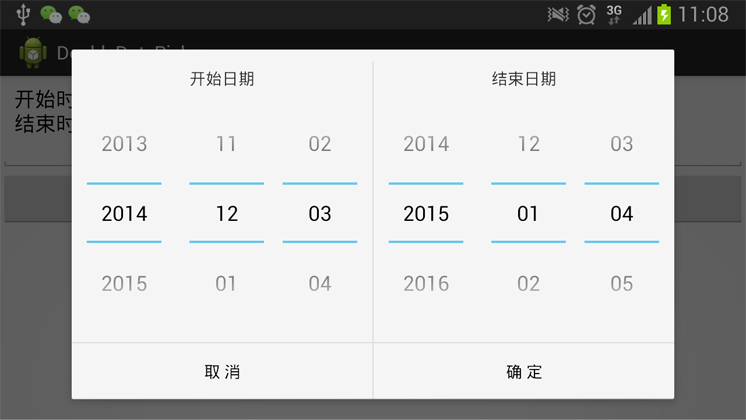
在安卓開發中,會碰到選開始日期和結束日期的問題。特別是在使用Pad時,如果彈出一個Dialog,能夠同時選擇開始日期和結束日期,那將是極好的。我在開發中在DatePickerDialog的基礎上做了修改,實現了這種Dialog。效果如下:
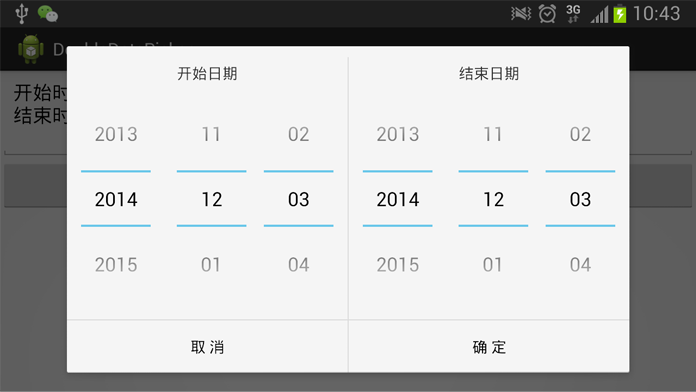
具體實現方法為:
先新建一個安卓項目DoubleDatePicker,在res/layout文件夾下新建date_picker_dialog.xml,內容如下:
<?xml version="1.0" encoding="utf-8"?>
<LinearLayout xmlns:android="http://schemas.android.com/apk/res/android"
  android:layout_width="wrap_content"
  android:layout_height="wrap_content"
  android:gravity="center_horizontal"
  android:orientation="horizontal"
  android:paddingTop="10dp" >

  <LinearLayout
    android:layout_width="wrap_content"
    android:layout_height="wrap_content"
    android:gravity="center_horizontal"
    android:orientation="vertical"
    android:padding="5dip" >

    <TextView
      android:layout_width="wrap_content"
      android:layout_height="wrap_content"
      android:text="開始日期" />

    <DatePicker
      android:id="@+id/datePickerStart"
      android:layout_width="wrap_content"
      android:layout_height="wrap_content"
      android:calendarViewShown="false" />
  </LinearLayout>

  <ImageView
    android:layout_width="wrap_content"
    android:layout_height="fill_parent"
    android:src="@drawable/fenge" />

  <LinearLayout
    android:layout_width="wrap_content"
    android:layout_height="wrap_content"
    android:gravity="center_horizontal"
    android:orientation="vertical"
    android:padding="5dip" >

    <TextView
      android:layout_width="wrap_content"
      android:layout_height="wrap_content"
      android:text="結束日期" />

    <DatePicker
      android:id="@+id/datePickerEnd"
      android:layout_width="wrap_content"
      android:layout_height="wrap_content"
      android:calendarViewShown="false" />
  </LinearLayout>

</LinearLayout>
然後,在src的 默認包下新建文件DoubleDatePickerDialog.java,內容如下:
/*
 * Copyright (C) 2007 The Android Open Source Project
 *
 * Licensed under the Apache License, Version 2.0 (the "License");
 * you may not use this file except in compliance with the License.
 * You may obtain a copy of the License at
 *
 *
 * Unless required by applicable law or agreed to in writing, software
 * distributed under the License is distributed on an "AS IS" BASIS,
 * WITHOUT WARRANTIES OR CONDITIONS OF ANY KIND, either express or implied.
 * See the License for the specific language governing permissions and
 * limitations under the License.
 */

package com.example.doubledatepicker;

import java.lang.reflect.Field;

import android.app.AlertDialog;
import android.content.Context;
import android.content.DialogInterface;
import android.content.DialogInterface.OnClickListener;
import android.os.Bundle;
import android.view.LayoutInflater;
import android.view.View;
import android.widget.DatePicker;
import android.widget.DatePicker.OnDateChangedListener;

/**
 * A simple dialog containing an {@link android.widget.DatePicker}.
 *
 * <p>
 * See the <a href="{@docRoot}guide/topics/ui/controls/pickers.html">Pickers</a>
 * guide.
 * </p>
 */
public class DoubleDatePickerDialog extends AlertDialog implements OnClickListener, OnDateChangedListener {

  private static final String START_YEAR = "start_year";
  private static final String END_YEAR = "end_year";
  private static final String START_MONTH = "start_month";
  private static final String END_MONTH = "end_month";
  private static final String START_DAY = "start_day";
  private static final String END_DAY = "end_day";

  private final DatePicker mDatePicker_start;
  private final DatePicker mDatePicker_end;
  private final OnDateSetListener mCallBack;

  /**
   * The callback used to indicate the user is done filling in the date.
   */
  public interface OnDateSetListener {

    /**
     * @param view
     *      The view associated with this listener.
     * @param year
     *      The year that was set.
     * @param monthOfYear
     *      The month that was set (0-11) for compatibility with
     *      {@link java.util.Calendar}.
     * @param dayOfMonth
     *      The day of the month that was set.
     */
    void onDateSet(DatePicker startDatePicker, int startYear, int startMonthOfYear, int startDayOfMonth,
        DatePicker endDatePicker, int endYear, int endMonthOfYear, int endDayOfMonth);
  }

  /**
   * @param context
   *      The context the dialog is to run in.
   * @param callBack
   *      How the parent is notified that the date is set.
   * @param year
   *      The initial year of the dialog.
   * @param monthOfYear
   *      The initial month of the dialog.
   * @param dayOfMonth
   *      The initial day of the dialog.
   */
  public DoubleDatePickerDialog(Context context, OnDateSetListener callBack, int year, int monthOfYear, int dayOfMonth) {
    this(context, 0, callBack, year, monthOfYear, dayOfMonth);
  }

  public DoubleDatePickerDialog(Context context, int theme, OnDateSetListener callBack, int year, int monthOfYear,
      int dayOfMonth) {
    this(context, 0, callBack, year, monthOfYear, dayOfMonth, true);
  }

  /**
   * @param context
   *      The context the dialog is to run in.
   * @param theme
   *      the theme to apply to this dialog
   * @param callBack
   *      How the parent is notified that the date is set.
   * @param year
   *      The initial year of the dialog.
   * @param monthOfYear
   *      The initial month of the dialog.
   * @param dayOfMonth
   *      The initial day of the dialog.
   */
  public DoubleDatePickerDialog(Context context, int theme, OnDateSetListener callBack, int year, int monthOfYear,
      int dayOfMonth, boolean isDayVisible) {
    super(context, theme);

    mCallBack = callBack;

    Context themeContext = getContext();
    setButton(BUTTON_POSITIVE, "確 定", this);
    setButton(BUTTON_NEGATIVE, "取 消", this);
    // setButton(BUTTON_POSITIVE,
    // themeContext.getText(android.R.string.date_time_done), this);
    setIcon(0);

    LayoutInflater inflater = (LayoutInflater) themeContext.getSystemService(Context.LAYOUT_INFLATER_SERVICE);
    View view = inflater.inflate(R.layout.date_picker_dialog, null);
    setView(view);
    mDatePicker_start = (DatePicker) view.findViewById(R.id.datePickerStart);
    mDatePicker_end = (DatePicker) view.findViewById(R.id.datePickerEnd);
    mDatePicker_start.init(year, monthOfYear, dayOfMonth, this);
    mDatePicker_end.init(year, monthOfYear, dayOfMonth, this);
    // updateTitle(year, monthOfYear, dayOfMonth);

    // 如果要隱藏當前日期,則使用下面方法。
    if (!isDayVisible) {
      hidDay(mDatePicker_start);
      hidDay(mDatePicker_end);
    }
  }

  /**
   * 隱藏DatePicker中的日期顯示
   *
   * @param mDatePicker
   */
  private void hidDay(DatePicker mDatePicker) {
    Field[] datePickerfFields = mDatePicker.getClass().getDeclaredFields();
    for (Field datePickerField : datePickerfFields) {
      if ("mDaySpinner".equals(datePickerField.getName())) {
        datePickerField.setAccessible(true);
        Object dayPicker = new Object();
        try {
          dayPicker = datePickerField.get(mDatePicker);
        } catch (IllegalAccessException e) {
          e.printStackTrace();
        } catch (IllegalArgumentException e) {
          e.printStackTrace();
        }
        // datePicker.getCalendarView().setVisibility(View.GONE);
        ((View) dayPicker).setVisibility(View.GONE);
      }
    }
  }

  public void onClick(DialogInterface dialog, int which) {
    // Log.d(this.getClass().getSimpleName(), String.format("which:%d",
    // which));
    // 如果是“取 消”按鈕,則返回,如果是“確 定”按鈕,則往下執行
    if (which == BUTTON_POSITIVE)
      tryNotifyDateSet();
  }

  @Override
  public void onDateChanged(DatePicker view, int year, int month, int day) {
    if (view.getId() == R.id.datePickerStart)
      mDatePicker_start.init(year, month, day, this);
    if (view.getId() == R.id.datePickerEnd)
      mDatePicker_end.init(year, month, day, this);
    // updateTitle(year, month, day);
  }

  /**
   * 獲得開始日期的DatePicker
   *
   * @return The calendar view.
   */
  public DatePicker getDatePickerStart() {
    return mDatePicker_start;
  }

  /**
   * 獲得結束日期的DatePicker
   *
   * @return The calendar view.
   */
  public DatePicker getDatePickerEnd() {
    return mDatePicker_end;
  }

  /**
   * Sets the start date.
   *
   * @param year
   *      The date year.
   * @param monthOfYear
   *      The date month.
   * @param dayOfMonth
   *      The date day of month.
   */
  public void updateStartDate(int year, int monthOfYear, int dayOfMonth) {
    mDatePicker_start.updateDate(year, monthOfYear, dayOfMonth);
  }

  /**
   * Sets the end date.
   *
   * @param year
   *      The date year.
   * @param monthOfYear
   *      The date month.
   * @param dayOfMonth
   *      The date day of month.
   */
  public void updateEndDate(int year, int monthOfYear, int dayOfMonth) {
    mDatePicker_end.updateDate(year, monthOfYear, dayOfMonth);
  }

  private void tryNotifyDateSet() {
    if (mCallBack != null) {
      mDatePicker_start.clearFocus();
      mDatePicker_end.clearFocus();
      mCallBack.onDateSet(mDatePicker_start, mDatePicker_start.getYear(), mDatePicker_start.getMonth(),
          mDatePicker_start.getDayOfMonth(), mDatePicker_end, mDatePicker_end.getYear(),
          mDatePicker_end.getMonth(), mDatePicker_end.getDayOfMonth());
    }
  }

  @Override
  protected void onStop() {
    // tryNotifyDateSet();
    super.onStop();
  }

  @Override
  public Bundle onSaveInstanceState() {
    Bundle state = super.onSaveInstanceState();
    state.putInt(START_YEAR, mDatePicker_start.getYear());
    state.putInt(START_MONTH, mDatePicker_start.getMonth());
    state.putInt(START_DAY, mDatePicker_start.getDayOfMonth());
    state.putInt(END_YEAR, mDatePicker_end.getYear());
    state.putInt(END_MONTH, mDatePicker_end.getMonth());
    state.putInt(END_DAY, mDatePicker_end.getDayOfMonth());
    return state;
  }

  @Override
  public void onRestoreInstanceState(Bundle savedInstanceState) {
    super.onRestoreInstanceState(savedInstanceState);
    int start_year = savedInstanceState.getInt(START_YEAR);
    int start_month = savedInstanceState.getInt(START_MONTH);
    int start_day = savedInstanceState.getInt(START_DAY);
    mDatePicker_start.init(start_year, start_month, start_day, this);

    int end_year = savedInstanceState.getInt(END_YEAR);
    int end_month = savedInstanceState.getInt(END_MONTH);
    int end_day = savedInstanceState.getInt(END_DAY);
    mDatePicker_end.init(end_year, end_month, end_day, this);

  }
}
這些代碼是以DatePickerDialog.java為基礎修改的。總的來說,閱讀源碼是一種好習慣。這裡面最需要注意的是hidDay方法,該方法如果調用,則隱藏“日”的選擇框,只能選擇“年月”。這個方法的實現也比較有難度,需要通過反射,找出DatePicker中表示日的字段,並將其設置為隱藏。
還有一點需要注意的是,為了讓控件顯示更加好看,我用了一張名字為fenge.png的圖片,圖片在我提供的源碼中可以找到。
下面就需要編輯activity_main.xml了,這個內容相當簡單,只要一個顯示的text和一個button即可,代碼如下:
<?xml version="1.0" encoding="utf-8"?>
<LinearLayout xmlns:android="http://schemas.android.com/apk/res/android"
  android:id="@+id/LinearLayout01"
  android:layout_width="fill_parent"
  android:layout_height="fill_parent"
  android:orientation="vertical" >

  <EditText
    android:id="@+id/et"
    android:layout_width="fill_parent"
    android:layout_height="wrap_content"
    android:cursorVisible="false"
    android:editable="false" />

  <Button
    android:id="@+id/dateBtn"
    android:layout_width="fill_parent"
    android:layout_height="wrap_content"
    android:text="日期對話框" />

</LinearLayout>
最後,在MainActivity.java中,加入測試代碼:
package com.example.doubledatepicker;

import java.util.Calendar;

import android.app.Activity;
import android.os.Bundle;
import android.view.View;
import android.widget.Button;
import android.widget.DatePicker;
import android.widget.TextView;

public class MainActivity extends Activity {

  Button btn;
  TextView et;

  @Override
  protected void onCreate(Bundle savedInstanceState) {
    super.onCreate(savedInstanceState);
    setContentView(R.layout.activity_main);

    btn = (Button) findViewById(R.id.dateBtn);
    et = (TextView) findViewById(R.id.et);

    btn.setOnClickListener(new View.OnClickListener() {
      Calendar c = Calendar.getInstance();

      @Override
      public void onClick(View v) {
        // 最後一個false表示不顯示日期,如果要顯示日期,最後參數可以是true或者不用輸入
        new DoubleDatePickerDialog(MainActivity.this, 0, new DoubleDatePickerDialog.OnDateSetListener() {

          @Override
          public void onDateSet(DatePicker startDatePicker, int startYear, int startMonthOfYear,
              int startDayOfMonth, DatePicker endDatePicker, int endYear, int endMonthOfYear,
              int endDayOfMonth) {
            String textString = String.format("開始時間:%d-%d-%d\n結束時間:%d-%d-%d\n", startYear,
                startMonthOfYear + 1, startDayOfMonth, endYear, endMonthOfYear + 1, endDayOfMonth);
            et.setText(textString);
          }
        }, c.get(Calendar.YEAR), c.get(Calendar.MONTH), c.get(Calendar.DATE), true).show();
      }
    });
  }
}
可以看到,在新建DoubleDatePickerDialog時, 我們實現了一個new DoubleDatePickerDialog.OnDateSetListener()的匿名類,這個類被DoubleDatePickerDialog引用,當DoubleDatePickerDialog中的“確 定”按鈕被點擊時,就會調用匿名類的onDateSet方法。(這也是事件綁定的基本原理)。
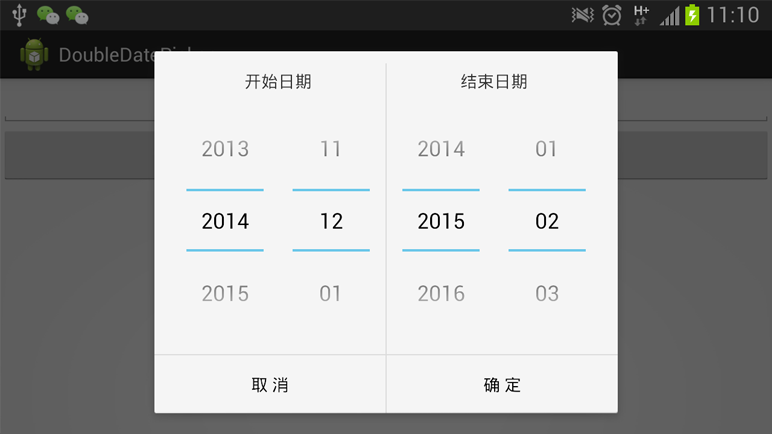
DoubleDatePickerDialog構造函數的最後一個參數,true為顯示日期,false為不顯示日期。
當最後一個參數為true時,顯示效果如下:
當最後一個參數為false時,顯示如下
源碼下載地址:http://xiazai.jb51.net/201701/yuanma/DoubleDatePicker_jb51.rar
以上就是本文的全部內容,希望對大家的學習有所幫助,也希望大家多多支持本站。
 android靈活布局
一開始接觸android,只知道拖拉布局,不靈活,難看很。後來才發現,原來和jsp一樣,可以靈活使用xml文件。 話不多說,直接上例子 任何布局既可以在代碼中實現,也可以
 AndroidStudio的debug功能詳解
運行debug模式 1. 進入debug- 點擊圖中紅色圓圈圈起的左邊綠色按鈕,運行app的debug模式,快捷鍵Shift+F9- 點擊圖中紅色圓圈圈起的右邊按鈕,可以
 Android 實現頂層窗口、懸浮窗口
1、如圖片1所示,在一個Android應用中,除了標題欄和底層的ActionBar的區域,是我們可以操縱的UI區域,那是不是說我們就不能改變除了這兩個區域的UI呢?答案是
 Android中使用PagerSlidingTabStrip實現導航標題的示例
此開源框架官網地址:https://github.com/astuetz/PagerSlidingTabStrip可以理解為配合ViewPager使用的交互式頁面指示器控