編輯:關於Android編程
本文實例講述了Android編程實現仿易信精美彈出框效果。分享給大家供大家參考,具體如下:
截圖:
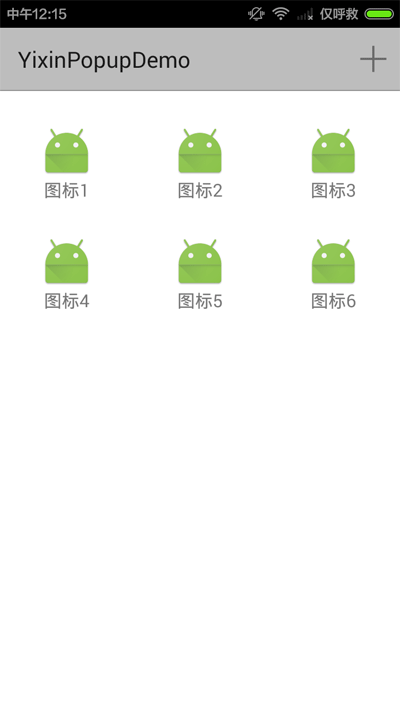
動畫效果介紹:
1.點擊ActionBar上“+”按鈕,菜單從上方彈出(帶反彈效果);
2.再次點擊“+”、點擊空白區域或者點擊返回鍵,菜單向上方收起;
3.點擊彈出框上的按鈕時,該按鈕放大,其它按鈕縮小,菜單整體漸變退出。
主體代碼:
1.Activity.
/**
 * 仿易信動畫彈出框
 */
public class MainActivity extends ActionBarActivity {
  //用於標記頁面頂端位置
  private View topView;
  @Override
  protected void onCreate(Bundle savedInstanceState) {
    super.onCreate(savedInstanceState);
    setContentView(R.layout.activity_main);
    topView = findViewById(R.id.main_top);
  }
  private PopupWindow popupWindow;
  private int line1DeltaY, line2DeltaY;
  //仿易信更多彈出框
  private void showPopup() {
    if (popupWindow == null) {
      View contentView = LayoutInflater.from(this).inflate(R.layout.yixin_pop_layout, null);
      //點擊空白區域關閉
      View blankView = contentView.findViewById(R.id.yixin_more_blank);
      View blankView2 = contentView.findViewById(R.id.yixin_more_blank2);
      initItems(contentView);
      //測量高度
      int line2Height = ViewUtils.getViewMeasuredHeight(itemViews[0]);
      line1DeltaY = -getActionBarHeight() - 40;
      line2DeltaY = line1DeltaY - line2Height;
      blankView.setOnClickListener(new View.OnClickListener() {
        @Override
        public void onClick(View v) {
          dismissPopup();
        }
      });
      blankView2.setOnClickListener(new View.OnClickListener() {
        @Override
        public void onClick(View v) {
          dismissPopup();
        }
      });
      popupWindow = new PopupWindow(contentView, ScreenUtils.getScreenW(this), ScreenUtils.getScreenH(this));
      //隨便設置一個drawable作為背景
      popupWindow.setBackgroundDrawable(new ColorDrawable());
    }
    if (!popupWindow.isShowing()) {
      popupWindow.showAsDropDown(topView, 0, 0);
      for (int i = 0; i < itemViews.length; i++) {
        if (i < 3) {
          //第一行
          itemViews[i].startAnimation(AnimationHelper.createPopupAnimIn(this, line1DeltaY));
        } else {
          //第二行
          itemViews[i].startAnimation(AnimationHelper.createPopupAnimIn(this, line2DeltaY));
        }
      }
      popupWindow.getContentView().startAnimation(AnimationHelper.createPopupBgFadeInAnim());
    }
  }
  private void dismissPopup() {
    if (popupWindow == null || !popupWindow.isShowing()) {
      return;
    }
    ViewGroup contentView = (ViewGroup) popupWindow.getContentView();
    contentView.startAnimation(AnimationHelper.createPopupBgFadeOutAnim(AnimationHelper.TIME_OUT));
    for (int i = 0; i < itemViews.length; i++) {
      if (i < 3) {
        //第一行
        itemViews[i].startAnimation(AnimationHelper.createPopupAnimOut(this, line1DeltaY));
      } else {
        //第二行
        itemViews[i].startAnimation(AnimationHelper.createPopupAnimOut(this, line2DeltaY));
      }
    }
    //動畫結束時隱藏popupWindow
    contentView.postDelayed(new Runnable() {
      @Override
      public void run() {
        popupWindow.dismiss();
      }
    }, AnimationHelper.TIME_OUT + 10);
  }
  private View[] itemViews;
  //初始化popupWindow上的按鈕
  private void initItems(View parent) {
    int[] viewIds = new int[]{R.id.yixin_more_item1, R.id.yixin_more_item2, R.id.yixin_more_item3,
        R.id.yixin_more_item4, R.id.yixin_more_item5, R.id.yixin_more_item6};
    itemViews = new View[viewIds.length];
    int itemWidth = ScreenUtils.getScreenW(this) / 3;
    OnClickImpl l = new OnClickImpl();
    for (int i = 0; i < viewIds.length; i++) {
      int id = viewIds[i];
      itemViews[i] = parent.findViewById(id);
      GridLayout.LayoutParams p = (GridLayout.LayoutParams) itemViews[i].getLayoutParams();
      p.width = itemWidth;
      itemViews[i].setLayoutParams(p);
      itemViews[i].setOnClickListener(l);
    }
  }
  private class OnClickImpl implements View.OnClickListener {
    @Override
    public void onClick(View v) {
      final int viewId = v.getId();
      //背景動畫
      popupWindow.getContentView().startAnimation(AnimationHelper.createPopupBgFadeOutAnim(AnimationHelper.TIME_OUT_CLICK));
      //動畫結束時隱藏popupWindow
      v.postDelayed(new Runnable() {
        @Override
        public void run() {
          popupWindow.dismiss();
          //動畫結束時響應點擊事件
          handleEvent(viewId);
        }
      }, AnimationHelper.TIME_OUT_CLICK + 10);
      //按鈕動畫
      for (View item : itemViews) {
        if (item.getId() == v.getId()) {
          //點擊的按鈕,放大
          item.startAnimation(AnimationHelper.createPopupItemBiggerAnim(MainActivity.this));
        } else {
          //其它按鈕,縮小
          item.startAnimation(AnimationHelper.createPopupItemSmallerAnim(MainActivity.this));
        }
      }
    }
  }
  //popupWindow上按鈕的點擊事件
  private void handleEvent(int viewId) {
    Toast.makeText(this, "點擊了按鈕:" + viewId, Toast.LENGTH_SHORT).show();
  }
  private int getActionBarHeight() {
    return getSupportActionBar().getHeight();
  }
  @Override
  public boolean onCreateOptionsMenu(Menu menu) {
    getMenuInflater().inflate(R.menu.menu_main, menu);
    return true;
  }
  @Override
  public boolean onOptionsItemSelected(MenuItem item) {
    int id = item.getItemId();
    if (id == R.id.action_more) {
      if (popupWindow == null || !popupWindow.isShowing()) {
        showPopup();
      } else {
        dismissPopup();
      }
      return true;
    }
    return super.onOptionsItemSelected(item);
  }
  //點擊返回鍵時,如果popupWindow是顯示狀態,則關閉它
  @Override
  public void onBackPressed() {
    if (popupWindow != null && popupWindow.isShowing()) {
      dismissPopup();
      return;
    }
    super.onBackPressed();
  }
}
2.動畫工具類。
/**
 * AnimationHelper
 */
public class AnimationHelper {
  /**
   * 進入動畫的時間
   */
  public static final int TIME_IN = 300;
  /**
   * 進入動畫之後的反彈動畫時間
   */
  public static final int TIME_IN_BACK = 100;
  /**
   * 退出動畫的時間
   */
  public static final int TIME_OUT = 300;
  /**
   * 點擊PopupWindow上菜單後退出動畫的時間
   */
  public static final int TIME_OUT_CLICK = 500;
  /**
   * PopupWindow上菜單進入動畫
   */
  public static Animation createPopupAnimIn(Context context, int fromYDelta) {
    AnimationSet animationSet = new AnimationSet(context, null);
//    animationSet.setInterpolator(new BounceInterpolator()); //結束時彈跳
    animationSet.setFillAfter(true);
    //移動
    TranslateAnimation translateAnim = new TranslateAnimation(0, 0, fromYDelta, 20);
    translateAnim.setDuration(TIME_IN);
    animationSet.addAnimation(translateAnim);
    //回彈效果
    TranslateAnimation translateAnim2 = new TranslateAnimation(0, 0, 0, -20);
    translateAnim2.setStartOffset(TIME_IN);
    translateAnim2.setDuration(TIME_IN_BACK);
    animationSet.addAnimation(translateAnim2);
    return animationSet;
  }
  /**
   * PopupWindow上菜單離開動畫
   */
  public static Animation createPopupAnimOut(Context context, int toYDelta) {
    AnimationSet animationSet = new AnimationSet(context, null);
    animationSet.setFillAfter(true);
    TranslateAnimation translateAnim = new TranslateAnimation(0, 0, 0, toYDelta);
    translateAnim.setDuration(TIME_OUT);
    animationSet.addAnimation(translateAnim);
    return animationSet;
  }
  /**
   * PopupWindow背景進入動畫(透明度漸變)
   */
  public static Animation createPopupBgFadeInAnim() {
    AlphaAnimation anim = new AlphaAnimation(0, 1.0f);
    anim.setDuration(TIME_IN);
    anim.setFillAfter(true);
    return anim;
  }
  /**
   * PopupWindow背景離開動畫(透明度漸變)
   */
  public static Animation createPopupBgFadeOutAnim(int duration) {
    AlphaAnimation anim = new AlphaAnimation(1.0f, 0);
    anim.setDuration(duration);
    anim.setFillAfter(true);
    return anim;
  }
  /**
   * PopupWindow按鈕點擊動畫
   */
  public static Animation createPopupItemBiggerAnim(Context context) {
    AnimationSet animationSet = new AnimationSet(context, null);
    animationSet.setFillAfter(true);
    //放大(設置縮放的中心點為自己的中心)
    ScaleAnimation scaleAnim = new ScaleAnimation(1.0f, 2.0f, 1.0f, 2.0f,
        Animation.RELATIVE_TO_SELF, 0.5f, Animation.RELATIVE_TO_SELF, 0.5f);
    scaleAnim.setDuration(TIME_OUT_CLICK);
    animationSet.addAnimation(scaleAnim);
    //漸變
    AlphaAnimation alphaAnim = new AlphaAnimation(1.0f, 0);
    alphaAnim.setInterpolator(new AccelerateInterpolator());
    alphaAnim.setDuration(TIME_OUT_CLICK);
    animationSet.addAnimation(alphaAnim);
    return animationSet;
  }
  /**
   * PopupWindow按鈕點擊時其它按鈕的動畫
   */
  public static Animation createPopupItemSmallerAnim(Context context) {
    //放大(設置縮放的中心點為自己的中心)
    ScaleAnimation scaleAnim = new ScaleAnimation(1.0f, 0, 1.0f, 0,
        Animation.RELATIVE_TO_SELF, 0.5f, Animation.RELATIVE_TO_SELF, 0.5f);
    scaleAnim.setDuration(TIME_OUT_CLICK);
    scaleAnim.setFillAfter(true);
    return scaleAnim;
  }
}
完整實例代碼點擊此處本站下載。
更多關於Android相關內容感興趣的讀者可查看本站專題:《Android開發動畫技巧匯總》、《Android編程之activity操作技巧總結》、《Android視圖View技巧總結》、《Android布局layout技巧總結》、《Android開發入門與進階教程》、《Android資源操作技巧匯總》及《Android控件用法總結》
希望本文所述對大家Android程序設計有所幫助。
 一加手機3和小米5哪個好?一加手機3和小米5買誰好?一加手機3和小米5對比
6月15日上午,一加科技在深圳大運中心召開發布了年度旗艦手機----一加手機3。一加手機3一發布,許多用戶就提出疑問說2499元的一加3和2699元的小米5
 Android 02 Started Service--之被啟動的服務
正文 1 Started Service介紹 Started Service,即被啟動的服務。它是2種常見服務之一,另一種是Bo
 Android圖片處理內存優化系列之圖片牆案例
本篇文章的主要內容是說圖片的內存緩存和從網絡異步獲取圖片的過程工程效果圖如下: 代碼中部分不常見的屬性解釋如下(百度也可以找到的)android:numCo
 Android Overview Screen -- 概覽界面
Android Overview Screen – 概覽界面原文鏈接:http://developer.android.com/guide/component