編輯:關於Android編程
Android aapt自動打包工具
概念
在Android.mk中有LOCAL_AAPT_FLAGS配置項,在gradle中也有aaptOptions,那麼aapt到底是干什麼的呢? aapt即Android Asset Packaging Tool(Android 打包工具),在SDK的build-tools目錄下。我們可以查 看,創建, 更新ZIP格式的文檔附件(zip, jar, apk)。也可將資源文件編譯成二進制文件,盡管你可能沒有直接使用過aapt工具,但是build scripts和IDE插件會使用這個工具打包apk文件構成一個Android 應用程序。
aapt打包流程
aapt傳統的打包主要是最res和Java代碼的打包,aapt打包走的是單線程、流水式的任務從上到下進行打包構建。
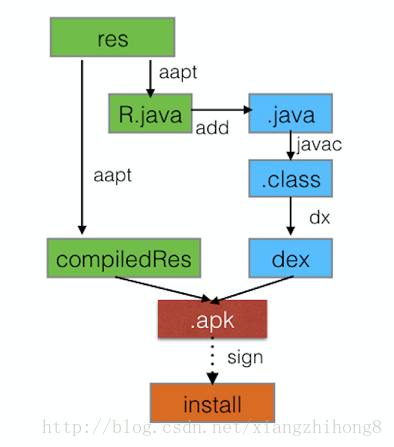
傳統的aapt打包,aapt會執行2次,第一次是生成R.java,參與javac編譯,第二次是對res裡面的資源文件進行編譯,最後APKBuilder會把DEX文件與編譯好的資源文件及DEX文件進行打包成APK,簽名並安裝至手機。整個流程下來,沒有任何緩存,沒有並發,也沒有增量,每次構建都是一個全新的過程,所以每次構建時間也比較恆定,代碼量,資源量越多,構建時間越慢。
aapt常用的參數
我們可以通過aapt help來查看常用的參數。
Usage:
 aapt l[ist] [-v] [-a] file.{zip,jar,apk}
  List contents of Zip-compatible archive.

 aapt d[ump] [--values] [--include-meta-data] WHAT file.{apk} [asset [asset ...]]
  strings     Print the contents of the resource table string pool in the APK.
  badging     Print the label and icon for the app declared in APK.
  permissions   Print the permissions from the APK.
  resources    Print the resource table from the APK.
  configurations  Print the configurations in the APK.
  xmltree     Print the compiled xmls in the given assets.
  xmlstrings    Print the strings of the given compiled xml assets.

 aapt p[ackage] [-d][-f][-m][-u][-v][-x][-z][-M AndroidManifest.xml] \
    [-0 extension [-0 extension ...]] [-g tolerance] [-j jarfile] \
    [--debug-mode] [--min-sdk-version VAL] [--target-sdk-version VAL] \
    [--app-version VAL] [--app-version-name TEXT] [--custom-package VAL] \
    [--rename-manifest-package PACKAGE] \
    [--rename-instrumentation-target-package PACKAGE] \
    [--utf16] [--auto-add-overlay] \
    [--max-res-version VAL] \
    [-I base-package [-I base-package ...]] \
    [-A asset-source-dir] [-G class-list-file] [-P public-definitions-file] \
    [-S resource-sources [-S resource-sources ...]] \
    [-F apk-file] [-J R-file-dir] \
    [--product product1,product2,...] \
    [-c CONFIGS] [--preferred-density DENSITY] \
    [--split CONFIGS [--split CONFIGS]] \
    [--feature-of package [--feature-after package]] \
    [raw-files-dir [raw-files-dir] ...] \
    [--output-text-symbols DIR]

  Package the android resources. It will read assets and resources that are
  supplied with the -M -A -S or raw-files-dir arguments. The -J -P -F and -R
  options control which files are output.

 aapt r[emove] [-v] file.{zip,jar,apk} file1 [file2 ...]
  Delete specified files from Zip-compatible archive.

 aapt a[dd] [-v] file.{zip,jar,apk} file1 [file2 ...]
  Add specified files to Zip-compatible archive.

 aapt c[runch] [-v] -S resource-sources ... -C output-folder ...
  Do PNG preprocessing on one or several resource folders
  and store the results in the output folder.

 aapt s[ingleCrunch] [-v] -i input-file -o outputfile
  Do PNG preprocessing on a single file.

 aapt v[ersion]
  Print program version.

 Modifiers:
  -a print Android-specific data (resources, manifest) when listing
  -c specify which configurations to include. The default is all
    configurations. The value of the parameter should be a comma
    separated list of configuration values. Locales should be specified
    as either a language or language-region pair. Some examples:
      en
      port,en
      port,land,en_US
  -d one or more device assets to include, separated by commas
  -f force overwrite of existing files
  -g specify a pixel tolerance to force images to grayscale, default 0
  -j specify a jar or zip file containing classes to include
  -k junk path of file(s) added
  -m make package directories under location specified by -J
  -u update existing packages (add new, replace older, remove deleted files)
  -v verbose output
  -x create extending (non-application) resource IDs
  -z require localization of resource attributes marked with
    localization="suggested"
  -A additional directory in which to find raw asset files
  -G A file to output proguard options into.
  -F specify the apk file to output
  -I add an existing package to base include set
  -J specify where to output R.java resource constant definitions
  -M specify full path to AndroidManifest.xml to include in zip
  -P specify where to output public resource definitions
  -S directory in which to find resources. Multiple directories will be scanned
    and the first match found (left to right) will take precedence.
  -0 specifies an additional extension for which such files will not
    be stored compressed in the .apk. An empty string means to not
    compress any files at all.
  --debug-mode
    inserts android:debuggable="true" in to the application node of the
    manifest, making the application debuggable even on production devices.
  --include-meta-data
    when used with "dump badging" also includes meta-data tags.
  --pseudo-localize
    generate resources for pseudo-locales (en-XA and ar-XB).
  --min-sdk-version
    inserts android:minSdkVersion in to manifest. If the version is 7 or
    higher, the default encoding for resources will be in UTF-8.
  --target-sdk-version
    inserts android:targetSdkVersion in to manifest.
  --max-res-version
    ignores versioned resource directories above the given value.
  --values
    when used with "dump resources" also includes resource values.
  --version-code
    inserts android:versionCode in to manifest.
  --version-name
    inserts android:versionName in to manifest.
  --replace-version
    If --version-code and/or --version-name are specified, these
    values will replace any value already in the manifest. By
    default, nothing is changed if the manifest already defines
    these attributes.
  --custom-package
    generates R.java into a different package.
  --extra-packages
    generate R.java for libraries. Separate libraries with ':'.
  --generate-dependencies
    generate dependency files in the same directories for R.java and resource package
  --auto-add-overlay
    Automatically add resources that are only in overlays.
  --preferred-density
    Specifies a preference for a particular density. Resources that do not
    match this density and have variants that are a closer match are removed.
  --split
    Builds a separate split APK for the configurations listed. This can
    be loaded alongside the base APK at runtime.
  --feature-of
    Builds a split APK that is a feature of the apk specified here. Resources
    in the base APK can be referenced from the the feature APK.
  --feature-after
    An app can have multiple Feature Split APKs which must be totally ordered.
    If --feature-of is specified, this flag specifies which Feature Split APK
    comes before this one. The first Feature Split APK should not define
    anything here.
  --rename-manifest-package
    Rewrite the manifest so that its package name is the package name
    given here. Relative class names (for example .Foo) will be
    changed to absolute names with the old package so that the code
    does not need to change.
  --rename-instrumentation-target-package
    Rewrite the manifest so that all of its instrumentation
    components target the given package. Useful when used in
    conjunction with --rename-manifest-package to fix tests against
    a package that has been renamed.
  --product
    Specifies which variant to choose for strings that have
    product variants
  --utf16
    changes default encoding for resources to UTF-16. Only useful when API
    level is set to 7 or higher where the default encoding is UTF-8.
  --non-constant-id
    Make the resources ID non constant. This is required to make an R java class
    that does not contain the final value but is used to make reusable compiled
    libraries that need to access resources.
  --shared-lib
    Make a shared library resource package that can be loaded by an application
    at runtime to access the libraries resources. Implies --non-constant-id.
  --error-on-failed-insert
    Forces aapt to return an error if it fails to insert values into the manifest
    with --debug-mode, --min-sdk-version, --target-sdk-version --version-code
    and --version-name.
    Insertion typically fails if the manifest already defines the attribute.
  --error-on-missing-config-entry
    Forces aapt to return an error if it fails to find an entry for a configuration.
  --output-text-symbols
    Generates a text file containing the resource symbols of the R class in the
    specified folder.
  --ignore-assets
    Assets to be ignored. Default pattern is:
    !.svn:!.git:!.ds_store:!*.scc:.*:<dir>_*:!CVS:!thumbs.db:!picasa.ini:!*~
  --skip-symbols-without-default-localization
    Prevents symbols from being generated for strings that do not have a default
    localization
  --no-version-vectors
    Do not automatically generate versioned copies of vector XML resources.
關於上面參數的具體含義大家可以自行去了解,但是有幾個常用的參數是需要記住的。
aapt常用命令
1. 列出apk包的內容
aapt l[ist] [-v] [-a] file.{zip,jar,apk}
-v 以table形式列出來
-a 詳細列出內容
例如:aapt l <你的apk文件>,這個命令就是查看apk內容
#### 2. 查看apk一些信息
aapt d[ump] [–values] WHAT file.{apk} [asset [asset …]]
badging Print the label and icon for the app declared in APK
permissions Print the permissions from the APK.
resources Print the resource table from the APK.
configurations Print the configurations in the APK.
xmltree Print the compiled xmls in the given assets.
xmlstrings Print the strings of the given compiled xml assets.
例如:aapt d permissions
3. 編譯android資源
aapt p[ackage] [-d][-f][-m][-u][-v][-x][-z][-M AndroidManifest.xml] /
[-0 extension [-0 extension …]] [-g tolerance] [-j jarfile] /
[–debug-mode] [–min-sdk-version VAL] [–target-sdk-version VAL] /
[–app-version VAL] [–app-version-name TEXT] [–custom-package VAL] /
[–rename-manifest-package PACKAGE] /
[–rename-instrumentation-target-package PACKAGE] /
[–utf16] [–auto-add-overlay] /
[–max-res-version VAL] /
[-I base-package [-I base-package …]] /
[-A asset-source-dir] [-G class-list-file] [-P public-definitions-file] /
[-S resource-sources [-S resource-sources …]] [-F apk-file] [-J R-file-dir] /
[–product product1,product2,…] /
[raw-files-dir [raw-files-dir] …]
這個比較復雜,只解釋幾個關鍵參數。
-f 如果編譯出來的文件已經存在,強制覆蓋。
-m 使生成的包的目錄放在-J參數指定的目錄。
-J 指定生成的R.java的輸出目錄
-S res文件夾路徑
-A assert文件夾的路徑
-M AndroidManifest.xml的路徑
-I 某個版本平台的android.jar的路徑
-F 具體指定apk文件的輸出
例如:
1). 將工程的資源編譯R.java文件
aapt package -m -J
4. 打包好的apk中移除文件
aapt r[emove] [-v] file.{zip,jar,apk} file1 [file2 …]
例如:aapt r <你的apk文件> AndroidManifest.xml, 這個就是將apk中的AndroidManifest移除掉
5. 添加文件到打包好的apk中
aapt a[dd] [-v] file.{zip,jar,apk} file1 [file2 …]
例如:aapt a <你的apk文件> <要添加的文件路徑>, 這個就是將文件添加到打包好的apk文件中
感謝閱讀,希望能幫助到大家,謝謝大家對本站的支持!
 Android數據存儲方式簡括
Android提供以下四種存儲方式:SharePreferenceSQLiteFileContentProvider如果要實現數據共享,正確的方式是使用ContentPr
 Android系統服務
概述本篇博文主要介紹的是Android中的Java服務。這部分服務大部分都有一個Manager類,其實就是一個RPC調用,用戶通過調用xxxManager的方法,實際上被
 Android中二維碼的生成方法(普通二維碼、中心Logo 二維碼、及掃描解析二維碼)
首先聲明我們通篇用的都是Google開源框架Zxing,要實現的功能有三個 ,生成普通二維碼、生成帶有中心圖片Logo 的二維碼,掃描解析二維碼,直接上效果圖吧首先我們需
 [例證]淺談getWidth()和getMeasureWidth()區別
一個簡單的例子:重寫自定義View的onDraw()代碼: oval.left=getMeasuredWidth()/2-radius;