編輯:關於Android編程
先看下利用wheelview實現滾動隨機選擇號碼效果:
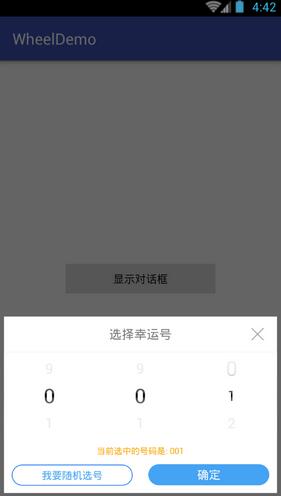
直接上代碼
首頁就是dialog顯示不在描述
主要看dialog代碼
package com.yskj.jh.wheeldemo;

import android.app.Dialog;
import android.content.Context;
import android.os.Bundle;
import android.view.View;
import android.view.ViewGroup;
import android.widget.ImageView;
import android.widget.TextView;
import android.widget.Toast;

import com.yskj.jh.wheeldemo.wheel.adapters.AbstractWheelTextAdapter;
import com.yskj.jh.wheeldemo.wheel.views.OnWheelChangedListener;
import com.yskj.jh.wheeldemo.wheel.views.OnWheelScrollListener;
import com.yskj.jh.wheeldemo.wheel.views.WheelView;

import java.util.ArrayList;
import java.util.List;


/**
 * Created by Administrator on 2016/4/7.
 */


public class SnatchDialog extends Dialog implements View.OnClickListener, OnWheelChangedListener {

 private Context context;

 private TextView tvNumberL, tvNumberC, tvNumberR;

 //數字控件
 private WheelView wvLeft;
 private WheelView wvCenter;
 private WheelView wvRight;

 //數字集合
 private List<String> list = new ArrayList<String>();

 //選中的數字信息
 private String strLeft;
 private String strCenter;
 private String strRight = "1";

 private TextView btnSure;//確定按鈕
 private ImageView btnCancle;//取消按鈕
 private TextView btnRandom;//隨機

 //回調函數
 private OnSnatchCListener onSnatchCListener;

 private NumberAdapter adapter;

 //顯示文字的字體大小
 private int maxsize = 26;
 private int minsize = 18;

 @Override
 protected void onCreate(Bundle savedInstanceState) {
 super.onCreate(savedInstanceState);
 setContentView(R.layout.dialog_snatch);
 initView();
 }

 public SnatchDialog(Context context){
 super(context, R.style.ShareDialog);
 this.context = context;
 }
 private void initView() {

 tvNumberL = (TextView) findViewById(R.id.tv_number1);
 tvNumberC = (TextView) findViewById(R.id.tv_number2);
 tvNumberR = (TextView) findViewById(R.id.tv_number3);

 for (int i = 0; i < 10; i++) {
  list.add(i + "");
 }

 wvLeft = (WheelView) findViewById(R.id.wv_snatch_left);
 wvCenter = (WheelView) findViewById(R.id.wv_snatch_center);
 wvRight = (WheelView) findViewById(R.id.wv_snatch_right);
 btnSure = (TextView) findViewById(R.id.tv_sure);
 btnCancle = (ImageView) findViewById(R.id.img_cancel);
 btnRandom = (TextView) findViewById(R.id.tv_random);

 btnSure.setOnClickListener(this);
 btnCancle.setOnClickListener(this);
 btnRandom.setOnClickListener(this);

 wvLeft.addChangingListener(this);
 wvCenter.addChangingListener(this);
 wvRight.addChangingListener(this);

 wvLeft.setCyclic(true);
 wvRight.setCyclic(true);
 wvCenter.setCyclic(true);

 wvLeft.setVisibleItems(3);

 wvCenter.setVisibleItems(3);

 wvRight.setVisibleItems(3);

 wvLeft.addScrollingListener(new OnWheelScrollListener() {
  @Override
  public void onScrollingStarted(WheelView wheel) {

  }

  @Override
  public void onScrollingFinished(WheelView wheel) {
  String currentText = (String) adapter.getItemText(wheel.getCurrentItem());
  strLeft = (String) adapter.getItemObject(wheel.getCurrentItem());
  setTextViewSize(strLeft, adapter);
  tvNumberL.setText(strLeft);
  }
 });
 wvCenter.addScrollingListener(new OnWheelScrollListener() {
  @Override
  public void onScrollingStarted(WheelView wheel) {

  }

  @Override
  public void onScrollingFinished(WheelView wheel) {
  String currentText = (String) adapter.getItemText(wheel.getCurrentItem());
  strCenter = (String) adapter.getItemObject(wheel.getCurrentItem());
  setTextViewSize(strCenter, adapter);
  tvNumberC.setText(strCenter);
  }
 });
 wvRight.addScrollingListener(new OnWheelScrollListener() {
  @Override
  public void onScrollingStarted(WheelView wheel) {

  }

  @Override
  public void onScrollingFinished(WheelView wheel) {
  String currentText = (String) adapter.getItemText(wheel.getCurrentItem());
  strRight = (String) adapter.getItemObject(wheel.getCurrentItem());
  setTextViewSize(strRight, adapter);
  tvNumberR.setText(strRight);
  }
 });
 /**
  * 設置適配器
  */
 adapter = new NumberAdapter(context, list, 0, maxsize, minsize);
 wvLeft.setViewAdapter(adapter);
 wvLeft.setCurrentItem(0);

 wvCenter.setViewAdapter(adapter);
 wvCenter.setCurrentItem(0);
 wvRight.setViewAdapter(adapter);
 wvRight.setCurrentItem(1);

 }

 @Override
 public void onChanged(WheelView wheel, int oldValue, int newValue) {

 }


 public interface OnSnatchCListener {
 void onClick(String strLeft, String strCenter, String strRight);
 }

 @Override
 public void onClick(View v) {

 if (v == btnSure) {
  if (onSnatchCListener != null) {
  onSnatchCListener.onClick(strLeft, strCenter, strRight);
  }
  if (strLeft == null) {
  strLeft = "0";
  }
  if (strCenter == null) {
  strCenter = "0";
  }
  if (strRight == null) {
  strRight = "0";
  }
  if ((strLeft + strCenter + strRight).equals("000")) {
  Toast.makeText(context, "不能為0", Toast.LENGTH_SHORT).show();
  } else {
  if (Integer.parseInt(strLeft + strCenter + strRight) > 0 && Integer.parseInt(strLeft + strCenter + strRight) <= 999) {
  }
  }
 }
 if (v == btnCancle) {
  dismiss();
 }
 if (v == btnRandom) {
  int a = (int) (Math.random() * 5000 + 1);
  int b = (int) (Math.random() * 5000 + 1);
  int c = (int) (Math.random() * 5000 + 1);
  wvLeft.scroll(a, 500);
  wvRight.scroll(b, 500);
  wvCenter.scroll(c, 500);

 }
 }


 //適配器
 public class NumberAdapter extends AbstractWheelTextAdapter {
 List<String> list;

 protected NumberAdapter(Context context, List<String> list, int currentItem, int maxsize, int minsize) {
  super(context, R.layout.item_birth_year, NO_RESOURCE, currentItem, maxsize, minsize);
  this.list = list;
  setItemTextResource(R.id.tempValue);
 }

 @Override
 public View getItem(int index, View cachedView, ViewGroup parent) {
  View view = super.getItem(index, cachedView, parent);
  return view;
 }

 @Override
 protected CharSequence getItemText(int index) {
  if (list != null && list.size() > 0) {
  return list.get(index);
  }
  return "";
 }

 @Override
 protected Object getItemObject(int index) {
  if (list != null && list.size() > 0) {
  return list.get(index);
  }
  return null;
 }

 @Override
 public int getItemsCount() {
  if (list != null) {
  return list.size();
  }
  return 0;
 }
 }

 public void setTextViewSize(String curriteItemText, NumberAdapter adapter) {
 ArrayList<View> arrayList = adapter.getTestViews();
 int size = arrayList.size();
 String currentText;
 for (int i = 0; i < size; i++) {
  TextView textview = (TextView) arrayList.get(i);
  currentText = textview.getText().toString();
  if (curriteItemText.equals(currentText)) {
  textview.setTextSize(maxsize);
  } else {
  textview.setTextSize(minsize);
  }
 }
 }

 public void setOnSnatchCListener(OnSnatchCListener onSnatchCListener) {
 this.onSnatchCListener = onSnatchCListener;
 }
}
布局
<?xml version="1.0" encoding="utf-8"?>
<LinearLayout xmlns:android="http://schemas.android.com/apk/res/android"
 android:layout_width="match_parent"
 android:layout_height="385dp"
 android:layout_marginBottom="5dp"
 android:layout_marginLeft="5dp"
 android:layout_marginRight="5dp"
 android:background="#00000000"
 android:gravity="bottom"
 android:layout_gravity="bottom"
 android:orientation="vertical">

 <LinearLayout
 android:id="@+id/ly_myinfo_changeaddress_child"
 android:layout_width="match_parent"
 android:layout_height="wrap_content"
 android:background="@drawable/address_edit_delete_ensure_bg"
 android:orientation="vertical"
 >

 <FrameLayout
  android:layout_width="match_parent"
  android:layout_height="wrap_content">

  <TextView
  android:layout_width="match_parent"
  android:layout_height="45dp"
  android:gravity="center"
  android:textSize="16sp"
  android:textColor="#7a7a7c"
  android:text="選擇幸運號" />

  <ImageView
  android:id="@+id/img_cancel"
  android:layout_width="16dp"
  android:layout_height="16dp"
  android:layout_gravity="right|center"
  android:layout_marginRight="17dp"
  android:clickable="true"
  android:src="@mipmap/cha" />
 </FrameLayout>

 <View
  android:layout_width="match_parent"
  android:layout_height="1dp"
  android:background="#f5f5f5" />
 <LinearLayout
  android:layout_width="match_parent"
  android:layout_height="110dp"
  android:gravity="center_vertical"
  android:orientation="horizontal">

  <com.yskj.jh.wheeldemo.wheel.views.WheelView
  android:id="@+id/wv_snatch_left"
  android:layout_width="0dp"
  android:layout_height="match_parent"
  android:layout_gravity="center_vertical"
  android:layout_weight="1" />

  <com.yskj.jh.wheeldemo.wheel.views.WheelView
  android:id="@+id/wv_snatch_center"
  android:layout_width="0dp"
  android:layout_height="match_parent"
  android:layout_gravity="center_vertical"
  android:layout_weight="1" />

  <com.yskj.jh.wheeldemo.wheel.views.WheelView
  android:id="@+id/wv_snatch_right"
  android:layout_width="0dp"
  android:layout_height="match_parent"
  android:layout_gravity="center_vertical"
  android:layout_weight="1" />
 </LinearLayout>

 <LinearLayout
  android:layout_width="match_parent"
  android:layout_height="wrap_content"
  android:gravity="center"
  android:orientation="vertical">
  <LinearLayout
  android:layout_width="wrap_content"
  android:layout_height="wrap_content"
  android:layout_marginTop="8dp"
  android:orientation="horizontal">
  <TextView
   android:id="@+id/tv_number"
   android:layout_width="wrap_content"
   android:layout_height="wrap_content"
   android:text="當前選中的號碼是: "
   android:textColor="#faa701"
   android:textSize="11sp"/>
  <TextView
   android:id="@+id/tv_number1"
   android:layout_width="wrap_content"
   android:layout_height="wrap_content"
   android:textSize="11sp"
   android:textColor="#faa701"
   android:text="0"/>
  <TextView
   android:id="@+id/tv_number2"
   android:layout_width="wrap_content"
   android:layout_height="wrap_content"
   android:textSize="11sp"
   android:textColor="#faa701"
   android:text="0"/>
  <TextView
   android:id="@+id/tv_number3"
   android:layout_width="wrap_content"
   android:layout_height="wrap_content"
   android:textSize="11sp"
   android:textColor="#faa701"
   android:text="1"/>
  </LinearLayout>
  <LinearLayout
  android:layout_width="match_parent"
  android:layout_height="wrap_content"
  android:orientation="horizontal">
  <TextView
   android:id="@+id/tv_random"
   android:layout_width="0dp"
   android:layout_height="27dp"
   android:layout_weight="1"
   android:layout_margin="10dp"
   android:background="@drawable/round_corner_blue"
   android:gravity="center"
   android:text="我要隨機選號"
   android:clickable="true"
   android:textSize="13sp"
   android:textColor="#45a3f3" />
  <TextView
   android:id="@+id/tv_sure"
   android:layout_width="0dp"
   android:layout_height="27dp"
   android:layout_weight="1"
   android:layout_margin="10dp"
   android:background="@drawable/round_corner_blue_btn"
   android:gravity="center"
   android:clickable="true"
   android:text="確定"
   android:textSize="15sp"
   android:textColor="#ffffff" />
  </LinearLayout>

 </LinearLayout>
 </LinearLayout>


</LinearLayout>
源碼下載:http://xiazai.jb51.net/201612/yuanma/AndroidWheelDemo(jb51.net).rar
以上就是本文的全部內容,希望對大家的學習有所幫助,也希望大家多多支持本站。
 靠譜助手安卓模擬器黑屏閃退怎麼辦
靠譜助手安卓模擬器黑屏/閃退的最有可能的原因在於顯卡驅動。顯卡驅動的兼容性對於安卓模擬器向來都是個大難題,各大安卓模擬器也在努力解決。但是顯卡型
 Android簡易實戰教程--第二十五話《網絡圖片查看器》
訪問網絡已經有了很成熟的框架。這一篇只是介紹一下HttpURLConnection的簡單用法,以及裡面的”注意點”。這一篇可以復習或者學習Http
 Android 實現仿網絡直播彈幕功能詳解及實例
Android 網絡直播彈幕
 Android 中即時聊天或者後台任務需要發送消息的一種解決方案.
在即時聊天中可能會存在一個隱藏的Bug,這個Bug根據手機的網速和性能有關系,比如你即時聊天中,你發送一消息,你的網絡情況不是很好,這個時候你發送的消息一直處於