編輯:關於Android編程
最近接了一個項目其中有功能要實現一個清理內存,要求和微信的效果一樣。於是想到用surfaceView而不是繼承view。下面小編給大家解析下實現思路。
surfaceView是為了解決頻繁繪制動畫產生了閃爍,而采用了雙緩沖機制,即A、B兩個緩沖輪流顯示在畫布上,同時,使用不當,同樣容易產生閃爍,這是由於A、B中有一個緩沖沒有改變。
在我寫這個view的時候就遇到了這個問題,研究了好久終於解決。
首先說一下思路:
微信清理緩存的動畫是:
一個圓環不停的轉動,同時中間有文字顯示-->加載完成後,出現一個慢慢展開的圖標,同時第一塊區域要突出一點。
這就是微信的動畫效果。但是具體實現是怎麼樣的呢?
下面說一下我實現的方法:
1、旋轉圓環:
這個圓環由兩部分組成,一個圓和一個深灰的弧線,而弧線一直在轉動,產生了圓環在旋轉的效果。
因此,這個就很好解決了。我們畫兩個圖形,一個圓形,一個弧線,而弧線的角度不停的變化就產了旋轉的效果。為了讓它不斷變化,就要用到一個動畫類ValueAnimator,通過這個類不停的給出一個角度,然後我們不停的繪制,就可以完成這個效果。
2、文字:
文字是和圓環是一部分的,當然他們其實應該同時繪制。但是每次繪制,為了避免文字的重疊,我們需要將canvas清除。
我們通過計算出總的旋轉動畫時間和一個由繪制動畫開始,到具體當前繪制時的時間差來模擬出百分比。
3、會展開的圖表:
這個是這個效果的難點部分,這裡遇到的問題也比較多。
這是一個慢慢展開的動畫,看似是一個圓在慢慢顯現,其實不是。只不過是一個扇形再不停的旋轉,但是沒有清除之前的畫布,這樣產生了平鋪效果。而第一塊區域的扇形較大只不過是半徑大一點而已。因此這部分我們同樣利用ValueAnimator,也可以畫出。
通過對第一個旋轉動畫進行監聽,當第一個效果結束的時候,第二個圖表的動畫開始進行。
4、具體的內存大小信息:
這個比較簡單,只需要確定坐標即可,但是在寫的時候也遇到了閃爍情況。
下面是具體實現
最初版本:
package xiaoqi.expandablechartview;
import android.animation.Animator;
import android.animation.PropertyValuesHolder;
import android.animation.ValueAnimator;
import android.content.Context;
import android.graphics.Canvas;
import android.graphics.Color;
import android.graphics.Paint;
import android.graphics.PixelFormat;
import android.graphics.PorterDuff;
import android.graphics.RectF;
import android.util.AttributeSet;
import android.view.SurfaceHolder;
import android.view.SurfaceView;
import android.view.animation.LinearInterpolator;
public class ChartView extends SurfaceView implements SurfaceHolder.Callback {
private Context context;
private SurfaceHolder holder;
private ValueAnimator chartAnimator;
private ValueAnimator circleAnimator;
//中間內存信息方塊的坐標
private float centerDetailLeft;
private float centerDetailTop;
private float centerDetailRight;
private float centerDetailBottom;
//chart外接正方形坐標
private float chartLeft;
private float chartTop;
private float chartRight;
private float chartBottom;
//起始角度
private float startAngle = 270;
//半徑
private float radius;
//各區域角度
private float area1Angle;
private float area2Angle;
//區域的量
private float total;
private float area1;
private float area2;
private long time;
private int repeatCount = 2;
//是否為第一次顯示,用於防止surface閃爍
private boolean area1IsFirstShow = true;
private boolean area2IsFirstShow = true;
//大扇形外接正方形
private RectF rectF;
//小扇形外接正方形
private RectF rectF2;
private Paint area1Paint;
private Paint area2Paint;
private Paint area3Paint;
private Paint circlePaint;
private Paint arcPaint;
private Paint loadingPaint;
private Paint textPaint;
private static final int CIRCLE_DURATION = 1000;
public ChartView(Context context) {
super(context);
this.context = context;
init();
}
public ChartView(Context context, AttributeSet attrs) {
super(context, attrs);
this.context = context;
init();
}
public ChartView(Context context, AttributeSet attrs, int defStyleAttr) {
super(context, attrs, defStyleAttr);
this.context = context;
init();
}
private void init() {
radius = Utility.dip2px(context, 100);
holder = getHolder();
holder.addCallback(this);
setZOrderOnTop(true);
holder.setFormat(PixelFormat.TRANSLUCENT);
initPaint();
initAnimator();
}
private void initAnimator() {
PropertyValuesHolder angleValues = PropertyValuesHolder.ofFloat("angle", 0f, 360f);
chartAnimator = ValueAnimator.ofPropertyValuesHolder(angleValues);
chartAnimator.setDuration(2000);
chartAnimator.setInterpolator(new LinearInterpolator());
chartAnimator.addUpdateListener(new ValueAnimator.AnimatorUpdateListener() {
@Override
public void onAnimationUpdate(ValueAnimator animation) {
float angle = obj2Float(animation.getAnimatedValue("angle"));
Canvas canvas = holder.lockCanvas(null);
if(canvas != null){
// canvas.drawColor(Color.TRANSPARENT, PorterDuff.Mode.CLEAR);
drawDetail(canvas);
// canvas.setDrawFilter(new PaintFlagsDrawFilter(0, Paint.ANTI_ALIAS_FLAG | Paint.FILTER_BITMAP_FLAG));
// if (!area1IsFirstShow) {
// canvas.drawArc(rectF, startAngle, area1Angle, true, area1Paint);
// }
// if (!area2IsFirstShow) {
// canvas.drawArc(rectF2, area1Angle + startAngle, area2Angle, true, area2Paint);
// }
if (angle < area1Angle) {
canvas.drawArc(rectF, startAngle, angle, true, area1Paint);
} else if (angle <= area2Angle + area1Angle) {
// if (area1IsFirstShow) {
// area1IsFirstShow = false;
// canvas.drawArc(rectF, startAngle, area1Angle, true, area1Paint);
// } else {
canvas.drawArc(rectF2, startAngle+area1Angle, angle - area1Angle, true, area2Paint);
// }
} else {
// if (area2IsFirstShow) {
// area2IsFirstShow = false;
// canvas.drawArc(rectF2, area1Angle + startAngle, area2Angle, true, area2Paint);
// } else {
canvas.drawArc(rectF2, startAngle + area1Angle + area2Angle, angle - area2Angle - area1Angle,
true, area3Paint);
// }
}
holder.unlockCanvasAndPost(canvas);
}
}
});
circleAnimator = ValueAnimator.ofPropertyValuesHolder(angleValues);
circleAnimator.setInterpolator(new LinearInterpolator());
circleAnimator.setDuration(CIRCLE_DURATION);
circleAnimator.addUpdateListener(new ValueAnimator.AnimatorUpdateListener() {
@Override
public void onAnimationUpdate(ValueAnimator animation) {
float angle = obj2Float(animation.getAnimatedValue("angle"));
Canvas canvas = holder.lockCanvas(null);
if(canvas != null){
long nowTime = System.currentTimeMillis();
int rate = (int) (nowTime - time) / (CIRCLE_DURATION * (repeatCount + 1) / 100);
if (rate <= 100) {
canvas.drawColor(Color.TRANSPARENT, PorterDuff.Mode.CLEAR);
canvas.drawText("正在加載" + rate + "%", getMeasuredWidth() / 2 - radius / 2,
getMeasuredHeight() / 2, loadingPaint);
}
canvas.drawCircle(getMeasuredWidth() / 2, getMeasuredHeight() / 2 - Utility.dip2px(context, 10),
radius, circlePaint);
canvas.drawArc(rectF2, 180 + angle, 30, false, arcPaint);
holder.unlockCanvasAndPost(canvas);
}
}
});
circleAnimator.addListener(new Animator.AnimatorListener() {
@Override
public void onAnimationStart(Animator animation) {
time = System.currentTimeMillis();
}
@Override
public void onAnimationEnd(Animator animation) {
chartAnimator.start();
}
@Override
public void onAnimationCancel(Animator animation) {
}
@Override
public void onAnimationRepeat(Animator animation) {
}
});
}
private void initPaint() {
area1Paint = new Paint();
area1Paint.setAntiAlias(true);
area1Paint.setStyle(Paint.Style.FILL);
area1Paint.setTextSize((Utility.dip2px(context, 15)));
area1Paint.setColor(context.getResources().getColor(R.color.background_blue));
area2Paint = new Paint();
area2Paint.setAntiAlias(true);
area2Paint.setStyle(Paint.Style.FILL);
area2Paint.setTextSize((Utility.dip2px(context, 15)));
area2Paint.setColor(context.getResources().getColor(R.color.chart_blue));
area3Paint = new Paint();
area3Paint.setAntiAlias(true);
area3Paint.setStyle(Paint.Style.FILL);
area3Paint.setTextSize((Utility.dip2px(context, 15)));
area3Paint.setColor(context.getResources().getColor(R.color.light_gary));
circlePaint = new Paint();
circlePaint.setAntiAlias(true);
circlePaint.setStrokeWidth(Utility.dip2px(context, 5));
circlePaint.setStyle(Paint.Style.STROKE);
circlePaint.setColor(context.getResources().getColor(R.color.background_gray));
arcPaint = new Paint();
arcPaint.setAntiAlias(true);
arcPaint.setStrokeWidth(Utility.dip2px(context, 5));
arcPaint.setStyle(Paint.Style.STROKE);
arcPaint.setColor(context.getResources().getColor(R.color.textcolor_gray));
loadingPaint = new Paint();
loadingPaint.setTextSize((Utility.dip2px(context, 15)));
loadingPaint.setColor(context.getResources().getColor(R.color.textcolor_gray));
textPaint = new Paint();
textPaint.setTextSize((Utility.dip2px(context, 15)));
textPaint.setColor(context.getResources().getColor(R.color.black));
}
private float obj2Float(Object o) {
return ((Number) o).floatValue();
}
@Override
protected void onMeasure(int widthMeasureSpec, int heightMeasureSpec) {
super.onMeasure(widthMeasureSpec, heightMeasureSpec);
chartLeft = getMeasuredWidth() / 2 - radius;
chartTop = getMeasuredHeight() / 2 - radius - Utility.dip2px(context, 10);
chartRight = getMeasuredWidth() / 2 + radius;
chartBottom = getMeasuredHeight() / 2 + radius - Utility.dip2px(context, 10);
centerDetailLeft = getMeasuredWidth() / 2 - Utility.dip2px(context, 20);
centerDetailTop = getMeasuredHeight() / 2 + radius + Utility.dip2px(context, 15);
centerDetailRight = getMeasuredWidth() / 2;
centerDetailBottom = getMeasuredHeight() / 2 + radius + Utility.dip2px(context, 35);
}
@Override
protected void onDraw(Canvas canvas) {
super.onDraw(canvas);
}
@Override
public void surfaceCreated(SurfaceHolder holder) {
rectF = new RectF(chartLeft - Utility.dip2px(context, 5), chartTop - Utility.dip2px(context, 5), chartRight +
Utility.dip2px(context, 5), chartBottom + Utility.dip2px(context, 5));
rectF2 = new RectF(chartLeft, chartTop, chartRight, chartBottom);
// valueAnimator.start();
}
@Override
public void surfaceChanged(SurfaceHolder holder, int format, int width, int height) {
}
@Override
public void surfaceDestroyed(SurfaceHolder holder) {
circleAnimator.cancel();
chartAnimator.cancel();
}
private void drawDetail(Canvas canvas) {
canvas.drawRect(centerDetailLeft - Utility.dip2px(context, 150), centerDetailTop,
centerDetailRight - Utility.dip2px(context, 150), centerDetailBottom, area1Paint);
canvas.drawRect(centerDetailLeft, centerDetailTop, centerDetailRight, centerDetailBottom, area2Paint);
canvas.drawRect(centerDetailLeft + Utility.dip2px(context, 150), centerDetailTop,
centerDetailRight + Utility.dip2px(context, 150), centerDetailBottom, area3Paint);
drawText(canvas);
}
private void drawText(Canvas canvas) {
canvas.drawText("本軟件", centerDetailRight - Utility.dip2px(context, 150) + Utility.dip2px(context, 5),
centerDetailTop + Utility.dip2px(context, 10), area1Paint);
canvas.drawText("200MB", centerDetailRight - Utility.dip2px(context, 150) + Utility.dip2px(context, 5),
centerDetailTop + Utility.dip2px(context, 25), textPaint);
canvas.drawText("其他", centerDetailRight + Utility.dip2px(context, 5),
centerDetailTop + Utility.dip2px(context, 10), area2Paint);
canvas.drawText("24.1GB", centerDetailRight + Utility.dip2px(context, 5),
centerDetailTop + Utility.dip2px(context, 25), textPaint);
canvas.drawText("可用", centerDetailRight + Utility.dip2px(context, 150) + Utility.dip2px(context, 5),
centerDetailTop + Utility.dip2px(context, 10), area3Paint);
canvas.drawText("30GB", centerDetailRight + Utility.dip2px(context, 150) + Utility.dip2px(context, 5),
centerDetailTop + Utility.dip2px(context, 25), textPaint);
}
public void show() {
circleAnimator.setRepeatCount(repeatCount);
circleAnimator.start();
}
public void setArea1Color(int color) {
area1Paint.setColor(color);
}
public void setArea2Color(int color) {
area2Paint.setColor(color);
}
public void setArea3Color(int color) {
area3Paint.setColor(color);
}
public void setRadius(float radius) {
this.radius = radius;
}
public void setScale(float total, float area1, float area2){
area1Angle = area1/total * 360;
area2Angle = area2/total * 360;
}
public void setRepeatCount(int repeatCount){
this.repeatCount = repeatCount;
}
}
效果:
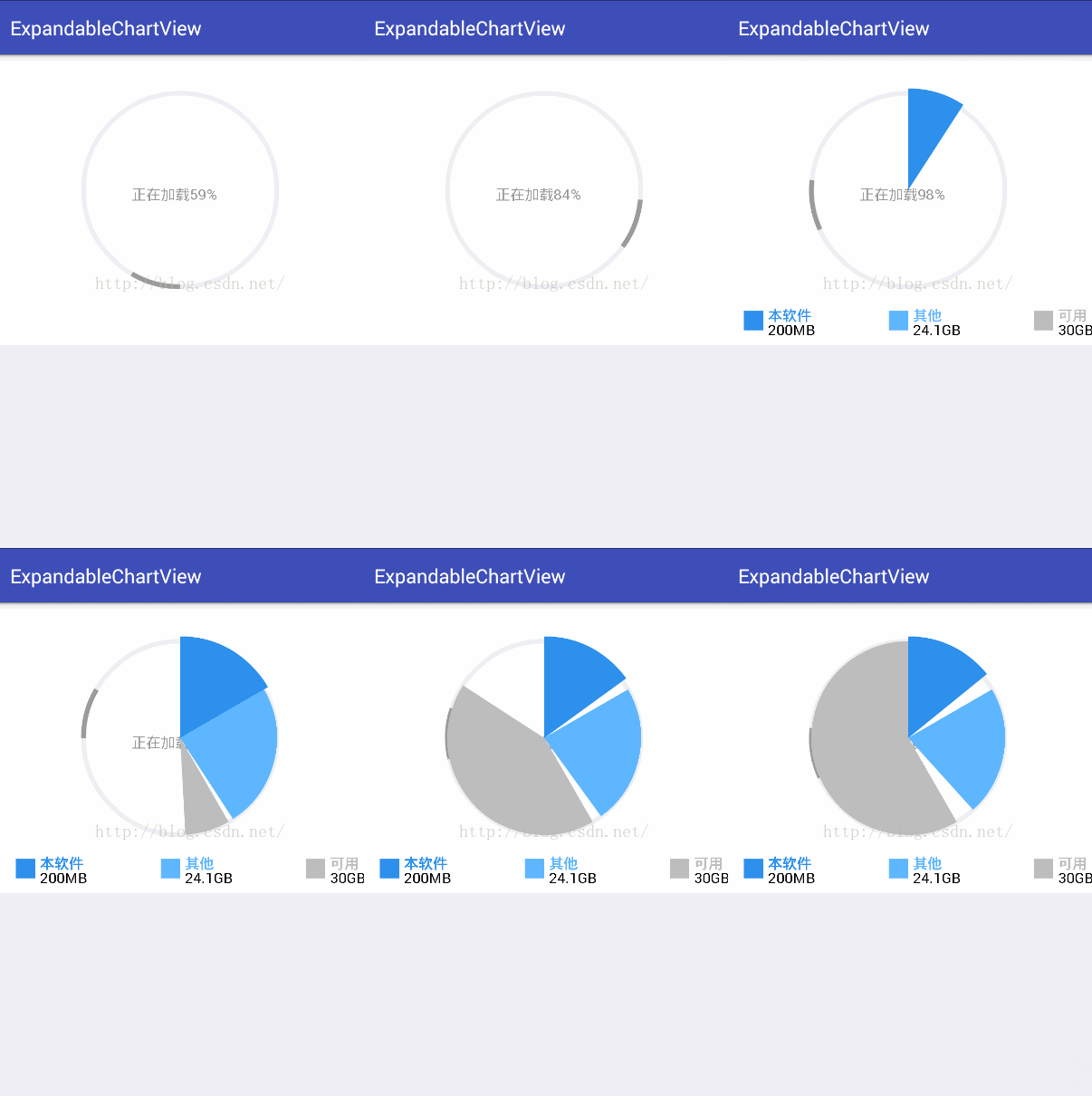
模仿微信的效果基本顯示出來了,但是當區域改變的時候,會不停閃爍,其實下面標注信息的小正方形也在閃爍,只不過我已經修改好了。
查了網上許多方法都沒有給出一個很直接的答案,大部分都是說要對surfaceView前後緩存都進行繪制,這樣就不產生閃爍問題。還有一種方法就是通過背景覆蓋,讓A緩沖在該區域的背景與B緩沖相同,這樣自然而然切換的時候,就不會看到緩存交替而產生的閃爍問題了。
關於第一種,我並不是很理解,說是每次要改變前後兩個緩沖,不能只變一個。。。。。。(網上都是這麼說,但是我到底怎麼改才算改!!?)
第二種方法,我經過了多次嘗試實現了,通過切換畫筆之後,每次畫圖都覆蓋上一層,這樣保持了之前閃爍部分的緩存一致。
該部分為找到的一些資料:
雙緩存(Double-buffer)與黑屏閃爍
每個SurfaceView 對象有兩個獨立的graphic buffer,官方SDK將它們稱作"front buffer"和"back buffer"。
常規的"double-buffer"會這麼做:每一幀的數據都被繪制到back buffer,然後back buffer的內容被持續翻轉(flip)到front buffer;屏幕一直顯示front buffer。但Android SurfaceView的"double-buffer"卻是這麼做的:在buffer A裡繪制內容,然後讓屏幕顯示buffer A; 下一個循環,在buffer B裡繪制內容,然後讓屏幕顯示buffer B; 如此往復。於是,屏幕上顯示的內容依次來自buffer A, B, A, B,....這樣看來,兩個buffer其實沒有主從的分別,與其稱之為"front buffer""back buffer",毋寧稱之為"buffer A""buffer B"。
Android中"double-buffer"的實現機制,可以很好地解釋閃屏現象。在第一個"lockCanvas-drawCanvas-unlockCanvasAndPost"循環中,更新的是buffer A的內容;到下一個"lockCanvas-drawCanvas-unlockCanvasAndPost"循環中,更新的是buffer B的內容。如果buffer A與buffer B中某個buffer內容為空,當屏幕輪流顯示它們時,就會出現畫面黑屏閃爍現象。
解決方法
出現黑屏是因為buffer A與buffer B中一者內容為空,而且為空的一方還被post到了屏幕。於是有兩種解決思路:
不讓空buffer出現:每次向一個buffer寫完內容並post之後,順便用這個buffer的內容填充另一個buffer。這樣能保證兩個buffer的內容是同步的,缺點是做了無用功,耗費性能。
不post空buffer到屏幕:當准備更新內容時,先判斷內容是否為空,只有非空時才啟動"lockCanvas-drawCanvas-unlockCanvasAndPost"這個流程。
就好比,A緩存是白色,B緩沖是黑色(也就是前後surfaceView的緩存)。而黑色是surfaceView的默認色。比如下面的偽代碼,通過線程不停的繪制:
canvas = holder.lockCanvas();
if(flag) {
canvas.drawColor(Color.WHITE);
}
holder.unlockCanvasAndPost(canvas);
flag = false;
看似沒有什麼問題,但是在實際過程卻一直在黑白閃爍,這就是因為,雖然A我們每次都繪制了,但是B一直沒變還是黑色。這時,我們通過覆蓋,講背景變為白色,就解決了這個問題,而我的解決方法也類似於這種。
下面貼出代碼:
package xiaoqi.expandablechartview;
import android.animation.Animator;
import android.animation.PropertyValuesHolder;
import android.animation.ValueAnimator;
import android.content.Context;
import android.graphics.Canvas;
import android.graphics.Color;
import android.graphics.Paint;
import android.graphics.PixelFormat;
import android.graphics.PorterDuff;
import android.graphics.RectF;
import android.util.AttributeSet;
import android.view.SurfaceHolder;
import android.view.SurfaceView;
import android.view.animation.LinearInterpolator;
public class ChartView extends SurfaceView implements SurfaceHolder.Callback {
private Context context;
private SurfaceHolder holder;
private ValueAnimator chartAnimator;
private ValueAnimator circleAnimator;
//中間內存信息方塊的坐標
private float centerDetailLeft;
private float centerDetailTop;
private float centerDetailRight;
private float centerDetailBottom;
//chart外接正方形坐標
private float chartLeft;
private float chartTop;
private float chartRight;
private float chartBottom;
//起始角度
private float startAngle = 270;
//半徑
private float radius;
//各區域角度
private float area1Angle;
private float area2Angle;
//區域的量
private float total;
private float area1;
private float area2;
private long time;
private int repeatCount = 2;
//是否為第一次顯示,用於防止surface閃爍
private boolean area1IsFirstShow = true;
private boolean area2IsFirstShow = true;
//大扇形外接正方形
private RectF rectF;
//小扇形外接正方形
private RectF rectF2;
private Paint area1Paint;
private Paint area2Paint;
private Paint area3Paint;
private Paint circlePaint;
private Paint arcPaint;
private Paint loadingPaint;
private Paint textPaint;
private static final int CIRCLE_DURATION = 1000;
public ChartView(Context context) {
super(context);
this.context = context;
init();
}
public ChartView(Context context, AttributeSet attrs) {
super(context, attrs);
this.context = context;
init();
}
public ChartView(Context context, AttributeSet attrs, int defStyleAttr) {
super(context, attrs, defStyleAttr);
this.context = context;
init();
}
private void init() {
radius = Utility.dip2px(context, 100);
holder = getHolder();
holder.addCallback(this);
setZOrderOnTop(true);
holder.setFormat(PixelFormat.TRANSLUCENT);
initPaint();
initAnimator();
}
private void initAnimator() {
PropertyValuesHolder angleValues = PropertyValuesHolder.ofFloat("angle", 0f, 360f);
chartAnimator = ValueAnimator.ofPropertyValuesHolder(angleValues);
chartAnimator.setDuration(2000);
chartAnimator.setInterpolator(new LinearInterpolator());
chartAnimator.addUpdateListener(new ValueAnimator.AnimatorUpdateListener() {
@Override
public void onAnimationUpdate(ValueAnimator animation) {
float angle = obj2Float(animation.getAnimatedValue("angle"));
Canvas canvas = holder.lockCanvas(null);
if(canvas != null){
canvas.drawColor(Color.TRANSPARENT, PorterDuff.Mode.CLEAR);
drawDetail(canvas);
// canvas.setDrawFilter(new PaintFlagsDrawFilter(0, Paint.ANTI_ALIAS_FLAG | Paint.FILTER_BITMAP_FLAG));
if (!area1IsFirstShow) {
canvas.drawArc(rectF, startAngle, area1Angle, true, area1Paint);
}
if (!area2IsFirstShow) {
canvas.drawArc(rectF2, area1Angle + startAngle, area2Angle, true, area2Paint);
}
if (angle < area1Angle) {
canvas.drawArc(rectF, startAngle, angle, true, area1Paint);
} else if (angle <= area2Angle + area1Angle) {
if (area1IsFirstShow) {
area1IsFirstShow = false;
canvas.drawArc(rectF, startAngle, area1Angle, true, area1Paint);
} else {
canvas.drawArc(rectF2, startAngle+area1Angle, angle - area1Angle, true, area2Paint);
}
} else {
if (area2IsFirstShow) {
area2IsFirstShow = false;
canvas.drawArc(rectF2, area1Angle + startAngle, area2Angle, true, area2Paint);
} else {
canvas.drawArc(rectF2, startAngle + area1Angle + area2Angle, angle - area2Angle - area1Angle,
true, area3Paint);
}
}
holder.unlockCanvasAndPost(canvas);
}
}
});
circleAnimator = ValueAnimator.ofPropertyValuesHolder(angleValues);
circleAnimator.setInterpolator(new LinearInterpolator());
circleAnimator.setDuration(CIRCLE_DURATION);
circleAnimator.addUpdateListener(new ValueAnimator.AnimatorUpdateListener() {
@Override
public void onAnimationUpdate(ValueAnimator animation) {
float angle = obj2Float(animation.getAnimatedValue("angle"));
Canvas canvas = holder.lockCanvas(null);
if(canvas != null){
long nowTime = System.currentTimeMillis();
int rate = (int) (nowTime - time) / (CIRCLE_DURATION * (repeatCount + 1) / 100);
if (rate <= 100) {
canvas.drawColor(Color.TRANSPARENT, PorterDuff.Mode.CLEAR);
canvas.drawText("正在加載" + rate + "%", getMeasuredWidth() / 2 - radius / 2,
getMeasuredHeight() / 2, loadingPaint);
}
canvas.drawCircle(getMeasuredWidth() / 2, getMeasuredHeight() / 2 - Utility.dip2px(context, 10),
radius, circlePaint);
canvas.drawArc(rectF2, 180 + angle, 30, false, arcPaint);
holder.unlockCanvasAndPost(canvas);
}
}
});
circleAnimator.addListener(new Animator.AnimatorListener() {
@Override
public void onAnimationStart(Animator animation) {
time = System.currentTimeMillis();
}
@Override
public void onAnimationEnd(Animator animation) {
chartAnimator.start();
}
@Override
public void onAnimationCancel(Animator animation) {
}
@Override
public void onAnimationRepeat(Animator animation) {
}
});
}
private void initPaint() {
area1Paint = new Paint();
area1Paint.setAntiAlias(true);
area1Paint.setStyle(Paint.Style.FILL);
area1Paint.setTextSize((Utility.dip2px(context, 15)));
area1Paint.setColor(context.getResources().getColor(R.color.background_blue));
area2Paint = new Paint();
area2Paint.setAntiAlias(true);
area2Paint.setStyle(Paint.Style.FILL);
area2Paint.setTextSize((Utility.dip2px(context, 15)));
area2Paint.setColor(context.getResources().getColor(R.color.chart_blue));
area3Paint = new Paint();
area3Paint.setAntiAlias(true);
area3Paint.setStyle(Paint.Style.FILL);
area3Paint.setTextSize((Utility.dip2px(context, 15)));
area3Paint.setColor(context.getResources().getColor(R.color.light_gary));
circlePaint = new Paint();
circlePaint.setAntiAlias(true);
circlePaint.setStrokeWidth(Utility.dip2px(context, 5));
circlePaint.setStyle(Paint.Style.STROKE);
circlePaint.setColor(context.getResources().getColor(R.color.background_gray));
arcPaint = new Paint();
arcPaint.setAntiAlias(true);
arcPaint.setStrokeWidth(Utility.dip2px(context, 5));
arcPaint.setStyle(Paint.Style.STROKE);
arcPaint.setColor(context.getResources().getColor(R.color.textcolor_gray));
loadingPaint = new Paint();
loadingPaint.setTextSize((Utility.dip2px(context, 15)));
loadingPaint.setColor(context.getResources().getColor(R.color.textcolor_gray));
textPaint = new Paint();
textPaint.setTextSize((Utility.dip2px(context, 15)));
textPaint.setColor(context.getResources().getColor(R.color.black));
}
private float obj2Float(Object o) {
return ((Number) o).floatValue();
}
@Override
protected void onMeasure(int widthMeasureSpec, int heightMeasureSpec) {
super.onMeasure(widthMeasureSpec, heightMeasureSpec);
chartLeft = getMeasuredWidth() / 2 - radius;
chartTop = getMeasuredHeight() / 2 - radius - Utility.dip2px(context, 10);
chartRight = getMeasuredWidth() / 2 + radius;
chartBottom = getMeasuredHeight() / 2 + radius - Utility.dip2px(context, 10);
centerDetailLeft = getMeasuredWidth() / 2 - Utility.dip2px(context, 20);
centerDetailTop = getMeasuredHeight() / 2 + radius + Utility.dip2px(context, 15);
centerDetailRight = getMeasuredWidth() / 2;
centerDetailBottom = getMeasuredHeight() / 2 + radius + Utility.dip2px(context, 35);
}
@Override
protected void onDraw(Canvas canvas) {
super.onDraw(canvas);
}
@Override
public void surfaceCreated(SurfaceHolder holder) {
rectF = new RectF(chartLeft - Utility.dip2px(context, 5), chartTop - Utility.dip2px(context, 5), chartRight +
Utility.dip2px(context, 5), chartBottom + Utility.dip2px(context, 5));
rectF2 = new RectF(chartLeft, chartTop, chartRight, chartBottom);
// valueAnimator.start();
}
@Override
public void surfaceChanged(SurfaceHolder holder, int format, int width, int height) {
}
@Override
public void surfaceDestroyed(SurfaceHolder holder) {
circleAnimator.cancel();
chartAnimator.cancel();
}
private void drawDetail(Canvas canvas) {
canvas.drawRect(centerDetailLeft - Utility.dip2px(context, 150), centerDetailTop,
centerDetailRight - Utility.dip2px(context, 150), centerDetailBottom, area1Paint);
canvas.drawRect(centerDetailLeft, centerDetailTop, centerDetailRight, centerDetailBottom, area2Paint);
canvas.drawRect(centerDetailLeft + Utility.dip2px(context, 150), centerDetailTop,
centerDetailRight + Utility.dip2px(context, 150), centerDetailBottom, area3Paint);
drawText(canvas);
}
private void drawText(Canvas canvas) {
canvas.drawText("本軟件", centerDetailRight - Utility.dip2px(context, 150) + Utility.dip2px(context, 5),
centerDetailTop + Utility.dip2px(context, 10), area1Paint);
canvas.drawText("200MB", centerDetailRight - Utility.dip2px(context, 150) + Utility.dip2px(context, 5),
centerDetailTop + Utility.dip2px(context, 25), textPaint);
canvas.drawText("其他", centerDetailRight + Utility.dip2px(context, 5),
centerDetailTop + Utility.dip2px(context, 10), area2Paint);
canvas.drawText("24.1GB", centerDetailRight + Utility.dip2px(context, 5),
centerDetailTop + Utility.dip2px(context, 25), textPaint);
canvas.drawText("可用", centerDetailRight + Utility.dip2px(context, 150) + Utility.dip2px(context, 5),
centerDetailTop + Utility.dip2px(context, 10), area3Paint);
canvas.drawText("30GB", centerDetailRight + Utility.dip2px(context, 150) + Utility.dip2px(context, 5),
centerDetailTop + Utility.dip2px(context, 25), textPaint);
}
public void show() {
circleAnimator.setRepeatCount(repeatCount);
circleAnimator.start();
}
public void setArea1Color(int color) {
area1Paint.setColor(color);
}
public void setArea2Color(int color) {
area2Paint.setColor(color);
}
public void setArea3Color(int color) {
area3Paint.setColor(color);
}
public void setRadius(float radius) {
this.radius = radius;
}
public void setScale(float total, float area1, float area2){
area1Angle = area1/total * 360;
area2Angle = area2/total * 360;
}
public void setRepeatCount(int repeatCount){
this.repeatCount = repeatCount;
}
}
效果:
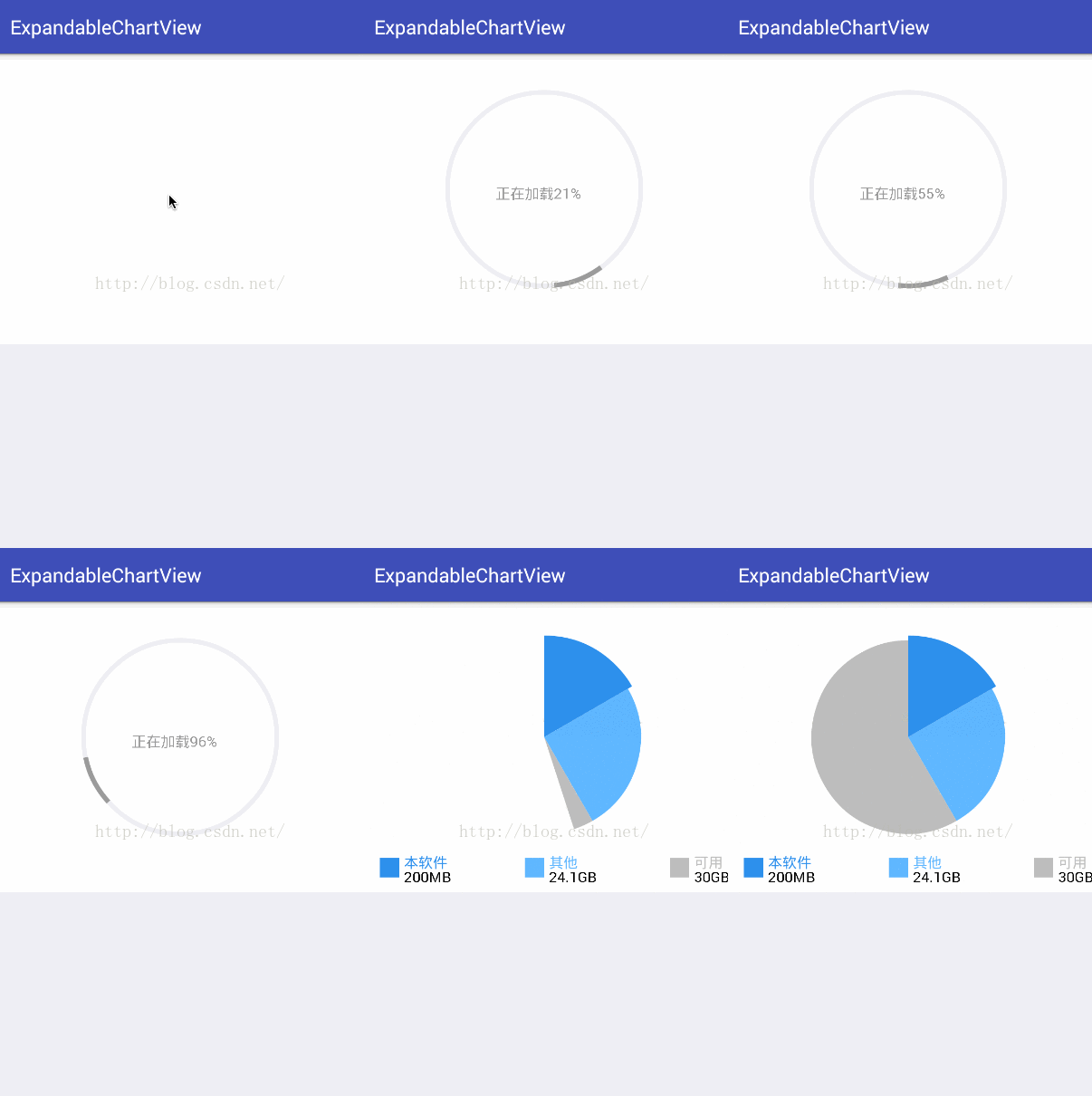
同時建議每個圖形都用自己的paint,而不是通過重新set不同設置來調用paint,因為在使用時,我發現,因為很多地方用的是同一個paint也導致了閃爍,而為每個圖形都創建了自己的paint之後就好了。
以上所述是小編給大家介紹的Android仿微信清理內存圖表動畫(解決surfaceView屏幕閃爍問題)demo實例詳解,希望對大家有所幫助,如果大家有任何疑問請給我留言,小編會及時回復大家的。在此也非常感謝大家對本站網站的支持!
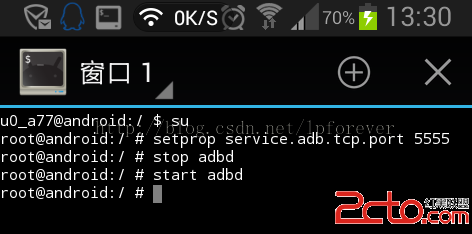 Android手機用WIFI與Android studio連接,真機測試APP
1,手機獲取ROOT權限(我的是小米note,直接下載MIUI開發版安裝即可)2,在應用市場下載(終端模擬器),安裝。3,賦予(終端模擬器)ROOT權限。提示:測試其是否
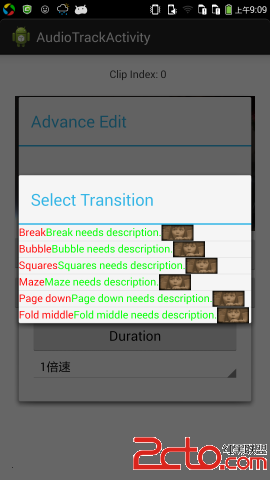 Android探秘:SimpleAdapter與Bitmap的結合
首先我們知道,在Android中,Adapter本身是一個接口,他 派生了很多子接口,這些子接口又被很多具體的類實現,來實現具體的顯示效果。本次我們主要介紹的是Simpl
 Android 性能優化工具
1. Allocation TrackerAllocation Tracker是android studio自帶的一個功能,我們可以在MemoryMonitor中打開使用
 Android-對抗反編譯工具的一種方式
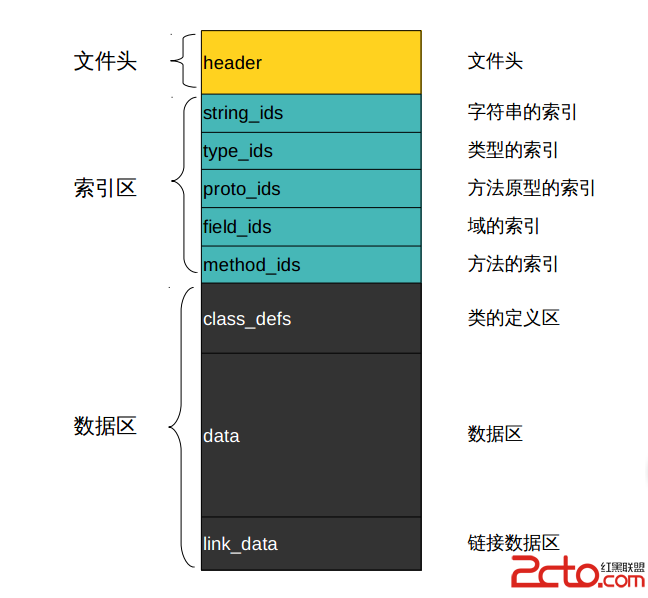
首先我們來看下dex文件的格式: class_defs的結構: (1) class_idx 描述具體的 class 類型 ,值是 type_ids 的一