編輯:關於Android編程
先給大家展示下效果圖:
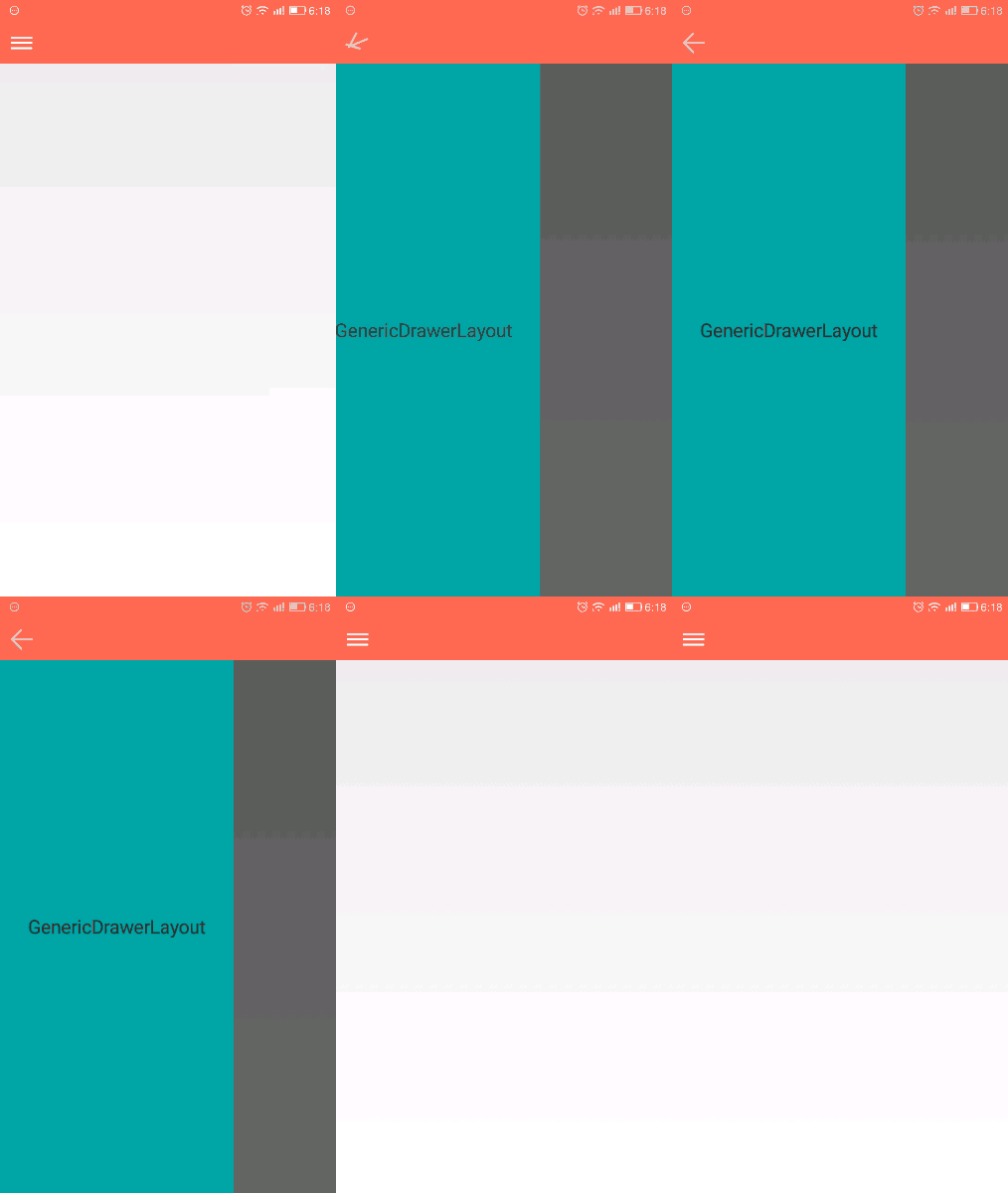
這個效果是安卓5.0推出 “材料設計” Ui效果 以前一直沒留意到,寫篇文章當成備忘錄
上面的效果圖 用 DrawerLayout和Toolbar實現
布局如下
<?xml version="1.0" encoding="utf-8"?>
<LinearLayout xmlns:android="http://schemas.android.com/apk/res/android"
  xmlns:tools="http://schemas.android.com/tools"
  android:layout_width="match_parent"
  android:layout_height="match_parent"
  android:background="#fff0ff"
  android:orientation="vertical"
  tools:context="a.fmy.com.myapplication.MainActivity">
<!--標題欄-->
  <android.support.v7.widget.Toolbar
    android:id="@+id/toolbar"
    android:layout_width="match_parent"
    android:layout_height="wrap_content"
    android:background="?attr/colorPrimary"
    android:minHeight="?attr/actionBarSize" />
  <android.support.v4.widget.DrawerLayout
    android:id="@+id/activity_main"
    android:layout_width="match_parent"
    android:layout_height="match_parent"
    android:background="#0ff"
   >
    <!--內容-->
    <LinearLayout
      android:layout_width="match_parent"
      android:layout_height="match_parent"
      android:background="#ff0"></LinearLayout>
    <!--菜單-->
    <LinearLayout
      android:layout_width="200dp"
      android:layout_height="match_parent"
      android:layout_gravity="start"
      android:background="#f0f" />
  </android.support.v4.widget.DrawerLayout>
</LinearLayout>
activity 代碼
public class MainActivity extends AppCompatActivity {
  private Toolbar toobar;
  private ActionBarDrawerToggle actionBarDrawerToggle;
  private DrawerLayout drawerLayout;
  @Override
  protected void onCreate(Bundle savedInstanceState) {
    super.onCreate(savedInstanceState);
    setContentView(R.layout.activity_main);
    toobar = (Toolbar) findViewById(R.id.toolbar);
    //設置toobar為標題欄
    setSupportActionBar(toobar);
    //設置顯示旋轉菜單
    getSupportActionBar().setDisplayHomeAsUpEnabled(true);
    //抽屜布局
    drawerLayout = ((DrawerLayout) findViewById(R.id.activity_main));
    //activitybar開關
    actionBarDrawerToggle = new ActionBarDrawerToggle(this, drawerLayout, R.string.app_name, R.string.app_name);
    //同步開關 如果不寫的話, 滑動開關 按鈕一直就一個狀態 不會變化
    actionBarDrawerToggle.syncState();
    //添加監聽
    drawerLayout.addDrawerListener(actionBarDrawerToggle);
  }
  @Override
  public boolean onOptionsItemSelected(MenuItem item) {
    //這裡是讓用戶點擊按鈕的時候可以打開抽屜
    return actionBarDrawerToggle.onOptionsItemSelected(item)
        || super.onOptionsItemSelected(item);
  }
}
 Android pendingInten 用法詳解
pendingIntent字面意義:等待的,未決定的Intent。要得到一個pendingIntent對象,使用方法類的靜態方法getActivity(Context,
 詳解Android圖表 MPAndroidChart折線圖
1.介紹MPAndroidChart GitHub地址 MPAndroidChart的強大之處就不在多說了,目前最新的版本是3.0.1,在新版本中很多方法都被
 Android學習路線(八)為Action bar添加action按鈕
Action bar允許你為與當前應用上下文相關的最重要的action items添加action按鈕。那些直接顯示在action bar上的icon或者文字都被稱作ac
 理解 Android 2D/3D 圖形架構
首先理解Android 的 egl 的函數調用,先要得到display (對應顯示器),而後選擇一個支持的config(這是顯卡支持的),而後創建WindowSurfac