編輯:關於Android編程
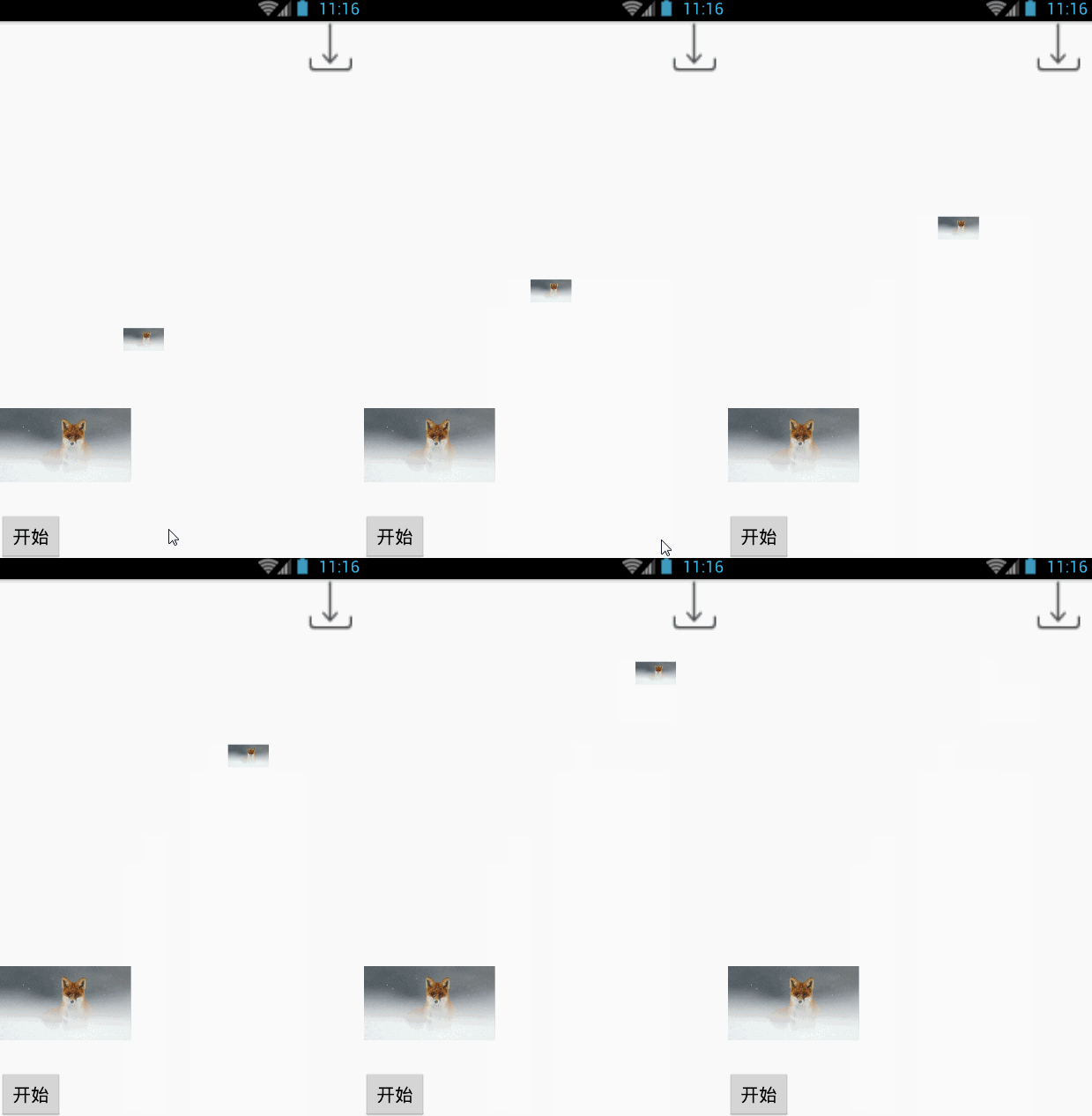
下載動畫經常出現在下載需求多的app中,比如游戲下載平台,應用市場……
先看看效果圖:
實現
private void startAnim() {
  //以bitmap創建new ImageView
  iv.setDrawingCacheEnabled(true);
  Bitmap bitmap = iv.getDrawingCache();
  ImageView logo = new ImageView(this);
  logo.setScaleType(ImageView.ScaleType.FIT_XY);
  logo.setImageBitmap(bitmap);
  int[] startLocation = new int[2];
  iv.getLocationInWindow(startLocation);
  end.getLocationInWindow(location_download);
  setAnim(logo, startLocation, location_download);
}
設置動畫
private void setAnim(final ImageView logo, int[] startLocation,int[] location_download) {
 ViewGroup animMaskLayout = createAnimLayout();
 animMaskLayout.addView(logo);// 把動畫小球添加到動畫層
 // 計算位移
 final View view = addViewToAnimLayout(logo, startLocation);
 // 動畫位移的X坐標
 int endY = location_download[1] - startLocation[1];
 // 動畫位移的y坐標
 TranslateAnimation translateAnimationX = new TranslateAnimation(0,  endX, 0, 0);
 translateAnimationX.setInterpolator(new LinearInterpolator());
 translateAnimationX.setRepeatCount(0);// 動畫重復執行的次數
 translateAnimationX.setFillAfter(true);  TranslateAnimation
 translateAnimationY = new TranslateAnimation(0, 0, 0, endY);
 translateAnimationY.setInterpolator(new AccelerateInterpolator());
 translateAnimationY.setRepeatCount(0);// 動畫重復執行的次數
 translateAnimationX.setFillAfter(true);  AnimationSet set = new
 AnimationSet(false);
 set.setFillAfter(false);
 set.addAnimation(translateAnimationY);
 set.addAnimation(translateAnimationX);
 set.setDuration(2000);// 動畫的執行時間
 view.startAnimation(set);  // 動畫監聽事件
 set.setAnimationListener(new Animation.AnimationListener() {
    // 動畫的開始
    @Override
    public void onAnimationStart(Animation animation) {
       logo.setVisibility(View.VISIBLE);
   }
   @Override
   public void onAnimationRepeat(Animation animation) {
   }
   // 動畫的結束
   @Override
   public void onAnimationEnd(Animation animation) {
       logo.setVisibility(View.GONE);
   }
  });
}
創建動畫父布局
private ViewGroup createAnimLayout() {
  ViewGroup rootView = (ViewGroup) getWindow().getDecorView();
  LinearLayout animLayout = new LinearLayout(this);
  LinearLayout.LayoutParams lp = new LinearLayout.LayoutParams(
    LinearLayout.LayoutParams.MATCH_PARENT, LinearLayout.LayoutParams.MATCH_PARENT);
  animLayout.setLayoutParams(lp);
  animLayout.setId(Integer.MAX_VALUE);
  animLayout.setBackgroundResource(android.R.color.transparent);
  rootView.addView(animLayout);
  return animLayout;
}
設置動畫布局參數
private static View addViewToAnimLayout(final View view, int[] location) {
 int x = location[0];
 int y = location[1];
 LinearLayout.LayoutParams lp = new LinearLayout.LayoutParams(80, 80);
 lp.leftMargin = x;
 lp.topMargin = y;
 view.setLayoutParams(lp);
 return view;
}
代碼就到此結束了,看起來並不難,動手試試吧。
以上就是本文的全部內容,希望對大家的學習有所幫助,也希望大家多多支持本站。
 教你如何正確反編譯apk
簡單的說下反編譯apk的流程:我們一般想要反編譯一個apk,無非就是想獲得三樣東西圖片資源 ,XML資源,和代碼資源一.圖片資源獲取、這個最簡單啦, &nbs
 自定義控件 編輯和選取圓形頭像
android大家都有很多需要用戶上傳頭像的需求,有的是選方形,有的是圓角矩形,有的是圓形。首先我們要做一個處理圖片的自定義控件,把傳入的圖片,經過用戶選擇區域,處理成一
 華為榮耀V8怎麼插卡?華為榮耀V8用什麼SIM卡?榮耀V8手機SIM卡安裝圖文教程
昨天,華為榮耀V8已經在華為商城和京東上正式開賣了,榮耀V8是華為榮耀推出的全新V系列手機,它采用了雙卡雙待的模式,擁有5.7英寸大屏,配備了2K分辨率顯示
 Android仿IOS的AssistiveTouch的控件EasyTouch實現
概述:之前我聽到過一則新聞,就是說Ipone中的AssistiveTouch的設計初衷是給殘疾人使用的。而這一功能在亞洲(中國)的使用最為頻繁。雖不知道這新聞的可靠性,但