編輯:關於Android編程
同時適配Android和IOS
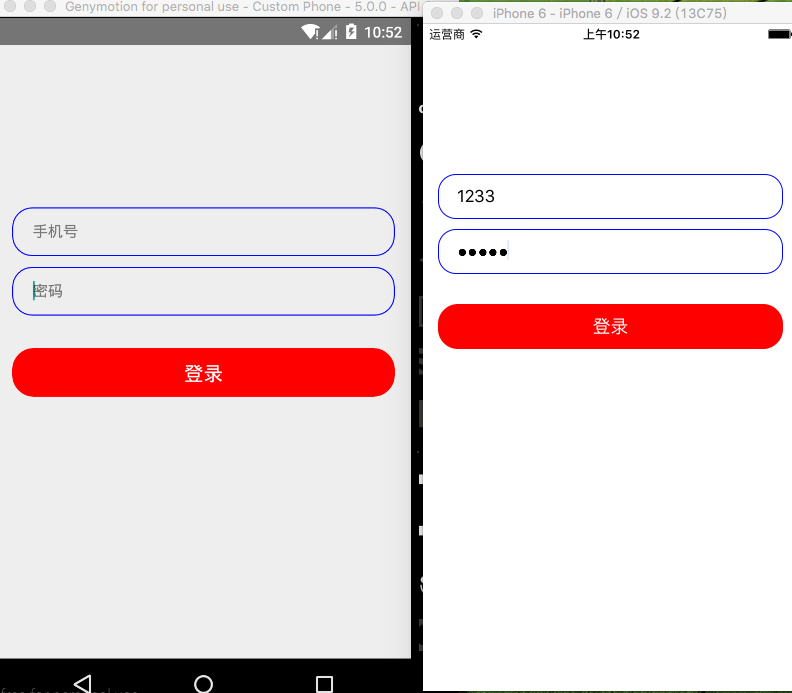
代碼注釋比較詳細
/**
 * Sample React Native App
 * https://github.com/facebook/react-native
 * @flow
 */

import React, {Component} from 'react';
import {
  AppRegistry,
  StyleSheet,
  Text,
  View,
  TextInput,
  Platform,
  TouchableOpacity,
} from 'react-native';

//獲取屏幕信息
var Dimensions = require('Dimensions');
var width = Dimensions.get('window').width;

class TextInputG extends Component {

  render() {
    return (
      <View style={styles.container}>

        {/*賬號輸入框在這裡用View包裹以便處理器樣式*/}
        <View style={styles.textInputViewStyle}>
          <TextInput
            style={styles.textInputStyle}
            //站位符
            placeholder='手機號'/>
        </View>
        {/*密碼輸入框*/}
        <View style={styles.textInputViewStyle}>
          <TextInput
            style={styles.textInputStyle}
            placeholder='密碼'
            //密文
            secureTextEntry={true}/>
        </View>

        {/*設置控件可點擊*/}
        <TouchableOpacity onPress={()=>{alert('點擊登錄')}}>
          {/*登錄按鈕*/}
          <View style={styles.textLoginViewStyle}>
            <Text style={styles.textLoginStyle}>登錄</Text>
          </View>
        </TouchableOpacity>

      </View>
    );
  }
}

const styles = StyleSheet.create({
  container: {
    //設置占滿屏幕
    flex: 1,
    // backgroundColor: 'black',
    marginTop: 140,

  },
  //包裹輸入框View樣式
  textInputViewStyle: {
    //設置寬度減去30將其居中左右便有15的距離
    width: width - 30,
    height: 45,
    //設置圓角程度
    borderRadius: 18,
    //設置邊框的顏色
    borderColor: 'blue',
    //設置邊框的寬度
    borderWidth: 1,
    //內邊距
    paddingLeft: 10,
    paddingRight: 10,
    //外邊距
    marginTop: 10,
    marginLeft: 20,
    marginRight: 20,
    //設置相對父控件居中
    alignSelf: 'center',


  },
  //輸入框樣式
  textInputStyle: {
    width: width - 30,
    height: 35,
    paddingLeft: 8,
    backgroundColor: '#00000000',
    // alignSelf: 'center',
    //根據不同平台進行適配
    marginTop: Platform.OS === 'ios' ? 4 : 8,
  },

  //登錄按鈕View樣式
  textLoginViewStyle: {
    width: width - 30,
    height: 45,
    backgroundColor: 'red',
    borderRadius: 20,
    marginTop: 30,
    alignSelf: 'center',
    justifyContent: 'center',
    alignItems: 'center',
  },
  //登錄Text文本樣式
  textLoginStyle: {
    fontSize: 18,
    color: 'white',


  },

});

module.exports = TextInputG;
感謝閱讀,希望能幫助到大家,謝謝大家對本站的支持!
 三星s7微信不提示怎麼辦 三星s7收不到微信消息推送解決方法
三星s7微信消息推送收不到怎麼辦?不少用戶反映手機出現爆音、收不到微信、qq消息推送,那麼三星s7微信不提示怎麼辦?三星s7收不到微信消息推送怎麼解決?下文
 Android線程實現圖片輪播
一、實現效果本篇文章實現了簡單的圖片輪播,初始化3張資源圖片,初始化3秒更換一次圖片背景,輪換播放。二、知識點Thread線程start() 、sleep();handl
 Android上下文服務管理查詢過程
在開發Android應用程序時,如果需要使用系統提供的服務,可以通過服務名稱調用山下文的getSystemService(String name)來獲取服務管理者,那麼該
 Android中實現為TextView添加多個可點擊的文本
本文實例展示了Android中實現為TextView添加多個可點擊的文本的方法。該功能在Android社交軟件的制作中非常具有實用價值。分享給大家供大家參考。具體如下:很