編輯:關於Android編程
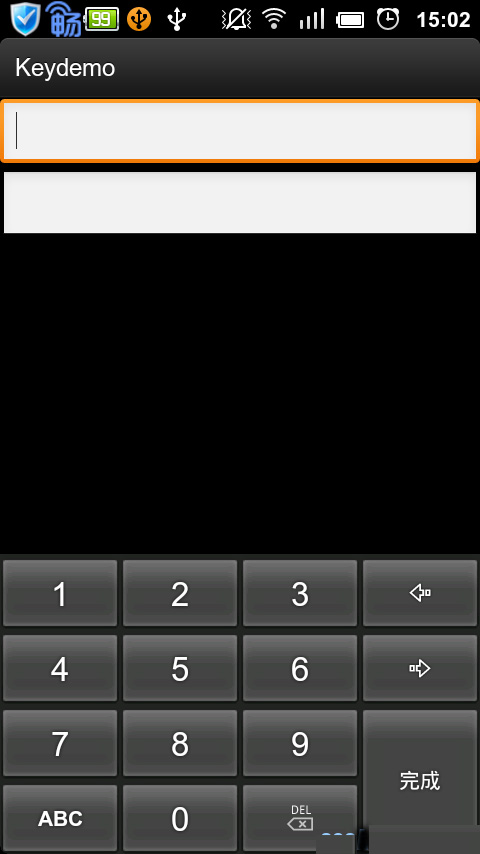
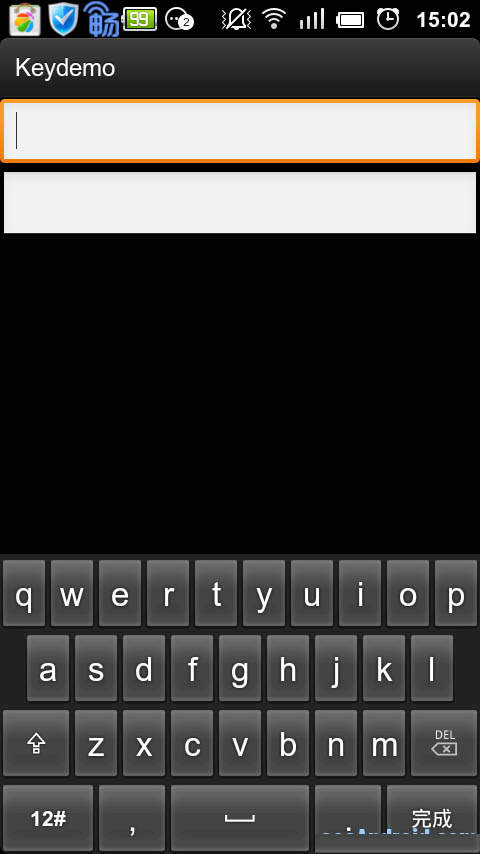
偶然間發現了Android.inputmethodservice.Keyboard類,即android可以自定義鍵盤類,做了一個簡單例子供大家參考。
效果如下:
先看界面布局文件
 <?xml version="1.0" encoding="utf-8"?>
<LinearLayout xmlns:android="http://schemas.android.com/apk/res/android"
  android:layout_width="fill_parent"
  android:layout_height="fill_parent"
  android:orientation="vertical" >

  <EditText
    android:id="@+id/edit"
    android:layout_width="fill_parent"
    android:layout_height="wrap_content" />

  <EditText
    android:id="@+id/edit1"
    android:layout_width="fill_parent"
    android:layout_height="wrap_content"
    android:password="true" />

  <RelativeLayout
    android:layout_width="fill_parent"
    android:layout_height="wrap_content" >

    <android.inputmethodservice.KeyboardView
      android:id="@+id/keyboard_view"
      android:layout_width="fill_parent"
      android:layout_height="wrap_content"
      android:layout_alignParentBottom="true"
      android:focusable="true"
      android:focusableInTouchMode="true"
      android:background="@color/lightblack"
      android:keyBackground="@drawable/btn_keyboard_key"
      android:keyTextColor="@color/white"
      android:visibility="gone" />
  </RelativeLayout>

</LinearLayout>
通過布局文件可以看出界面上有兩個輸入框,其中一個是密碼輸入框,界面上還有一個隱藏的鍵盤控件。
在res下新建xml文件夾,在xml文件夾中新建qwerty.xml和symbols.xml文件. qwerty.xml 是字母鍵盤布局,symbols.xml 是數字鍵盤布局,內如如下:
qwerty.xml內容
<?xml version="1.0" encoding="UTF-8"?>
<Keyboard android:keyWidth="10.000002%p" android:keyHeight="@dimen/key_height"
    android:horizontalGap="0.0px" android:verticalGap="0.0px"
    xmlns:android="http://schemas.android.com/apk/res/android">
    <Row>
        <Key android:codes="113" android:keyEdgeFlags="left"
            android:keyLabel="q" />
        <Key android:codes="119" android:keyLabel="w" />
        <Key android:codes="101" android:keyLabel="e" />
        <Key android:codes="114" android:keyLabel="r" />
        <Key android:codes="116" android:keyLabel="t" />
        <Key android:codes="121" android:keyLabel="y" />
        <Key android:codes="117" android:keyLabel="u" />
        <Key android:codes="105" android:keyLabel="i" />
        <Key android:codes="111" android:keyLabel="o" />
        <Key android:codes="112" android:keyEdgeFlags="right"
            android:keyLabel="p" />
    </Row>
    <Row>
        <Key android:horizontalGap="4.999995%p" android:codes="97"
            android:keyEdgeFlags="left" android:keyLabel="a" />
        <Key android:codes="115" android:keyLabel="s" />
        <Key android:codes="100" android:keyLabel="d" />
        <Key android:codes="102" android:keyLabel="f" />
        <Key android:codes="103" android:keyLabel="g" />
        <Key android:codes="104" android:keyLabel="h" />
        <Key android:codes="106" android:keyLabel="j" />
        <Key android:codes="107" android:keyLabel="k" />
        <Key android:codes="108" android:keyEdgeFlags="right"
            android:keyLabel="l" />
    </Row>
    <Row>
        <Key android:keyWidth="14.999998%p" android:codes="-1"
            android:keyEdgeFlags="left" android:isModifier="true"
            android:isSticky="true" android:keyIcon="@drawable/sym_keyboard_shift" />
        <Key android:codes="122" android:keyLabel="z" />
        <Key android:codes="120" android:keyLabel="x" />
        <Key android:codes="99" android:keyLabel="c" />
        <Key android:codes="118" android:keyLabel="v" />
        <Key android:codes="98" android:keyLabel="b" />
        <Key android:codes="110" android:keyLabel="n" />
        <Key android:codes="109" android:keyLabel="m" />
        <Key android:keyWidth="14.999998%p" android:codes="-5"
            android:keyEdgeFlags="right" android:isRepeatable="true"
            android:keyIcon="@drawable/sym_keyboard_delete" />
    </Row>
    <Row android:rowEdgeFlags="bottom">
        <Key android:keyWidth="20.000004%p" android:codes="-2"
            android:keyLabel="12#" />
        <Key android:keyWidth="14.999998%p" android:codes="44"
            android:keyLabel="," />
        <Key android:keyWidth="29.999996%p" android:codes="32"
            android:isRepeatable="true" android:keyIcon="@drawable/sym_keyboard_space" />
        <Key android:keyWidth="14.999998%p" android:codes="46"
            android:keyLabel="." />
        <Key android:keyWidth="20.000004%p" android:codes="-3"
            android:keyEdgeFlags="right" android:keyLabel="完成" />
    </Row>
</Keyboard>
symbols.xml 內容
<?xml version="1.0" encoding="utf-8"?>
<Keyboard xmlns:android="http://schemas.android.com/apk/res/android"
    android:keyWidth="25%p" android:horizontalGap="0px"
    android:verticalGap="0px" android:keyHeight="@dimen/key_height">
    <Row>
        <Key android:codes="49" android:keyLabel="1" />
        <Key android:codes="50" android:keyLabel="2" />
        <Key android:codes="51" android:keyLabel="3" />
        <Key android:codes="57419" android:keyEdgeFlags="right"
            android:keyIcon="@drawable/sym_keyboard_left" />
    </Row>
    <Row>
        <Key android:codes="52" android:keyLabel="4" />
        <Key android:codes="53" android:keyLabel="5" />
        <Key android:codes="54" android:keyLabel="6" />
        <Key android:codes="57421" android:keyEdgeFlags="right"
            android:keyIcon="@drawable/sym_keyboard_right" />
    </Row>
    <Row>
        <Key android:codes="55" android:keyLabel="7" />
        <Key android:codes="56" android:keyLabel="8" />
        <Key android:codes="57" android:keyLabel="9" />
        <Key android:codes="-3" android:keyHeight="100dip"
            android:keyEdgeFlags="right" android:isRepeatable="true"
            android:keyLabel="完成" />
    </Row>
    <Row>
        <Key android:codes="-2" android:keyLabel="ABC" />
        <Key android:codes="48" android:keyLabel="0" />
        <Key android:codes="-5" android:keyIcon="@drawable/sym_keyboard_delete" />
    </Row>
</Keyboard>
KeydemoActivity.java
package cn.key;

import android.app.Activity;
import android.content.Context;
import android.os.Bundle;
import android.text.InputType;
import android.view.MotionEvent;
import android.view.View;
import android.view.View.OnTouchListener;
import android.widget.EditText;

public class KeydemoActivity extends Activity {
    private Context ctx;
    private Activity act;
    private EditText edit;
    private EditText edit1;

    @Override
    public void onCreate(Bundle savedInstanceState) {
        super.onCreate(savedInstanceState);
        setContentView(R.layout.main);
        ctx = this;
        act = this;

        edit = (EditText) this.findViewById(R.id.edit);
        edit.setInputType(InputType.TYPE_NULL);

        edit1 = (EditText) this.findViewById(R.id.edit1);

        edit.setOnTouchListener(new OnTouchListener() {
            @Override
            public boolean onTouch(View v, MotionEvent event) {
                new KeyboardUtil(act, ctx, edit).showKeyboard();
                return false;
            }
        });

        edit1.setOnTouchListener(new OnTouchListener() {
            @Override
            public boolean onTouch(View v, MotionEvent event) {
                int inputback = edit1.getInputType();
                edit1.setInputType(InputType.TYPE_NULL);
                new KeyboardUtil(act, ctx, edit1).showKeyboard();
                edit1.setInputType(inputback);
                return false;
            }
        });

    }
}
KeyboardUtil.java
package cn.key;

import java.util.List;

import android.app.Activity;
import android.content.Context;
import android.inputmethodservice.Keyboard;
import android.inputmethodservice.KeyboardView;
import android.inputmethodservice.Keyboard.Key;
import android.inputmethodservice.KeyboardView.OnKeyboardActionListener;
import android.text.Editable;
import android.view.View;
import android.widget.EditText;

public class KeyboardUtil {
    private Context ctx;
    private Activity act;
    private KeyboardView keyboardView;
    private Keyboard k1;// 字母鍵盤
    private Keyboard k2;// 數字鍵盤
    public boolean isnun = false;// 是否數據鍵盤
    public boolean isupper = false;// 是否大寫

    private EditText ed;

    public KeyboardUtil(Activity act, Context ctx, EditText edit) {
        this.act = act;
        this.ctx = ctx;
        this.ed = edit;
        k1 = new Keyboard(ctx, R.xml.qwerty);
        k2 = new Keyboard(ctx, R.xml.symbols);
        keyboardView = (KeyboardView) act.findViewById(R.id.keyboard_view);
        keyboardView.setKeyboard(k1);
        keyboardView.setEnabled(true);
        keyboardView.setPreviewEnabled(true);
        keyboardView.setOnKeyboardActionListener(listener);
    }

    private OnKeyboardActionListener listener = new OnKeyboardActionListener() {
        @Override
        public void swipeUp() {
        }

        @Override
        public void swipeRight() {
        }

        @Override
        public void swipeLeft() {
        }

        @Override
        public void swipeDown() {
        }

        @Override
        public void onText(CharSequence text) {
        }

        @Override
        public void onRelease(int primaryCode) {
        }

        @Override
        public void onPress(int primaryCode) {
        }

        @Override
        public void onKey(int primaryCode, int[] keyCodes) {
            Editable editable = ed.getText();
            int start = ed.getSelectionStart();
            if (primaryCode == Keyboard.KEYCODE_CANCEL) {// 完成
                hideKeyboard();
            } else if (primaryCode == Keyboard.KEYCODE_DELETE) {// 回退
                if (editable != null && editable.length() > 0) {
                    if (start > 0) {
                        editable.delete(start - 1, start);
                    }
                }
            } else if (primaryCode == Keyboard.KEYCODE_SHIFT) {// 大小寫切換
                changeKey();
                keyboardView.setKeyboard(k1);

            } else if (primaryCode == Keyboard.KEYCODE_MODE_CHANGE) {// 數字鍵盤切換
                if (isnun) {
                    isnun = false;
                    keyboardView.setKeyboard(k1);
                } else {
                    isnun = true;
                    keyboardView.setKeyboard(k2);
                }
            } else if (primaryCode == 57419) { // go left
                if (start > 0) {
                    ed.setSelection(start - 1);
                }
            } else if (primaryCode == 57421) { // go right
                if (start < ed.length()) {
                    ed.setSelection(start + 1);
                }
            } else {
                editable.insert(start, Character.toString((char) primaryCode));
            }
        }
    };

    /**
     * 鍵盤大小寫切換
     */
    private void changeKey() {
        List<Key> keylist = k1.getKeys();
        if (isupper) {//大寫切換小寫
            isupper = false;
            for(Key key:keylist){
                if (key.label!=null && isword(key.label.toString())) {
                    key.label = key.label.toString().toLowerCase();
                    key.codes[0] = key.codes[0]+32;
                }
            }
        } else {//小寫切換大寫
            isupper = true;
            for(Key key:keylist){
                if (key.label!=null && isword(key.label.toString())) {
                    key.label = key.label.toString().toUpperCase();
                    key.codes[0] = key.codes[0]-32;
                }
            }
        }
    }

  public void showKeyboard() {
    int visibility = keyboardView.getVisibility();
    if (visibility == View.GONE || visibility == View.INVISIBLE) {
      keyboardView.setVisibility(View.VISIBLE);
    }
  }

  public void hideKeyboard() {
    int visibility = keyboardView.getVisibility();
    if (visibility == View.VISIBLE) {
      keyboardView.setVisibility(View.INVISIBLE);
    }
  }

  private boolean isword(String str){
      String wordstr = "abcdefghijklmnopqrstuvwxyz";
      if (wordstr.indexOf(str.toLowerCase())>-1) {
            return true;
        }
      return false;
  }

}
以上就是本文的全部內容,希望對大家的學習有所幫助,也希望大家多多支持本站。
 Android集成微信登錄的步驟詳解
一、首先在Application的onCreate中寫:// GeneralAppliction.javapublic static IWXAPI sApi;@Overr
 Android下拉刷新上拉加載更多的擴展ListView
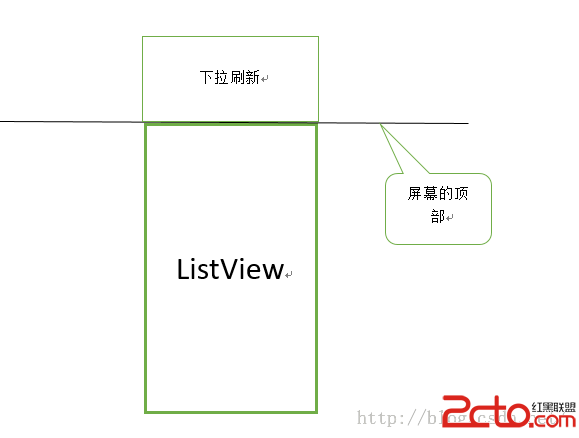
下拉刷新上拉加載更多的擴展ListView在很多APP我們都能看到,在一個列表上面,將手指往屏幕下面滑動,列表上方就會出現一個隱藏的View,一般寫有“下拉刷
 關於JNI
關於JNI
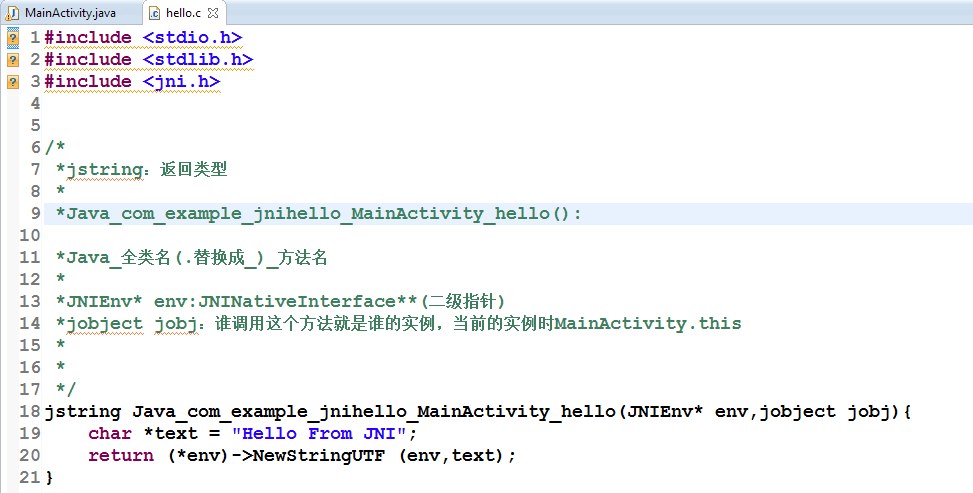
JNINDK開發環境的搭建將NDK的路徑拷貝到環境變量path中 cmd中運行ndk-build可驗證是否添加成功JNI_HelloWorld步驟1.創建Android工
 Android安卓手機如何進入工程模式的方式
說到工程模式,好多非技術流的玩家都很頭疼。手機工程模式給人的印象就是生硬的黑白屏,全屏的英文和代碼命令,就像視窗重新回到了DOS系統,雖然好奇但又怕手機變磚