編輯:關於Android編程
BroadcastReceiver(廣播接收器)是Android中的四大組件之一。下面就具體介紹一下Broadcast Receiver組件的用法。
下面是Android Doc中關於BroadcastReceiver的概述:
①廣播接收器是一個專注於接收廣播通知信息,並做出對應處理的組件。很多廣播是源自於系統代碼的──比如,通知時區改變、電池電量低、拍攝了一張照片或者用戶改變了語言選項。應用程序也可以進行廣播──比如說,通知其它應用程序一些數據下載完成並處於可用狀態。
②應用程序可以擁有任意數量的廣播接收器以對所有它感興趣的通知信息予以響應。所有的接收器均繼承自BroadcastReceiver基類。
③廣播接收器沒有用戶界面。然而,它們可以啟動一個activity來響應它們收到的信息,或者用NotificationManager來通知用戶。通知可以用很多種方式來吸引用戶的注意力──閃動背燈、震動、播放聲音等等。一般來說是在狀態欄上放一個持久的圖標,用戶可以打開它並獲取消息。
Android中的廣播事件有兩種,一種就是系統廣播事件,比如:ACTION_BOOT_COMPLETED(系統啟動完成後觸發),ACTION_TIME_CHANGED(系統時間改變時觸發),ACTION_BATTERY_LOW(電量低時觸發)等等。另外一種是我們自定義的廣播事件。
廣播事件的流程
①注冊廣播事件:注冊方式有兩種,一種是靜態注冊,就是在AndroidManifest.xml文件中定義,注冊的廣播接收器必須要繼承BroadcastReceiver;另一種是動態注冊,是在程序中使用Context.registerReceiver注冊,注冊的廣播接收器相當於一個匿名類。兩種方式都需要IntentFIlter。
②發送廣播事件:通過Context.sendBroadcast來發送,由Intent來傳遞注冊時用到的Action。
③接收廣播事件:當發送的廣播被接收器監聽到後,會調用它的onReceive()方法,並將包含消息的Intent對象傳給它。onReceive中代碼的執行時間不要超過5s,否則Android會彈出超時dialog。
下面我通過代碼演示自定義廣播事件和系統廣播事件的使用。
Step1:在MainActivity的onStart方法中注冊廣播事件。靜態注冊方式是在AndroidManifest.xml文件中。
Step2: 點擊相應按鈕後會觸發相應的方式來發送廣播消息。
/**
 * MainActivity
 * @author zuolongsnail
 *
 */
public class MainActivity extends Activity {
  private Button sendStaticBtn;
  private Button sendDynamicBtn;
  private Button sendSystemBtn;
  private static final String STATICACTION = "com.byread.static";
  private static final String DYNAMICACTION = "com.byread.dynamic";
  // USB設備連接
  private static final String SYSTEMACTION = Intent.ACTION_POWER_CONNECTED;
  @Override
  public void onCreate(Bundle savedInstanceState) {
    super.onCreate(savedInstanceState);
    setContentView(R.layout.main);
    sendStaticBtn = (Button) findViewById(R.id.send_static);
    sendDynamicBtn = (Button) findViewById(R.id.send_dynamic);
    sendSystemBtn = (Button) findViewById(R.id.send_system);
    sendStaticBtn.setOnClickListener(new MyOnClickListener());
    sendDynamicBtn.setOnClickListener(new MyOnClickListener());
    sendSystemBtn.setOnClickListener(new MyOnClickListener());
  }
  class MyOnClickListener implements OnClickListener{
    @Override
    public void onClick(View v) {
      // 發送自定義靜態注冊廣播消息
      if(v.getId() == R.id.send_static){
        Log.e("MainActivity", "發送自定義靜態注冊廣播消息");
        Intent intent = new Intent();
        intent.setAction(STATICACTION);
        intent.putExtra("msg", "接收靜態注冊廣播成功!");
        sendBroadcast(intent);
      }
      // 發送自定義動態注冊廣播消息
      else if(v.getId() == R.id.send_dynamic){
        Log.e("MainActivity", "發送自定義動態注冊廣播消息");
        Intent intent = new Intent();
        intent.setAction(DYNAMICACTION);
        intent.putExtra("msg", "接收動態注冊廣播成功!");
        sendBroadcast(intent);
      }
      // 發送系統動態注冊廣播消息。當手機連接充電設備時會由系統自己發送廣播消息。
      else if(v.getId() == R.id.send_system){
        Log.e("MainActivity", "發送系統動態注冊廣播消息");
        Intent intent = new Intent();
        intent.setAction(SYSTEMACTION);
        intent.putExtra("msg", "正在充電。。。。");
      }
    }
  }
  @Override
  protected void onStart() {
    super.onStart();
    Log.e("MainActivity", "注冊廣播事件");
    // 注冊自定義動態廣播消息
    IntentFilter filter_dynamic = new IntentFilter();
    filter_dynamic.addAction(DYNAMICACTION);
    registerReceiver(dynamicReceiver, filter_dynamic);
    // 注冊系統動態廣播消息
    IntentFilter filter_system = new IntentFilter();
    filter_system.addAction(SYSTEMACTION);
    registerReceiver(systemReceiver, filter_system);
  }
  private BroadcastReceiver dynamicReceiver = new BroadcastReceiver() {

    @Override
    public void onReceive(Context context, Intent intent) {
      Log.e("MainActivity", "接收自定義動態注冊廣播消息");
      if(intent.getAction().equals(DYNAMICACTION)){
        String msg = intent.getStringExtra("msg");
        Toast.makeText(context, msg, Toast.LENGTH_SHORT).show();
      }
    }
  };
  private BroadcastReceiver systemReceiver = new BroadcastReceiver() {

    @Override
    public void onReceive(Context context, Intent intent) {
      Log.e("MainActivity", "接收系統動態注冊廣播消息");
      if(intent.getAction().equals(SYSTEMACTION)){
        String msg = intent.getStringExtra("msg");
        Toast.makeText(context, msg, Toast.LENGTH_SHORT).show();
      }
    }
  };
}
Step3:接收廣播消息。以下為兩個靜態注冊的廣播接收器。
/**
 * 自定義靜態注冊廣播消息接收器
 * @author zuolongsnail
 *
 */
public class StaticReceiver extends BroadcastReceiver {

  @Override
  public void onReceive(Context context, Intent intent) {
    String msg = intent.getStringExtra("msg");
    Toast.makeText(context, msg, Toast.LENGTH_SHORT).show();
  }
}
/**
 * 系統靜態注冊廣播消息接收器
 *
 * @author zuolongsnail
 *
 */
public class SystemReceiver extends BroadcastReceiver {

  @Override
  public void onReceive(Context context, Intent intent) {
    if (intent.getAction().equals(Intent.ACTION_BATTERY_LOW)) {
      Log.e("SystemReceiver", "電量低提示");
      Toast.makeText(context, "您的手機電量偏低,請及時充電", Toast.LENGTH_SHORT).show();
    }
  }
}
下面是AndroidManifest.xml文件:
<?xml version="1.0" encoding="utf-8"?>
<manifest xmlns:android="http://schemas.android.com/apk/res/android"
  package="com.byread" android:versionCode="1" android:versionName="1.0">
  <application android:icon="@drawable/icon" android:label="@string/app_name">
    <activity android:name=".MainActivity" android:label="@string/app_name">
      <intent-filter>
        <action android:name="android.intent.action.MAIN" />
        <category android:name="android.intent.category.LAUNCHER" />
      </intent-filter>
    </activity>
    <!-- 注冊自定義靜態廣播接收器 -->
    <receiver android:name=".StaticReceiver">
      <intent-filter>
        <action android:name="com.byread.static" />
      </intent-filter>
    </receiver>
    <!-- 注冊系統靜態廣播接收器 -->
    <receiver android:name=".SystemReceiver">
      <intent-filter>
        <action android:name="android.intent.action.BATTERY_LOW" />
      </intent-filter>
    </receiver>
  </application>
</manifest>
界面布局文件main.xml
<?xml version="1.0" encoding="utf-8"?>
<LinearLayout xmlns:android="http://schemas.android.com/apk/res/android"
  android:orientation="vertical" android:layout_width="fill_parent"
  android:layout_height="fill_parent">
  <TextView android:layout_width="fill_parent"
    android:layout_height="wrap_content" android:text="@string/hello" />
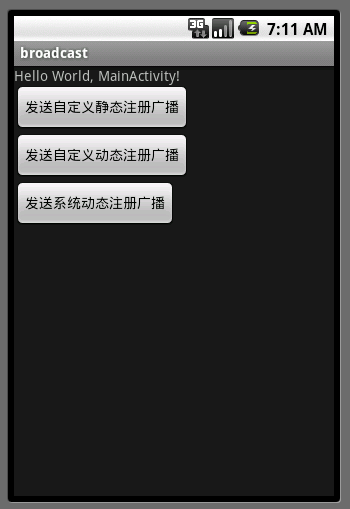
  <Button android:id="@+id/send_static" android:layout_width="wrap_content"
    android:layout_height="wrap_content" android:text="發送自定義靜態注冊廣播" />
  <Button android:id="@+id/send_dynamic" android:layout_width="wrap_content"
    android:layout_height="wrap_content" android:text="發送自定義動態注冊廣播" />
  <Button android:id="@+id/send_system" android:layout_width="wrap_content"
    android:layout_height="wrap_content" android:text="發送系統動態注冊廣播" />
</LinearLayout>
講解結束,不過有一點我自己也沒弄清楚,這個系統廣播事件如果我在程序中sendBroadcast的話,那就是自定義廣播了。如果不寫的話,那是不是系統自己來發送對應Action廣播呢?有知道的同學請告訴我一下,再此先謝過。
運行界面:
以上就是本文的全部內容,希望對大家的學習有所幫助,也希望大家多多支持本站。
 Android搶紅包助手開發全攻略
背景:新年之際,微信微博支付寶紅包是到處飛,但是,自己的手速總是比別人慢一點最後導致紅包沒搶到,紅包助手就應運而生。需求:收到紅包的時候進行提醒,然後跳轉到紅包的界面方便
 Android 動畫之ScaleAnimation應用詳解
android中提供了4中動畫: AlphaAnimation 透明度動畫效果 ScaleAnimation 縮放動畫效果 TranslateAnimation 位移動畫
 設計模式-裝飾者模式(Decorator)理解和在Android中的應用
介紹最近寫代碼沒有手感,就看看書找點寫代碼的靈感。看點高大上的設計模式談談自己的理解。我讀的是《研磨設計模式》看完之後真正的醍醐灌頂。借用一句話 一本值得反復研讀的書讀了
 自定義卡尺選擇器
前言由於某個項目需要,就寫了這個東西。大家看看有需求的直接拿走。效果1.支持拖動,支持點擊2.可定制的屬性還是比較全面的包裹差值器都可以設置,下面這個使用的是oversh