編輯:關於Android編程
背景:新年之際,微信微博支付寶紅包是到處飛,但是,自己的手速總是比別人慢一點最後導致紅包沒搶到,紅包助手就應運而生。
需求:收到紅包的時候進行提醒,然後跳轉到紅包的界面方便用戶。
思路:獲取“讀取通知信息”權限,然後開啟服務監控系統通知,判斷如果是微信紅包就進行提醒(聲音),然後跳轉到紅包所在的地方。
界面:
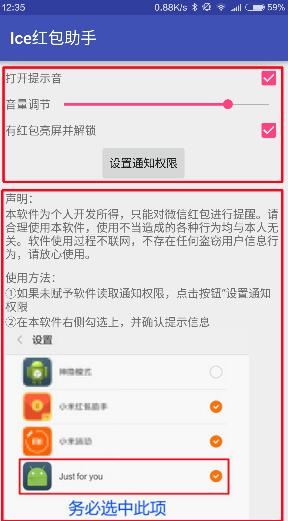
界面分為兩部分,一部分是可以對App進行操作的,下面是一個可以滑動的界面,提示用戶如何是軟件正常工作,布局代碼如下:
<?xml version="1.0" encoding="utf-8"?>
<LinearLayout
 android:id="@+id/root"
 xmlns:android="http://schemas.android.com/apk/res/android"
 xmlns:tools="http://schemas.android.com/tools"
 android:layout_width="match_parent"
 android:layout_height="match_parent"
 android:layout_marginLeft="10dp"
 android:layout_marginRight="10dp"
 android:layout_marginTop="5dp"
 android:orientation="vertical"
 tools:context="com.fndroid.administrator.justforyou.MainActivity">


 <LinearLayout
  android:layout_width="match_parent"
  android:layout_height="wrap_content"
  android:orientation="horizontal">

  <TextView
   android:layout_width="wrap_content"
   android:layout_height="wrap_content"
   android:layout_weight="3"
   android:text="打開提示音"/>

  <CheckBox
   android:id="@+id/isMusic"
   android:layout_width="wrap_content"
   android:layout_height="wrap_content"/>

 </LinearLayout>

 <LinearLayout
  android:layout_width="match_parent"
  android:layout_height="wrap_content">

  <TextView
   android:layout_width="wrap_content"
   android:layout_height="wrap_content"
   android:layout_gravity="center"
   android:text="音量調節"/>

  <SeekBar
   android:id="@+id/seekbar"
   android:layout_width="wrap_content"
   android:layout_height="wrap_content"
   android:layout_gravity="center"
   android:layout_weight="1"/>

 </LinearLayout>

 <LinearLayout
  android:layout_width="match_parent"
  android:layout_height="wrap_content"
  android:orientation="horizontal">

  <TextView
   android:layout_width="0dp"
   android:layout_height="wrap_content"
   android:layout_weight="3"
   android:text="有紅包亮屏並解鎖"/>

  <CheckBox
   android:id="@+id/isUnlock"
   android:layout_width="wrap_content"
   android:layout_height="wrap_content"/>
 </LinearLayout>

 <Button
  android:id="@+id/setPermision"
  android:layout_width="wrap_content"
  android:layout_height="wrap_content"
  android:layout_gravity="center"
  android:text="設置通知權限"/>

 <ScrollView
  android:layout_width="match_parent"
  android:layout_height="match_parent">

  <LinearLayout
   android:layout_width="match_parent"
   android:layout_height="match_parent"
   android:orientation="vertical">

   <TextView
    android:layout_width="wrap_content"
    android:layout_height="wrap_content"
    android:layout_marginTop="10dp"
    android:text="聲明:"/>

   <TextView
    android:layout_width="wrap_content"
    android:layout_height="wrap_content"
    android:text="本軟件為個人開發所得,只能對微信紅包進行提醒。請合理使用本軟件,使用不當造成的各種行為均與本人無關。軟件使用過程不聯網,不存在任何盜竊用戶信息行為,請放心使用。"/>


   <TextView
    android:layout_width="wrap_content"
    android:layout_height="wrap_content"
    android:layout_marginTop="10dp"
    android:text="使用方法:"/>

   <TextView
    android:layout_width="wrap_content"
    android:layout_height="wrap_content"
    android:text="①如果未賦予軟件讀取通知權限,點擊按鈕“設置通知權限"/>

   <TextView
    android:layout_width="wrap_content"
    android:layout_height="wrap_content"
    android:text="②在本軟件右側勾選上,並確認提示信息"/>

   <ImageView
    android:layout_width="wrap_content"
    android:layout_height="wrap_content"
    android:scaleType="fitCenter"
    android:src="@drawable/inf"/>

   <TextView
    android:layout_width="wrap_content"
    android:layout_height="wrap_content"
    android:text="③關閉微信群的消息免打擾(取消圖中的綠色按鈕)"/>

   <ImageView
    android:layout_width="wrap_content"
    android:layout_height="wrap_content"
    android:src="@drawable/inf2"/>
  </LinearLayout>
 </ScrollView>
</LinearLayout>
app打開的時候開啟一個服務,編寫一個NotificationListenerService的子類並實現onNotificationPosted和onNotificationRemoved方法,前面的方法會在收到通知的時候調用
// 編寫一個NotificationListenerService的子類並實現onNotificationPosted和onNotificationRemoved方法
// 這兩個方法在從SDK版本21的時候開始變成了非抽象,不重寫則不能兼容21以下設備
public class NotificationService extends NotificationListenerService {

 private KeyguardManager.KeyguardLock kl;

 @Override
 public void onNotificationPosted(StatusBarNotification sbn) {
  // 主界面設置的信息保存在SharedPreferences中,在這裡進行獲取
  SharedPreferences sharedPreferences = getSharedPreferences("userdata", MODE_PRIVATE);

  // 判斷消息是否為微信紅包
  if (sbn.getNotification().tickerText.toString().contains("[微信紅包]") && sbn.getPackageName
    ().equals("com.tencent.mm")) {

   // 讀取設置信息,判斷是否該點亮屏幕並解開鎖屏,解鎖的原理是把鎖屏關閉掉
   if (sharedPreferences.getBoolean("isUnlock",true)) {
    KeyguardManager km = (KeyguardManager) getSystemService(getApplicationContext()
      .KEYGUARD_SERVICE);
    kl = km.newKeyguardLock("unlock");

    // 把系統鎖屏暫時關閉
    kl.disableKeyguard();
    PowerManager pm = (PowerManager) getSystemService(getApplicationContext()
      .POWER_SERVICE);
    PowerManager.WakeLock wl = pm.newWakeLock(PowerManager.ACQUIRE_CAUSES_WAKEUP |
      PowerManager.SCREEN_DIM_WAKE_LOCK, "bright");
    wl.acquire();
    wl.release();
   }

   try {
    // 打開notification所對應的pendingintent
    sbn.getNotification().contentIntent.send();

   } catch (PendingIntent.CanceledException e) {
    e.printStackTrace();
   }

   // 判斷是否該播放提示音
   if (sharedPreferences.getBoolean("isMusic",true)){
    MediaPlayer mediaPlayer = new MediaPlayer().create(this, R.raw.heihei);
    mediaPlayer.start();
   }

   // 這裡監聽一下系統廣播,判斷如果屏幕熄滅就把系統鎖屏還原
   IntentFilter intentFilter = new IntentFilter();
   intentFilter.addAction("android.intent.action.SCREEN_OFF");
   ScreenOffReceiver screenOffReceiver = new ScreenOffReceiver();
   registerReceiver(screenOffReceiver, intentFilter);

  }

 }

 class ScreenOffReceiver extends BroadcastReceiver {
  @Override
  public void onReceive(Context context, Intent intent) {
   if (kl != null) {
    // 還原鎖屏
    kl.reenableKeyguard();
   }
  }
 }

 @Override
 public void onNotificationRemoved(StatusBarNotification sbn) {
  super.onNotificationRemoved(sbn);
 }
}
主的activity,注釋在代碼中了,就不詳細說了
public class MainActivity extends AppCompatActivity implements CompoundButton
  .OnCheckedChangeListener, View.OnClickListener,SeekBar.OnSeekBarChangeListener {

 private LinearLayout root;
 private CheckBox isMusic;
 private CheckBox isUnlock;
 private SharedPreferences.Editor editor;
 private SharedPreferences sharedPreferences;
 private Button setPermision;
 private SeekBar seekBar;
 private AudioManager audioManager;

 @Override
 protected void onCreate(Bundle savedInstanceState) {
  super.onCreate(savedInstanceState);
  setContentView(R.layout.activity_main);

  // 獲取控件實例
  root = (LinearLayout) findViewById(R.id.root);
  isMusic = (CheckBox) findViewById(R.id.isMusic);
  isUnlock = (CheckBox) findViewById(R.id.isUnlock);
  setPermision = (Button) findViewById(R.id.setPermision);
  seekBar = (SeekBar) findViewById(R.id.seekbar);

  // 注冊監聽
  isMusic.setOnCheckedChangeListener(this);
  isUnlock.setOnCheckedChangeListener(this);
  setPermision.setOnClickListener(this);
  seekBar.setOnSeekBarChangeListener(this);

  // 讀取設置信息
  sharedPreferences = getSharedPreferences("userdata", MODE_PRIVATE);
  editor = sharedPreferences.edit();
  boolean music = sharedPreferences.getBoolean("isMusic", true);
  boolean unlock = sharedPreferences.getBoolean("isUnlock", true);
  isMusic.setChecked(music);
  isUnlock.setChecked(unlock);

  // 獲得Audiomanager,控制系統音量
  audioManager = (AudioManager) getSystemService(this.AUDIO_SERVICE);
  seekBar.setMax(audioManager.getStreamMaxVolume(AudioManager.STREAM_MUSIC));
  seekBar.setProgress(audioManager.getStreamVolume(AudioManager.STREAM_MUSIC));

  // 監聽系統媒體音量改變,並改變界面上的Seekbar的進度
  IntentFilter intentFilter = new IntentFilter();
  intentFilter.addAction("android.media.VOLUME_CHANGED_ACTION");
  VolumReceiver receiver = new VolumReceiver();
  registerReceiver(receiver,intentFilter);

  // 開啟服務
  Intent intent = new Intent(MainActivity.this, NotificationService.class);
  startService(intent);
 }

 @Override
 public boolean onKeyDown(int keyCode, KeyEvent event) {
  // 判斷返回鍵點擊,提示用戶是否確認退出
  if (keyCode == KeyEvent.KEYCODE_BACK && event.getRepeatCount() == 0) {
   Snackbar snackbar = Snackbar.make(root, "退出軟件", Snackbar.LENGTH_LONG)
     .setAction("確認", new View.OnClickListener() {
      @Override
      public void onClick(View v) {
       MainActivity.this.finish();
      }
     });
   snackbar.show();
   return true;
  }
  return super.onKeyDown(keyCode, event);
 }

 @Override
 public void onCheckedChanged(CompoundButton buttonView, boolean isChecked) {
  // checkbox的點擊監聽
  switch (buttonView.getId()) {
   case R.id.isMusic:
    editor.putBoolean("isMusic", isChecked);
    editor.commit();
    break;
   case R.id.isUnlock:
    editor.putBoolean("isUnlock", isChecked);
    editor.commit();
    break;
  }

 }

 @Override
 public void onClick(View v) {
  switch (v.getId()){
   case R.id.setPermision:
    // 打開系統裡面的服務,方便用戶直接賦予權限
    Intent intent = new Intent(Settings.ACTION_NOTIFICATION_LISTENER_SETTINGS);
    startActivity(intent);
    break;
  }

 }

 @Override
 public void onProgressChanged(SeekBar seekBar, int progress, boolean fromUser) {
 }

 @Override
 public void onStartTrackingTouch(SeekBar seekBar) {
 }

 @Override
 public void onStopTrackingTouch(SeekBar seekBar) {
  // seekbar的監聽,滑動停止就修改系統媒體音量
  audioManager.setStreamVolume(AudioManager.STREAM_MUSIC,seekBar.getProgress(),0);
 }

 // 音量廣播接收
 class VolumReceiver extends BroadcastReceiver{
  @Override
  public void onReceive(Context context, Intent intent) {
   seekBar.setProgress(audioManager.getStreamVolume(AudioManager.STREAM_MUSIC));
  }
 }
}
Mainfest
<?xml version="1.0" encoding="utf-8"?>
<manifest package="com.fndroid.administrator.justforyou"
   xmlns:android="http://schemas.android.com/apk/res/android">

 <uses-permission android:name="android.permission.BIND_NOTIFICATION_LISTENER_SERVICE"/>
 <uses-permission android:name="android.permission.WAKE_LOCK" />
 <uses-permission android:name="android.permission.DISABLE_KEYGUARD" />

 <application
  android:allowBackup="true"
  android:icon="@mipmap/ic_launcher"
  android:label="@string/app_name"
  android:supportsRtl="true"
  android:theme="@style/AppTheme">
  <activity android:name=".MainActivity">
   <intent-filter>
    <action android:name="android.intent.action.MAIN"/>

    <category android:name="android.intent.category.LAUNCHER"/>
   </intent-filter>
  </activity>
  <service android:name=".NotificationService"
     android:permission="android.permission.BIND_NOTIFICATION_LISTENER_SERVICE">
   <intent-filter>
    <action android:name="android.service.notification.NotificationListenerService" />
   </intent-filter>
  </service>
 </application>

</manifest>
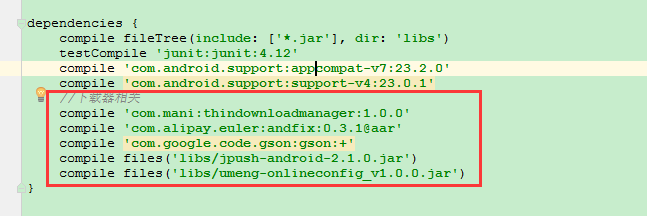
gradle添加依賴,因為用了Snackbar
dependencies {
 compile fileTree(dir: 'libs', include: ['*.jar'])
 testCompile 'junit:junit:4.12'
 compile 'com.android.support:appcompat-v7:23.1.1'
 compile 'com.android.support:design:23.1.1'
}
以上就是本文的全部內容,希望對大家的學習有所幫助,也希望大家多多支持本站。
 Android基礎知識(6)—數據持久化之數據存儲
首先,我們要知道什麼是數據持久化。數據持久化就是指那些內存中的瞬時數據保存到存儲設備中,保證即使手機在關機的情況下,這些數據不會丟失。保存在內存中的數據是處於瞬時狀態,保
 網易雲音樂怎麼查看歌詞
網易雲音樂怎麼查看歌詞?如果你在網易雲音樂客戶端中聽音樂,卻找不到歌詞時,一定會很郁悶。其實,網易雲音樂是支持在線音樂播放加顯示歌詞的哦!那麼網易雲音樂怎麼
 計算器(android)
對計算器的一些說明: 此計算器比較簡陋,可以實現加減乘除這些運算,並能實現連續運算。對小數運算進行了優化了,避免了小數在計算時出現誤差。 主界面: calculato
 Android屏幕旋轉 處理Activity與AsyncTask的最佳解決方案
一、概述運行時變更就是設備在運行時發生變化(例如屏幕旋轉、鍵盤可用性及語言)。發生這些變化,Android會重啟Activity,這時就需要保存activity的狀態及與