編輯:關於Android編程
單Activity多Fragment實現底部導航器
最近由於Android基礎知識講解需要,采用單Activity多Fragment實現類似QQ底部導航器示例,這種開發模式廣泛應用於App開發,比如QQ,微信,新浪等,關於Android底部導航欄的實現方式特別多,實現也是五花八門,同時Google在自己推出的Material design中也增加了Bottom Navigation導航控制,實現起來更加簡單,且支持動態效果更加酷炫,但是因為是基礎的知識,所以打算通過自定義來實現,不使用Bottom Navigation(如果是實際的項目開發可以考慮使用哈~~),希望對初學者有所幫助。
BottomNavigationBar 地址:https://github.com/Ashok-Varma/BottomNavigation
分析
整體區域分為兩部分:底部的導航區域和其余的內容區域,內容區域使用Fragment最為UI展示,底部導航區域添加點擊事件,點擊TAB切換Fragment,並做字體顏色和圖片的切換,在切換上使用add()和hide()的方式,不使用replase(),至於兩者的區別,這裡就不再說明了,感興趣的話可以谷歌。
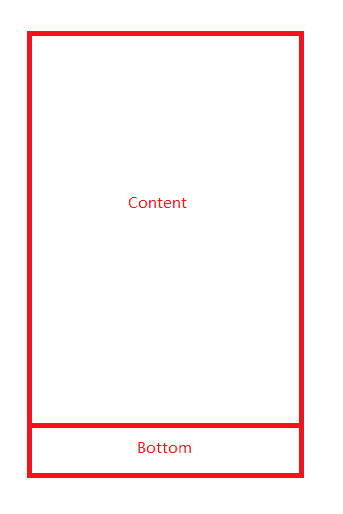
整體結構
底部導航通常由圖片和文字組成,上面為ImageView,下面為TextView
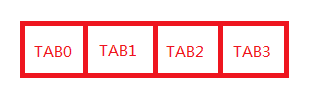
底部導航
底部Bottom
使用布局使用RelativeLayout,添加weight,平分屏幕寬度
<?xml version="1.0" encoding="utf-8"?>
<LinearLayout xmlns:android="http://schemas.android.com/apk/res/android"
  android:layout_width="match_parent"
  android:layout_height="@dimen/bottom_height"
  android:background="@color/base_white"
  android:orientation="vertical">

  <View
    android:layout_width="match_parent"
    android:layout_height="1dp"
    android:background="@color/gray_line" />

  <LinearLayout
    android:layout_width="match_parent"
    android:layout_height="match_parent"
    android:orientation="horizontal">

    <RelativeLayout
      android:layout_width="0dp"
      android:layout_height="match_parent"
      android:layout_weight="1">

      <RelativeLayout
        android:id="@+id/layout_home"
        android:layout_width="wrap_content"
        android:layout_height="wrap_content"
        android:layout_centerInParent="true">

        <ImageView
          android:id="@+id/img_home"
          android:layout_width="24dp"
          android:layout_height="24dp"
          android:layout_centerHorizontal="true"
          android:src="@mipmap/icon_home_pressed" />

        <TextView
          android:id="@+id/tv_home"
          android:layout_width="wrap_content"
          android:layout_height="wrap_content"
          android:layout_below="@id/img_home"
          android:layout_centerHorizontal="true"
          android:text="首頁"
          android:textColor="@color/bottom_text_color_pressed"
          android:textSize="12sp" />
      </RelativeLayout>

    </RelativeLayout>

    <RelativeLayout

      android:layout_width="0dp"
      android:layout_height="match_parent"
      android:layout_weight="1">

      <RelativeLayout
        android:id="@+id/layout_health"
        android:layout_width="wrap_content"
        android:layout_height="wrap_content"
        android:layout_centerInParent="true">

        <ImageView
          android:id="@+id/img_health"
          android:layout_width="24dp"
          android:layout_height="24dp"
          android:layout_centerHorizontal="true"
          android:src="@mipmap/icon_health_normal" />

        <TextView
          android:id="@+id/tv_health"
          android:layout_width="wrap_content"
          android:layout_height="wrap_content"
          android:layout_below="@id/img_health"
          android:layout_centerHorizontal="true"
          android:text="健康"
          android:textColor="@color/bottom_text_color_normal"
          android:textSize="12sp" />
      </RelativeLayout>
    </RelativeLayout>

    <RelativeLayout

      android:layout_width="0dp"
      android:layout_height="match_parent"
      android:layout_weight="1">

      <RelativeLayout
        android:id="@+id/layout_msg"
        android:layout_width="wrap_content"
        android:layout_height="wrap_content"
        android:layout_centerInParent="true">

        <ImageView
          android:id="@+id/img_msg"
          android:layout_width="24dp"
          android:layout_height="24dp"
          android:layout_centerHorizontal="true"
          android:src="@mipmap/icon_msg_normal" />

        <TextView
          android:id="@+id/tv_msg"
          android:layout_width="wrap_content"
          android:layout_height="wrap_content"
          android:layout_below="@id/img_msg"
          android:layout_centerHorizontal="true"
          android:text="消息"
          android:textColor="@color/bottom_text_color_normal"
          android:textSize="12sp" />
      </RelativeLayout>
    </RelativeLayout>
    >

    <RelativeLayout

      android:layout_width="0dp"
      android:layout_height="match_parent"
      android:layout_weight="1">

      <RelativeLayout
        android:id="@+id/layout_usercenter"
        android:layout_width="wrap_content"
        android:layout_height="wrap_content"
        android:layout_centerInParent="true">

        <ImageView
          android:id="@+id/img_usercenter"
          android:layout_width="24dp"
          android:layout_height="24dp"
          android:layout_centerHorizontal="true"
          android:src="@mipmap/icon_user_normal" />

        <TextView
          android:id="@+id/tv_usercenter"
          android:layout_width="wrap_content"
          android:layout_height="wrap_content"
          android:layout_below="@id/img_usercenter"
          android:layout_centerHorizontal="true"
          android:text="我的"
          android:textColor="@color/bottom_text_color_normal"
          android:textSize="12sp" />
      </RelativeLayout>
    </RelativeLayout>
    >
  </LinearLayout>

</LinearLayout>
activity_main.xml
<?xml version="1.0" encoding="utf-8"?>
<LinearLayout xmlns:android="http://schemas.android.com/apk/res/android"
  android:id="@+id/activity_main"
  android:layout_width="match_parent"
  android:layout_height="match_parent"
  android:orientation="vertical"
  >
  <FrameLayout
    android:layout_width="match_parent"
    android:layout_height="0dp"
    android:layout_weight="1"
    android:id="@+id/frame_content"
    />
  <include layout="@layout/layout_bottom"/>

</LinearLayout>
MainActivity
public class MainActivity extends BaseActivity implements View.OnClickListener {
  private RelativeLayout layout_home;
  private RelativeLayout layout_health;
  private RelativeLayout layout_msg;
  private RelativeLayout layout_usercenter;

  private ImageView img_home;
  private ImageView img_health;
  private ImageView img_msg;
  private ImageView img_usercenter;

  private TextView tv_home;
  private TextView tv_health;
  private TextView tv_msg;
  private TextView tv_usercenter;

  private Fragment[] fragments;
  private int currentIndex;
  private int index;

  private int selectColor;
  private int unSelectColor;


  @Override
  protected void onCreate(Bundle savedInstanceState) {
    super.onCreate(savedInstanceState);
    setContentView(R.layout.activity_main);
    init();
  }

  @Override
  public void init() {
    initViews();
    initEvent();
    initData();

  }

  public void initViews(){
    layout_health=(RelativeLayout)findViewById(R.id.layout_health);
    layout_home=(RelativeLayout)findViewById(R.id.layout_home);
    layout_msg=(RelativeLayout)findViewById(R.id.layout_msg);
    layout_usercenter=(RelativeLayout)findViewById(R.id.layout_usercenter);

    img_home=(ImageView)findViewById(R.id.img_home);
    img_health=(ImageView)findViewById(R.id.img_health);
    img_msg=(ImageView)findViewById(R.id.img_msg);
    img_usercenter=(ImageView)findViewById(R.id.img_usercenter);

    tv_home=(TextView)findViewById(R.id.tv_home);
    tv_health=(TextView)findViewById(R.id.tv_health);
    tv_msg=(TextView)findViewById(R.id.tv_msg);
    tv_usercenter=(TextView)findViewById(R.id.tv_usercenter);
  }

  public void initEvent(){
    layout_home.setOnClickListener(this);
    layout_health.setOnClickListener(this);
    layout_msg.setOnClickListener(this);
    layout_usercenter.setOnClickListener(this);
  }

  public void initData(){
    selectColor=getResources().getColor(R.color.bottom_text_color_pressed);
    unSelectColor=getResources().getColor(R.color.bottom_text_color_normal);

    fragments=new Fragment[4];
    fragments[0]= HomeFragment.getInstance();
    fragments[1]= HealthFragment.getInstance();
    fragments[2]= MsgFragment.getInstance();
    fragments[3]= UserCenterFragment.getInstance();
    getSupportFragmentManager().beginTransaction().add(R.id.frame_content,fragments[0]).commit();
  }

  @Override
  public void onClick(View view) {
    switch (view.getId()){
      case R.id.layout_home:
        index=0;
        setTabs(index);
        break;
      case R.id.layout_health:
        index=1;
        setTabs(index);
        break;
      case R.id.layout_msg:
        index=2;
        setTabs(index);
        break;
      case R.id.layout_usercenter:
        index=3;
        setTabs(index);
        break;
    }
    if(currentIndex!=index){
      FragmentManager fm=getSupportFragmentManager();
      FragmentTransaction ft=fm.beginTransaction();
      ft.hide(fragments[currentIndex]);
      if(!fragments[index].isAdded()){
        ft.add(R.id.frame_content,fragments[index]);
      }
      ft.show(fragments[index]).commit();
    }
    currentIndex=index;
  }

  public void setTabs(int pos){
    resetColor();
    switch (pos){
      case 0:
        img_home.setImageResource(R.mipmap.icon_home_pressed);
        tv_home.setTextColor(selectColor);
        break;
      case 1:
        img_health.setImageResource(R.mipmap.icon_health_pressed);
        tv_health.setTextColor(selectColor);
        break;
      case 2:
        img_msg.setImageResource(R.mipmap.icon_msg_pressed);
        tv_msg.setTextColor(selectColor);
        break;
      case 3:
        img_usercenter.setImageResource(R.mipmap.icon_user_pressed);
        tv_usercenter.setTextColor(selectColor);
        break;
    }

  }
  public void resetColor(){
    img_home.setImageResource(R.mipmap.icon_home_normal);
    img_health.setImageResource(R.mipmap.icon_health_normal);
    img_msg.setImageResource(R.mipmap.icon_msg_normal);
    img_usercenter.setImageResource(R.mipmap.icon_user_normal);
    tv_home.setTextColor(unSelectColor);
    tv_health.setTextColor(unSelectColor);
    tv_msg.setTextColor(unSelectColor);
    tv_usercenter.setTextColor(unSelectColor);

  }

}
四個Fragment只是一個簡單的布局,裡面放置了一個TextView,這裡就不再貼出來O.o.
效果圖預覽:
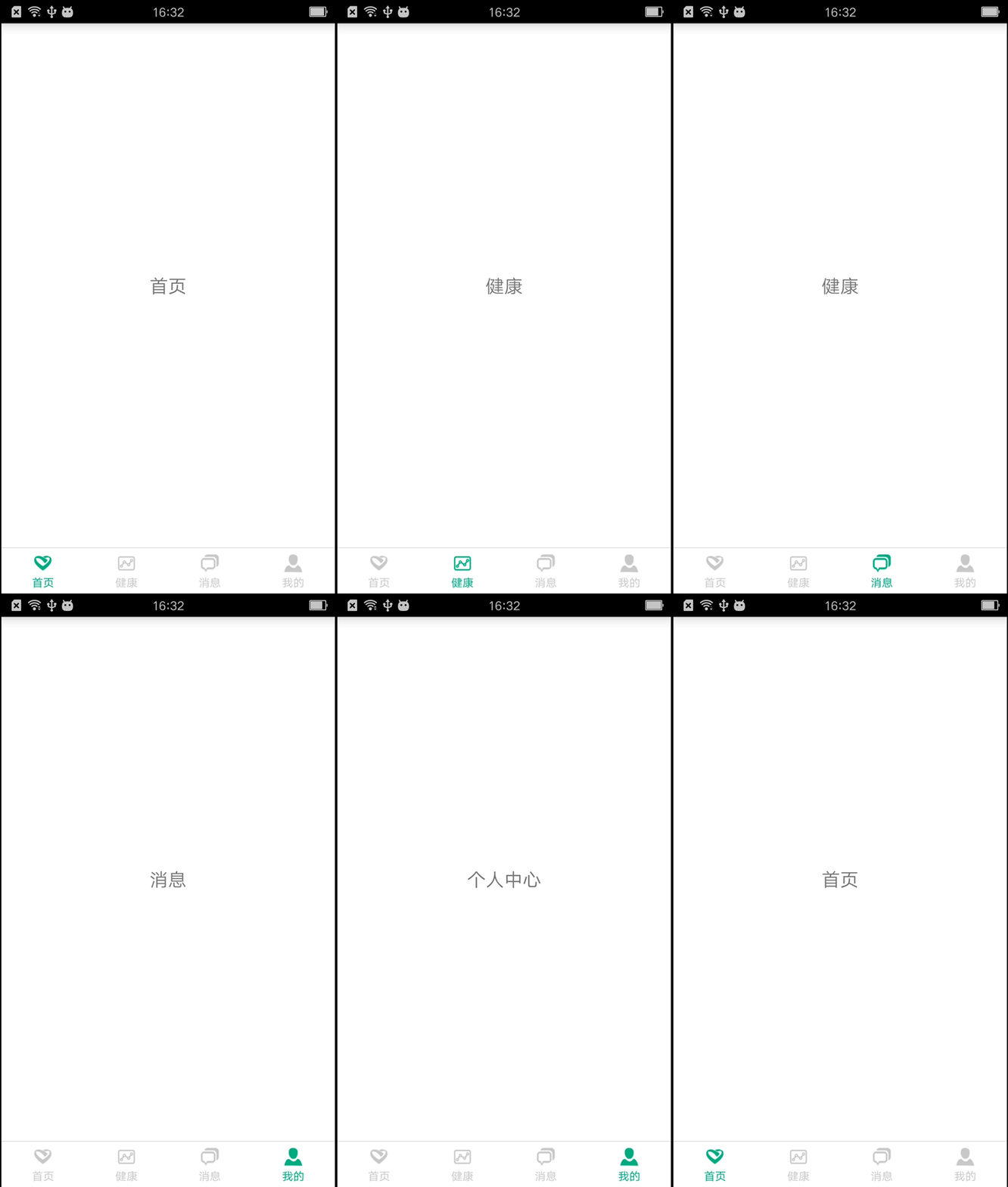
效果圖
感謝閱讀,希望能幫助到大家,謝謝大家對本站的支持!
 Android編程布局(Layout)之AbsoluteLayout用法實例分析
本文實例講述了Android編程布局(Layout)之AbsoluteLayout用法。分享給大家供大家參考,具體如下:AbsoluteLayout,顧名思義,就是絕對位
 android開發筆記之Gson解析
上篇我們講了一下的Json的解析,大家有沒有發現解析一個簡單的Json數據都寫了這麼多代碼,如果是一個復雜龐大的Json數據呢,那不得寫好多。所以谷歌推出了一款Json解
 android 7.0對開發者會有哪些影響
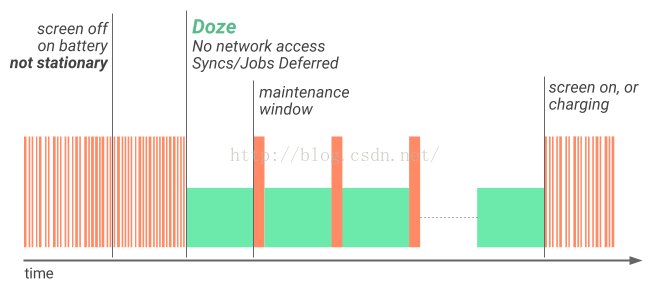
Android N 除了提供諸多新特性和功能外,還對系統和 API 行為做出了各種變更。 本文重點介紹您應該了解並在開發應用時加以考慮的一些重要變更。如果您之前發布過 A
 使用Android提供的大量標准Action,Category調用系統Activity
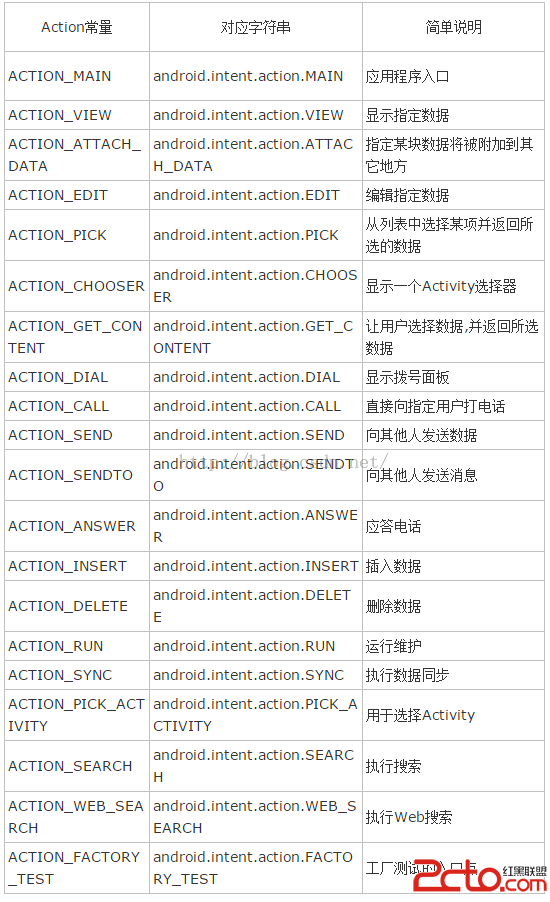
Android提供了大量的標准Action,Category:例子,查看並獲取聯系人電話用戶點擊按鈕值會顯示系統的聯系人列表,當用戶單擊聯系人之後,程序將會顯示該聯系人的