編輯:關於Android編程
本文實例分析了Android中Socket的應用。分享給大家供大家參考,具體如下:
Android 提供的常用的網絡編程包括針對TCP/IP協議的Socket通信。Socket是一種跨平台的編程方式,可以在異構語言之間進行通信。
Socket程序的開發原理,是要實現服務器端和客戶端。
服務器,使用ServerSocket監聽指定的端口,端口可以隨意指定(由於1024以下的端口通常屬於保留端口,在一些操作系統中不可以隨意使用,所以建議使用大於1024的端口),等待客戶連接請求,客戶連接後,會話產生;在完成會話後,關閉連接。
客戶端,使用Socket對網絡上某一個服務器的某一個端口發出連接請求,一旦連接成功,打開會話;會話完成後,關閉Socket。客戶端不需要指定打開的端口,通常臨時的、動態的分配一個1024以上的端口。
下面是一個實現socket的例子:
服務器端代碼:
package com.socket;
import java.io.BufferedReader;
import java.io.InputStream;
import java.io.InputStreamReader;
import java.io.OutputStream;
import java.io.PrintWriter;
import java.net.ServerSocket;
import java.net.Socket;
/**
* com Server
*/
public class Main {
  private int ServerPort = 9999;
  private ServerSocket serversocket = null;
  private OutputStream outputStream = null;
  private InputStream inputStream = null;
  private PrintWriter printWinter = null;
  private Socket socket = null;
  private BufferedReader reader = null;
  public Main(){
    try{
      serversocket = new ServerSocket(ServerPort);
      System.out.println("服務啟動。。。");
      socket = serversocket.accept();
      System.out.println("客戶已連接");
    }catch(Exception ex){
      ex.printStackTrace();
    }
    try{
      outputStream= socket.getOutputStream();
      inputStream = socket.getInputStream();
      printWinter = new PrintWriter(outputStream,true);
      reader = new BufferedReader(new InputStreamReader(inputStream));
      BufferedReader in = new BufferedReader(new InputStreamReader(System.in));
      while (true){
        String message = reader.readLine();
        System.out.println("client:"+message);
        if(message.equals("bye")||message.equals("Bye")){
          break;
        }
        message = in.readLine();
        printWinter.println(message);
      }
      outputStream.close();
      inputStream.close();
      socket.close();
      serversocket.close();
      System.out.print("Client is disconnected");
    }catch(Exception e){
      e.printStackTrace();
    }finally{
    }
  }
  public static void main(String[] args){
    new Main();
  }
}
客服端代碼:
package com.Aina.Android;
import java.io.BufferedReader;
import java.io.BufferedWriter;
import java.io.InputStreamReader;
import java.io.OutputStreamWriter;
import java.io.PrintWriter;
import java.net.Socket;
import android.app.Activity;
import android.app.AlertDialog;
import android.content.DialogInterface;
import android.os.Bundle;
import android.os.Handler;
import android.os.Message;
import android.util.Log;
import android.view.View;
import android.widget.Button;
import android.widget.EditText;
import android.widget.TextView;
public class Test extends Activity implements Runnable {
/** Called when the activity is first created. */
private TextView tv_msg = null;
private EditText ed_msg = null;
private Button btn_send = null;
private Button btn_login = null;
private static final String HOST = "192.168.0.132";
private static final int PORT = 9999;
private Socket socket = null;
private BufferedReader in = null;
private PrintWriter out = null;
private String content = "";
@Override
public void onCreate(Bundle savedInstanceState) {
 super.onCreate(savedInstanceState);
 setContentView(R.layout.main);
 tv_msg = (TextView) this.findViewById(R.id.TextView);
 ed_msg = (EditText) this.findViewById(R.id.EditText01);
 btn_login = (Button) this.findViewById(R.id.Button01);
 btn_send = (Button) this.findViewById(R.id.Button02);
 try {
  socket = new Socket(HOST, PORT);
  in = new BufferedReader(new InputStreamReader(socket
   .getInputStream()));
  out = new PrintWriter(new BufferedWriter(
   new OutputStreamWriter(socket.getOutputStream())),
   true);
 } catch (Exception ex) {
  ex.printStackTrace();
  ShowDialog("登陸異常:" + ex.getMessage());
 }
 btn_send.setOnClickListener(new Button.OnClickListener() {
  public void onClick(View v) {
  // TODO Auto-generated method stub
  String msg = ed_msg.getText().toString();
  if (socket.isConnected()) {
   if (!socket.isOutputShutdown()) {
   out.println(msg);
   }
  }
  }
 });
 new Thread(this).start();
}
public void ShowDialog(String msg) {
 new AlertDialog.Builder(this).setTitle("提示").setMessage(msg)
  .setPositiveButton("OK", new DialogInterface.OnClickListener() {
   public void onClick(DialogInterface dialog, int which) {
   // TODO Auto-generated method stub
   }
  }).show();
}
public void run() {
 try {
  while (true) {
  if(socket.isConnected()){
   if(!socket.isInputShutdown()){
   if ((content = in.readLine()) != null) {
    Log.i("TAG", "++ "+content);
    content += "\n";
    mHandler.sendMessage(mHandler.obtainMessage());
   }else{
   }
   }
  }
  }
 } catch (Exception ex) {
  ex.printStackTrace();
 }
}
public Handler mHandler = new Handler() {
 public void handleMessage(Message msg) {
  super.handleMessage(msg);
  Log.i("TAG", "-- "+msg);
  tv_msg.setText(tv_msg.getText().toString() + content);
 }
};
}
XML文件布局:
<?xml version="1.0" encoding="utf-8"?>
<LinearLayout xmlns:android="http://schemas.android.com/apk/res/android"
android:orientation="vertical" android:layout_width="fill_parent"
android:layout_height="fill_parent">
<TextView android:id="@+id/TextView" android:singleLine="false"
 android:layout_width="fill_parent"
 android:layout_height="wrap_content" />
<EditText android:hint="content" android:id="@+id/EditText01"
 android:layout_width="fill_parent"
 android:layout_height="wrap_content">
</EditText>
<Button android:text="login" android:id="@+id/Button01"
 android:layout_width="fill_parent"
 android:layout_height="wrap_content">
</Button>
<Button android:text="send" android:id="@+id/Button02"
 android:layout_width="fill_parent"
 android:layout_height="wrap_content">
</Button>
</LinearLayout>
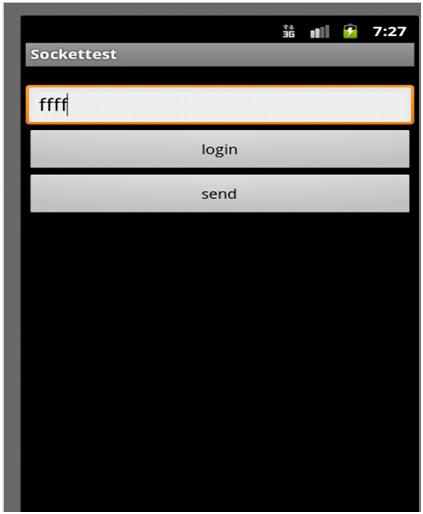
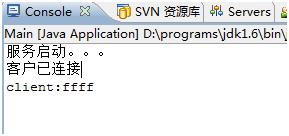
先啟動服務器端,再運行客戶端程序。
注意:
(一)即使服務器端和客戶端在一台機器上運行,也不能使用ip地址:127.0.0.1,否則,程序會出現拒絕連接的錯誤。
(二)客戶端和服務器端最好不要建在一個工程下,最好是分別建立工程,然後啟動服務器端和客戶端,否則會報Error: ShouldNotReachHere()錯誤。這是因為Android程序不是已main方法為程序的入口。
運行效果:
更多關於Android相關內容感興趣的讀者可查看本站專題:《Android通信方式總結》、《Android調試技巧與常見問題解決方法匯總》、《Android開發入門與進階教程》、《Android多媒體操作技巧匯總(音頻,視頻,錄音等)》、《Android基本組件用法總結》、《Android視圖View技巧總結》、《Android布局layout技巧總結》及《Android控件用法總結》
希望本文所述對大家Android程序設計有所幫助。
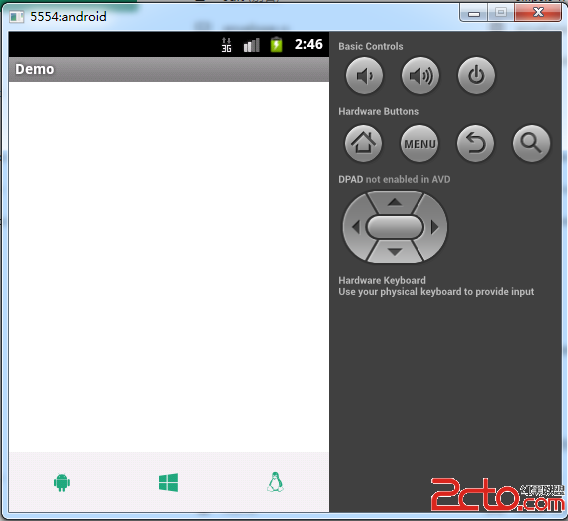 android使用Font Awesome字體圖標
可以使用CSS所提供的所有特性對它們進行更改,包括:大小、顏色、陰影或者其它任何支持的效果。僅一個Font Awesome字庫,就包含了與網頁相關的所有形象圖
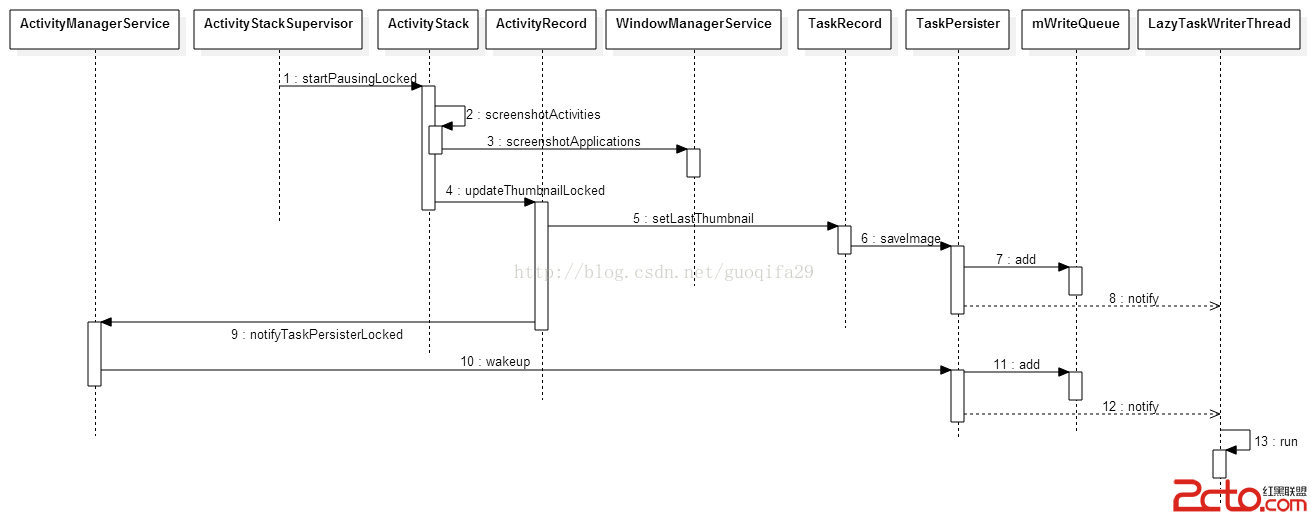 Android 5.0重啟恢復Task功能分析
Android5.0新增了一個重啟後可恢復Task功能。在正常的Activity切換使用過程中AMS會將Task和對應截圖進行保存,重啟後會將Task和截圖恢復到最近任務
 Android開發之使用MediaRecorder錄制聲音
為了在 Android 應用中錄制聲音,Android提供了 MediaRecorder 類,關於MediaRecorder的詳解大家可以參考《Android開發之Med
 Android編程實現為應用添加菜單的方法
本文實例講述了Android編程實現為應用添加菜單的方法。分享給大家供大家參考,具體如下:添加菜單的方法有很多,一般推薦用xml創建菜單。建立menu步驟:在res下建立