編輯:關於Android編程
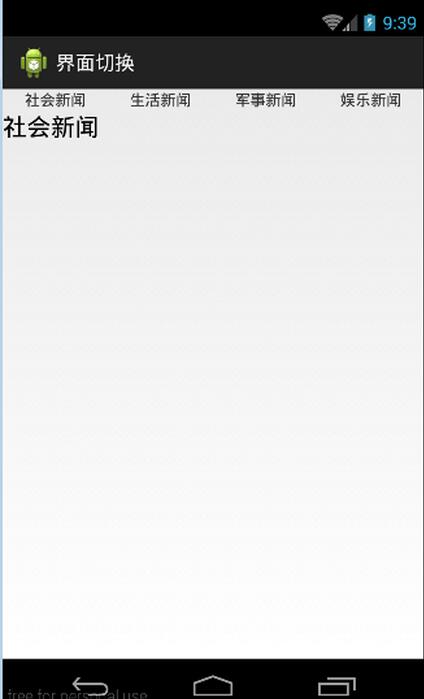
本文結合之前的動態創建fragment來進行一個實踐,來實現用Fragment創建一個選項卡
項目布局
<LinearLayout xmlns:android="http://schemas.android.com/apk/res/android"
 xmlns:tools="http://schemas.android.com/tools"
 android:layout_width="match_parent"
 android:layout_height="match_parent"
 android:orientation="vertical"
 tools:context=".MainActivity" >

 <LinearLayout
  android:layout_width="fill_parent"
  android:layout_height="wrap_content"
  android:orientation="horizontal" >

  <TextView
   android:id="@+id/tab1"
   android:layout_width="0dip"
   android:layout_height="wrap_content"
   android:layout_weight="1"
   android:gravity="center"
   android:text="社會新聞" />

  <TextView
   android:id="@+id/tab2"
   android:layout_width="0dip"
   android:layout_height="wrap_content"
   android:layout_weight="1"
   android:gravity="center"
   android:text="生活新聞" />

  <TextView
   android:id="@+id/tab3"
   android:layout_width="0dip"
   android:layout_height="wrap_content"
   android:layout_weight="1"
   android:gravity="center"
   android:text="軍事新聞" />

  <TextView
   android:id="@+id/tab4"
   android:layout_width="0dip"
   android:layout_height="wrap_content"
   android:layout_weight="1"
   android:gravity="center"
   android:text="娛樂新聞" />
 </LinearLayout>

 <LinearLayout
  android:id="@+id/content"
  android:layout_width="fill_parent"
  android:layout_height="fill_parent" >
 </LinearLayout>

</LinearLayout>
新建Fragment1.java~Fragment4.java,其中Fragment1.java中的代碼如下:
public class Fragment1 extends Fragment {
 @Override
 public View onCreateView(LayoutInflater inflater, ViewGroup container,
   Bundle savedInstanceState) {
  return inflater.inflate(R.layout.fragment1, null);
 }

}
其他幾個文件的代碼類似
新建fragment1.xml~fragment4.xml,其中fragment1.xml中的代碼如下:
<?xml version="1.0" encoding="utf-8"?>
<LinearLayout xmlns:android="http://schemas.android.com/apk/res/android"
 android:layout_width="match_parent"
 android:layout_height="match_parent"
 android:gravity="center"
 android:orientation="vertical" >

 <TextView
  android:id="@+id/textview1"
  android:layout_width="wrap_content"
  android:layout_height="wrap_content"
  android:text="社會新聞"
  android:textAppearance="?android:attr/textAppearanceLarge"/>
</LinearLayout>
其他幾個文件的代碼類似
MainActivity.java中的代碼如下:
public class MainActivity extends Activity implements OnClickListener {

 private LinearLayout content;
 private TextView tv1, tv2, tv3, tv4;
 private FragmentManager fm;
 private FragmentTransaction ft;

 @Override
 protected void onCreate(Bundle savedInstanceState) {
  super.onCreate(savedInstanceState);
  setContentView(R.layout.activity_main);

  content = (LinearLayout) findViewById(R.id.content);

  tv1 = (TextView) findViewById(R.id.tab1);
  tv2 = (TextView) findViewById(R.id.tab2);
  tv3 = (TextView) findViewById(R.id.tab3);
  tv4 = (TextView) findViewById(R.id.tab4);

  tv1.setOnClickListener(this);
  tv2.setOnClickListener(this);
  tv3.setOnClickListener(this);
  tv4.setOnClickListener(this);

  fm = getFragmentManager();
  ft = fm.beginTransaction();
  ft.replace(R.id.content, new Fragment1()); // 默認情況下Fragment1

 }

 @Override
 public void onClick(View v) {
  ft = fm.beginTransaction();
  switch (v.getId()) {
  case R.id.tab1:
   ft.replace(R.id.content, new Fragment1());
   break;
  case R.id.tab2:
   ft.replace(R.id.content, new Fragment2());
   break;
  case R.id.tab3:
   ft.replace(R.id.content, new Fragment3());
   break;
  case R.id.tab4:
   ft.replace(R.id.content, new Fragment4());
   break;

  default:
   break;
  }
  ft.commit();

 }

}
運行項目後如下效果:
以上就是本文的全部內容,希望對大家的學習有所幫助,也希望大家多多支持本站。
/**
 * Created by gerry.zhong on 2016/10/11.
 */
var gerry =
(function(){
  //創建一個獨立的對象,注入所有的方法,包括你想拋出去和不想拋出去的
  var tool = {
    AAAA:function(){},
    BBBB:function(){
      console.log("我只想內部使用,不想給別人用");
    }
  };

  /*
  * 該對象承載所有需要拋出去的對象
  *  1.該對象中的方法可以自己寫
  *  2.該對象中的方法可以注入(例子中的tempObj.tool.AA)
  *  3.該對象也可以選擇性拋出給使用者需要的方法,也可以隱藏(tool.BBBB)
  * */
  var tempObj ={
    //reader為一些初始化需要的操作,有時候會有注冊事件等,或者一些預操作
    reader:function(){
    },
    //注入所有的選擇器,方便選擇器變化,直接修改該對象中的選擇器,而不需要全局去更改
    selector:{
      mySelector:"#mySelector", //原密碼
    },
    //注入所有的接口地址,方便接口變化可以進行,快速變更,不需要全局找引用的對象
    interface:{
      loginUrl:"",
    },
    //注入page中所有的事件,統一管理,建議命名規范:事件_命名,例 click_login
    registerEle:{
      click_login:function(){
        //注冊單擊事件
      }
    },
    //注入所有ajax請求,頁面所有請求,將在這裡統一管理,建議命名規范:ajax_命名,例 ajax_login
    /*
    * 該請求中有2種方案,看需求使用
    * 1.不公用一個請求方案
    * 2.公用一個請求,但是回調處理不一樣
    * */
    ajaxRequest:{
      //不公用一個請求方案
      ajax_login:function(){
        $.post("","",function(data){
          tempObj.callback.call_login(data);
        });
      },
      //會有多個業務公用這個請求
      ajax_login_T:function(callback){
        //所有接口地址從interface中獲取,callback中tempObj.callback中處理
        $.post("","",callback);
      },
    },
    //處理所有回調函數,針對一個請求,處理一個回調
    callback:{
      //不共用請求處理回調
      call_login:function(data){
        //處理回調
      },
      //公用請求處理回調
      call_login_T:function(){
        var temp = function(){

        };
        tempObj.ajaxRequest.ajax_login_T(temp);
      }
    },
    //所有使用的工具類,如果每個項目都單獨的unit.js或者common.js等存放一些公共方法的,這裡可以不使用
    // PS:這裡存放的只是僅針對於這個頁面處理的一些tool,一般沒必要拋出去,不過看業務而定
    tool:{
      A:function(){
        console.log("我是自己寫的方法");
      },
      AA:tool.AAAA,  //這是我想拋出去給別人用的東西
    },
    //臨時緩存存放區域,僅針對本頁面,如果跨頁面請存放cookie或者localstorage等
    //主要解決有時候會使用頁面控件display來緩存當前頁面的一些數據
    temp:{

    },
    /*
    * 業務使用區域,針對每個特別的業務去串上面所有的一個個原子
    *  因為上面所有的方法,只是做一件事,這邊可以根據業務進行串服務,很簡單的
    * */
    firm:{

    }
  };
  /*
  * 閉包拋出去的方法
  * */
  var outputObj =function(){
    //首先執行reader方法,初始化一些操作,比如注冊事件啥啥啥的
    tempObj.reader();
    /*
    * 拋出給別人使用的對象
    *  想給別人看和使用的東西,可以注入tempObj對象,就像tool中的AA的方式
    *  不想給別人看和使用的東西,就像內部tool對象中的BBBB方法,你內部可以使用,外部是無法引用的
    * */
    return tempObj;
  }

  //拋出你希望拋出去的對象,因為你掌控了所有,哈哈。
  return new outputObj();
})();
 Android之通過網絡播放一首簡單的音樂
首先,附上程序運行後的效果,如下圖所示: 一.部署一個web項目到tomcat服務器上:1.這個小程序是結合網絡來播放一首音樂的,首先,把我們搞好的
 Android Demo之旅 Activity、Service、BroadCast實現計數統計
時間匆匆,轉眼就是大半個月過去了,學習android的道理上艱苦而漫長呀!!自己寫了很多的小demo,總結總結,也在博客裡面留點足跡吧! 源代碼下載:htt
 打造Android 最實用的ViewPager 指示器控件
為什麼我說它是最實用的 ViewPager 指示器控件呢? 它有以下幾個特點: 1、通過自定義 View 來實現,代碼簡單易懂; 2、使用起來非常方便; 3、通用性高,大
 Android App卡頓慢優化之多線程優化
本博客涉及的內容有:多線程並發的性能問題,介紹了AsyncTask,HandlerThread,IntentService與ThreadPool分別適合的使用場景以及各自