編輯:關於Android編程
先來上個效果圖:
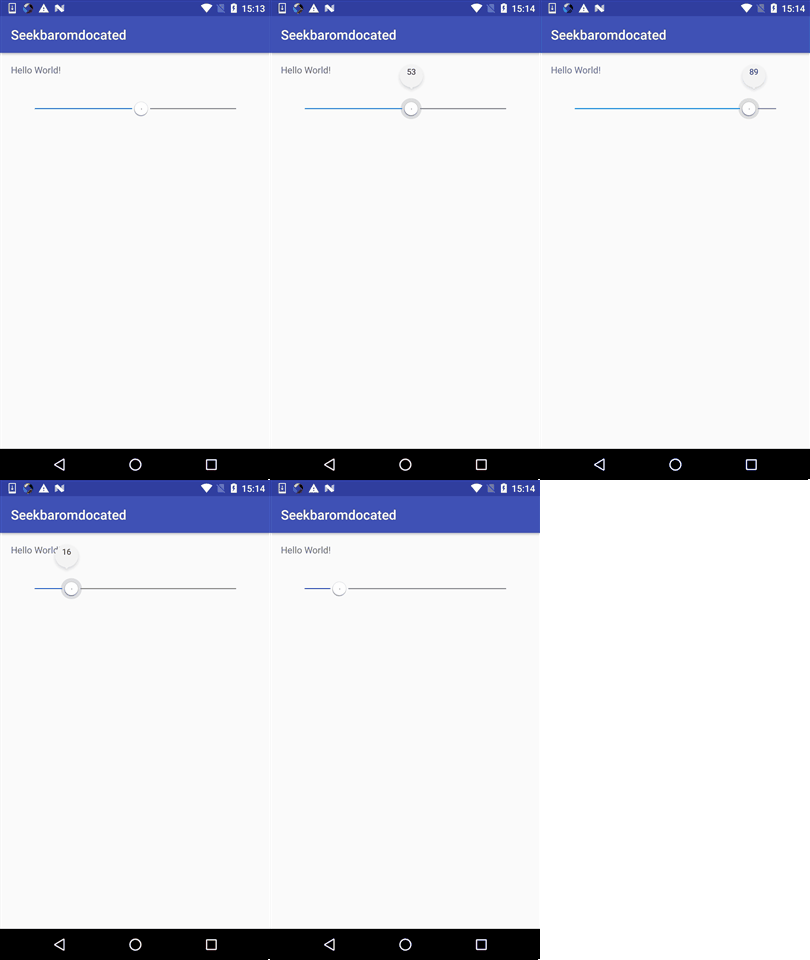
當滑動時:數值顯示,滑動停止時顯示數字,使用FrameLayout結合SeekBar。
首先我們看看。
Layout:
<?xml version="1.0" encoding="utf-8"?>
<merge xmlns:android="http://schemas.android.com/apk/res/android"
 xmlns:tools="http://schemas.android.com/tools">

 <RelativeLayout
  android:id="@+id/wrapper_seekbar_indicator"
  android:layout_width="wrap_content"
  android:layout_height="wrap_content">

  <ImageView
   android:id="@+id/img_seekbar_indicator"
   android:layout_width="wrap_content"
   android:layout_height="wrap_content"
   android:layout_alignParentTop="true" />

  <TextView
   android:id="@+id/txt_seekbar_indicated_progress"
   android:layout_width="wrap_content"
   android:layout_height="wrap_content"
   android:gravity="center"
   android:textColor="#333333"
   android:textSize="@dimen/space_12"
   tools:text="100" />
 </RelativeLayout>

 <RelativeLayout
  android:id="@+id/wrapper_seekbar"
  android:layout_width="wrap_content"
  android:layout_height="wrap_content">

  <SeekBar
   android:id="@+id/seekbar"

   android:layout_width="match_parent"
   android:layout_height="wrap_content" />
 </RelativeLayout>

</merge>
需要自定義可再上面修改圖片問題顏色等,或者自己封裝起來。
初始化函數。
private void init(Context context, AttributeSet attrs, int defStyle) {
  View view = LayoutInflater.from(context).inflate(
    R.layout.view_seekbar_indicated, this);
  bindViews(view);

  if (attrs != null)
   setAttributes(context, attrs, defStyle);
  mSeekBar.setOnSeekBarChangeListener(this);
  mTextViewProgress.setText(String.valueOf(mSeekBar.getProgress()));

  getViewTreeObserver().addOnGlobalLayoutListener(
    new ViewTreeObserver.OnGlobalLayoutListener() {
     @TargetApi(Build.VERSION_CODES.JELLY_BEAN)
     @Override
     public void onGlobalLayout() {
      mMeasuredWidth = mSeekBar.getWidth()
        - mSeekBar.getPaddingLeft()
        - mSeekBar.getPaddingRight();
      mSeekBar.setPadding(
        mSeekBar.getPaddingLeft(),
        mSeekBar.getPaddingTop()
          + mWrapperIndicator.getHeight(),
        mSeekBar.getPaddingRight(),
        mSeekBar.getPaddingBottom());
      setIndicator();
      getViewTreeObserver()
        .removeOnGlobalLayoutListener(this);
     }
    });
  // mWrapperIndicator.setVisibility(View.GONE);
 }
主要是根據是否有改變,和觸摸進行判斷字和圖片的顯示。
 @Override
 public void onProgressChanged(SeekBar seekBar, int progress,
         boolean fromUser) {
  setIndicator();
  if (mOnSeekBarChangeListener != null)
   mOnSeekBarChangeListener.onProgressChanged(seekBar, progress,
     fromUser);
 }

 @Override
 public void onStartTrackingTouch(SeekBar seekBar) {
  if (mOnSeekBarChangeListener != null) {
   mOnSeekBarChangeListener.onStartTrackingTouch(seekBar);
   mWrapperIndicator.setVisibility(View.VISIBLE);
  }
 }

 @Override
 public void onStopTrackingTouch(SeekBar seekBar) {
  if (mOnSeekBarChangeListener != null) {
   mOnSeekBarChangeListener.onStopTrackingTouch(seekBar);
   mWrapperIndicator.setVisibility(View.GONE);
  }
 }
廢話也不多說,原理很簡單。
工程地址:
https://github.com/xiaoli1993/SeekBarIndicated/tree/47ffcc890fb9c7000bb20d9b248620564c2c8122
以上就是本文的全部內容,希望對大家的學習有所幫助,也希望大家多多支持本站。
 Android中在GridView網格視圖上實現item拖拽交換的方法
GridView基礎新建一個HelloGridView的工程修改main.xml代碼如下:<?xml version=1.0 encoding=utf-8&
 UIWebView的使用
UIWebView是網頁視圖控件,用來顯示網頁內容。功能類似於浏覽器。1、goBack功能使用時,需要在已經打開過第二層及以上子鏈接的情況下才能返回打開上一層的鏈接2、g
 android 自定義控件屬性(TypedArray以及attrs解釋)
最近在搗鼓android 自定義控件屬性,學到了TypedArray以及attrs。在這其中看了一篇大神博客Android 深入理解Android中的自定義屬性。我就更加
 學習Android Material Design(RecyclerView代替ListView)
本文實例實現一下 RecyclerView,代碼比較簡單,適合初學者,如有錯誤,歡迎指出。復習 ListView可以查看這篇文章深入淺出學習Android ListVie