編輯:關於Android編程
Android與單片機通信常用數據轉換方法
1. 將GB2312轉化為中文,如BAFAC2DCB2B7→胡蘿卜,兩個字節合成一個文字
public static String stringToGbk(String string) throws Exception {
  byte[] bytes = new byte[string.length() / 2];
  for (int j = 0; j < bytes.length; j++) {
    byte high = Byte.parseByte(string.substring(j * 2, j * 2 + 1), 16);
    byte low = Byte.parseByte(string.substring(j * 2 + 1, j * 2 + 2),
        16);
    bytes[j] = (byte) (high << 4 | low);
  }
  String result = new String(bytes, "GBK");
  return result;
}
2.將中文轉化為GB2312,並且結果以byte[]形式返回,如胡蘿卜→new byte[]{BA FA C2 DC B2 B7},一個字被分為兩個字節
public static byte[] gbkToString(String str) throws Exception {
  return new String(str.getBytes("GBK"), "gb2312").getBytes("gb2312");
}
3.將十六進制的byte[]原封不動的轉化為string,如byte[]{0x7e,0x80,0x11,0x20}→7e801120,可用於log打印
public static String bytesToHexString(byte[] src) {
  StringBuilder stringBuilder = new StringBuilder("");
  if (src == null || src.length <= 0) {
    return null;
  }
  for (int i = 0; i < src.length; i++) {
    int v = src[i] & 0xFF;
    String hv = Integer.toHexString(v);
    if (hv.length() < 2) {
      stringBuilder.append(0);
    }
    stringBuilder.append(hv);
  }
  return stringBuilder.toString();
}
4.將十六進制的byte[]原封不動的轉化為string,並且每個byte之間用空格分開,如byte[]{0x7e,0x80,0x11,0x20}→7e 80 11 20,,可用於log打印
public static StringBuilder byte2HexStr(byte[] data) {

  if (data != null && data.length > 0) {
    StringBuilder stringBuilder = new StringBuilder(data.length);
    for (byte byteChar : data) {
      stringBuilder.append(String.format("%02X ", byteChar));
    }
    return stringBuilder;
  }
  return null;
}
5.將byte[]數組轉化為8、10、16等各種進制,例如byte[0x11,0x20]→4384,約等於1120(16進制)→4384,radix代表進制
public static String bytesToAllHex(byte[] bytes, int radix) {
  return new BigInteger(1, bytes).toString(radix);// 這裡的1代表正數
}
6.將String的十六進制原封不動轉化為byte的十六進制,例如7e20→new byte[]{0x7e,x20}
public static byte[] HexString2Bytes(String src) {
  byte[] ret = new byte[src.length() / 2];
  byte[] tmp = src.getBytes();
  for (int i = 0; i < tmp.length / 2; i++) {
    ret[i] = uniteBytes(tmp[i * 2], tmp[i * 2 + 1]);
  }
  return ret;
}
public static byte uniteBytes(byte src0, byte src1) {
  byte _b0 = Byte.decode("0x" + new String(new byte[] { src0 }))
      .byteValue();
  _b0 = (byte) (_b0 << 4);
  byte _b1 = Byte.decode("0x" + new String(new byte[] { src1 }))
      .byteValue();
  byte ret = (byte) (_b0 ^ _b1);
  return ret;
}
以上就是對Android 與單片機通信的資料整理,後續繼續補充相關資料謝謝大家對本站的支持!
 Android http文件上傳-本地+服務器一條龍分析
本地: 先看下項目結構 MainActivity.java oldProcess) { Message msg = handler.obtainMessage()
 Android動畫進階(Interpolator)
Android:interpolatorInterpolator 被用來修飾動畫效果,定義動畫的變化率,可以使存在的動畫效果accelerated(加速),deceler
 android 使用開源庫zxing生成二維碼,掃描二維碼
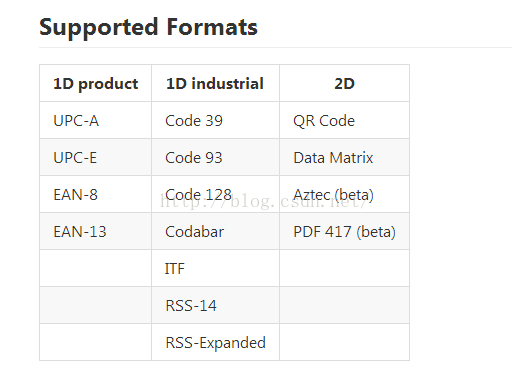
zxing是一個開放源碼的,用java實現的多種格式的1D/2D條碼圖像處理庫,它包含了聯系到其他語言的接口。可以實現使用手機的內置的攝像頭完成條形碼和二維碼的掃描與解碼
 android手把手教你開發launcher(一)
我們要開發一個自己的launcher,使其替代系統的默認launcher。怎樣使我們的應用程序成為一個launcher?下面我們就新建一個叫做SAOLauncher的工程
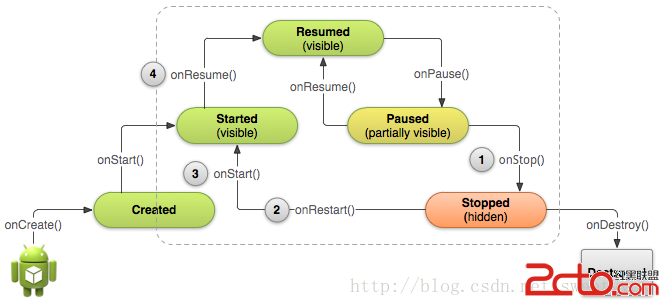 Android學習路線(十四)Activity生命周期——停止和重啟(Stopping and Restarting)一個Activity
先占個位置,下次翻譯~ :p Properly stopping a