編輯:關於Android編程
zxing是一個開放源碼的,用java實現的多種格式的1D/2D條碼圖像處理庫,它包含了聯系到其他語言的接口。可以實現使用手機的內置的攝像頭完成條形碼和二維碼的掃描與解碼。可以實現條形碼和二維碼的編碼與解碼。
github官網源碼地址:https://github.com/zxing/zxing
開源庫api文檔:https://zxing.github.io/zxing/apidocs/
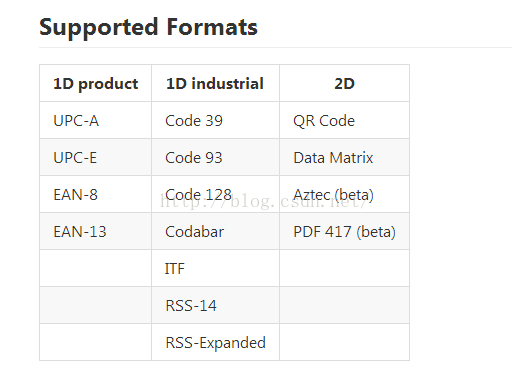
核心核心圖像解碼庫和測試代碼
java se javase-specific 客戶機代碼“條形碼掃描器”
android android 客戶條形碼掃描器
androidtest 安卓測試應用,zx測試
android-integration 支持集成通過意圖與條形碼掃描器
androidtest android-core android-related 代碼之間共享安卓,玻璃玻璃簡單的谷歌眼鏡的應用程序
zxingorg zxing.org 源碼
zxing.appspot.com 基於web的條形碼生成器在zxing.appspot.com背後的來源
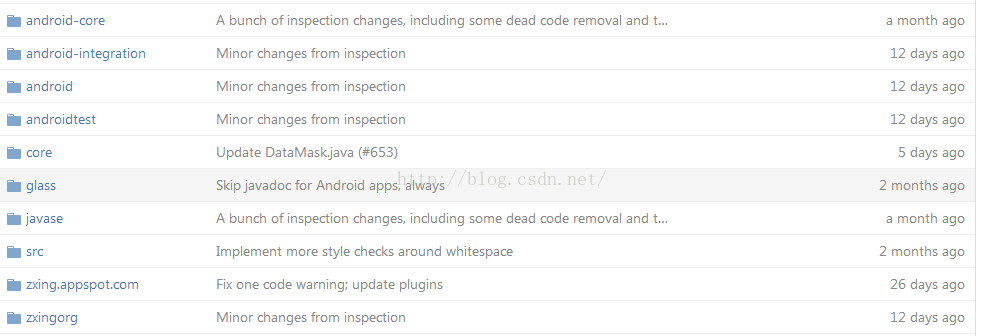
ZXing-based第三方開源項目
qzxing 端口Qt框架
zxing-cpp 接口c++(分叉的棄用官方c++端口)
zxing_cpp rb綁定Ruby(不僅僅是JRuby),由zxing-cpp
python-zxing Python框架
zx 網絡端口。NET和c#,和相關的Windows平台
PHP php-qrcode-detector-decoder港口
	public  void encode(String contents) {
		int WIDTH = 300, HEIGHT = 300 ;
		MultiFormatWriter formatWriter = new MultiFormatWriter();
		try {
			// 按照指定的寬度,高度和附加參數對字符串進行編碼
			BitMatrix bitMatrix = formatWriter.encode(contents, BarcodeFormat.QR_CODE, WIDTH, HEIGHT/*, hints*/);
			Bitmap bitmap=StringUtil.bitMatrix2Bitmap(bitMatrix);
			Intent intent = new Intent(this, SurveyPointShowQrCodeActivity.class);
			ByteArrayOutputStream bOutputStream = new ByteArrayOutputStream();
			bitmap.compress(Bitmap.CompressFormat.PNG, 100, bOutputStream);
			byte[] bytes = bOutputStream.toByteArray();
			intent.putExtra("bitmap", bytes);
			startActivity(intent);
		} catch (WriterException e) {
			e.printStackTrace();
		} catch (Exception e) {
			e.printStackTrace();
		}
	}
	  private Bitmap bitMatrix2Bitmap(BitMatrix matrix) {
	        int w = matrix.getWidth();
	        int h = matrix.getHeight();
	        int[] rawData = new int[w * h];
	        for (int i = 0; i < w; i++) {
	            for (int j = 0; j < h; j++) {
	                int color = Color.WHITE;
	                if (matrix.get(i, j)) {
	                    color = Color.BLACK;
	                }
	                rawData[i + (j * w)] = color;
	            }
	        }

	        Bitmap bitmap = Bitmap.createBitmap(w, h, Config.RGB_565);
	        bitmap.setPixels(rawData, 0, w, 0, 0, w, h);
	        return bitmap;
	    }
	/**
	 * 處理掃描結果
	 * @param result
	 * @param barcode
	 */
	public void handleDecode(Result result, Bitmap barcode) {
		inactivityTimer.onActivity();
		playBeepSoundAndVibrate();
		String resultString = result.getText();
		if (resultString.equals("")) {
			Toast.makeText(MipcaActivityCapture.this, "Scan failed!", Toast.LENGTH_SHORT).show();
		}else {
			Intent resultIntent = new Intent();
			Bundle bundle = new Bundle();
			bundle.putString("result", resultString);
			bundle.putParcelable("bitmap", barcode);
			resultIntent.putExtras(bundle);
			this.setResult(RESULT_OK, resultIntent);
		}
		MipcaActivityCapture.this.finish();
	}
github官網源碼地址:https://github.com/zxing/zxing
開源庫api文檔:https://zxing.github.io/zxing/apidocs/
 解決Android模擬器端口被占用問題的辦法
一、問題描述 今天在Eclipse中運行Android項目時遇到The connection to adb is down, and a severe error ha
 Android動畫總結系列(4)——屬性動畫集成
一、概述1.1 簡述Android框架提供兩大動畫方案:屬性動畫與補間動畫。這兩者都非常有用,而且從谷歌文檔來看,都會持續支持。但官方文檔建議我們應優先考慮使用屬性動畫,
 Android編程入門之HelloWorld項目目錄結構分析
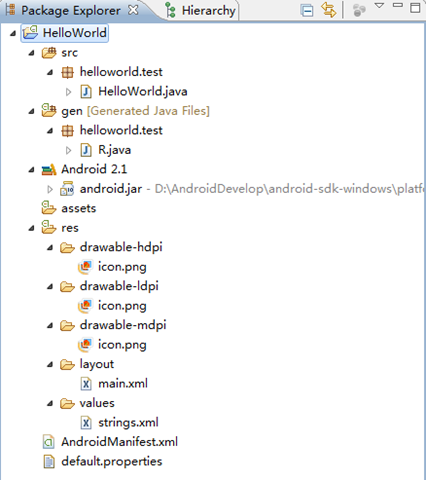
本文實例講述了Android編程入門之HelloWorld項目目錄結構。分享給大家供大家參考,具體如下:我們介紹了如何搭建Android開發環境及簡單地建立一個Hello
 Android自定義控件 芝麻信用分雷達圖
1.介紹首先看下支付寶上芝麻信用分的效果圖:2.思路確定雷達圖中心點坐標 繪制多邊形及連接線 根據維度值繪制覆蓋區域 繪制分數 繪制每個維度的標題文字和圖標3.實現獲取布