編輯:關於Android編程
廢話不多說了,直接給大家貼關鍵代碼了。
/**
* 往服務器上上傳文本 比如log日志
* @param urlstr 請求的url
* @param uploadFile log日志的路徑
* /mnt/shell/emulated/0/LOG/LOG.log
* @param newName log日志的名字 LOG.log
* @return
*/
public static void httpPost(Activity activity,String urlstr,String uploadFile,String newName) {
LogUtil.info("getEhttpPostt", "urlstr="+urlstr+";uploadFile="+uploadFile+";newName="+newName,"i");
String end = "\r\n";
String twoHyphens = "--";
String boundary = "*****";//邊界標識
int TIME_OUT = 10*1000; //超時時間
HttpURLConnection con = null;
DataOutputStream ds = null;
InputStream is = null;
try {
URL url = new URL(urlstr);
con = (HttpURLConnection) url.openConnection();
con.setReadTimeout(TIME_OUT);
con.setConnectTimeout(TIME_OUT);
/* 允許Input、Output,不使用Cache */
con.setDoInput(true);
con.setDoOutput(true);
con.setUseCaches(false);
// 設置http連接屬性
con.setRequestMethod("POST");//請求方式
con.setRequestProperty("Connection", "Keep-Alive");//在一次TCP連接中可以持續發送多份數據而不會斷開連接
con.setRequestProperty("Charset", "UTF-8");//設置編碼
con.setRequestProperty("Content-Type",//multipart/form-data能上傳文件的編碼格式
"multipart/form-data;boundary=" + boundary);
ds = new DataOutputStream(con.getOutputStream());
ds.writeBytes(twoHyphens + boundary + end);
ds.writeBytes("Content-Disposition: form-data; "
+ "name=\"stblog\";filename=\"" + newName + "\"" + end);
ds.writeBytes(end);
// 取得文件的FileInputStream
FileInputStream fStream = new FileInputStream(uploadFile);
/* 設置每次寫入1024bytes */
int bufferSize = 1024;
byte[] buffer = new byte[bufferSize];
int length = -1;
/* 從文件讀取數據至緩沖區 */
while ((length = fStream.read(buffer)) != -1) {
/* 將資料寫入DataOutputStream中 */
ds.write(buffer, 0, length);
}
ds.writeBytes(end);
ds.writeBytes(twoHyphens + boundary + twoHyphens + end);//結束
fStream.close();
ds.flush();
/* 取得Response內容 */
is = con.getInputStream();
int ch;
StringBuffer b = new StringBuffer();
while ((ch = is.read()) != -1) {
b.append((char) ch);
}
/* 將Response顯示於Dialog */
showDialog(activity,true,uploadFile,"上傳成功" + b.toString().trim());
} catch (Exception e) {
showDialog(activity,false,uploadFile,"上傳失敗" + e);
}finally {
/* 關閉DataOutputStream */
if(ds!=null){
try {
ds.close();
} catch (IOException e) {
e.printStackTrace();
}
}
if (is != null) {
try {
is.close();
} catch (IOException e) {
e.printStackTrace();
}
}
if (con != null) {
con.disconnect();
}
}
}
/* 顯示Dialog的method */
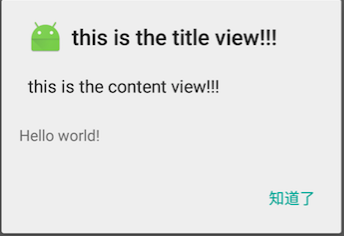
private static void showDialog(final Activity activity,final Boolean isSuccess,final String uploadFile,final String mess) {
activity.runOnUiThread(new Runnable() {
@Override
public void run() {
new AlertDialog.Builder(activity).setTitle("Message")
.setMessage(mess)
.setNegativeButton("確定", new DialogInterface.OnClickListener() {
public void onClick(DialogInterface dialog, int which) {
File file = new File(uploadFile);
if(file.exists()&&isSuccess){//日志文件存在且上傳日志成功
file.delete();
Toast.makeText(activity, "log日志已刪除", Toast.LENGTH_SHORT).show();
}
}
}).show();
}
});
}
以上內容是小編給大家介紹的Android 通過httppost上傳文本文件到服務器的實例代碼,代碼簡單易懂,附有注釋,如果大家有任何疑問請給我留言,小編會及時回復大家的。在此也非常感謝大家對本站網站的支持!
 android 在開發WebView時,去掉網頁的標題並設置成自定義的標題
IOS中關於去掉標題只需類似下面的兩行代碼[js appendString:@var title = document.getElementsByClassName(&#
 Android 性能優化 UI優化
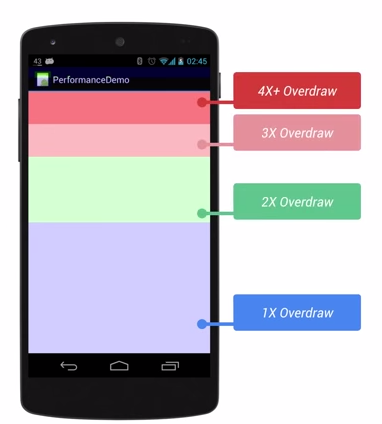
前言:本篇文章主要學習UI性能優化。1. 應用UI卡頓的原理1.1 原理用戶感覺到卡頓的原理就是在渲染時出現了掉幀。Android系統要求 1s內渲染60幀,即渲染1幀必
 輕松實現安卓(Android)九宮格解鎖
效果圖思路首先我們來分析一下實現九宮格解鎖的思路:當用戶的手指觸摸到某一個點時,先判斷該點是否在九宮格的某一格范圍之內,若在范圍內,則該格變成選中的狀態;之後用戶手指滑動
 動作視圖和動作提供器(Action Views and Action Providers)
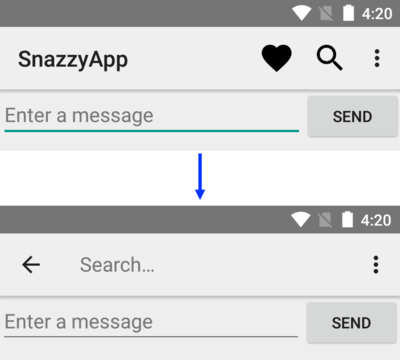
首先承認:這篇文章翻譯的有點不准確,因為這個action,我拿不准怎麼翻譯,不知道是翻譯成動詞還是名詞。所以我把有道詞典上的翻譯結果列在下面。action n. 行動;活