編輯:關於Android編程
在Android中實現分享有一種比較方便的方式,調用系統的分享面板來分享我們的應用。最基本的實現如下:
	public Intent getShareIntent(){
		Intent intent = new Intent();
		intent.setAction(Intent.ACTION_SEND);
		intent.putExtra(Intent.EXTRA_TEXT, "這是測試分享面板, http://www.baidu.comss");
		intent.setType("text/plain");
		return intent;
	}
還有一種是實現在ActionBar上添加分享列表,實現代碼如下: @Override
public boolean onCreateOptionsMenu(Menu menu) {
getMenuInflater().inflate(R.menu.actionbar_menu, menu);
MenuItem item = menu.findItem(R.id.menu_item_share);
shareActionProvider = (ShareActionProvider) item.getActionProvider();
Intent shareIntent = getShareIntent();
shareActionProvider.setShareIntent(shareIntent);
return true;
}
public Intent getShareIntent(){
Intent intent = new Intent();
intent.setAction(Intent.ACTION_SEND);
intent.putExtra(Intent.EXTRA_TEXT, "這是測試分享面板, http://www.baidu.comss");
intent.setType("text/plain");
return intent;
}系統默認會為我們找出所有支持seteType中類型的應用,同樣我們可以實現自定義分享的平台。 private void initShareIntent() {
Intent intent = new Intent(Intent.ACTION_SEND);
intent.setType("text/plain");
List resInfo = getPackageManager().queryIntentActivities(
intent, 0);
if (!resInfo.isEmpty()) {
List targetedShareIntents = new ArrayList();
for (ResolveInfo info : resInfo) {
Intent targeted = new Intent(Intent.ACTION_SEND);
targeted.setType("text/plain");
ActivityInfo activityInfo = info.activityInfo;
//在這裡可以添加相應的平台,用 || 連接
if (activityInfo.packageName.contains("com.tencent.mm")) {
targeted.putExtra(Intent.EXTRA_TEXT, "分享內容");
targeted.setPackage(activityInfo.packageName);
targetedShareIntents.add(targeted);
}
}
Intent chooserIntent = Intent.createChooser(
targetedShareIntents.remove(0), "Select app to share");
if (chooserIntent == null) {
return;
}
chooserIntent.putExtra(Intent.EXTRA_INITIAL_INTENTS,
targetedShareIntents.toArray(new Parcelable[] {}));
try {
startActivity(chooserIntent);
} catch (android.content.ActivityNotFoundException ex) {
Toast.makeText(this, "Can't find sharecomponent to share",
Toast.LENGTH_SHORT).show();
}
}
} 系統的分享面板存在一些缺陷,比如每個手機顯示的面板的樣式不同,不同手機上顯示的分享平台種類和數目不同,會出現一些雜亂的應用。我們可以給上面的方法添加參數,讓只能分享到一個平台就可以解決這個問題,這樣我們就可以自定義一個分享面板,來添加我們想要的應用,代碼如下: private void initShareIntent(String type) {
boolean found = false;
Intent share = new Intent(android.content.Intent.ACTION_SEND);
share.setType("image/*");
// gets the list of intentsthat can be loaded.
List resInfo =getPackageManager().queryIntentActivities(
share, 0);
if (!resInfo.isEmpty()) {
for (ResolveInfo info : resInfo) {
if (info.activityInfo.packageName.toLowerCase().contains(type)
|| info.activityInfo.name.toLowerCase().contains(type)) {
share.putExtra(Intent.EXTRA_SUBJECT, "subject");
share.putExtra(Intent.EXTRA_TEXT, "your text");
//share.putExtra(Intent.EXTRA_STREAM,
// Uri.fromFile(newFile(myPath))); // Optional, just
// // if you wanna
// // share an
// // image.
share.setPackage(info.activityInfo.packageName);
found = true;
break;
}
}
if (!found)
return;
startActivity(Intent.createChooser(share, "Select"));
}
}
 Android內存洩漏的簡單檢查與分析方法
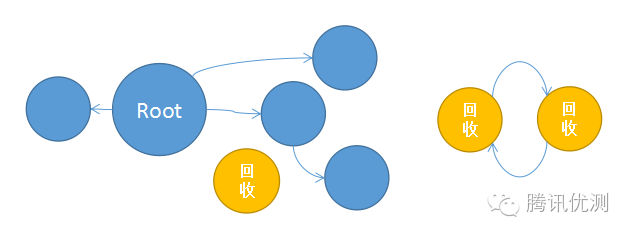
導語內存洩漏問題大約是Android開發者最煩惱的問題之一了,項目中連續遇到幾個內存洩漏問題,這裡簡單總結下檢查分析內存洩漏的一些工具與方法。一、什麼是內存洩漏?大家都知
 Android開發技巧--Application, ListView排列,格式化浮點數,string.xml占位符,動態引用圖片
一. Application用途 1. Application用途 創建Application時機 : Application在啟動的時候會調用Application
 Android開發 OpenGL ES繪制3D 圖形實例詳解
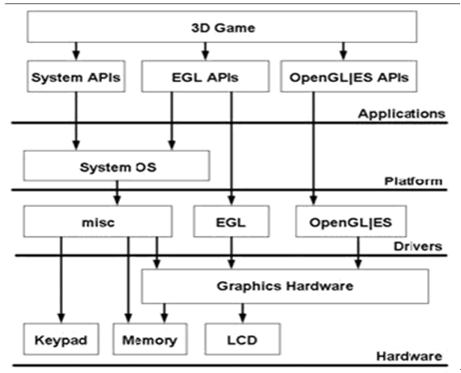
OpenGL ES是 OpenGL三維圖形API 的子集,針對手機、PDA和游戲主機等嵌入式設備而設計。 Ophone目前支持OpenGL ES 1.0 ,OpenGL
 Android浏覽圖片,點擊放大至全屏效果
最近做一個項目類似於QQ空間,做到照片浏覽的功能,對於QQ空間中點擊圖片放大至全屏,感覺效果很贊,於是也做了個類似的效果。如下。 packag