編輯:關於Android編程
本文所需要實現的就是這樣一種有逼格的效果:
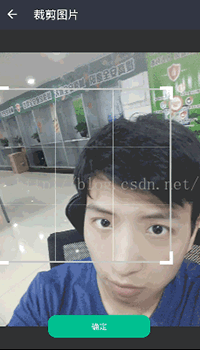
右上角加了個圖片框,按下確定可以裁剪正方形區域裡的圖片並顯示在右上角。
實現思路:
1:首先需要自定義一個ZoomImageView來顯示我們需要的圖片,這個View需要讓圖片能夠以合適的位置展現在當前布局的圖片展示區域內(合適的位置值的是:如果圖片長度大於屏幕,則壓縮圖片長度至屏幕寬度,高度等比壓縮並居中顯示,如果圖片高度大於屏幕,則壓縮圖片高度至屏幕高度,長度等比壓縮並居中顯示。);
2:然後需要實現這個拖動的框框,該框框實現的功能有四點:拖動、擴大縮小、觸摸時顯示基准線、截圖。
首先是布局設計image_details.xml:
<?xml version="1.0" encoding="utf-8"?>
<LinearLayout
xmlns:android="http://schemas.android.com/apk/res/android"
android:layout_width="match_parent"
android:layout_height="match_parent"
android:orientation="vertical"
>
<RelativeLayout
android:layout_width="match_parent"
android:layout_height="55dp"
android:background="#323441">
<ImageButton
android:id="@+id/certification_returnbtn"
android:layout_width="55dp"
android:layout_height="55dp"
android:background="@android:color/transparent"
android:padding="15dp"
android:scaleType="fitCenter"
android:src="@drawable/topbar_returnbtn"/>
<TextView
android:layout_width="wrap_content"
android:layout_height="match_parent"
android:layout_marginLeft="10dp"
android:layout_toRightOf="@id/certification_returnbtn"
android:gravity="center_vertical"
android:text="裁剪圖片"
android:textColor="@android:color/white"
android:textSize="20sp"/>
<!-- <ImageButton
android:layout_width="55dp"
android:layout_height="55dp"
android:layout_alignParentRight="true"
android:layout_marginRight="10dp"
android:background="@android:color/transparent"
android:padding="16dp"
android:scaleType="fitCenter"
android:src="@drawable/ic_rotate_24dp"/>-->
<ImageView
android:id="@+id/testimg"
android:layout_alignParentRight="true"
android:layout_marginRight="10dp"
android:layout_width="55dp"
android:layout_height="55dp"/>
</RelativeLayout>
<RelativeLayout
android:layout_width="match_parent"
android:layout_height="0dp"
android:layout_weight="1">
<com.whale.nangua.pubuliuzhaopianqiang.ZoomImageView
android:id="@+id/zoom_image_view"
android:layout_width="match_parent"
android:layout_height="match_parent"
android:background="#303030"/>
<com.whale.nangua.pubuliuzhaopianqiang.ChoiceBorderView
android:id="@+id/zoom_choiceborder_view"
android:layout_width="match_parent"
android:layout_height="match_parent"/>
<Button
android:id="@+id/image_details_subbtn"
android:text="確定"
android:background="@drawable/image_details_submitbtn_shape"
android:layout_marginBottom="20dp"
android:layout_width="180dp"
android:layout_height="40dp"
android:layout_alignParentBottom="true"
android:layout_centerHorizontal="true"/>
</RelativeLayout>
</LinearLayout>
布局比較簡單,兩個View互相層疊。
自定義圖片大小控制視圖:ZoomImageView.java
代碼注釋很詳細就不解釋了。
package com.whale.nangua.pubuliuzhaopianqiang;
import android.content.Context;
import android.graphics.Bitmap;
import android.graphics.Canvas;
import android.graphics.Matrix;
import android.util.AttributeSet;
import android.util.Log;
import android.view.MotionEvent;
import android.view.View;
/**
* Created by nangua on 2016/7/20.
*/
public class ZoomImageView extends View {
/**
* 初始化狀態常量
*/
public static final int STATUS_INIT = 1;
/**
* 用於對圖片進行移動和縮放變換的矩陣
*/
private Matrix matrix = new Matrix();
/**
* 待展示的Bitmap對象
*/
private Bitmap sourceBitmap;
/**
* 記錄當前操作的狀態,可選值為STATUS_INIT、STATUS_ZOOM_OUT、STATUS_ZOOM_IN和STATUS_MOVE
*/
private int currentStatus;
/**
* ZoomImageView控件的寬度
*/
private int width;
/**
* ZoomImageView控件的高度
*/
private int height;
/**
* ZoomImageView構造函數,將當前操作狀態設為STATUS_INIT。
*
* @param context
* @param attrs
*/
public ZoomImageView(Context context, AttributeSet attrs) {
super(context, attrs);
currentStatus = STATUS_INIT;
}
/**
* 將待展示的圖片設置進來。
*
* @param bitmap 待展示的Bitmap對象
*/
public void setImageBitmap(Bitmap bitmap) {
sourceBitmap = bitmap;
invalidate();
}
@Override
protected void onLayout(boolean changed, int left, int top, int right, int bottom) {
super.onLayout(changed, left, top, right, bottom);
if (changed) {
// 分別獲取到ZoomImageView的寬度和高度
width = getWidth();
height = getHeight();
}
}
/**
* 根據currentStatus的值來決定對圖片進行什麼樣的繪制操作。
*/
@Override
protected void onDraw(Canvas canvas) {
super.onDraw(canvas);
initBitmap(canvas);
canvas.drawBitmap(sourceBitmap, matrix, null);
}
float translateY;//Y軸偏移量
float translateX;//X軸偏移量
/**
* @param canvas
* @autohr nangua
* 對圖片進行初始化操作,包括讓圖片居中,以及當圖片大於屏幕寬高時對圖片進行壓縮。
* <p>
* 1.當圖片寬度大於顯示寬度、圖片高度小於顯示寬度:
* 設置圖片寬度為顯示寬度,高度縮放*(圖片寬度/顯示寬度)
* <p>
* 2.當圖片寬度小於顯示寬度、圖片高度大於顯示寬度:
* 設置圖片高度為顯示高度,寬度縮放*(圖片高度/顯示高 度)
* <p>
* 3.當圖片寬度大於顯示寬度,圖片高度大於顯示寬度:
* 選取差度更大的一邊進行壓縮,另一邊等比縮放
* <p>
* 4.當圖片寬度小於顯示寬度,圖片高度小於顯示寬度:
* 選取差度更大的一邊進行壓縮,另一邊等比縮放
*/
private void initBitmap(Canvas canvas) {
if (sourceBitmap != null) {
matrix.reset(); //重置矩陣
int bitmapWidth = sourceBitmap.getWidth(); //得到源圖片寬
int bitmapHeight = sourceBitmap.getHeight(); //得到源圖片高
//如果原圖片大小大於控件寬高
if (bitmapWidth > width || bitmapHeight > height) {
//如果寬和高都比屏幕大,選擇差度大的一邊縮小,另一邊等比縮小
if (bitmapWidth > width && bitmapHeight > height) {
int distanceX = Math.abs(width - bitmapWidth);
int distanceY = Math.abs(height - bitmapHeight);
float ratio;
//找出差值大的一邊,進行縮小
if (distanceX >= distanceY) {
ratio = width / (bitmapWidth * 1.0f);
matrix.postScale(ratio, ratio);
//此時橫軸鋪滿,只需要對豎軸進行平移
translateY = (height - sourceBitmap.getHeight() * ratio) / 2f;
matrix.postTranslate(0, translateY);
} else {
ratio = height / (bitmapHeight * 1.0f);
matrix.postScale(ratio, ratio);
//此時豎軸鋪滿,只需要對橫軸進行平移
translateX = (width - sourceBitmap.getWidth() * ratio) / 2f;
matrix.postTranslate(translateX, 0); //在橫縱軸上進行平移
}
//當圖片寬度大於顯示寬度、圖片高度小於顯示寬度:
} else if (bitmapWidth > width) {
// 當圖片寬度大於屏幕寬度時,將圖片等比例壓縮,使它可以完全顯示出來
float ratio = width / (bitmapWidth * 1.0f); //壓縮比例
matrix.postScale(ratio, ratio);
translateY = (height - (bitmapHeight * ratio)) / 2f;
// 在縱坐標方向上進行偏移,以保證圖片居中顯示
matrix.postTranslate(0, translateY);
//當圖片寬度小於顯示寬度、圖片高度大於顯示寬度:
} else if (bitmapHeight > height) {
// 當圖片高度大於屏幕高度時,將圖片等比例壓縮,使它可以完全顯示出來
float ratio = height / (bitmapHeight * 1.0f); //壓縮比例
matrix.postScale(ratio, ratio);
translateX = (width - (bitmapWidth * ratio)) / 2f;
// 在橫坐標方向上進行偏移,以保證圖片居中顯示
matrix.postTranslate(translateX, 0);
}
} else {
// 當圖片的寬高都小於屏幕寬高時,選擇差度小的一邊鋪滿,另一邊等比擴大
//計算長和寬的差值
int distanceX = Math.abs(width - bitmapWidth);
int distanceY = Math.abs(height - bitmapHeight);
float ratio;
//找出差值小的一邊,進行擴大
if (distanceX <= distanceY) {
ratio = width / (bitmapWidth * 1.0f);
matrix.postScale(ratio, ratio);
//此時橫軸鋪滿,只需要對豎軸進行平移
translateY = (height - sourceBitmap.getHeight() * ratio) / 2f;
matrix.postTranslate(0, translateY);
} else {
ratio = height / (bitmapHeight * 1.0f);
matrix.postScale(ratio, ratio);
//此時豎軸鋪滿,只需要對橫軸進行平移
translateX = (width - sourceBitmap.getWidth() * ratio) / 2f;
matrix.postTranslate(translateX, 0); //在橫縱軸上進行平移
}
}
//進行繪制
canvas.drawBitmap(sourceBitmap, matrix, null);
}
}
}
重點來了,相冊選取框視圖:ChoiceBorderView.java
package com.whale.nangua.pubuliuzhaopianqiang;
import android.content.Context;
import android.graphics.Canvas;
import android.graphics.Color;
import android.graphics.Paint;
import android.util.AttributeSet;
import android.util.Log;
import android.view.MotionEvent;
import android.view.View;
import android.widget.Toast;
/**
* 相冊選擇框的View
* Created by nangua on 2016/7/21.
*/
public class ChoiceBorderView extends View {
private int scale = (int) this.getResources().getDisplayMetrics().density; //屏幕像素密度
private float borderHeight; //總高
private float borderWith; //總寬
private float borderLength = 200 * scale; //邊框長度
private int RECT_BORDER_WITH = 3 * scale; //長方形框框粗
private int RECT_CORNER_WITH = 6 * scale; //四個角的粗
private int RECT_CORNER_HEIGHT = 20 * scale; //四個角的長度
//四個點坐標
private static float[][] four_corner_coordinate_positions;
private static int NOW_MOVE_STATE = 1; //移動狀態,默認為1,Y軸=1,X軸=2
private static boolean MOVE_OR_ZOOM_STATE = true; //移動或縮放狀態, true 為移動
public ChoiceBorderView(Context context, AttributeSet attrs) {
super(context, attrs);
this.setFocusable(true);
this.setFocusableInTouchMode(true);
init();
}
/**
* 初始化布局
* @param changed
* @param left
* @param top
* @param right
* @param bottom
*/
@Override
protected void onLayout(boolean changed, int left, int top, int right, int bottom) {
super.onLayout(changed, left, top, right, bottom);
borderHeight = this.getHeight();
borderWith = this.getWidth();
//初始化四個點的坐標
four_corner_coordinate_positions = new float[][]{
{(borderWith - borderLength) / 2, (borderHeight - borderLength) / 2}, //左上
{(borderWith + borderLength) / 2, (borderHeight - borderLength) / 2}, //右上
{(borderWith - borderLength) / 2, (borderHeight + borderLength) / 2}, //左下
{(borderWith + borderLength) / 2, (borderHeight + borderLength) / 2}, //右上
};
}
private void init() {
}
private int temp1 = (RECT_CORNER_WITH - RECT_BORDER_WITH) / 2; //長方形的粗半距
private int temp2 = (RECT_CORNER_WITH + RECT_BORDER_WITH) / 2; //四個角的粗半距
/**
* RECT_CORNER_WITH = 6
* RECT_BORDER_WITH =3
*
* @param canvas
*/
@Override
protected void onDraw(Canvas canvas) {
Paint paintRect = new Paint(); //初始化畫筆
//畫邊框的畫筆
paintRect.setColor(getResources().getColor(R.color.bordercolor)); //顏色
paintRect.setStrokeWidth(RECT_BORDER_WITH); //寬度
paintRect.setAntiAlias(true); //抗鋸齒
paintRect.setStyle(Paint.Style.STROKE); //設置空心
canvas.drawRect(four_corner_coordinate_positions[0][0],
four_corner_coordinate_positions[0][1],
four_corner_coordinate_positions[3][0],
four_corner_coordinate_positions[3][1], paintRect);
//畫四個角的畫筆
paintRect.setColor(Color.WHITE);
paintRect.setStrokeWidth(RECT_CORNER_WITH);
paintRect.setAntiAlias(true);
//左上角的兩根
canvas.drawLine(four_corner_coordinate_positions[0][0] - temp2,
four_corner_coordinate_positions[0][1] - temp1,
four_corner_coordinate_positions[0][0] - temp1 + RECT_CORNER_HEIGHT,
four_corner_coordinate_positions[0][1] - temp1,
paintRect);
canvas.drawLine(four_corner_coordinate_positions[0][0] - temp1,
four_corner_coordinate_positions[0][1] - temp2,
four_corner_coordinate_positions[0][0] - temp1,
four_corner_coordinate_positions[0][1] - temp1 + RECT_CORNER_HEIGHT,
paintRect);
//左下角的兩根
canvas.drawLine(four_corner_coordinate_positions[2][0] - temp2,
four_corner_coordinate_positions[2][1] + temp1,
four_corner_coordinate_positions[2][0] - temp1 + RECT_CORNER_HEIGHT,
four_corner_coordinate_positions[2][1] + temp1,
paintRect);
canvas.drawLine(four_corner_coordinate_positions[2][0] - temp1,
four_corner_coordinate_positions[2][1] + temp1,
four_corner_coordinate_positions[2][0] - temp1,
four_corner_coordinate_positions[2][1] + temp1 - RECT_CORNER_HEIGHT,
paintRect);
//右上角的兩根
canvas.drawLine(four_corner_coordinate_positions[1][0] + temp1,
four_corner_coordinate_positions[1][1] - temp1,
four_corner_coordinate_positions[1][0] + temp1 - RECT_CORNER_HEIGHT,
four_corner_coordinate_positions[1][1] - temp1,
paintRect);
canvas.drawLine(four_corner_coordinate_positions[1][0] + temp1,
four_corner_coordinate_positions[1][1] - temp2,
four_corner_coordinate_positions[1][0] + temp1,
four_corner_coordinate_positions[1][1] - temp1 + RECT_CORNER_HEIGHT
, paintRect);
//右下角的兩根
canvas.drawLine(four_corner_coordinate_positions[3][0] + temp2,
four_corner_coordinate_positions[3][1] + temp1,
four_corner_coordinate_positions[3][0] + temp1 - RECT_CORNER_HEIGHT,
four_corner_coordinate_positions[3][1] + temp1,
paintRect);
canvas.drawLine(four_corner_coordinate_positions[3][0] + temp1,
four_corner_coordinate_positions[3][1] + temp1,
four_corner_coordinate_positions[3][0] + temp1,
four_corner_coordinate_positions[3][1] + temp1 - RECT_CORNER_HEIGHT,
paintRect);
//畫掃描線
if (IF_SCANNING_SHOW) {
paintRect.setColor(Color.WHITE);
paintRect.setStrokeWidth(1);
paintRect.setAntiAlias(true);
paintRect.setStyle(Paint.Style.STROKE);
//共四根線
//豎1
canvas.drawLine(four_corner_coordinate_positions[0][0] + borderLength / 3,
four_corner_coordinate_positions[0][1] + temp1,
four_corner_coordinate_positions[2][0] + borderLength / 3,
four_corner_coordinate_positions[2][1] - temp1,
paintRect);
//豎2
canvas.drawLine(four_corner_coordinate_positions[1][0] - borderLength / 3,
four_corner_coordinate_positions[1][1] + temp1,
four_corner_coordinate_positions[3][0] - borderLength / 3,
four_corner_coordinate_positions[3][1] - temp1,
paintRect);
//橫1
canvas.drawLine(four_corner_coordinate_positions[0][0] + temp1,
four_corner_coordinate_positions[0][1] + borderLength / 3,
four_corner_coordinate_positions[1][0] - temp1,
four_corner_coordinate_positions[1][1] + borderLength / 3,
paintRect);
//橫2
canvas.drawLine(four_corner_coordinate_positions[2][0] + temp1,
four_corner_coordinate_positions[2][1] - borderLength / 3,
four_corner_coordinate_positions[3][0] - temp1,
four_corner_coordinate_positions[3][1] - borderLength / 3,
paintRect);
}
}
private boolean IF_SCANNING_SHOW = false;
private int lastX = 0; //上次按下的X位置
private int lastY = 0; //上次按下的Y位置
private int offsetX = 0; //X軸偏移量
private int offsetY = 0; //Y軸偏移量
static int point = -1;// 用戶按下的點
private int POINT_STATE = -1; //判斷用戶是縮小還是放大 0放大 1縮小
@Override
public boolean onTouchEvent(MotionEvent event) {
int x = (int) event.getX();
int y = (int) event.getY();
switch (event.getAction()) {
case MotionEvent.ACTION_DOWN:
IF_SCANNING_SHOW = true;//顯示掃描線
if (isInTheCornerCircle(event.getX(), event.getY()) != -1) {
//開始縮放操作
MOVE_OR_ZOOM_STATE = false; //設置false為縮放狀態
point = isInTheCornerCircle(event.getX(), event.getY());
}
lastX = x;
lastY = y;
invalidate();
break;
case MotionEvent.ACTION_MOVE:
offsetX = x - lastX;
offsetY = y - lastY;
//判斷當前是擴大還是縮小操作
judgementXandY();
//限定移動范圍
//移動狀態:只有在移動狀態下才能移動
if (MOVE_OR_ZOOM_STATE) {
getoffsetXandoffsetY();
//四個點的坐標信息也要隨之改變
for (int i = 0; i < four_corner_coordinate_positions.length; i++) {
four_corner_coordinate_positions[i][0] += offsetX;
four_corner_coordinate_positions[i][1] += offsetY;
//更新回調接口
onImageDetailsSizeChanggedl.onBorderSizeChangged(
(int) four_corner_coordinate_positions[0][0],
(int) four_corner_coordinate_positions[0][1],
(int) borderLength
);
invalidate();
}
// this.scrollBy(-offsetX, -offsetY); //這裡棄用,後面改用了四點坐標移動代替背景移動
}
//在縮放狀態下
else {
//按住某一個點,該點的坐標改變,其他2個點坐標跟著改變,對點坐標不變
max = Math.abs(offsetX) >= Math.abs(offsetY) ? Math.abs(offsetX) : Math.abs(offsetY);
//只有在擴大操作才進行邊界范圍判斷
if (POINT_STATE == 0) {
getoffsetXandoffsetY(); //邊界范圍判斷
}
//縮小操作時進行邊界不能太小判斷
else if (POINT_STATE == 1) {
//如果邊長+max太小,直接返回
if (borderLength - max <= RECT_CORNER_HEIGHT*2-temp2) {
max = 0;
}
}
//改變坐標
changgeFourCoodinatePosition(point, offsetX, offsetY);
//更新邊長
notifyNowborderLength();
//更新回調接口
onImageDetailsSizeChanggedl.onBorderSizeChangged(
(int) four_corner_coordinate_positions[0][0],
(int) four_corner_coordinate_positions[0][1],
(int) borderLength
);
invalidate();
}
lastX = x;
lastY = y;
break;
case MotionEvent.ACTION_UP:
IF_SCANNING_SHOW = false; //不顯示掃描線
MOVE_OR_ZOOM_STATE = true; //回歸為默認的移動狀態
invalidate();
break;
}
return true;
}
/**
* 更新矩形框邊長的方法
*/
private void notifyNowborderLength() {
float a = four_corner_coordinate_positions[0][0];
float b = four_corner_coordinate_positions[0][1];
float c = four_corner_coordinate_positions[1][0];
float d = four_corner_coordinate_positions[1][1];
float temp1 = (float) Math.pow(a - c, 2);
float temp2 = (float) Math.pow(b - d, 2);
borderLength = (float) Math.sqrt(temp1 + temp2);
}
/**
* POINT_STATE 為0放大, 1縮小
*/
private void judgementXandY() {
switch (point) {
case 0:
if ((offsetX <= 0 && offsetY <= 0) || (offsetX <= 0 && offsetY >= 0)) {
POINT_STATE = 0;//擴大
} else {
POINT_STATE = 1;//縮小
}
break;
case 1:
if ((offsetX >= 0 && offsetY <= 0) || (offsetX >= 0 && offsetY >= 0)) {
POINT_STATE = 0;
} else {
POINT_STATE = 1;
}
break;
case 2:
if ((offsetX <= 0 && offsetY >= 0) || (offsetX <= 0 && offsetY <= 0)) {
POINT_STATE = 0;
} else {
POINT_STATE = 1;
}
break;
case 3:
if ((offsetX >= 0 && offsetY >= 0) || (offsetX >= 0 && offsetY <= 0)) {
POINT_STATE = 0;
} else {
POINT_STATE = 1;
}
break;
}
}
/**
* 防止X和Y溢出邊界的算法
*/
private void getoffsetXandoffsetY() {
//如果是移動狀態
if (MOVE_OR_ZOOM_STATE) {
if ((four_corner_coordinate_positions[0][0] + offsetX <= 0) ||
(four_corner_coordinate_positions[1][0] + offsetX >= borderWith)
) {
offsetX = 0;
}
if ((four_corner_coordinate_positions[0][1] + offsetY <= 0) ||
(four_corner_coordinate_positions[2][1] + offsetY >= borderHeight)
) {
offsetY = 0;
}
}
//如果是縮放狀態
else {
switch (point) {
case 0:
if ((four_corner_coordinate_positions[0][0] - max <= 0) ||
(four_corner_coordinate_positions[0][1] - max <= 0)
) {
max = 0;
}
break;
case 1:
if ((four_corner_coordinate_positions[1][0] + max >= borderWith) ||
(four_corner_coordinate_positions[1][1] - max <= 0)
) {
max = 0;
}
break;
case 2:
if ((four_corner_coordinate_positions[2][0] - max <= 0) ||
(four_corner_coordinate_positions[2][1] + max >= borderHeight)
) {
max = 0;
}
break;
case 3:
if ((four_corner_coordinate_positions[3][0] + max >= borderWith) ||
(four_corner_coordinate_positions[3][1] + max >= borderHeight)
) {
max = 0;
}
break;
}
}
}

static int max;

/**
* 擴大縮放方法
* 根據用戶傳來的點改變其他點的坐標
* 按住某一個點,該點的坐標改變,其他2個點坐標跟著改變,對點坐標不變
* 點陣示意:
* 0 1
* 2 3
*
* @param point 用戶按的點
* @param offsetX X軸偏移量
* @param offsetY Y軸偏移量
*/
private void changgeFourCoodinatePosition(int point, int offsetX, int offsetY) {
switch (point) {
case 0:
if (offsetX > 0 && offsetY < 0) {
//變化0點的位置 suoxiao
four_corner_coordinate_positions[0][0] += max;
four_corner_coordinate_positions[0][1] += max;
//變化1點的Y軸
four_corner_coordinate_positions[1][1] += max;
//變化2點的X軸
four_corner_coordinate_positions[2][0] += max;
} else if (offsetX < 0 && offsetY > 0) {
//變化0點的位置 kuoda
four_corner_coordinate_positions[0][0] -= max;
four_corner_coordinate_positions[0][1] -= max;
//變化1點的Y軸
four_corner_coordinate_positions[1][1] -= max;
//變化2點的X軸
four_corner_coordinate_positions[2][0] -= max;
} else if (offsetX < 0 && offsetY < 0) {
//變化0點的位置 kuoda
four_corner_coordinate_positions[0][0] -= max;
four_corner_coordinate_positions[0][1] -= max;
//變化1點的Y軸
four_corner_coordinate_positions[1][1] -= max;
//變化2點的X軸
four_corner_coordinate_positions[2][0] -= max;
} else if (offsetX > 0 && offsetY > 0) {
//變化0點的位置 suoxiao
four_corner_coordinate_positions[0][0] += max;
four_corner_coordinate_positions[0][1] += max;
//變化1點的Y軸
four_corner_coordinate_positions[1][1] += max;
//變化2點的X軸
four_corner_coordinate_positions[2][0] += max;
}
break;
case 1:
if (offsetX > 0 && offsetY < 0) {
//變化1點的位置
four_corner_coordinate_positions[1][0] += max;
four_corner_coordinate_positions[1][1] -= max;
//變化0點的Y軸
four_corner_coordinate_positions[0][1] -= max;
//變化3點的X軸
four_corner_coordinate_positions[3][0] += max;
} else if (offsetX < 0 && offsetY > 0) {
//變化1點的位置
four_corner_coordinate_positions[1][0] -= max;
four_corner_coordinate_positions[1][1] += max;
//變化0點的Y軸
four_corner_coordinate_positions[0][1] += max;
//變化3點的X軸
four_corner_coordinate_positions[3][0] -= max;
} else if (offsetX < 0 && offsetY < 0) {
//變化1點的位置
four_corner_coordinate_positions[1][0] -= max;
four_corner_coordinate_positions[1][1] += max;
//變化0點的Y軸
four_corner_coordinate_positions[0][1] += max;
//變化3點的X軸
four_corner_coordinate_positions[3][0] -= max;
} else if (offsetX > 0 && offsetY > 0) {
//變化1點的位置
four_corner_coordinate_positions[1][0] += max;
four_corner_coordinate_positions[1][1] -= max;
//變化0點的Y軸
four_corner_coordinate_positions[0][1] -= max;
//變化3點的X軸
four_corner_coordinate_positions[3][0] += max;
}
break;
case 2:
if (offsetX > 0 && offsetY < 0) {
//變化2點的位置 suoxiao
four_corner_coordinate_positions[2][0] += max;
four_corner_coordinate_positions[2][1] -= max;
//變化0點的X軸
four_corner_coordinate_positions[0][0] += max;
//變化3點的Y軸
four_corner_coordinate_positions[3][1] -= max;
} else if (offsetX < 0 && offsetY > 0) {
//變化2點的位置 kuoda
four_corner_coordinate_positions[2][0] -= max;
four_corner_coordinate_positions[2][1] += max;
//變化0點的X軸
four_corner_coordinate_positions[0][0] -= max;
//變化3點的Y軸
four_corner_coordinate_positions[3][1] += max;
} else if (offsetX < 0 && offsetY < 0) {
//變化2點的位置 kuoda
four_corner_coordinate_positions[2][0] -= max;
four_corner_coordinate_positions[2][1] += max;
//變化0點的X軸
four_corner_coordinate_positions[0][0] -= max;
//變化3點的Y軸
four_corner_coordinate_positions[3][1] += max;
} else if (offsetX > 0 && offsetY > 0) {
//變化2點的位置 suoxiao
four_corner_coordinate_positions[2][0] += max;
four_corner_coordinate_positions[2][1] -= max;
//變化0點的X軸
four_corner_coordinate_positions[0][0] += max;
//變化3點的Y軸
four_corner_coordinate_positions[3][1] -= max;
}
break;
case 3:
if (offsetX > 0 && offsetY < 0) {
//變化3點的位置 kuoda
four_corner_coordinate_positions[3][0] += max;
four_corner_coordinate_positions[3][1] += max;
//變化1點的X軸
four_corner_coordinate_positions[1][0] += max;
//變化2點的Y軸
four_corner_coordinate_positions[2][1] += max;
} else if (offsetX < 0 && offsetY > 0) {
//變化3點的位置 suoxiao
four_corner_coordinate_positions[3][0] -= max;
four_corner_coordinate_positions[3][1] -= max;
//變化1點的X軸
four_corner_coordinate_positions[1][0] -= max;
//變化2點的Y軸
four_corner_coordinate_positions[2][1] -= max;
} else if (offsetX < 0 && offsetY < 0) {
//變化3點的位置 suoxiao
four_corner_coordinate_positions[3][0] -= max;
four_corner_coordinate_positions[3][1] -= max;
//變化1點的X軸
four_corner_coordinate_positions[1][0] -= max;
//變化2點的Y軸
four_corner_coordinate_positions[2][1] -= max;
} else if (offsetX > 0 && offsetY > 0) {
//變化3點的位置 kuoda
four_corner_coordinate_positions[3][0] += max;
four_corner_coordinate_positions[3][1] += max;
//變化1點的X軸
four_corner_coordinate_positions[1][0] += max;
//變化2點的Y軸
four_corner_coordinate_positions[2][1] += max;
}
break;
}
}
/**
* 判斷按下的點在圓圈內
*
* @param x 按下的X坐標
* @param y 按下的Y坐標
* @return 返回按到的是哪個點, 沒有則返回-1
* 點陣示意:
* 0 1
* 2 3
*/
private int isInTheCornerCircle(float x, float y) {
for (int i = 0; i < four_corner_coordinate_positions.length; i++) {
float a = four_corner_coordinate_positions[i][0];
float b = four_corner_coordinate_positions[i][1];
float temp1 = (float) Math.pow((x - a), 2);
float temp2 = (float) Math.pow((y - b), 2);
if (((float) RECT_CORNER_HEIGHT) >= Math.sqrt(temp1 + temp2)) {
return i;
}
}
return -1;
}
public interface onImageDetailsSizeChangged {
void onBorderSizeChangged(int x, int y, int length);
}
public onImageDetailsSizeChangged onImageDetailsSizeChanggedl;
public void setonImageDetailsSizeChangged(onImageDetailsSizeChangged onImageDetailsSizeChangged) {
this.onImageDetailsSizeChanggedl = onImageDetailsSizeChangged;
}
}
以上所述是小編給大家介紹的Android自定義View實現照片裁剪框與照片裁剪功能,希望對大家有所幫助,如果大家有任何疑問請給我留言,小編會及時回復大家的。在此也非常感謝大家對本站網站的支持!
 Android編程基礎之Menu功能菜單設計實例
本文實例講述了Android編程中的Menu功能菜單。分享給大家供大家參考,具體如下:Android功能菜單的設計,程序裡定義了兩個菜單子項,一個是關於,一個是退出,當點
 Android 非靜態內部類導致內存洩漏原因深入剖析
背景上周發現蘑菇街IM-Android代碼裡面,一些地方代碼編寫不當,存在內存洩漏的問題,在和瘋紫交流的過程中,發現加深了一些理解,所以決定寫一下分析思路,相互學習。內存
 Android之NDK開發一第一個測試
前兩天研究了一下NDK開發,然而沒有成功。今天興趣盎然,再試試,不知道會不會成功,我將記錄我在學習過程中遇到的一些困難,以及成功後的效果。我當前的狀態是以及學習了一段時間
 Activity啟動模式的探索(1)之 HelloWorld
本篇是Activity啟動模式篇的基礎篇,介紹Activity四種啟動模式的基本概念、Intent Flag設置啟動模式以及應用場景。在介紹四種啟動模式之前,先介紹一下