編輯:關於Android編程
RecyclerView 是Android L版本中新添加的一個用來取代ListView的SDK,它的靈活性與可替代性比listview更好。本文給大家介紹Android中RecyclerView實現橫向滑動代碼,一起看看吧。
android.support.v7.widget.RecyclerView
功能:RecyclerView橫向滑動
控件:<android.support.v7.widget.RecyclerView />
Java類:RecyclerView、GalleryAdapter、List<Integer>
1、主界面布局
<?xml version="1.0" encoding="utf-8"?>
<RelativeLayout xmlns:android="http://schemas.android.com/apk/res/android"
xmlns:tools="http://schemas.android.com/tools"
android:layout_width="match_parent"
android:layout_height="match_parent"
android:paddingBottom="@dimen/activity_vertical_margin"
android:paddingLeft="@dimen/activity_horizontal_margin"
android:paddingRight="@dimen/activity_horizontal_margin"
android:paddingTop="@dimen/activity_vertical_margin"
tools:context="com.info.activity.RecyclerActivity">
<android.support.v7.widget.RecyclerView
android:id="@+id/id_recyclerview_horizontal"
android:layout_width="match_parent"
android:layout_height="120dp"
android:layout_centerVertical="true"
android:background="#FF0000"
android:scrollbars="none"
></android.support.v7.widget.RecyclerView>
</RelativeLayout>
2、子界面布局
<?xml version="1.0" encoding="utf-8"?>
<RelativeLayout xmlns:android="http://schemas.android.com/apk/res/android"
android:layout_width="120dp"
android:layout_height="120dp">
<ImageView
android:id="@+id/id_index_gallery_item_image"
android:layout_width="80dp"
android:layout_height="80dp"
android:layout_alignParentTop="true"
android:layout_centerHorizontal="true"
android:layout_margin="5dp"
android:scaleType="centerCrop" />
<TextView
android:id="@+id/id_index_gallery_item_text"
android:layout_width="wrap_content"
android:layout_height="wrap_content"
android:layout_below="@id/id_index_gallery_item_image"
android:layout_centerHorizontal="true"
android:layout_marginBottom="5dp"
android:layout_marginTop="5dp"
android:textColor="#000000"
android:text="some info"
android:textSize="12dp" />
</RelativeLayout>
3、Java代碼
package com.info.activity;
import android.app.Activity;
import android.content.Context;
import android.support.v7.app.AppCompatActivity;
import android.os.Bundle;
import android.support.v7.widget.LinearLayoutManager;
import android.support.v7.widget.RecyclerView;
import android.view.LayoutInflater;
import android.view.View;
import android.view.ViewGroup;
import android.widget.ImageView;
import android.widget.TextView;
import java.util.ArrayList;
import java.util.Arrays;
import java.util.List;
public class RecyclerActivity extends Activity {
private RecyclerView mRecyclerView;
private GalleryAdapter mAdapter;
private List<Integer> mDatas;
@Override
protected void onCreate(Bundle savedInstanceState) {
super.onCreate(savedInstanceState);
setContentView(R.layout.activity_recycler);
initDatas();
//得到控件
mRecyclerView = (RecyclerView) findViewById(R.id.id_recyclerview_horizontal);
//設置布局管理器
LinearLayoutManager linearLayoutManager = new LinearLayoutManager(this);
linearLayoutManager.setOrientation(LinearLayoutManager.HORIZONTAL);
mRecyclerView.setLayoutManager(linearLayoutManager);
//設置適配器
mAdapter = new GalleryAdapter(this, mDatas);
mRecyclerView.setAdapter(mAdapter);
}
private void initDatas()
{
mDatas = new ArrayList<>(Arrays.asList(R.drawable.ic_launcher,
R.drawable.ic_launcher, R.drawable.ic_launcher, R.drawable.ic_launcher, R.drawable.ic_launcher,
R.drawable.ic_launcher, R.drawable.ic_launcher, R.drawable.ic_launcher, R.drawable.ic_launcher));
}
public class GalleryAdapter extends
RecyclerView.Adapter<GalleryAdapter.ViewHolder>
{
private LayoutInflater mInflater;
private List<Integer> mDatas;
public GalleryAdapter(Context context, List<Integer> datats)
{
mInflater = LayoutInflater.from(context);
mDatas = datats;
}
public class ViewHolder extends RecyclerView.ViewHolder
{
public ViewHolder(View arg0)
{
super(arg0);
}
ImageView mImg;
TextView mTxt;
}
@Override
public int getItemCount()
{
return mDatas.size();
}
/**
* 創建ViewHolder
*/
@Override
public ViewHolder onCreateViewHolder(ViewGroup viewGroup, int i)
{
View view = mInflater.inflate(R.layout.activity_recycler_item,
viewGroup, false);
ViewHolder viewHolder = new ViewHolder(view);
viewHolder.mImg = (ImageView) view
.findViewById(R.id.id_index_gallery_item_image);
return viewHolder;
}
/**
* 設置值
*/
@Override
public void onBindViewHolder(final ViewHolder viewHolder, final int i)
{
viewHolder.mImg.setImageResource(mDatas.get(i));
}
}
}
以上所述是小編給大家介紹的Android中RecyclerView實現橫向滑動代碼,希望對大家有所幫助,如果大家有任何疑問請給我留言,小編會及時回復大家的。在此也非常感謝大家對本站網站的支持!
 理解 Android 2D/3D 圖形架構
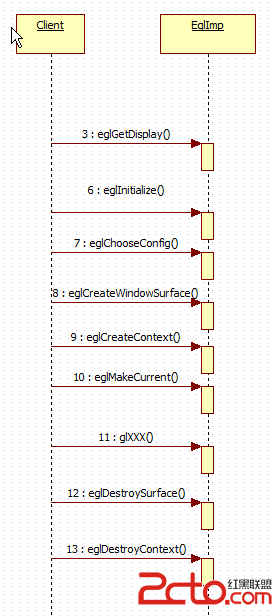
首先理解Android 的 egl 的函數調用,先要得到display (對應顯示器),而後選擇一個支持的config(這是顯卡支持的),而後創建WindowSurfac
 Android 仿qq上傳頭像(一)
這麼長時間沒寫博客感覺手都要生了啊,最近因為工作的關系來到了上海,目前還算穩定,所以抓緊時間寫篇博客壓壓驚。標題早已經看穿一切,這次我們來模仿一下
 Android 開發第三彈:自定義左右菜單(滑動動畫+蒙版效果)
下面的截圖……哎,因為1080P在Windows 10上雖然適配了,但大部分軟件並沒有跟上,比如某個錄制GIF的軟件,所以這裡有一定的偏移導致
 Fresco簡單的使用—SimpleDraweeView
百學須先立志—學前須知:在我們平時加載圖片(不管是下載還是加載本地圖片…..)的時候,我們經常會遇到這樣一個需求,那就是當圖片正在加載時應該呈現