編輯:關於Android編程
MyRecorder(仿微信,錄制音頻並發送功能)
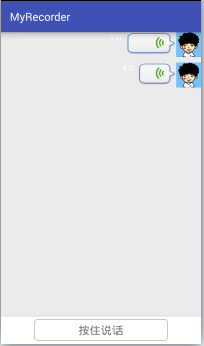
①布局實現(activity_main.xml)
布局采用線性布局,上面使用的一個ListView,下面使用的是一個自定義的Button(會在下面進行介紹)
<?xml version="1.0" encoding="utf-8"?>
<LinearLayout
 xmlns:android="http://schemas.android.com/apk/res/android"
 xmlns:tools="http://schemas.android.com/tools"
 android:layout_width="match_parent"
 android:layout_height="match_parent"
 android:orientation="vertical"
 tools:context="com.yitong.myrecorder.MainActivity">

 <ListView
  android:id="@+id/main_listview"
  android:layout_width="match_parent"
  android:layout_height="0dp"
  android:layout_weight="1"
  android:background="#ebebeb"
  android:dividerHeight="10dp"
  android:divider="@null"
  />
 <FrameLayout
  android:layout_width="match_parent"
  android:layout_height="wrap_content"
  android:background="#fff">
  <com.yitong.myrecorder.view.AudioRecorderButton
   android:id="@+id/main_btn"
   android:layout_width="match_parent"
   android:layout_height="wrap_content"
   android:gravity="center"
   android:layout_marginTop="6dp"
   android:layout_marginBottom="6dp"
   android:layout_marginLeft="60dp"
   android:layout_marginRight="60dp"
   android:minHeight="0dp"
   android:padding="6dp"
   android:text="@string/str_recoder_normal"
   android:textSize="20sp"
   android:textColor="#727272"
   android:background="@drawable/btn_recorder_normal"
   />
  <View
   android:layout_width="match_parent"
   android:layout_height="1dp"
   android:background="#ccc"/>
 </FrameLayout>
</LinearLayout>
相關使用的string值(需要添加到value/string中):
 <string name="str_recoder_normal">按住說話</string>
 <string name="str_recorder_recording">松開結束</string>
 <string name="str_recorder_want_cancel">松開手指,取消發送</string>
 <string name="str_dialog_want_cancel">手指上滑,取消發送</string>
 <string name="str_dialog_want_send">手指上滑,取消發送</string>
 <string name="str_dialog_time_short">錄音時間過短</string>
②我們分析一下自定Button的幾種狀態:
1.正常狀態 (在初次顯示,即沒有點擊的時候顯示的狀態,顯示的文本為“按住說話”)
2.錄音狀態 (當手指按在Button上時,即為錄音狀態,顯示的文本為“松開結束”)
3.取消狀態 (當手指上滑,此時若松開手指,便取消發送,即為取消狀態,顯示的文本為“松開手指,取消發送”)
③當錄音狀態時,在View上有一個Dialog的提示,首先我們先自定義這個Dialog的布局:

<?xml version="1.0" encoding="utf-8"?>
<LinearLayout xmlns:android="http://schemas.android.com/apk/res/android"
    android:layout_width="wrap_content"
    android:layout_height="wrap_content"
    android:background="@drawable/dialog_bg"
    android:orientation="vertical"
    android:padding="20dp">
 <LinearLayout
  android:layout_width="wrap_content"
  android:layout_height="wrap_content"
  android:layout_gravity="center_horizontal"
  android:orientation="horizontal">

  <ImageView
   android:id="@+id/main_recorder_dialog_icon"
   android:layout_width="wrap_content"
   android:layout_height="wrap_content"
   android:src="@mipmap/recorder"
   android:visibility="visible"/>

  <ImageView
   android:id="@+id/main_recorder_dialog_voice"
   android:layout_width="wrap_content"
   android:layout_height="wrap_content"
   android:src="@mipmap/v1"
   android:visibility="visible"/>
 </LinearLayout>

 <TextView
  android:id="@+id/main_recorder_dialog_label"
  android:layout_width="wrap_content"
  android:layout_height="wrap_content"
  android:layout_gravity="center_horizontal"
  android:layout_marginTop="5dp"
  android:text="@string/str_dialog_want_cancel"
  android:textColor="#fff"
  android:textSize="20sp"/>
</LinearLayout>
其中用到的@drawable/dialog_bg即為自定的shape
 <?xml version="1.0" encoding="utf-8"?>
 <shape xmlns:android="http://schemas.android.com/apk/res/android"
   android:shape="rectangle">
  <corners android:radius="12dp"/>
  <solid android:color="#a3d7f5"/>
  <stroke
   android:width="1dp"
   android:color="#9b9b9b"/>
 </shape>
④定義DialogManager,便於對這個自定義布局的Dialog進行操作
public class DialogManager {

 private static final String TAG = "DialogManager";
 private Dialog mDialog;
 private ImageView mIcon;
 private ImageView mVoice;
 private TextView mLabel;

 private Context mContext;

 public DialogManager(Context mContext) {
  this.mContext = mContext;
 }

 /**
  * 顯示對話框
  */
 public void showRecordeingDialog() {
  mDialog = new Dialog(mContext, R.style.Theme_AudioDialog);
  LayoutInflater inflater = (LayoutInflater) mContext.getSystemService(mContext.LAYOUT_INFLATER_SERVICE);
  View view = inflater.inflate(R.layout.dialog, null);
  mDialog.setContentView(view);

  mIcon = (ImageView) mDialog.findViewById(R.id.main_recorder_dialog_icon);
  mVoice = (ImageView) mDialog.findViewById(R.id.main_recorder_dialog_voice);
  mLabel = (TextView) mDialog.findViewById(R.id.main_recorder_dialog_label);

  mDialog.show();
 }

 /**
  * 正在錄制提示
  */
 public void recording() {
  if (mDialog != null && mDialog.isShowing()) {
   mIcon.setVisibility(View.VISIBLE);
   mVoice.setVisibility(View.VISIBLE);
   mLabel.setVisibility(View.VISIBLE);
   mIcon.setImageResource(R.mipmap.recorder);
   mLabel.setText(R.string.str_dialog_want_send);
  }
 }

 /**
  * 取消錄制對話框提示
  */
 public void wantToCancel() {
  if (mDialog != null && mDialog.isShowing()) {
   mIcon.setVisibility(View.VISIBLE);
   mVoice.setVisibility(View.VISIBLE);
   mLabel.setVisibility(View.VISIBLE);
   mIcon.setImageResource(R.mipmap.recorder);
   mLabel.setText(R.string.str_recorder_want_cancel);
  }
 }

 /**
  * 錄音時間過短提示
  */
 public void tooShort() {
  if (mDialog != null && mDialog.isShowing()) {
   mIcon.setVisibility(View.VISIBLE);
   mVoice.setVisibility(View.VISIBLE);
   mLabel.setVisibility(View.VISIBLE);
   mIcon.setImageResource(R.mipmap.recorder);
   mLabel.setText(R.string.str_dialog_time_short);
  }
 }

 /**
  * 取消對話框
  */
 public void dismissDialog() {
  if (mDialog != null && mDialog.isShowing()) {
   mDialog.dismiss();
   mDialog = null;
  }
 }

 /**
  * 顯示音量大小
  */
 public void updateVoiceLevel(int level) {
  if (mDialog != null && mDialog.isShowing()) {
   int resId = mContext.getResources().getIdentifier("v" + level, "mipmap", mContext.getPackageName());
   mVoice.setImageResource(resId);
  }
 }
}
Dialog的樣式Theme_AudioDialog,需要在values/styles.xml中定義
 <style name="Theme_AudioDialog">
  <item name="android:windowBackground">@android:color/transparent</item>
  <item name="android:windowFrame">@null</item>
  <item name="android:windowIsFloating">true</item>
  <item name="android:windowIsTranslucent">true</item>
  <item name="android:backgroundDimEnabled">false</item>
 </style>
⑤當手指按住Button時,便開始錄音,所以我們還需要定義一個錄音的管理類AudioManager來控制錄制狀態。
public class AudioManager {

 private MediaRecorder mMediaRecorder;
 private String mDir;// 保存的目錄

 private String mCurrentFilePath;// 保存音頻文件的全路徑

 private boolean isPrepared = false;// 是否准備完畢

 private AudioManager(String dir) {
  mDir = dir;
 }

 private static AudioManager mInstance;

 public static AudioManager getmInstance(String mDir) {
  if (mInstance == null) {
   synchronized (AudioManager.class) {
    if (mInstance == null) {
     mInstance = new AudioManager(mDir);
    }
   }
  }
  return mInstance;
 }

 /**
  * 准備完畢的回調
  */
 public interface AudioStateListener {
  void wellPrepared();
 }

 private AudioStateListener mListener;

 public void setAudioStateListener(AudioStateListener listener) {
  mListener = listener;
 }

 /** 准備錄制 */
 public void prepareAudio() {
  try {
   isPrepared = false;
   File dir = new File(mDir);
   if (!dir.exists()) {
    dir.mkdirs();
   }

   String fileName = generateName();
   File file = new File(dir, fileName);
   mCurrentFilePath = file.getAbsolutePath();

   mMediaRecorder = new MediaRecorder();
   // 設置輸出文件
   mMediaRecorder.setOutputFile(mCurrentFilePath);
   // 設置音頻源為麥克風
   mMediaRecorder.setAudioSource(MediaRecorder.AudioSource.MIC);
   // 設置音頻格式
   mMediaRecorder.setOutputFormat(MediaRecorder.OutputFormat.RAW_AMR);
   // 設置音頻編碼
   mMediaRecorder.setAudioEncoder(MediaRecorder.AudioEncoder.AMR_NB);

   mMediaRecorder.prepare();
   mMediaRecorder.start();

   isPrepared = true;
   if (mListener != null) {
    mListener.wellPrepared();
   }
  } catch (Exception e) {
   e.printStackTrace();
  }
 }

 /** 獲取音量大小 */
 public int getVoiceLevel(int maxLevel) {
  if (isPrepared) {
   try {
    //mMediaRecorder.getMaxAmplitude() 1-32767
    //注意此處mMediaRecorder.getMaxAmplitude 只能取一次,如果前面取了一次,後邊再取就為0了
    return ((mMediaRecorder.getMaxAmplitude() * maxLevel) / 32768) + 1;
   } catch (Exception e) {
   }

  }
  return 1;
 }

 /** 保存錄音,釋放資源 */
 public void release() {
  if(mMediaRecorder != null) {
   mMediaRecorder.stop();
   mMediaRecorder.release();
   mMediaRecorder = null;
  }
 }

 /** 取消錄制 */
 public void cancel() {
  release();
  if(mCurrentFilePath != null) {
   File file = new File(mCurrentFilePath);
   if(file.exists()) {
    file.delete();
    mCurrentFilePath = null;
   }
  }
 }

 /** 獲取錄制音頻的總路徑 */
 public String getmCurrentFilePath(){
  return mCurrentFilePath;
 }

 /**
  * 生成一個隨機名字
  */
 private String generateName() {
  return UUID.randomUUID().toString() + ".mp3";
 }
}
⑥處理完DialogManager和AudioManger後,接著我們回到自定義的Button,即AudioRecorderButton
public class AudioRecorderButton extends Button implements AudioManager.AudioStateListener {

 private static final int STATE_NORMAL = 1;//正常狀態
 private static final int STATE_RECORDING = 2;//錄音狀態
 private static final int STATE_WANT_TO_CANCEL = 3;//取消狀態
 private static final String TAG = "AudioRecorderButton";

 private int mCurState = STATE_NORMAL;//當前狀態
 private boolean isRecording = false;//是否正在錄音

 private DialogManager mDialogManger;
 private AudioManager mAudioManager;

 private boolean mReady = false;//是否觸發longClick
 private float mTime;//計時

 public AudioRecorderButton(Context context) {
  this(context, null);
 }

 public AudioRecorderButton(Context context, AttributeSet attrs) {
  this(context, attrs, 0);
 }

 public AudioRecorderButton(Context context, AttributeSet attrs, int defStyleAttr) {
  super(context, attrs, defStyleAttr);
  mDialogManger = new DialogManager(getContext());

  String dir = Environment.getExternalStorageDirectory() + "/my_recorder_audios";
  mAudioManager = AudioManager.getmInstance(dir);
  mAudioManager.setAudioStateListener(this);

  setOnLongClickListener(new OnLongClickListener() {
   @Override
   public boolean onLongClick(View v) {
    mReady = true;
    mAudioManager.prepareAudio();
    return false;
   }
  });
 }

 @Override
 public boolean onTouchEvent(MotionEvent event) {
  int x = (int) event.getX();
  int y = (int) event.getY();
  switch (event.getAction()) {
   case MotionEvent.ACTION_DOWN:
    changeSate(STATE_RECORDING);
    break;

   case MotionEvent.ACTION_MOVE:
    if (isRecording) {
     if (isCancelRecorder(x, y)) {
      changeSate(STATE_WANT_TO_CANCEL);
     } else {
      changeSate(STATE_RECORDING);
     }
    }
    break;

   case MotionEvent.ACTION_UP:
    if (!mReady) {
     reset();
     return super.onTouchEvent(event);
    }
    if (!isRecording || mTime < 0.6f) {
     mDialogManger.tooShort();
     mAudioManager.cancel();
     mHandler.sendEmptyMessageDelayed(MSG_LODING_DISMISS, 1000);
    } else if (mCurState == STATE_RECORDING) {//正常錄制結束
     mDialogManger.dismissDialog();
     mAudioManager.release();
     if (mListener != null) {
      mListener.onFinish(mTime, mAudioManager.getmCurrentFilePath());
     }
    } else if (mCurState == STATE_WANT_TO_CANCEL) {
     mDialogManger.dismissDialog();
     mAudioManager.cancel();
    }
    reset();
    break;
  }
  return super.onTouchEvent(event);
 }

 /**
  * 根據不同狀態,更改不同的文字和顯示的背景
  */
 private void changeSate(int stateRecording) {
  if (mCurState != stateRecording) {
   mCurState = stateRecording;
   switch (mCurState) {
    case STATE_NORMAL:
     setBackgroundResource(R.drawable.btn_recorder_normal);
     setText(R.string.str_recoder_normal);
     break;

    case STATE_RECORDING:
     setBackgroundResource(R.drawable.btn_recording);
     setText(R.string.str_recorder_recording);
     if (isRecording) {
      mDialogManger.recording();
     }
     break;

    case STATE_WANT_TO_CANCEL:
     setBackgroundResource(R.drawable.btn_recording);
     setText(R.string.str_recorder_want_cancel);
     mDialogManger.wantToCancel();
     break;
   }
  }
 }

 /**
  * 根據移動後的位置,判斷是否取消錄音
  */
 private boolean isCancelRecorder(int x, int y) {
  if (x < 0 || x > getWidth() || y < 0 || y > getHeight()) {
   return true;
  }
  return false;
 }

 /**
  * 重置標識位
  */
 private void reset() {
  changeSate(STATE_NORMAL);
  isRecording = false;
  mReady = false;
  mTime = 0;
 }

 /**
  * 開始播放時回調此方法
  */
 @Override
 public void wellPrepared() {
  mHandler.sendEmptyMessage(MSG_AUDIO_PREPARED);
 }

 private static final int MSG_AUDIO_PREPARED = 0x110;
 private static final int MSG_VOICE_CHAGE = 0x111;
 private static final int MSG_LODING_DISMISS = 0x112;

 private Handler mHandler = new Handler() {
  @Override
  public void handleMessage(Message msg) {
   super.handleMessage(msg);
   switch (msg.what) {
    case MSG_AUDIO_PREPARED:
     mDialogManger.showRecordeingDialog();
     isRecording = true;
     new Thread(mGetVoiceLevelRunnable).start();
     break;

    case MSG_VOICE_CHAGE:
     mDialogManger.updateVoiceLevel(mAudioManager.getVoiceLevel(7));
     break;

    case MSG_LODING_DISMISS:
     mDialogManger.dismissDialog();
     break;
   }
  }
 };

 /**
  * 獲取音量大小,並計時
  */
 private Runnable mGetVoiceLevelRunnable = new Runnable() {
  @Override
  public void run() {
   while (isRecording) {
    SystemClock.sleep(100);
    mTime += 0.1f;
    mHandler.sendEmptyMessage(MSG_VOICE_CHAGE);
   }
  }
 };

 /**
  * 完成錄制後的回調接口
  */
 public interface AudioFinishRecorderListener {
  void onFinish(float time, String filePath);
 }

 private AudioFinishRecorderListener mListener;

 public void setAudioFinishRecorderListener(AudioFinishRecorderListener listener) {
  mListener = listener;
 }
}
=====================至此自定義Button就定義完===================================
①接著我們回到了MainActivity,我們需要獲取ListView和AudioRecorderButton組件。對於ListView,需要定義Adapter,當點擊某個條目的需要把錄制的音頻播放出來,需要定義一個MediaManager來控制音頻的播放。
②首先我們先定義RecorderAdapter
/**
 * 音頻實體類,包含音頻的長度和保存的路徑
 */
public class Recorder implements Serializable {
 private int time;
 private String filePath;

 public Recorder() {
 }

 public Recorder(int time, String filePath) {
  this.time = time;
  this.filePath = filePath;
 }

 public void setTime(int time) {
  this.time = time;
 }

 public void setFilePath(String filePath) {
  this.filePath = filePath;
 }

 public float getTime() {
  return time;
 }

 public String getFilePath() {
  return filePath;
 }
}

/**
 * 繼承ArrayAdater,重寫getView方法
 */
public class RecorderAdapter extends ArrayAdapter<Recorder> {

 private List<Recorder> mDatas;
 private Context mContext;

 private LayoutInflater mInfalter;

 private int mMinItemWidhth;
 private int mMaxItemWidhth;

 public RecorderAdapter(Context context, List<Recorder> datas) {
  super(context, -1, datas);
  mDatas = datas;
  mContext = context;

  mInfalter = (LayoutInflater) context.getSystemService(Context.LAYOUT_INFLATER_SERVICE);

  WindowManager wm = (WindowManager) context.getSystemService(Context.WINDOW_SERVICE);
  DisplayMetrics outMetrics = new DisplayMetrics();
  wm.getDefaultDisplay().getMetrics(outMetrics);

  mMaxItemWidhth = (int) (outMetrics.widthPixels * 0.7f);
  mMinItemWidhth = (int) (outMetrics.widthPixels * 0.15f);
 }

 @Override
 public View getView(int position, View convertView, ViewGroup parent) {
  ViewHolder holder = new ViewHolder();
  if(convertView == null) {
   convertView = mInfalter.inflate(R.layout.item_recorder, null);
  }
  holder = holder.getHolder(convertView);
  holder.setView(holder, mDatas.get(position));
  return convertView;
 }

 private class ViewHolder{
  TextView time;
  View length;

  public ViewHolder getHolder(View view){
   ViewHolder holder = (ViewHolder) view.getTag();
   if(holder == null) {
    holder = new ViewHolder();
   }
   holder.time = (TextView) view.findViewById(R.id.item_recorder_time);
   holder.length = view.findViewById(R.id.item_recorder_length);
   view.setTag(holder);

   return holder;
  }

  public void setView(ViewHolder holder, Recorder recorder) {
   holder.time.setText(recorder.getTime() + "\"");
   ViewGroup.LayoutParams layoutParams = holder.length.getLayoutParams();
   layoutParams.width = (int) (mMinItemWidhth + (mMaxItemWidhth / 60f * recorder.getTime()));
  }
 }
}
③定義MediaManger,用於播放音頻
public class MediaManager {

 private static MediaPlayer mMediaPlayer;

 private static boolean isPause = false;//是否是暫停

 /**
  * 播放音頻
  */
 public static void playSound(String filePath, MediaPlayer.OnCompletionListener onCompletionListener) {
  if (mMediaPlayer == null) {
   mMediaPlayer = new MediaPlayer();
   mMediaPlayer.setOnErrorListener(new MediaPlayer.OnErrorListener() {
    @Override
    public boolean onError(MediaPlayer mp, int what, int extra) {
     mMediaPlayer.reset();
     return false;
    }
   });
  } else {
   mMediaPlayer.reset();
  }

  try {
   mMediaPlayer.setAudioStreamType(AudioManager.STREAM_MUSIC);
   mMediaPlayer.setOnCompletionListener(onCompletionListener);
   mMediaPlayer.setDataSource(filePath);
   mMediaPlayer.prepare();
   mMediaPlayer.start();
  } catch (Exception e) {
   e.printStackTrace();
  }
 }

 /**
  * 暫停
  */
 public static void pause() {
  if (mMediaPlayer != null && mMediaPlayer.isPlaying()) {
   mMediaPlayer.pause();
   isPause = true;
  }
 }

 /**
  * 繼續
  */
 public static void resume() {
  if (mMediaPlayer != null && isPause) {
   mMediaPlayer.start();
   isPause = false;
  }
 }

 /**
  * 釋放資源
  */
 public static void release() {
  if (mMediaPlayer != null) {
   mMediaPlayer.release();
   mMediaPlayer = null;
  }
 }

}
④MainActivity的實現
public class MainActivity extends AppCompatActivity {

 private static final String TAG = "MainActivity";

 private List<Recorder> mDatas = new ArrayList<Recorder>();

 private AudioRecorderButton mAudioRecorderButton;
 private ListView mListView;
 private RecorderAdapter mAdapter;
 private View mAnimView;

 @Override
 protected void onCreate(Bundle savedInstanceState) {
  super.onCreate(savedInstanceState);
  setContentView(R.layout.activity_main);
  initView();
  initAction();
 }

 private void initView() {
  mAudioRecorderButton = (AudioRecorderButton) findViewById(R.id.main_btn);
  mListView = (ListView) findViewById(R.id.main_listview);
 }

 private void initAction() {
  mAudioRecorderButton.setAudioFinishRecorderListener(new AudioRecorderButton.AudioFinishRecorderListener() {
   @Override
   public void onFinish(float time, String filePath) {
    Recorder recorder = new Recorder((int)time, filePath);
    mDatas.add(recorder);
    mAdapter.notifyDataSetChanged();
    mListView.setSelection(mDatas.size() - 1);
   }
  });
  mAdapter = new RecorderAdapter(this, mDatas);
  mListView.setAdapter(mAdapter);

  mListView.setOnItemClickListener(new AdapterView.OnItemClickListener() {
   @Override
   public void onItemClick(AdapterView<?> parent, View view, int position, long id) {
    // 播放幀動畫
    mAnimView = view.findViewById(R.id.item_anim);
    mAnimView.setBackgroundResource(R.drawable.play_anim);
    AnimationDrawable anim = (AnimationDrawable) mAnimView.getBackground();
    anim.start();

    // 播放音頻
    MediaManager.playSound(mDatas.get(position).getFilePath(), new MediaPlayer.OnCompletionListener() {
     @Override
     public void onCompletion(MediaPlayer mp) {
      mAnimView.setBackgroundResource(R.mipmap.adj);
     }
    });
   }
  });
 }

 @Override
 protected void onPause() {
  super.onPause();
  MediaManager.pause();
 }

 @Override
 protected void onResume() {
  super.onResume();
  MediaManager.resume();
 }

 @Override
 protected void onDestroy() {
  super.onDestroy();
  MediaManager.release();
 }
}
幀動畫play_anim定義在drawable下
 <?xml version="1.0" encoding="utf-8"?>
 <animation-list xmlns:android="http://schemas.android.com/apk/res/android"
  >
  <item
   android:drawable="@mipmap/v_anim1"
   android:duration="300"/>
  <item
   android:drawable="@mipmap/v_anim2"
   android:duration="300"/>
  <item
   android:drawable="@mipmap/v_anim3"
   android:duration="300"/>
 </animation-list>
⑤最後,不要忘了添加權限
<uses-permission android:name="android.permission.RECORD_AUDIO"/>
<uses-permission android:name="android.permission.WRITE_EXTERNAL_STORAGE"/>
<uses-permission android:name="android.permission.MOUNT_UNMOUNT_FILESYSTEMS"/>
以上就是本文的全部內容,希望對大家的學習有所幫助,也希望大家多多支持本站。
 android觸碰消息傳遞機制
前陣子要的工作是給桌面(Launcher啟動器,其實也是一個activity)添加一個觸摸特效(一個View),而這個特效是每次觸碰都會有,不管你在桌面上做什麼操作都會顯
 Android組件:Fragment切換後保存狀態
之前寫的第一篇Fragment實例,和大多數人一開始學的一樣,都是通過FragmentTransaction的replace方法來實現,replace方法相
 Android UI開源組件庫BottomView ,第三方自定義UI控件
這裡分享一個Android的非常經典實用而且簡單方便的第三方UI控件庫:BottomView(小米的米UI也用到了這個) 實現功能: 可以在底部彈出的Vie
 android產品研發(二十)--)代碼Review
上一篇文章中我們講解了如何在android studio中進行單元測試。實際開發過程中有一些功能性的需求,比如測試工具類,測試數據存儲等測試工作,如果還是通過重復執行ap