編輯:關於Android編程
在Android的3.0之後,google又提出了屬性動畫的這樣一個框架,他可以更好的幫助我們實現更豐富的動畫效果。所以為了跟上技術的步伐,今天就聊一聊屬性動畫。
這一次的需求是這樣的:當點擊一個View的時候,顯示下面隱藏的一個View,要實現這個功能,需要將V iew的visibility屬性設置gone為visible即可,但是這個過程是一瞬間的,並不能實現我們要的效果。所以,屬性動畫是個不錯的方案。
先把效果貼上
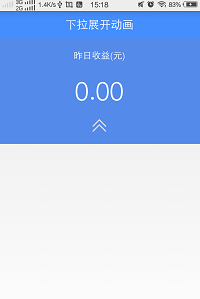
第一個:
第二個:
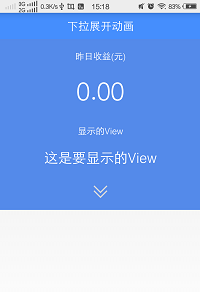
前面的這個是隱藏著,後面這個是顯示的。當點擊這個箭頭的時候,來切換顯示或者隱藏。
現在開始編碼:
布局文件如下
<LinearLayout xmlns:android="http://schemas.android.com/apk/res/android"
  xmlns:tools="http://schemas.android.com/tools"
  android:layout_width="match_parent"
  android:layout_height="match_parent"
  android:orientation="vertical"
  tools:context="com.ltl.mpiggybank.MainActivity" >

  <RelativeLayout
    android:layout_width="match_parent"
    android:layout_height="wrap_content"
    android:background="#458EFD"
    android:padding="10dip" >

    <TextView
      android:layout_width="wrap_content"
      android:layout_height="wrap_content"
      android:layout_centerInParent="true"
      android:gravity="center_vertical"
      android:text="下拉展開動畫"
      android:textColor="#ffffff"
      android:textSize="20sp" />
  </RelativeLayout>

  <LinearLayout
    android:layout_width="match_parent"
    android:layout_height="wrap_content"
    android:background="#548AEA"
    android:gravity="center"
    android:orientation="vertical" >

    <TextView
      android:layout_width="wrap_content"
      android:layout_height="wrap_content"
      android:layout_margin="20dip"
      android:text="昨日收益(元)"
      android:textColor="#ffffff"
      android:textSize="16sp" />

    <TextView
      android:layout_width="wrap_content"
      android:layout_height="wrap_content"
      android:text="0.00"
      android:textColor="#ffffff"
      android:textSize="45sp" />
  </LinearLayout>

  <LinearLayout
    android:id="@+id/linear_hidden"
    android:layout_width="match_parent"
    android:layout_height="120dip"
    android:background="#548AEA"
    android:gravity="center"
    android:orientation="vertical" >

    <TextView
      android:layout_width="wrap_content"
      android:layout_height="wrap_content"
      android:layout_margin="20dip"
      android:text="顯示的View"
      android:textColor="#ffffff"
      android:textSize="16sp" />

    <TextView
      android:layout_width="wrap_content"
      android:layout_height="wrap_content"
      android:text="0.00"
      android:textColor="#ffffff"
      android:textSize="35sp" />
  </LinearLayout>

  <LinearLayout
    android:layout_width="match_parent"
    android:layout_height="wrap_content"
    android:background="#548AEA"
    android:gravity="center"
    android:onClick="onClick"
    android:orientation="vertical" >

    <ImageView
      android:id="@+id/my_iv"
      android:layout_width="25dip"
      android:layout_height="25dip"
      android:layout_margin="20dip"
      android:src="@drawable/scroll" />
  </LinearLayout>

</LinearLayout>
這裡面代碼並不多,也很簡單,三個線性布局,裡面裝載著各自的控件,並且還設置了ID。按鈕是一個線性布局,采用了onClick自身的點擊事件。接下來,當點擊了這個線性布局的時候,需要隱藏的控件最終到達一個高度,這個就是我們的目標值,只需要通過布局中的dp轉換成像素就行了。
mDensity = getResources().getDisplayMetrics().density;
mHiddenViewMeasuredHeight = (int) (mDensity * 120 + 0.5);
這裡是120就是我們布局裡面定義的高度。
然後給這個過程增加一個動畫效果。
  ValueAnimator animator = ValueAnimator.ofInt(start, end);
    animator.addUpdateListener(new AnimatorUpdateListener() {

      @Override
      public void onAnimationUpdate(ValueAnimator arg0) {
        int value = (int) arg0.getAnimatedValue();
        ViewGroup.LayoutParams layoutParams = v.getLayoutParams();
        layoutParams.height = value;
        v.setLayoutParams(layoutParams);

      }
    });
通過這樣一個簡單的ValueAnimator ,就可以很方便的實現顯示和隱藏的動畫效果了。
下面是完整的代碼。
import android.animation.Animator;
import android.animation.AnimatorListenerAdapter;
import android.animation.ValueAnimator;
import android.animation.ValueAnimator.AnimatorUpdateListener;
import android.os.Bundle;
import android.support.v7.app.ActionBarActivity;
import android.view.View;
import android.view.ViewGroup;
import android.view.Window;
import android.view.animation.Animation;
import android.view.animation.RotateAnimation;
import android.widget.ImageView;
import android.widget.LinearLayout;

public class MainActivity extends ActionBarActivity {
  private LinearLayout mHiddenLayout;

  private float mDensity;

  private int mHiddenViewMeasuredHeight;

  private ImageView mIv;

  @Override
  protected void onCreate(Bundle savedInstanceState) {
    super.onCreate(savedInstanceState);
    requestWindowFeature(Window.FEATURE_NO_TITLE);
    setContentView(R.layout.activity_main);

    mHiddenLayout = (LinearLayout) findViewById(R.id.linear_hidden);
    mIv = (ImageView) findViewById(R.id.my_iv);

    mDensity = getResources().getDisplayMetrics().density;

    mHiddenViewMeasuredHeight = (int) (mDensity * 120 + 0.5);

  }

  public void onClick(View v) {
    if (mHiddenLayout.getVisibility() == View.GONE) {
      animateOpen(mHiddenLayout);
      animationIvOpen();
    } else {
      animateClose(mHiddenLayout);
      animationIvClose();
    }
  }

  private void animateOpen(View v) {
    v.setVisibility(View.VISIBLE);
    ValueAnimator animator = createDropAnimator(v, 0,
        mHiddenViewMeasuredHeight);
    animator.start();

  }

  private void animationIvOpen() {
    RotateAnimation animation = new RotateAnimation(0, 180,
        Animation.RELATIVE_TO_SELF, 0.5f, Animation.RELATIVE_TO_SELF,
        0.5f);
    animation.setFillAfter(true);
    animation.setDuration(100);
    mIv.startAnimation(animation);
  }

  private void animationIvClose() {
    RotateAnimation animation = new RotateAnimation(180, 0,
        Animation.RELATIVE_TO_SELF, 0.5f, Animation.RELATIVE_TO_SELF,
        0.5f);
    animation.setFillAfter(true);
    animation.setDuration(100);
    mIv.startAnimation(animation);
  }

  private void animateClose(final View view) {
    int origHeight = view.getHeight();
    ValueAnimator animator = createDropAnimator(view, origHeight, 0);
    animator.addListener(new AnimatorListenerAdapter() {
      @Override
      public void onAnimationEnd(Animator animation) {
        view.setVisibility(View.GONE);
      }

    });
    animator.start();
  }

  private ValueAnimator createDropAnimator(final View v, int start, int end) {
    ValueAnimator animator = ValueAnimator.ofInt(start, end);
    animator.addUpdateListener(new AnimatorUpdateListener() {

      @Override
      public void onAnimationUpdate(ValueAnimator arg0) {
        int value = (int) arg0.getAnimatedValue();
        ViewGroup.LayoutParams layoutParams = v.getLayoutParams();
        layoutParams.height = value;
        v.setLayoutParams(layoutParams);

      }
    });
    return animator;
  }

}
以上就是本文的全部內容,希望對大家的學習有所幫助,也希望大家多多支持本站。
 移動一卡多號業務開通/價錢/APP使用指南
中國移動推出的一卡多號業務可以在已有移動手機號上增加1-3個副號,不用換機、換卡。特別適合想擁有多個手機號碼的用戶或需要保護隱私的用戶服務。在不增加手機、不
 Android屏幕適配攻略
一、屏幕適配的必要性為什麼Android需要適配?由於Android系統的開放性,任何用戶、開發者、OEM廠商、運營商都可以對Android進行定制,修改成他們想要的樣子
 Android 開發 之 Fragment 詳解
作者 : 韓曙亮轉載請著名出處 : http://blog.csdn.net/shulianghan/article/details/38064191本博客代碼地址 :
 Android中的跨進程通信方法實例及特點分析(二):ContentProvider
1.ContentProvider簡介 在Android中有些數據(如通訊錄、音頻、視頻文件等)是要供很多應用程序使用的,為了更好地對外提供