編輯:關於Android編程
廢話不多說了,直接給大家貼java代碼了,具體代碼如下所示:
Java代碼
package com.maidong.utils;
import java.io.BufferedInputStream;
import java.io.BufferedOutputStream;
import java.io.File;
import java.io.FileInputStream;
import java.io.FileNotFoundException;
import java.io.FileOutputStream;
import java.io.IOException;
import java.io.InputStream;
import java.io.OutputStream;
import java.io.UnsupportedEncodingException;
import java.util.ArrayList;
import java.util.Collection;
import java.util.Enumeration;
import java.util.zip.ZipEntry;
import java.util.zip.ZipException;
import java.util.zip.ZipFile;
import java.util.zip.ZipOutputStream;
import org.apache.http.protocol.HTTP;
public class ZipUtils {
private static final int BUFF_SIZE = 1024 * 1024; // 1M Byte
/**
* 批量壓縮文件(夾)
*
* @param resFileList
* 要壓縮的文件(夾)列表
* @param zipFile
* 生成的壓縮文件
* @throws IOException
* 當壓縮過程出錯時拋出
*/
public static void zipFiles(Collection<File> resFileList, File zipFile) throws IOException {
ZipOutputStream zipout = null;
try {
zipout = new ZipOutputStream(new BufferedOutputStream(new FileOutputStream(zipFile), BUFF_SIZE));
for (File resFile : resFileList) {
zipFile(resFile, zipout, "");
}
} finally {
if (zipout != null)
zipout.close();
}
}
/**
* 批量壓縮文件(夾)
*
* @param resFileList
* 要壓縮的文件(夾)列表
* @param zipFile
* 生成的壓縮文件
* @param comment
* 壓縮文件的注釋
* @throws IOException
* 當壓縮過程出錯時拋出
*/
public static void zipFiles(Collection<File> resFileList, File zipFile, String comment) throws IOException {
ZipOutputStream zipout = null;
try {
zipout = new ZipOutputStream(new BufferedOutputStream(new FileOutputStream(zipFile), BUFF_SIZE));
for (File resFile : resFileList) {
zipFile(resFile, zipout, "");
}
zipout.setComment(comment);
} finally {
if (zipout != null)
zipout.close();
}
}
/**
* 解壓縮一個文件
*
* @param zipFile
* 壓縮文件
* @param folderPath
* 解壓縮的目標目錄
* @throws IOException
* 當解壓縮過程出錯時拋出
*/
public static void upZipFile(File zipFile, String folderPath) throws ZipException, IOException {
File desDir = new File(folderPath);
if (!desDir.exists()) {
desDir.mkdirs();
}
ZipFile zf = new ZipFile(zipFile);
InputStream in = null;
OutputStream out = null;
try {
for (Enumeration<?> entries = zf.entries(); entries.hasMoreElements();) {
ZipEntry entry = ((ZipEntry) entries.nextElement());
in = zf.getInputStream(entry);
String str = folderPath + File.separator + entry.getName();
str = new String(str.getBytes("8859_1"), HTTP.UTF_8);
File desFile = new File(str);
if (!desFile.exists()) {
File fileParentDir = desFile.getParentFile();
if (!fileParentDir.exists()) {
fileParentDir.mkdirs();
}
desFile.createNewFile();
}
out = new FileOutputStream(desFile);
byte buffer[] = new byte[BUFF_SIZE];
int realLength;
while ((realLength = in.read(buffer)) > 0) {
out.write(buffer, 0, realLength);
}
}
} finally {
if (in != null)
in.close();
if (out != null)
out.close();
}
}
/**
* 解壓文件名包含傳入文字的文件
*
* @param zipFile
* 壓縮文件
* @param folderPath
* 目標文件夾
* @param nameContains
* 傳入的文件匹配名
* @throws ZipException
* 壓縮格式有誤時拋出
* @throws IOException
* IO錯誤時拋出
*/
public static ArrayList<File> upZipSelectedFile(File zipFile, String folderPath, String nameContains) throws ZipException,
IOException {
ArrayList<File> fileList = new ArrayList<File>();
File desDir = new File(folderPath);
if (!desDir.exists()) {
desDir.mkdir();
}
ZipFile zf = new ZipFile(zipFile);
InputStream in = null;
OutputStream out = null;
try {
for (Enumeration<?> entries = zf.entries(); entries.hasMoreElements();) {
ZipEntry entry = ((ZipEntry) entries.nextElement());
if (entry.getName().contains(nameContains)) {
in = zf.getInputStream(entry);
String str = folderPath + File.separator + entry.getName();
str = new String(str.getBytes("8859_1"), HTTP.UTF_8);
// str.getBytes(AppConstans.UTF_8),"8859_1" 輸出
// str.getBytes("8859_1"),AppConstans.UTF_8 輸入
File desFile = new File(str);
if (!desFile.exists()) {
File fileParentDir = desFile.getParentFile();
if (!fileParentDir.exists()) {
fileParentDir.mkdirs();
}
desFile.createNewFile();
}
out = new FileOutputStream(desFile);
byte buffer[] = new byte[BUFF_SIZE];
int realLength;
while ((realLength = in.read(buffer)) > 0) {
out.write(buffer, 0, realLength);
}
fileList.add(desFile);
}
}
} finally {
if (in != null)
in.close();
if (out != null)
out.close();
}
return fileList;
}
/**
* 獲得壓縮文件內文件列表
*
* @param zipFile
* 壓縮文件
* @return 壓縮文件內文件名稱
* @throws ZipException
* 壓縮文件格式有誤時拋出
* @throws IOException
* 當解壓縮過程出錯時拋出
*/
public static ArrayList<String> getEntriesNames(File zipFile) throws ZipException, IOException {
ArrayList<String> entryNames = new ArrayList<String>();
Enumeration<?> entries = getEntriesEnumeration(zipFile);
while (entries.hasMoreElements()) {
ZipEntry entry = ((ZipEntry) entries.nextElement());
entryNames.add(new String(getEntryName(entry).getBytes(HTTP.UTF_8), "8859_1"));
}
return entryNames;
}
/**
* 獲得壓縮文件內壓縮文件對象以取得其屬性
*
* @param zipFile
* 壓縮文件
* @return 返回一個壓縮文件列表
* @throws ZipException
* 壓縮文件格式有誤時拋出
* @throws IOException
* IO操作有誤時拋出
*/
public static Enumeration<?> getEntriesEnumeration(File zipFile) throws ZipException, IOException {
ZipFile zf = new ZipFile(zipFile);
return zf.entries();
}
/**
* 取得壓縮文件對象的注釋
*
* @param entry
* 壓縮文件對象
* @return 壓縮文件對象的注釋
* @throws UnsupportedEncodingException
*/
public static String getEntryComment(ZipEntry entry) throws UnsupportedEncodingException {
return new String(entry.getComment().getBytes(HTTP.UTF_8), "8859_1");
}
/**
* 取得壓縮文件對象的名稱
*
* @param entry
* 壓縮文件對象
* @return 壓縮文件對象的名稱
* @throws UnsupportedEncodingException
*/
public static String getEntryName(ZipEntry entry) throws UnsupportedEncodingException {
return new String(entry.getName().getBytes(HTTP.UTF_8), "8859_1");
}
/**
* 壓縮文件
*
* @param resFile
* 需要壓縮的文件(夾)
* @param zipout
* 壓縮的目的文件
* @param rootpath
* 壓縮的文件路徑
* @throws FileNotFoundException
* 找不到文件時拋出
* @throws IOException
* 當壓縮過程出錯時拋出
*/
private static void zipFile(File resFile, ZipOutputStream zipout, String rootpath) throws FileNotFoundException, IOException {
rootpath = rootpath + (rootpath.trim().length() == 0 ? "" : File.separator) + resFile.getName();
rootpath = new String(rootpath.getBytes("8859_1"), HTTP.UTF_8);
BufferedInputStream in = null;
try {
if (resFile.isDirectory()) {
File[] fileList = resFile.listFiles();
for (File file : fileList) {
zipFile(file, zipout, rootpath);
}
} else {
byte buffer[] = new byte[BUFF_SIZE];
in = new BufferedInputStream(new FileInputStream(resFile), BUFF_SIZE);
zipout.putNextEntry(new ZipEntry(rootpath));
int realLength;
while ((realLength = in.read(buffer)) != -1) {
zipout.write(buffer, 0, realLength);
}
in.close();
zipout.flush();
zipout.closeEntry();
}
} finally {
if (in != null)
in.close();
// if (zipout != null);
// zipout.close();
}
}
}
代碼到此結束,關於Android實現壓縮和解壓縮文件的全內容就給大家介紹這麼多,希望能夠幫助到大家!
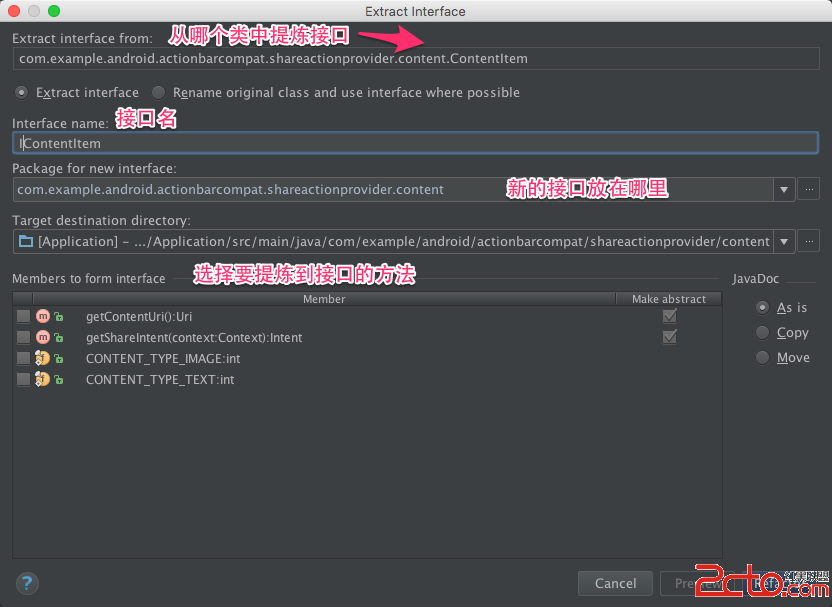 《Android Studio實用指南》8.20 提煉接口
提煉接口重構是從一個已存在的類中提煉接口,它可以從某個類中選擇方法,把選中的方法提取到一個單獨的接口中.操作步驟:? 菜單欄: Refactor —>
 Android Launcher淺析(二)
1,如何修改主菜單圖標的位置?[DESCRIPTION]默認主菜單圖標在中間,如何修改它的位置? Launcher3:DynamicGrid.java文件hotseatA
 Android實現有視差效果的ListView
視差效果是什麼?所謂的視差效果在Web設計和移動應用中都非常常見,我們在一些主要的平台都可以發現它的身影,從Windows Phone到iOS乃至Android。按照維基
 Android design包自定義tablayout的底部導航欄的實現方法
以前做項目大多用的radiobutton,今天用tablayout來做一個tab切換頁面的的效果.實現的效果就是類似QQ.微信的頁面間(也就是Fragment間)的切換.