編輯:關於Android編程
spinner組件有點類型於HTML中的下拉框<Select></select>的樣子,讓用戶每次從下拉框中選取一個,本文為大家分享了Android下拉列表spinner的具體實現代碼,供大家參考,具體內容如下
mian.xml
<LinearLayout xmlns:android="http://schemas.android.com/apk/res/android"
 xmlns:tools="http://schemas.android.com/tools"
 android:layout_width="match_parent"
 android:layout_height="match_parent"
 android:orientation="vertical"
 tools:context=".Main" >

 <Spinner
  android:id="@+id/spinner"
  android:layout_width="300sp"
  android:layout_height="50sp"
  android:layout_gravity="center_horizontal" />

</LinearLayout>
Main.java
package com.app.main;

import android.app.Activity;
import android.os.Bundle;
import android.widget.ArrayAdapter;
import android.widget.Spinner;

public class Main extends Activity {

 Spinner spinner = null;

 @Override
 protected void onCreate(Bundle savedInstanceState) {
  super.onCreate(savedInstanceState);
  setContentView(R.layout.main);

  spinner = (Spinner) this.findViewById(R.id.spinner);
  ArrayAdapter adapter = new ArrayAdapter(this,
    android.R.layout.simple_spinner_item, new String[] { "第一項",
      "第二項", "第三項" });

  //設置下拉樣式
  adapter.setDropDownViewResource(android.R.layout.simple_dropdown_item_1line);
  spinner.setAdapter(adapter);
 }

}
效果圖:
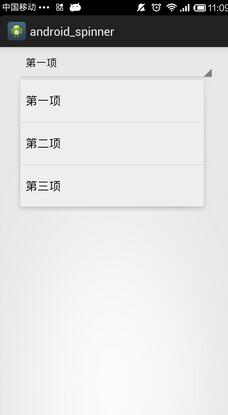
其中主要涉及到兩個xml文件,一個是填充數據時的simple_spinner_item.xml和下拉樣式simple_dropdown_item_1line
simple_spinner_item.xml:
<TextView xmlns:android="http://schemas.android.com/apk/res/android"
 android:id="@android:id/text1"

 android:singleLine="true"
 android:layout_width="match_parent"
 android:layout_height="wrap_content"
 android:ellipsize="marquee"
 android:textAlignment="inherit"/>
simple_dropdown_item_1line.xml:
<TextView xmlns:android="http://schemas.android.com/apk/res/android"
 android:id="@android:id/text1"

 android:textAppearance="?android:attr/textAppearanceLargePopupMenu"
 android:singleLine="true"
 android:layout_width="match_parent"
 android:layout_height="?android:attr/listPreferredItemHeight"
 android:ellipsize="marquee" />
以上就是本文的全部內容,希望對大家學習Android軟件編程有所幫助,也希望大家多多支持本站。
 Android相機、圖冊demo
本文為大家分享了Android相機、圖冊基本demo,供大家參考,具體內容如下package com.example.democamera; import java.io
 Android UI開發神兵利器之Angrytools
最近很多人在問我,個人App開發者如何去設計UI。 其實這是個人開發者最頭痛的問題,搞技術的人,確實沒法做到面面俱到,不可能花大量的時間去切圖,去做原型設計,去做美工。
 Android Activity組件的啟動過程
1、總圖中的第一步 如圖:第一步 class ActivityManagerProxy implements IActivityManager
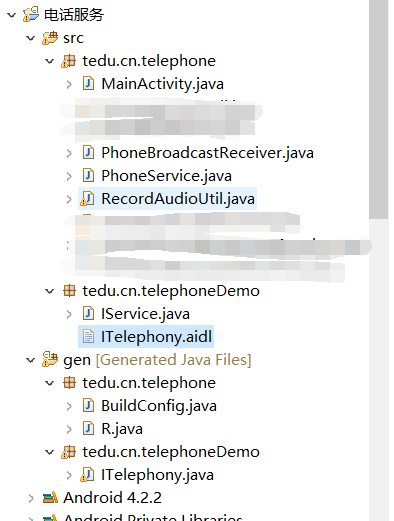 Android 電話服務(完成版)
之前的代碼是分開寫的,並沒有實現一個完成電話相關服務,這次就給大家來一記猛藥,望大家提出寶貴意見和建議與我分享,感謝! 電話監聽主Activity