編輯:關於Android編程
ContentProvider基本使用
為了在應用程序之間交換數據,android提供了ContentProvider,ContentProvider是不同應用程序之間進行數據交換的標准API,當一個應用程序需要把自己的數據暴露給其他程序使用時,該應用程序就可以通過提供ContentPRovider來實現,其他應用程序就可以通過ContentResolver來操作ContentProvider暴露的數據。
實現ContentProvider的步驟:
1)編寫一個類,繼承ContentProvider,並且重寫裡面的CRUD方法。
2)在androidmanifest.xml文件中注冊provider。
在androidmanifest.xml中注冊provider需要以下3個屬性:
android:name provider的實現類。
android:authorities provider的uri。
android:exported provider是否暴露給其他程序。
ContentResovler操作ContentProvider:
1)獲取ContentResolver,getContentResovler()方法來自於ContextWrapper,所以activity和service中都可以使用。
2)調用CURD方法,通過參數url,調用指定的ContentProvider的方法。
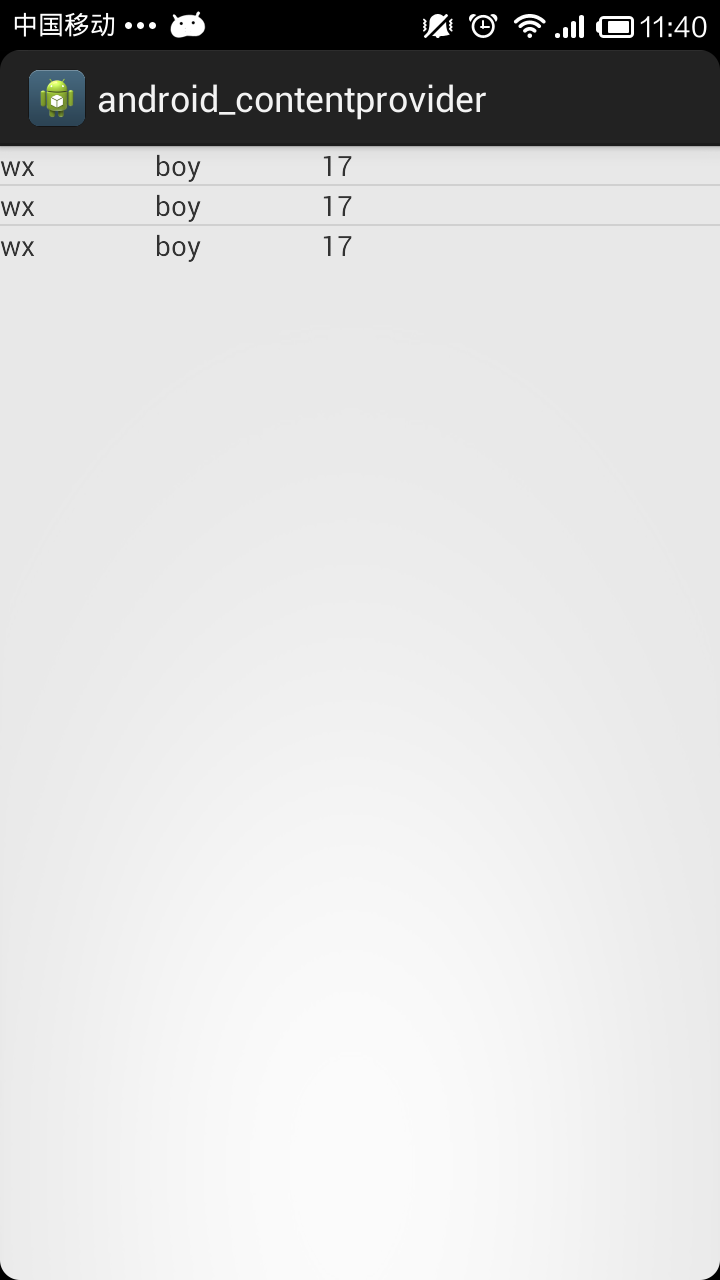
下面是一個demo,向contentProvider中插入一條數據,並且返回到listview中。
main.xml:
<RelativeLayout xmlns:android="http://schemas.android.com/apk/res/android"
  xmlns:tools="http://schemas.android.com/tools"
  android:layout_width="match_parent"
  android:layout_height="match_parent"
  tools:context=".Main" >

  <ListView
    android:id="@+id/listview"
    android:layout_width="match_parent"
    android:layout_height="wrap_content" />

</RelativeLayout>
MySQLiteOpenHelper類
package com.app.dao;

import android.content.Context;
import android.database.sqlite.SQLiteDatabase;
import android.database.sqlite.SQLiteDatabase.CursorFactory;
import android.database.sqlite.SQLiteOpenHelper;

public class MySQLiteOpenHelper extends SQLiteOpenHelper {

  public MySQLiteOpenHelper(Context context, String name,
      CursorFactory factory, int version) {
    super(context, name, factory, version);

  }

  @Override
  public void onCreate(SQLiteDatabase db) {

    String create_sql = "create table tb_test(_id integer primary key autoincrement,name,gender,age)";

    db.execSQL(create_sql);
  }

  @Override
  public void onUpgrade(SQLiteDatabase db, int oldVersion, int newVersion) {

  }

}
MyContentProvider類
package com.app.dao;

import android.content.ContentProvider;
import android.content.ContentValues;
import android.database.Cursor;
import android.net.Uri;

public class MyContentProvider extends ContentProvider{

  MySQLiteOpenHelper helper=null;
  @Override
  public int delete(Uri arg0, String arg1, String[] arg2) {

    return 0;
  }

  @Override
  public String getType(Uri arg0) {
    // TODO Auto-generated method stub
    return null;
  }

  @Override
  public Uri insert(Uri arg0, ContentValues values) {

    String insert_sql="insert into tb_test values(null,'wx','boy',17)";

    helper.getReadableDatabase().execSQL(insert_sql);

    return null;
  }

  @Override
  public boolean onCreate() {

    helper=new MySQLiteOpenHelper(this.getContext(),"test.db3",null,1);

    return true;
  }

  @Override
  public Cursor query(Uri arg0, String[] arg1, String arg2, String[] arg3,
      String arg4) {

    String query_sql="select * from tb_test";

    Cursor cursor=helper.getReadableDatabase().rawQuery(query_sql, null);

    return cursor;
  }

  @Override
  public int update(Uri arg0, ContentValues arg1, String arg2, String[] arg3) {
    // TODO Auto-generated method stub
    return 0;
  }

}
listview的顯示界面show.xml
<?xml version="1.0" encoding="utf-8"?>
<LinearLayout xmlns:android="http://schemas.android.com/apk/res/android"
  android:layout_width="match_parent"
  android:layout_height="match_parent"
  android:orientation="horizontal" >

  <TextView
    android:id="@+id/name"
    android:layout_width="wrap_content"
    android:layout_height="wrap_content" />

  <TextView
    android:id="@+id/gender"
    android:layout_width="wrap_content"
    android:layout_height="wrap_content"
    android:layout_marginLeft="60dp" />

  <TextView
    android:id="@+id/age"
    android:layout_width="wrap_content"
    android:layout_height="wrap_content"
    android:layout_marginLeft="60dp" />

</LinearLayout>
Main.java
package com.app.main;

import android.annotation.SuppressLint;
import android.app.Activity;
import android.content.ContentResolver;
import android.database.Cursor;
import android.net.Uri;
import android.os.Bundle;
import android.support.v4.widget.CursorAdapter;
import android.widget.ListView;
import android.widget.SimpleCursorAdapter;

public class Main extends Activity {

  ContentResolver resolver = null;

  ListView lv = null;

  @SuppressLint("NewApi")
  @Override
  protected void onCreate(Bundle savedInstanceState) {

    super.onCreate(savedInstanceState);

    setContentView(R.layout.main);

    lv = (ListView) this.findViewById(R.id.listview);

    resolver = this.getContentResolver();

    String str = "content://com.app.test.db/";

    Uri uri = Uri.parse(str);

    resolver.insert(uri, null);

    Cursor cursor = resolver.query(uri, null, null, null, null);

    SimpleCursorAdapter adapter = new SimpleCursorAdapter(this,
        R.layout.show, cursor,
        new String[] { "name", "gender", "age" }, new int[] {
            R.id.name, R.id.gender, R.id.age },
        CursorAdapter.FLAG_REGISTER_CONTENT_OBSERVER);

    lv.setAdapter(adapter);

  }

}
實現效果:(執行了3次插入後的效果)
ContentProvider的單元測試
ContentProvider是android的四大組件之一,在編寫代碼的時候最好是加上單元測試,這樣可以確定對數據的CRUD的正確。本篇文章主要介紹ContentProvider中兩個主要輔助類的使用還有單元測試的在ContentProvider中的使用。
需要用到的兩個輔助類:UriMatcher類和ContentUris類。
UriMatcher類:能夠對輸入的uri參數就行匹配,以確定對什麼表執行什麼樣的操作。
ContentUris類:有些方法需要返回uri,運用此類可以方便的生成uri類。
對於單元測試,個人覺得非常有必要在今後寫代碼的時候使用,這樣可以非常准確的確定代碼的正確性。
使用單元測試的步驟:
1)加入instrumentation,這個部分的代碼是固定,也可以完全在ADT提供的向導中導入。
<instrumentation
    android:name="android.test.InstrumentationTestRunner"
    android:targetPackage="com.example.android_contentprovider" >
  </instrumentation>
2)添加<uses-library>,這個部分的代碼也是固定的寫法。
<uses-library android:name="android.test.runner" />
好了,必備的知識已經講完了,現在上代碼:
1)生成一個SQLiteDatabase類,這個是必需的類MySQLiteOpenHelper類
package com.app.db;

import android.content.Context;
import android.database.sqlite.SQLiteDatabase;
import android.database.sqlite.SQLiteDatabase.CursorFactory;
import android.database.sqlite.SQLiteOpenHelper;

public class MySQLiteOpenHelper extends SQLiteOpenHelper {

  private static String DB_NAME = "test.db3";
  private static int VERSION = 1;

  public MySQLiteOpenHelper(Context context) {
    super(context, DB_NAME, null, VERSION);

  }

  @Override
  public void onCreate(SQLiteDatabase db) {
       //建表語句
    String create_student = "create table student(_id integer primary key autoincrement,name varchar(10),age integer,gender vachar(10))";

    db.execSQL(create_student);
       //千萬不能執行這句  // db.close();

  }

  @Override
  public void onUpgrade(SQLiteDatabase arg0, int arg1, int arg2) {

  }

}
然後添加我們需要的MyContentProvider類:
package com.app.contentprovider;

import com.app.db.MySQLiteOpenHelper;

import android.content.ContentProvider;
import android.content.ContentUris;
import android.content.ContentValues;
import android.content.UriMatcher;
import android.database.Cursor;
import android.database.sqlite.SQLiteDatabase;
import android.net.Uri;
import android.util.Log;

public class MyContentProvider extends ContentProvider {

  MySQLiteOpenHelper helper = null;

  private static UriMatcher matcher = new UriMatcher(UriMatcher.NO_MATCH);

  // 匹配單條記錄
  private static final int student = 1;
  // 匹配多條記錄
  private static final int students = 2;

  static {
    matcher.addURI("com.app.wx", "student/#", student);

    matcher.addURI("com.app.wx", "student", students);
  }

  @Override
  public int delete(Uri uri, String selection, String[] selectionArgs) {

    SQLiteDatabase db = helper.getWritableDatabase();

    int action = matcher.match(uri);

    switch (action) {

    // 匹配單條記錄
    case student:

      long id = ContentUris.parseId(uri);
     //獲取單條記錄的id號
      String delete_id = "_id=" + id;

      if (selection != null) {
        delete_id += delete_id + " and " + selection;
      }

      db.delete("student", delete_id, selectionArgs);

      break;

    // 匹配多條記錄
    case students:

      db.delete("student", selection, selectionArgs);

      break;
    }

    return 0;
  }

  //必需實現這個方法,這個方法與intent有關系,以後再講
  @Override
  public String getType(Uri uri) {

    int code = matcher.match(uri);
    switch (code) {
    case student:
      return "vnd.android.cursor.item/student_item";
    case students:
      return "vnd.android.cursor.dir/students";
    default:
      return null;
    }
  }

  @Override
  public Uri insert(Uri uri, ContentValues values) {

    SQLiteDatabase db = helper.getWritableDatabase();

    int action = matcher.match(uri);

    switch (action) {

    case students:

      long id1 = db.insert("student", "_id", values);

      Log.i("--------", ContentUris.withAppendedId(uri, id1).toString());

      return ContentUris.withAppendedId(uri, id1);

    }

    return null;
  }

  @Override
  public boolean onCreate() {

    helper = new MySQLiteOpenHelper(this.getContext());

    return true;
  }

  @Override
  public Cursor query(Uri uri, String[] projection, String selection,
      String[] selectionArgs, String orderBy) {

    SQLiteDatabase db = helper.getWritableDatabase();

    Cursor cursor = null;

    int action = matcher.match(uri);

    switch (action) {

    case students:

      cursor = db.query("student", projection, selection, selectionArgs,
          null, null, orderBy);

      break;

    }

    System.out.println("-----------count:" + cursor.getCount());

    return cursor;
  }

  @Override
  public int update(Uri uri, ContentValues values, String selection,
      String[] arg3) {

    int count = -1;

    SQLiteDatabase db = helper.getWritableDatabase();

    int action = matcher.match(uri);

    switch (action) {

    case student:
      // 以id來處理更新
      long id = ContentUris.parseId(uri);

      String id_selection = "_id=" + id;

      if (selection != null && !selection.equals("")) {

        id_selection = id_selection + " and " + values;

      }

      count = db.update("student", values, id_selection, arg3);

      System.out.println("----------count:" + count);

      break;
    }

    return count;
  }

}
這個類很長,但是執行的方法都是比較常見的CURD的方法,重要的是UriMatcher和ContentUris類的使用。
接著執行單元測試類:Test
package com.app.contentprovider;

import android.content.ContentResolver;
import android.content.ContentValues;
import android.database.Cursor;
import android.net.Uri;
import android.test.AndroidTestCase;
import android.util.Log;

public class Test extends AndroidTestCase {

  public void insert() {

    ContentResolver resolver = this.getContext().getContentResolver();

    String str = "content://com.app.wx/student";

    ContentValues values = new ContentValues();

    values.put("name", "wzq");

    values.put("age", 18);

    values.put("gender", "boy");

    resolver.insert(Uri.parse(str), values);

  }

  public void update() {

    ContentResolver resolver = this.getContext().getContentResolver();

    String str = "content://com.app.wx/student/2";

    ContentValues values = new ContentValues();

    values.put("name", "哈哈");

    resolver.update(Uri.parse(str), values, null, null);

  }

  public void query() {

    ContentResolver resolver = this.getContext().getContentResolver();

    String str = "content://com.app.wx/student";

    Uri uri = Uri.parse(str);

    Cursor cursor = resolver.query(uri, new String[] { "_id",
        "name,age,gender" }, null, null, "_id desc");

    Log.d("------count",cursor.getCount()+"");
  }

  public void delete() {
    ContentResolver resolver = this.getContext().getContentResolver();

    String str = "content://com.app.wx/student/2";

    Uri uri = Uri.parse(str);

    long id=resolver.delete(uri, null, null);

  }

}
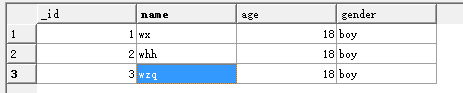
執行insert方法之後(執行了三次):
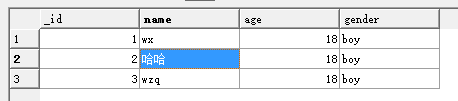
執行了update方法之後:
執行了query方法之後:

執行了delete方法之後:

 Android仿IOS的AssistiveTouch的控件EasyTouch實現
概述:之前我聽到過一則新聞,就是說Ipone中的AssistiveTouch的設計初衷是給殘疾人使用的。而這一功能在亞洲(中國)的使用最為頻繁。雖不知道這新聞的可靠性,但
 Android(Lollipop/5.0) Material Design(三) 使用Material主題
官網地址:https://developer.android.com/intl/zh-tw/training/material/theme.html 新的Material
 Android自定義ActionProvider ToolBar實現Menu小紅點
今天的幾個目標: 1. 自定義ActionProvider 2. Toolbar ActionBar自定義Menu 3. Toolbar ActionBar 右側Menu
 手機qq提示異地登陸怎麼辦 如何加強手機qq安全管理
我們的qq有時候會有異地登陸的提示,這是怎麼回事呢?難道我們的qq號被盜了?如何才能加強手機qq的安全管理?下面我們就一起來看看吧!1、大家登錄自己的QQ賬