編輯:關於Android編程
首先描述下我們想要實現的內容,我們希望在一個應用中通過點擊按鈕,去操作另一個進程中應用的音樂播放功能。
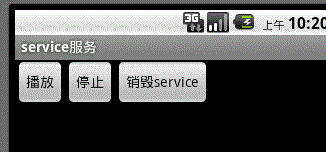
如圖,我們點擊“播放”時,系統就會去遠程調用我們提供的一個service(與當前service不是同一個應用哦),然後操作service中的音樂播放,點擊“停止”則會終止播放。想要重新播放的話,必須先點“銷毀service”,再點播放按鈕哦。(至於這裡為什麼要先點銷毀按鈕才能播放,完全是為了給大家展示下,遠程調用service時,怎麼去解綁service)。
在這個例子中,我們用到了一個非常重要的概念,AIDL。
AIDL(android interface definition language)android接口描述語言,其主要的作用就是允許我們在不同的進程間進行通信。
我們都知道每個應用程序都運行在各自的進程中,並且android平台是不允許不同進程間進行直接的對象數據等傳遞的。如果我們非要進行進程間的通訊,那麼我們就必須將我們的數據對象分解成一個個微小的、可以被操作系統理解的數據單元,然後有序的通過進程邊界的檢查。
如果讓我們自己實現,那麼這個過程都愁死一批批的程序人了。幸好android,為我們解決了這個問題,這就是AIDL出現的原因了。
AIDL (Android Interface Definition Language)是一種IDL 語言,用於生成可以在Android設備上兩個進程之間進行進程間通信(IPC)的代碼。如果在一個進程中(例如Activity)要調用另一個進程中(例如Service)對象的操作,就可以使用AIDL生成可序列化的參數。
AIDL IPC機制是面向接口的,像COM或Corba一樣,但是更加輕量級。它是使用代理類在客戶端和實現端傳遞數據。
注意:AIDL只支持方法,不能定義靜態成員,並且方法也不能有類似public等的修飾符;AIDL運行方法有任何類型的參數和返回值,在java的類型中,以下的類型使用時不需要導入包(import),基本數據類型、String、Map、List.當然為了避免出錯,建議只要使用了,就導入包。
使用AIDL的步驟:
服務端(提供服務):
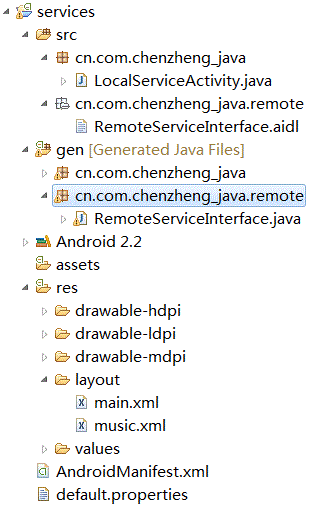
第一步:定義一個*.aidl文件,該文件裡是符合aidl語言規范的接口定義,裡面定義了外部應用可以訪問的方法。當我們保存該文件的時候,eclipse會自動為我們在gen文件夾下生成一個相應的java接口文件。例如RemoteServiceInterface.java
第二步:定義一個自己的service, 並將其注冊到androidManifest.xml文件中,例如:
<service android:name="MyRemoteService">
 <intent-filter>
 <action android:name="cn.com.chenzheng_java.remote"/>
 </intent-filter>
 </service>
注意這裡一定要提供一個intent-filter,我們的客戶端進程就是通過該action訪問到服務端進程的哦。
我們都知道,在實現自己的service時,為了其他應用可以通過bindService來和我們的service進行交互,我們都要實現service中的onBind()方法,並且返回一個繼承了Binder的內部類;在這裡,eclipse自動為我們生成的RemoteServiceInterface.java中有一個實現了Binder的內部類,RemoteServiceInterface.Stub。AIDL要求我們,在這裡不能再直接去實現Binder類了,而是去實現,AIDL提供給我們的Stub類。 實現stub類的同時,AIDL還要求我們同時實現我們在接口中定義的各種服務的具體實現。至此為止,我們的服務端已經和我們的aidl文件綁定到一起了哦。
客戶端:
第一步:客戶端要想使用該服務,肯定要先知道我們的服務在aidl文件中到底對外提供了什麼服務,對吧?所以,第一步,我們要做的就是,將aidl文件拷貝一份到客戶端的程序中(這裡一定要注意,包路徑要和服務端的保持一致哦,例如服務端為cn.com.chenzheng_java.remote.a.aidl,那麼在客戶端這邊也應該是這個路徑)。
第二步:我們都知道,想要和service交互,我們要通過bindService方法,該方法中有一個ServiceConnection類型的參數。而我們的主要代碼便是在該接口的實現中。
第三步:在ServiceConnection實現類的onServiceConnected(ComponentName name, IBinder service)方法中通過類似remoteServiceInterface = RemoteServiceInterface.Stub.asInterface(service);方式就可以獲得遠程服務端提供的服務的實例,然後我們就可以通過remoteServiceInterface 對象調用接口中提供的方法進行交互了。(這裡的關鍵是通過*.Stub.asInterface(service);方法獲取一個aidl接口的實例哦)
我們前面在服務端中說過了,必須提供一個intent-filter來匹配請求是否合法,所以我們在客戶端訪問服務的時候,還必須傳遞包含了匹配action的Intent哦。
下邊整體是代碼:
遠程服務端:
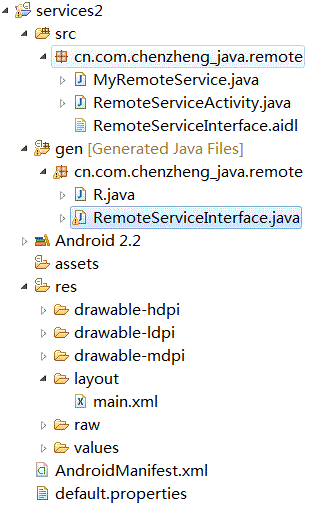
RemoteServiceInterface.aidl
package cn.com.chenzheng_java.remote;
/**AIDL的語法和Interface的語法稍微有些不同,
*它裡面只能有方法,並且java中的那些修飾詞如public等,在這裡是不支持的.
*當我們在eclipse中添加一個以.aidl結尾的AIDL文件時,如果你的格式正確,那麼
*在gen目錄下,你就會看到系統根據你提供AIDL文件自動為你生成的相應的java類
*@author chenzheng_java
*/


 interface RemoteServiceInterface {

   void startMusic();
   void stopMusic();
}
MyRemoteService.java
package cn.com.chenzheng_java.remote;

import java.io.IOException;

import android.app.Service;
import android.content.Intent;
import android.media.MediaPlayer;
import android.os.IBinder;
import android.os.RemoteException;
/**
 * @description 遠程service
 * @author chenzheng_java
 *
 */
public class MyRemoteService extends Service {
  MediaPlayer mediaPlayer;
  @Override
  public IBinder onBind(Intent intent) {
    return new MyBinder();
  }
  @Override
  public void onCreate() {
    /*
     * MediaPlayer.create方法第一個參數實際上為context對象,這裡我們直接傳遞service給它,
     * 是因為service本身也是繼承了context的。
     */
     mediaPlayer = MediaPlayer.create(MyRemoteService.this, R.raw.aiweier);
    super.onCreate();
  }

  /**
   * @description 這裡一定要注意,繼承的不再是Binder,而是系統自動為我們生成的
   *       Binder的一個內部類,叫做Stub。我們通過繼承Stub類,然後實現AIDL
   *       中定義的方法,便等於對接口的方法進行了具體的實現。
   * @author chenzheng_java
   *
   */
  private class MyBinder extends RemoteServiceInterface.Stub{

    public void startMusic() throws RemoteException {

       mediaPlayer.start();

    }

    public void stopMusic() throws RemoteException {
      mediaPlayer.stop();
      try {
        mediaPlayer.prepare();
      } catch (IllegalStateException e) {
        e.printStackTrace();
      } catch (IOException e) {
        e.printStackTrace();
      }
    }

  }

}
RemoteServiceActivity.java
package cn.com.chenzheng_java.remote;

import android.app.Activity;
import android.os.Bundle;
/**
 * 很多人不理解,這裡面基本上什麼也沒實現,為什麼還要提供呢?
 * 其實原因是這樣的,service代碼我們寫好了,也在配置文件中注冊了,
 * 這樣,手機系統就會識別了嗎?不是的哦,你至少得將該service所在的
 * 應用運行一次才可以哦。要不手機怎麼知道你添加了一個service啊,對吧!
 * @author chenzheng_Java
 *
 */
public class RemoteServiceActivity extends Activity {
  @Override
  public void onCreate(Bundle savedInstanceState) {
    super.onCreate(savedInstanceState);
    setContentView(R.layout.main);
  }
}
androidManifest.xml
<?xml version="1.0" encoding="utf-8"?>
<manifest xmlns:android="http://schemas.android.com/apk/res/android"
   package="cn.com.chenzheng_java.remote"
   android:versionCode="1"
   android:versionName="1.0">
  <uses-sdk android:minSdkVersion="8" />

  <application android:icon="@drawable/icon" android:label="@string/app_name">
    <activity android:name=".RemoteServiceActivity"
         android:label="@string/app_name">
      <intent-filter>
        <action android:name="android.intent.action.MAIN" />
        <category android:name="android.intent.category.LAUNCHER" />
      </intent-filter>
    </activity>

  <service android:name="MyRemoteService">
    <intent-filter>
    <action android:name="cn.com.chenzheng_java.remote"/>
    </intent-filter>
  </service>

  </application>
</manifest>
客戶端:
activity代碼:
package cn.com.chenzheng_java;

import android.app.Activity;
import android.content.ComponentName;
import android.content.Context;
import android.content.Intent;
import android.content.ServiceConnection;
import android.os.Bundle;
import android.os.IBinder;
import android.os.RemoteException;
import android.util.Log;
import android.view.View;
import android.view.View.OnClickListener;
import android.widget.Button;
import cn.com.chenzheng_java.remote.RemoteServiceInterface;
/***
 * @author chenzheng_java
 * @description 通過當前activity去調用不同進程中的遠程service
 */
public class LocalServiceActivity extends Activity implements OnClickListener {
  String ACTION_NAME = "cn.com.chenzheng_java.remote";
  boolean flag = false;
  Button button_start ;
  Button button_stop ;
  Button button_destroy ;

  @Override
  public void onCreate(Bundle savedInstanceState) {
    super.onCreate(savedInstanceState);
    setContentView(R.layout.music);

    button_start = (Button) findViewById(R.id.button1);
    button_stop = (Button) findViewById(R.id.button2);
    button_destroy = (Button) findViewById(R.id.button3);

    button_start.setOnClickListener(this);
    button_stop.setOnClickListener(this);
    button_destroy.setOnClickListener(this);
  }

  RemoteServiceInterface remoteServiceInterface ;

  private class MyServiceConnection implements ServiceConnection{
    public void onServiceConnected(ComponentName name, IBinder service) {
      remoteServiceInterface = RemoteServiceInterface.Stub.asInterface(service);
      try {
        Log.i("flag", flag+"");
        if(flag){
          Log.i("通知", "已經開始唱歌");
          remoteServiceInterface.startMusic();
        }else{
          Log.i("通知", "已經停止唱歌");
          remoteServiceInterface.stopMusic();
        }


      } catch (RemoteException e) {
        e.printStackTrace();
      }

    }

    public void onServiceDisconnected(ComponentName name) {

    }

  }

  private MyServiceConnection serviceConnection = new MyServiceConnection();

  public void onClick(View v) {
    if(v == button_start){
      flag = true;
      Intent intent = new Intent(ACTION_NAME);
      /**
       * Context.BIND_AUTO_CREATE 當綁定service時,如果發現尚未create,那麼就先create一個,然後綁定
       */
      bindService(intent, serviceConnection ,Context.BIND_AUTO_CREATE);
    }

    if(v == button_stop){
      Log.i("通知", "已經點擊了停止按鈕");
      flag = false;
      Intent intent = new Intent(ACTION_NAME);
      bindService(intent, serviceConnection ,Context.BIND_AUTO_CREATE);
      try {
        remoteServiceInterface.stopMusic();
      } catch (RemoteException e) {
        e.printStackTrace();
      }
    }

    if(v == button_destroy){
      flag = false;
      Intent intent = new Intent(ACTION_NAME);
      bindService(intent, serviceConnection ,Context.BIND_AUTO_CREATE);
      unbindService(serviceConnection);
    }

  }
}
music.xml
<?xml version="1.0" encoding="utf-8"?>
<LinearLayout xmlns:android="http://schemas.android.com/apk/res/android"
  android:layout_width="match_parent" android:layout_height="match_parent">
  <Button android:text="播放" android:id="@+id/button1"
    android:layout_width="wrap_content" android:layout_height="wrap_content"></Button>
  <Button android:text="停止" android:id="@+id/button2"
    android:layout_width="wrap_content" android:layout_height="wrap_content"></Button>
  <Button android:text="銷毀service" android:id="@+id/button3"
    android:layout_width="wrap_content" android:layout_height="wrap_content"></Button>
</LinearLayout>
其他沒有粘貼出來的代碼都是由系統默認生成的。
AIDL與傳遞對象
除了上面我們提到的通過service提供音樂播放等類似的服務之外,我們還可以通過service將對象傳遞回來哦,你知道怎麼用嗎,先看例子:
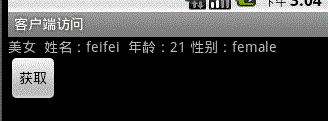
當我們點擊“獲取”時,會從另一個線程的service中獲取一個對象,然後將裡面的內容讀出來。
對於aidl實現以對象的方式交互。主要步驟如下:
服務端:
第一:定義一個實體類,這裡是Beauty,定義一個服務接口aidl文件RemoteBeauty.aidl,這裡有一點需要注意,我們引用自定義的實體類到aidl中時需要通過import導入包,但是你會發現,即使你導入了包,還是提示找不到,這時候,你要做的是,建一個以實體類名稱命名的aidl文件,如Beauty.aidl,在裡面添加一句pracelable Beauty。
第二:開始編寫Beauty,這裡一定要注意,它一定要實現Pracelable接口,該接口是一個序列化的接口,功能和serializable相似,但是功能更加的迅速。此外,在該Beauty內部一定要聲明一個public static final Pracelable.Creator<T>CREATOR對象!!除了裡面的那個T代表實體類之外,其他的都不准改變哦。
第三:在androidManifest.xml中注冊service。並定義好訪問該service的action字符串。
客戶端:
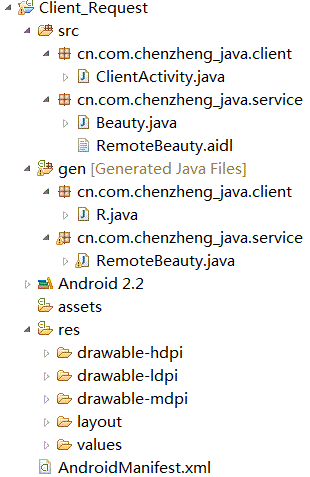
客戶端這邊相應的要簡單很多,但是要注意的一點是,要將實體類還有aidl文件都拷貝過來哦,而且要保證路徑完全一致!!
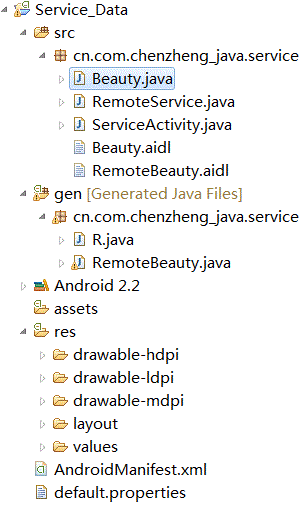
Beauty.java
package cn.com.chenzheng_java.service;

import android.os.Parcel;
import android.os.Parcelable;
/**
 *
 * @author chenzheng_java
 * @description Parcelable是android提供的一個比serializable效率更高的序列號接口
 *       這裡必須要繼承Parcelable哦,不序列號怎麼可以傳遞……對吧?!
 * 在實體類我們要做兩件重要的事情:
 * 第一:實現Parcelable接口
 * 第二:定義一個Parcelable.Creator類型的CREATOR對象
 * 第三:要提供一個Beauty.aidl文件,其中內容為parcelable Beauty,定義了之後,在其他aidl文件中引用Beauty時便不會提示出錯了。
 * @since 2011/03/18
 *
 */
public class Beauty implements Parcelable {

  String name ;
  int age ;
  String sex ;

  public String getName() {
    return name;
  }

  public void setName(String name) {
    this.name = name;
  }

  public int getAge() {
    return age;
  }

  public void setAge(int age) {
    this.age = age;
  }

  public String getSex() {
    return sex;
  }

  public void setSex(String sex) {
    this.sex = sex;
  }

  @Override
  public int describeContents() {
    return 0;
  }

  /**
   * 將對象序列號
   * dest 就是對象即將寫入的目的對象
   * flags 有關對象序列號的方式的標識
   * 這裡要注意,寫入的順序要和在createFromParcel方法中讀出的順序完全相同。例如這裡先寫入的為name,
   * 那麼在createFromParcel就要先讀name
   */
  @Override
  public void writeToParcel(Parcel dest, int flags) {

      dest.writeString(name);
      dest.writeInt(age);
      dest.writeString(sex);
  }
  /**
   * 在想要進行序列號傳遞的實體類內部一定要聲明該常量。常量名只能是CREATOR,類型也必須是
   * Parcelable.Creator<T>
   */
  public static final Parcelable.Creator<Beauty> CREATOR = new Creator<Beauty>() {

    /**
     * 創建一個要序列號的實體類的數組,數組中存儲的都設置為null
     */
    @Override
    public Beauty[] newArray(int size) {
      return new Beauty[size];
    }

    /***
     * 根據序列號的Parcel對象,反序列號為原本的實體對象
     * 讀出順序要和writeToParcel的寫入順序相同
     */
    @Override
    public Beauty createFromParcel(Parcel source) {
      String name = source.readString();
      int age = source.readInt();
      String sex = source.readString();
      Beauty beauty = new Beauty();
      beauty.setName(name);
      beauty.setAge(age);
      beauty.setSex(sex);

      return beauty;
    }
  };

}
RemoteService.java
package cn.com.chenzheng_java.service;

import android.app.Service;
import android.content.Intent;
import android.os.IBinder;
import android.os.RemoteException;
import android.util.Log;
/**
 *
 * @author chenzheng_java
 * @description 提供服務的service
 *
 */
public class RemoteService extends Service {

  @Override
  public IBinder onBind(Intent intent) {
    Log.i("通知", "執行了OnBind");
    return new MyBinder();
  }


  private class MyBinder extends RemoteBeauty.Stub{

    @Override
    public Beauty getBeauty() throws RemoteException {

      Beauty beauty = new Beauty();
      beauty.setName("feifei");
      beauty.setAge(21);
      beauty.setSex("female");

      return beauty;
    }}


}
ServiceActivity.java
package cn.com.chenzheng_java.service;

import android.app.Activity;
import android.os.Bundle;
/**
 * @description 進程之間對象數據的傳遞
 * @author chenzheng_java
 *
 */
public class ServiceActivity extends Activity {
  @Override
  public void onCreate(Bundle savedInstanceState) {
    super.onCreate(savedInstanceState);
    setContentView(R.layout.main);
  }
}
Beauty.aidl
parcelable Beauty;

RemoteBeauty.aidl

package cn.com.chenzheng_java.service;
import cn.com.chenzheng_java.service.Beauty;
 interface RemoteBeauty {

  Beauty getBeauty();

}
manifest.xml
<?xml version="1.0" encoding="utf-8"?>
<manifest xmlns:android="http://schemas.android.com/apk/res/android"
   package="cn.com.chenzheng_java.service"
   android:versionCode="1"
   android:versionName="1.0">
  <uses-sdk android:minSdkVersion="8" />

  <application android:icon="@drawable/icon" android:label="@string/app_name">
    <activity android:name=".ServiceActivity"
         android:label="@string/app_name">
      <intent-filter>
        <action android:name="android.intent.action.MAIN" />
        <category android:name="android.intent.category.LAUNCHER" />
      </intent-filter>
    </activity>

<!-- service開始 -->
  <service android:name="RemoteService">
    <intent-filter>
      <action android:name="cn.com.chenzheng_java.remote2"/>
    </intent-filter>
  </service>
<!-- service結束 -->
  </application>
</manifest>
客戶端:
ClientActivity.java
package cn.com.chenzheng_java.client;

import android.app.Activity;
import android.content.ComponentName;
import android.content.Context;
import android.content.Intent;
import android.content.ServiceConnection;
import android.os.Bundle;
import android.os.IBinder;
import android.os.RemoteException;
import android.util.Log;
import android.view.View;
import android.view.View.OnClickListener;
import android.widget.Button;
import android.widget.TextView;
import cn.com.chenzheng_java.service.Beauty;
import cn.com.chenzheng_java.service.RemoteBeauty;

public class ClientActivity extends Activity implements OnClickListener {
  TextView textView ;
  Button button ;
  String actionName = "cn.com.chenzheng_java.remote2";
  RemoteBeauty remoteBeauty;

  @Override
  public void onCreate(Bundle savedInstanceState) {
    super.onCreate(savedInstanceState);
    setContentView(R.layout.main);
    textView = (TextView) findViewById(R.id.textView1);
    button = (Button) findViewById(R.id.button1);

    button.setOnClickListener(this);
  }

  private class MyServiceConnection implements ServiceConnection{

    @Override
    public void onServiceConnected(ComponentName name, IBinder service) {
      Log.i("通知", "鏈接成功!");
      remoteBeauty = RemoteBeauty.Stub.asInterface(service);
      try {
        Beauty beauty = remoteBeauty.getBeauty();
        textView.setText("美女 姓名:"+beauty.getName()+" 年齡:"+beauty.getAge() +" 性別:"+beauty.getSex());


      } catch (RemoteException e) {
        e.printStackTrace();
      }
    }

    @Override
    public void onServiceDisconnected(ComponentName name) {

    }

  }
  MyServiceConnection connection = new MyServiceConnection();
  @Override
  public void onClick(View v) {
    Intent intent = new Intent(actionName);
    bindService(intent, connection, Context.BIND_AUTO_CREATE);
  }
}
另外Beauty.java 以及RemoteBeauty.aidl都是從服務端系統中拷貝過來的哦。
如果你想你的service在系統開機時自啟動。可以在service的androidManifest.xml中加上這樣的配置。
<receiver android:name=".StartBroadcastReceiver">

      <intent-filter>

  <action android:name="android.intent.action.BOOT_COMPLETED"/>

      </intent-filter>

</receiver>
 細說JVM系列:JVM內存空間分區
java虛擬機基本結構:JVM是一個內存中的虛擬機,那它的存儲就是內存了,我們寫的所有類、常量、變量、方法都在內存中,因此明白java虛擬機的內存分配非常重要,本部分主要
 Android BitmapFactory圖片壓縮處理(大位圖二次采樣壓縮處理)
Android實際開發中,在加載大量圖片的時候,比如ViewPager、GridView、ListView中,加載了大量的比較大圖片就容易出現OOM(內存溢出)的異常,這
 Android中Activity切換時共享視圖元素的切換動畫(4.x兼容方案)
方案一:PreLollipopTransition首先在 build.gradle 配置文件添加這個庫依賴dependencies { compile
 點九圖片的顯示內容區域應作何理解
點九圖片的拉伸區域不難理解,顯示內容區域是怎樣的?.9 ,是andriod平台的應用軟件開發裡的一種特殊的圖片形式,文件擴展名為:.9.png智能手機中有自動橫屏的功能,