編輯:關於Android編程
1、首先我們要寫一個廣播接收器,當我們的手機收到短信時,系統會自動發送一個廣播,我們只需要接收到這條廣播就可以了
2、在廣播裡面,我們重寫的onReceive()方法,通過裡面的Intent寫到的Bundle就可以拿到短信的內容,
3、清單文件裡面我們必須要添加權限,否則無法接收到。
4、為了防止我們的廣播接收不到,我們自己寫的廣播接收器的權限必須要大,以防萬一,我設置了1000。
下面上代碼,裡面的注釋也比較詳細..
 <?xml version="." encoding="utf-"?>
 <manifest xmlns:android="http://schemas.android.com/apk/res/android"
   package="com.example.fanlei.cutnotedemo" >
   //接收短信
   <uses-permission android:name="android.permission.RECEIVE_SMS"/>
   <application
     android:allowBackup="true"
     android:icon="@drawable/ic_launcher"
     android:label="@string/app_name"
     android:theme="@style/AppTheme" >
     <!-- action:name = 的名稱是固定的 -->
     <receiver android:name=".NoteReceiver">
       <intent-filter android:priority="">
         <action android:name="android.provider.Telephony.SMS_RECEIVED"/>
       </intent-filter>
     </receiver>
     <activity
       android:name=".MainActivity"
       android:label="@string/app_name" >
       <intent-filter>
         <action android:name="android.intent.action.MAIN" />
         <category android:name="android.intent.category.LAUNCHER" />
       </intent-filter>
     </activity>
   </application>
 </manifest>
寫一個類,繼承BroadcastReceiver
Android--獲取短信的內容,截取短信
 package com.example.fanlei.cutnotedemo;
 import android.content.BroadcastReceiver;
 import android.content.Context;
 import android.content.Intent;
 import android.os.Bundle;
 import android.telephony.SmsMessage;
 import android.widget.Toast;
 import java.text.SimpleDateFormat;
 import java.util.Date;
 /**
 * 廣播接收器
 */
 public class NoteReceiver extends BroadcastReceiver {
   private static final String SMS_RECEIVED_ACTION = "android.provider.Telephony.SMS_RECEIVED";
   @Override
   public void onReceive(Context context, Intent intent) {
     String action = intent.getAction();
     //判斷廣播消息
     if (action.equals(SMS_RECEIVED_ACTION)){
       Bundle bundle = intent.getExtras();
       //如果不為空
       if (bundle != null){
         //將pdus裡面的內容轉化成Object[]數組
         Object pdusData[] = (Object[]) bundle.get("pdus");
         //解析短信
         SmsMessage[] msg = new SmsMessage[pdusData.length];
         for (int i = ;i < msg.length;i++){
           byte pdus[] = (byte[]) pdusData[i];
           msg[i] = SmsMessage.createFromPdu(pdus);
         }
         StringBuffer content = new StringBuffer();//獲取短信內容
         StringBuffer phoneNumber = new StringBuffer();//獲取地址
         StringBuffer receiveData = new StringBuffer();//獲取時間
         //分析短信具體參數
         for (SmsMessage temp : msg){
           content.append(temp.getMessageBody());
           phoneNumber.append(temp.getOriginatingAddress());
           receiveData.append(new SimpleDateFormat("yyyy-MM-dd hh:mm:ss.SSS")
               .format(new Date(temp.getTimestampMillis())));
         }
         /**
         * 這裡還可以進行好多操作,比如我們根據手機號進行攔截(取消廣播繼續傳播)等等
         */
         Toast.makeText(context,phoneNumber.toString()+content+receiveData, Toast.LENGTH_LONG).show();//短信內容
       }
     }
   }
 }
ps:android獲取短信所有內容
public class GetMessageInfo {
  List<MessageInfo> list;
  Context context;
  MessageInfo messageInfo;
  public GetMessageInfo(Context context) {
    list = new ArrayList<MessageInfo>();
    this.context = context;
  }
  // --------------------------------收到的短息信息----------------------------------
  public List<MessageInfo> getSmsInfos() {
    final String SMS_URI_INBOX = "content://sms/inbox";// 收信箱
    try {
      ContentResolver cr = context.getContentResolver();
      String[] projection = new String[] { "_id", "address", "person","body", "date", "type" };
      Uri uri = Uri.parse(SMS_URI_INBOX);
      Cursor cursor = cr.query(uri, projection, null, null, "date desc");
      while (cursor.moveToNext()) {
        messageInfo = new MessageInfo();
        // -----------------------信息----------------
        int nameColumn = cursor.getColumnIndex("person");// 聯系人姓名列表序號
        int phoneNumberColumn = cursor.getColumnIndex("address");// 手機號
        int smsbodyColumn = cursor.getColumnIndex("body");// 短信內容
        int dateColumn = cursor.getColumnIndex("date");// 日期
        int typeColumn = cursor.getColumnIndex("type");// 收發類型 1表示接受 2表示發送
        String nameId = cursor.getString(nameColumn);
        String phoneNumber = cursor.getString(phoneNumberColumn);
        String smsbody = cursor.getString(smsbodyColumn);
        Date d = new Date(Long.parseLong(cursor.getString(dateColumn)));
        SimpleDateFormat dateFormat = new SimpleDateFormat("yyyy-MM-dd " + "\n" + "hh:mm:ss");
        String date = dateFormat.format(d);
        // --------------------------匹配聯系人名字--------------------------
        Uri personUri = Uri.withAppendedPath(ContactsContract.PhoneLookup.CONTENT_FILTER_URI,phoneNumber);
        Cursor localCursor = cr.query(personUri, new String[] {PhoneLookup.DISPLAY_NAME, PhoneLookup.PHOTO_ID,PhoneLookup._ID }, null, null, null);
        System.out.println(localCursor.getCount());
        System.out.println("之前----"+localCursor);
        if (localCursor.getCount()!=0) {
          localCursor.moveToFirst();
          System.out.println("之後----"+localCursor);
          String name = localCursor.getString(localCursor.getColumnIndex(PhoneLookup.DISPLAY_NAME));
          long photoid = localCursor.getLong(localCursor.getColumnIndex(PhoneLookup.PHOTO_ID));
          long contactid = localCursor.getLong(localCursor.getColumnIndex(PhoneLookup._ID));
          messageInfo.setName(name);
          // 如果photoid 大於0 表示聯系人有頭像 ,如果沒有給此人設置頭像則給他一個默認的
          if (photoid > 0) {
           Uri uri1 = ContentUris.withAppendedId(ContactsContract.Contacts.CONTENT_URI,contactid);
            InputStream input = ContactsContract.Contacts.openContactPhotoInputStream(cr, uri1);
            messageInfo.setContactPhoto(BitmapFactory.decodeStream(input));
          } else {
            messageInfo.setContactPhoto(BitmapFactory.decodeResource(context.getResources(),R.drawable.ic_launcher));
          }
        }else{
            messageInfo.setName(phoneNumber);
            messageInfo.setContactPhoto(BitmapFactory.decodeResource(context.getResources(), R.drawable.ic_launcher));
          }
        localCursor.close();
        messageInfo.setSmsContent(smsbody);
        messageInfo.setSmsDate(date);
        list.add(messageInfo);
      }
    } catch (SQLiteException e) {
      e.printStackTrace();
    }
    return list;
  }
}
以上內容是小編給大家分享的Android開發獲取短信的內容並截取短信,希望大家喜歡。
 靠譜助手怎麼輸入中文
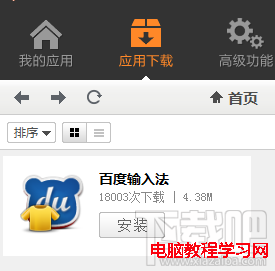
手機上輸入中文相當容易,但是在靠譜助手這個電腦上的安卓模擬器要怎麼輸入中文呢?電腦上直接輸入中文根本沒反應啊?靠譜助手模擬器輸入中文需要安裝拼音輸入法。經小
 Android 驅動(二) IIC簡介
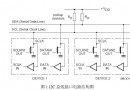
一、 I2C簡介 I2C(Inter-Integrated Circuit)總線是一種由 Philips 公司開發的兩線式串行總線,用於連接微控制器及其外圍設備。I2
 Android UI布局之LinearLayout
LinearLayout是Android中最常用的布局之一,它將自己包含的子元素按照一個方向進行排列。方向有兩種,水平或者豎直。這個方向可以通過設置android:ori
 Android實現3D旋轉的View
今天在網上看到一篇文章寫關於Android實現3D旋轉(http://www.ibm.com/developerworks/cn/opensource/os-cn-and