編輯:關於Android編程
本文實例分析了Android重寫View並自定義屬性的方法。分享給大家供大家參考,具體如下:
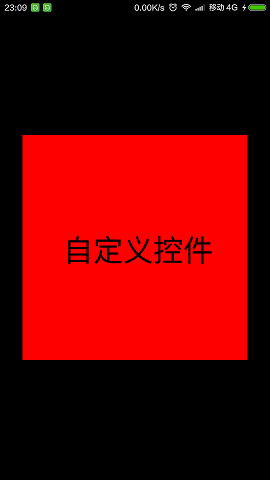
這裡通過自定義屬性 實現如下圖所示效果:
第一步:在res\values的目錄下新建一個文件attrs.xml
聲明一些自定義屬性
<?xml version="1.0" encoding="utf-8"?>
<resources>
  <declare-styleable name="CustomViewStyle">
    <attr name="customText" format="string" />
    <attr name="customTextColor" format="color" />
    <attr name="customTextSize" format="dimension" />
  </declare-styleable>
</resources>
第二步:在layout目錄下新建布局文件activity_main.xml
特別注意要在外層控件加上這個聲明:
格式:xmlns:(你自定義名稱)="http://schemas.android.com/apk/(你應用的包名)"
xmlns:xr="http://schemas.android.com/apk/res/com.rong.test"
或者
xmlns:xr="http://schemas.android.com/apk/res-auto"
推薦使用第二種
在布局文件中加入這些自定義的屬性:
<?xml version="1.0" encoding="utf-8"?>
<RelativeLayout xmlns:android="http://schemas.android.com/apk/res/android"
  xmlns:xr="http://schemas.android.com/apk/res/com.rong.test"
  android:layout_width="match_parent"
  android:layout_height="match_parent"
  android:background="@android:color/black"
  android:orientation="vertical" >
  <com.rong.activity.CustomView
    android:layout_width="300dp"
    android:layout_height="300dp"
    android:layout_centerInParent="true"
    android:background="#ff0000"
    xr:customText="自定義控件"
    xr:customTextColor="#000000"
    xr:customTextSize="40sp" />
</RelativeLayout>
第三部繼承View重寫
package com.rong.activity;
import com.rong.test.R;
import android.content.Context;
import android.content.res.TypedArray;
import android.graphics.Canvas;
import android.graphics.Color;
import android.graphics.Paint;
import android.graphics.Rect;
import android.util.AttributeSet;
import android.view.View;
/**
 * 自定義控件
 *
 * @author 徐榮
 *
 */
public class CustomView extends View {
  /**
   * 自定義畫筆
   */
  private Paint mPaint;
  /**
   * 文字范圍
   */
  private Rect mBounds;
  /**
   * 自定義文字
   */
  private String customText;
  /**
   * 自定義大小
   */
  private int customTextSize;
  /**
   * 自定義顏色
   */
  private int customTextColor;
  public CustomView(Context context, AttributeSet attrs) {
    super(context, attrs);
    TypedArray typedArray = context.obtainStyledAttributes(attrs, R.styleable.CustomViewStyle);
    // 獲取自定義文字
    customText = typedArray.getString(R.styleable.CustomViewStyle_customText);
    // 獲取自定義文字大小
    customTextSize = typedArray.getDimensionPixelSize(R.styleable.CustomViewStyle_customTextSize, 28);
    // 或者自定義文字顏色
    customTextColor = typedArray.getColor(R.styleable.CustomViewStyle_customTextColor, Color.WHITE);
    // 要回收這個typedArray對象
    typedArray.recycle();
    initView();
  }
  public void initView() {
    // 初始化畫筆
    mPaint = new Paint();
    mPaint.setAntiAlias(true);
    mPaint.setStyle(Paint.Style.FILL);
    mPaint.setColor(customTextColor);
    mPaint.setTextSize(customTextSize);
    // 生成文字區域
    mBounds = new Rect();
  }
  @Override
  protected void onDraw(Canvas canvas) {
    super.onDraw(canvas);
    // 獲取文字顯示區域mBounds
    mPaint.getTextBounds(customText, 0, customText.length(), mBounds);
    //使文字寬居中顯示=控件的寬度/2 -文字的寬度/2
    float helfWidth = getWidth() / 2 - mBounds.width() / 2;
    //使文字高居中顯示=控件的寬度/2 +文字的寬度/2
    float helfHeight = getHeight() / 2+mBounds.height()/2;
    //繪制文字
    canvas.drawText(customText, helfWidth, helfHeight, mPaint);
  }
}
運行!
更多關於Android相關內容感興趣的讀者可查看本站專題:《Android開發入門與進階教程》、《Android基本組件用法總結》、《Android視圖View技巧總結》、《Android布局layout技巧總結》及《Android控件用法總結》
希望本文所述對大家Android程序設計有所幫助。
 Android實現網絡加載時的對話框功能
效果預覽簡要說明現在android程序網絡請求操作是必不可少的,然而擁有好的交互體驗的程序對網絡耗時操作的處理尤為重要。代碼說明:dialog_loading.xml&l
 微信電腦版視頻文件夾位置 微信電腦版視頻存在哪裡
微信出了電腦版,在收到視頻後,視頻是保存在哪呢?微信電腦版視頻存在哪裡? 微信電腦版視頻文件夾位置就讓下載吧小編來告訴你吧 1、首先我們打開手機上的微信,
 ActiveAndroid使用詳解
ActiveAndroid和OrmLite都是ORM架構的數據庫,之前使用的是OrmLite,今天研究了一番ActiveAndroid,發現兩者各有千秋,在代碼上,Act
 qq厘米秀怎麼換角色
QQ厘米秀是手機QQ6.2.2開啟的新功能,為大家提供一個手機QQ秀功能,就像用戶在電腦端的QQ秀。有些小伙伴玩著玩著覺得不對勁了,為什麼本人性別是個女女,