編輯:關於Android編程
本文實例講述了Android編程自定義AlertDialog(退出提示框)用法,分享給大家供大家參考,具體如下:
有時候我們需要在游戲或應用中用一些符合我們樣式的提示框(AlertDialog)
以下是我在開發一個小游戲中總結出來的.希望對大家有用.
先上效果圖:
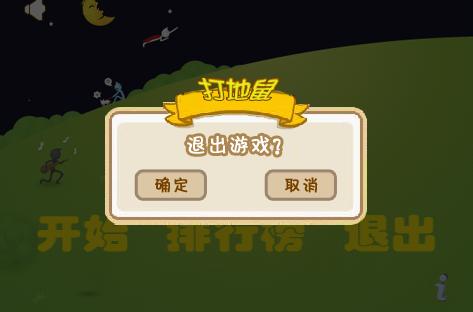
下面是用到的背景圖或按鈕的圖片
經過查找資料和參考了一下例子後才知道,要實現這種效果很簡單.就是在設置alertDialog的contentView.
以下的代碼是寫在Activity下的,代碼如下:
public boolean onKeyDown(int keyCode, KeyEvent event) {
 // 如果是返回鍵,直接返回到桌面
 if(keyCode == KeyEvent.KEYCODE_BACK || keyCode == KeyEvent.KEYCODE_HOME){
      showExitGameAlert();
 }
 return super.onKeyDown(keyCode, event);
}
private void showExitGameAlert() {
 final AlertDialog dlg = new AlertDialog.Builder(this).create();
 dlg.show();
 Window window = dlg.getWindow();
    // *** 主要就是在這裡實現這種效果的.
    // 設置窗口的內容頁面,shrew_exit_dialog.xml文件中定義view內容
 window.setContentView(R.layout.shrew_exit_dialog);
    // 為確認按鈕添加事件,執行退出應用操作
 ImageButton ok = (ImageButton) window.findViewById(R.id.btn_ok);
 ok.setOnClickListener(new View.OnClickListener() {
 public void onClick(View v) {
  exitApp(); // 退出應用...
 }
 });
    // 關閉alert對話框架
    ImageButton cancel = (ImageButton) window.findViewById(R.id.btn_cancel);
    cancel.setOnClickListener(new View.OnClickListener() {
  public void onClick(View v) {
  dlg.cancel();
 }
  });
}
以下的是layout文件,定義了對話框中的背景與按鈕.點擊事件在Activity中添加.
文件名為 : shrew_exit_dialog.xml
<?xml version="1.0" encoding="utf-8"?>
<RelativeLayout
 xmlns:Android="http://schemas.android.com/apk/res/android"
 android:layout_height="wrap_content"
 android:layout_width="wrap_content">
 <!-- 退出游戲的背景圖 -->
 <ImageView android:id="@+id/exitGameBackground"
 android:layout_centerInParent="true"
 android:layout_height="wrap_content"
 android:layout_width="wrap_content"
 android:src="@drawable/bg_exit_game" />
 <!-- 確認按鈕 -->
 <ImageButton android:layout_alignBottom="@+id/exitGameBackground"
 android:layout_alignLeft="@+id/exitGameBackground"
 android:layout_marginBottom="30dp"
 android:layout_marginLeft="35dp"
 android:id="@+id/btn_ok"
 android:layout_height="wrap_content"
 android:layout_width="wrap_content"
 android:background="@drawable/btn_ok" />
 <!-- 取消按鈕 -->
 <ImageButton android:layout_alignBottom="@+id/exitGameBackground"
 android:layout_alignRight="@+id/exitGameBackground"
 android:layout_marginBottom="30dp"
 android:layout_marginRight="35dp"
 android:id="@+id/btn_cancel"
 android:layout_height="wrap_content"
 android:layout_width="wrap_content"
 android:background="@drawable/btn_cancel" />
</RelativeLayout>
就這樣經過了以上幾步,就可以實現自定義AlertDialog的效果了. 用同樣的思路可以實現其它更復雜的效果.
希望本文所述對大家Android程序設計有所幫助。
 Android 模仿搜狐新聞的ViewpagerIndicator
好久沒寫博客了,今天沒事怒更一記。 如標題今天我們來模仿一下搜狐新聞,先上個效果圖. 1,接下來我們就來分析一下這個效果 下面的內容應該是用
 Android中BaseActivity自定義標題欄
再做一個項目的時候,要求標題欄的標題再中間,樣式,字體大小都要自定義。左邊一個返回按鈕,一個關閉按鈕,右邊定義一個提交按鈕,有時候顯示有時候隱藏。因為原生的title標題
 Android Touch事件傳遞原理分析
一、Touch事件分析1.Touch事件類型Touch事件被封裝成MotionEvent,用戶當前的touch事件主要類型有:ACTION_DOWN: 表示用戶開始觸摸A
 Android中使用GridView進行應用程序UI布局的教程
0.簡介GridView 和 ListView 有共同的父類:AbsListView,因此 GridView 和 ListView 具有一定 的相似性。GridView與