編輯:關於Android編程
本文實例總結了Android編程經典代碼段。分享給大家供大家參考,具體如下:
1、 復制,粘貼
clip = (ClipboardManager)getSystemService(Context.CLIPBOARD_SERVICE);
clip.setText("copy"); // 復制
clip.getText(); // 粘貼
2、調用浏覽器
核心代碼如下:
Intent intent = new Intent();
intent.setAction("android.intent.action.VIEW");
Uri content_url = Uri.parse("http://www.jb51.net");
intent.setData(content_url);
//調用指定浏覽器—UC
intent.setClassName("com.uc.browser", "com.uc.browser.ActivityUpdate");
startActivity(intent);
具體步驟與實現代碼可參考前面一篇《Android開發之浏覽器用法實例詳解》
3、根據包名,去軟件市場查找
Intent intent = new Intent(Intent.ACTION_VIEW, Uri.parse("market://search?q=pname:com.acp.main"));
startActivity(intent);
4、Toast一直顯示
final Toast toast = Toast.makeText(context,"toast", Toast.LENGTH_LONG);
Timer timer = new Timer();
timer.schedule(new TimerTask() {
  @Override
  public void run() {
    // TODO Auto-generated methodstub
    while (flag) {
      toast.show();
    }
  }
}, 10);
5、自定義Dialog
final Dialog mInfoDlg = new Dialog(context,R.style.dialog);
// R.style.dialog – 去掉dialog的最上面title部分
LayoutInflater factory = LayoutInflater.from(context);
View nCurrView = factory.inflate(R.layout.mydialog, null);
nCurrView.setBackgroundResource(R.drawable.bgline);
LinearLayout nParentLayout = (LinearLayout)nCurrView.findViewById(R.id.iparents);
nParentLayout.setBackgroundResource(R.drawable.titlebgline);
mInfoDlg.setContentView(nCurrView);
Button nBt1 = (Button)nCurrView.findViewById(R.id.button1);
nBt1.setText("返回");
nBt1.setTypeface(Typeface.create(Typeface.SERIF, Typeface.BOLD));
nBt1.setOnClickListener(new Button.OnClickListener() {
  @Override
  public void onClick(View v) {
    // TODO Auto-generated methodstub
    mInfoDlg.dismiss();
  }
});
mInfoDlg.show();
R.style.dialog:
<?xml version="1.0"encoding="utf-8"?>
<resources>
  <style name="dialog"parent="@android:style/Theme.Dialog">
    <itemname="android:windowNoTitle">true</item>
  </style>
</resources>
R.drawable.titlebgline:
<?xml version="1.0"encoding="utf-8"?>
<shapexmlns:android="http://schemas.android.com/apk/res/android">
  <gradientandroid:startColor="#ff9911" android:endColor="#FF9911"/>
  <strokeandroid:width="1dp" android:color="@color/inputTxt" />
  <cornersandroid:radius="5dp" />
</shape>
希望本文所述對大家Android程序設計有所幫助。
 Android setContentView()源碼解析
前言在Activity中一般第一句就是調用setContentView(R.layout.XXX),但這其中系統做了那些工作?我們知道,在ClassLoader裝載了Ma
 Android仿微信底部實現Tab選項卡切換效果
在網上看了比較多的關於Tab的教程,發現都很雜亂。比較多的用法是用TitlePagerTabStrip和ViewPaper。不過TitlePagerTabStrip有個很
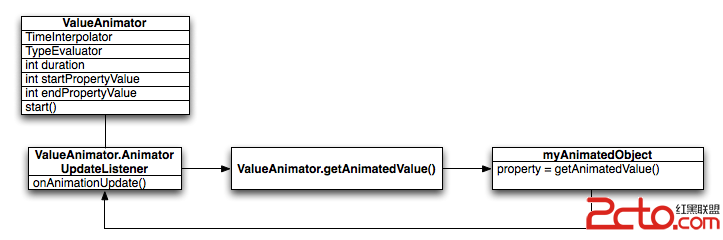 Android中的屬性動畫(Property Animation)——Android開發藝術探索筆記
Animator最早出現在Android 3.0 中,和之前的Animation框架相比,Animator更加的靈活並且具有更多的功能,官方推薦使用Animator代替A
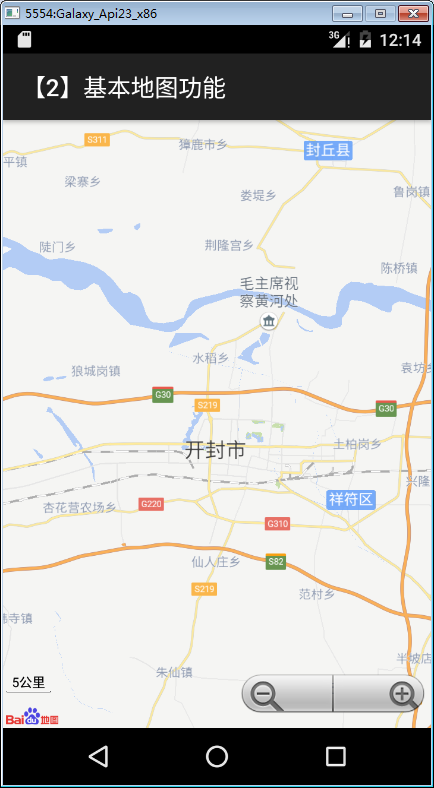 Android百度地圖應用之創建顯示地圖
本文是在完成了Android百度地圖應用開發基礎知識的基礎上繼續實現的。本文實例為大家分享了Android如何顯示地圖,並為後續內容做准備,供大家參考,具體內容如下&nb