編輯:關於Android編程
本文實例講述了Android編程之線性布局LinearLayout用法。分享給大家供大家參考,具體如下:
線性布局(LinearLayout)
可以讓它的子元素垂直或水平的方式排成一行(不設置方向的時候默認按照垂直方向排列)。
下面示例是在別人基礎上修改的main.xml:
<?xml version="1.0" encoding="utf-8"?>
<LinearLayout xmlns:android="http://schemas.android.com/apk/res/android"
  android:layout_width="fill_parent"
  android:layout_height="fill_parent"
  android:orientation="vertical" >
  <LinearLayout
    android:orientation="horizontal"
    android:layout_width="fill_parent"
    android:layout_height="wrap_content"
    android:baselineAligned="false"
    android:layout_weight="1" >
    <LinearLayout
      android:orientation="horizontal"
      android:layout_width="wrap_content"
      android:layout_height="fill_parent"
      android:layout_weight="1">
      <TextView
        android:text="@string/color_green"
        android:textColor="#ff0000"
        android:background="#00aa00"
        android:layout_width="wrap_content"
        android:layout_height="fill_parent"
        android:layout_weight="1"/>
      <TextView
        android:text="@string/color_blue"
        android:background="#0000aa"
        android:layout_width="wrap_content"
        android:layout_height="fill_parent"
        android:layout_weight="1"/>
    </LinearLayout>
    <LinearLayout
       android:orientation="vertical"
       android:layout_width="wrap_content"
       android:layout_height="fill_parent"
       android:layout_weight="1">
       <TextView
         android:text="@string/color_black"
         android:background="#000000"
         android:layout_width="fill_parent"
         android:layout_height="wrap_content"
         android:layout_weight="1"/>
       <TextView
         android:text="@string/color_yellow"
         android:background="#aaaa00"
         android:layout_width="fill_parent"
         android:layout_height="wrap_content"
         android:layout_weight="1"/>
       <TextView
         android:text="@string/color_unknown"
         android:background="#00aaaa"
         android:layout_width="fill_parent"
         android:layout_height="wrap_content"
         android:layout_weight="1"/>
     </LinearLayout>
  </LinearLayout>
  <LinearLayout
    android:orientation="vertical"
    android:layout_width="fill_parent"
    android:layout_height="wrap_content"
    android:layout_weight="2">
    <TextView
      android:text="@string/color_red"
      android:gravity="fill_vertical"
      android:background="#aa0000"
      android:layout_width="fill_parent"
      android:layout_height="wrap_content"
      android:layout_weight="2"/>
    <TextView
      android:text="@string/color_white"
      android:textColor="#ff0000"
      android:background="#ffffff"
      android:layout_width="fill_parent"
      android:layout_height="wrap_content"
      android:layout_weight="2"/>
  </LinearLayout>
</LinearLayout>
string.xml
<?xml version="1.0" encoding="utf-8"?>
<resources>
  <string name="hello">Hello World, TestAbsoluteLayoutActivity!</string>
  <string name="app_name">TestAbsoluteLayout</string>
  <string name= "color_red">red</string>
  <string name= "color_green">green</string>
  <string name= "color_blue">blue</string>
  <string name= "color_white">white</string>
  <string name= "color_black">black</string>
  <string name= "color_yellow">yellow</string>
  <string name= "color_unknown">unknown</string>
</resources>
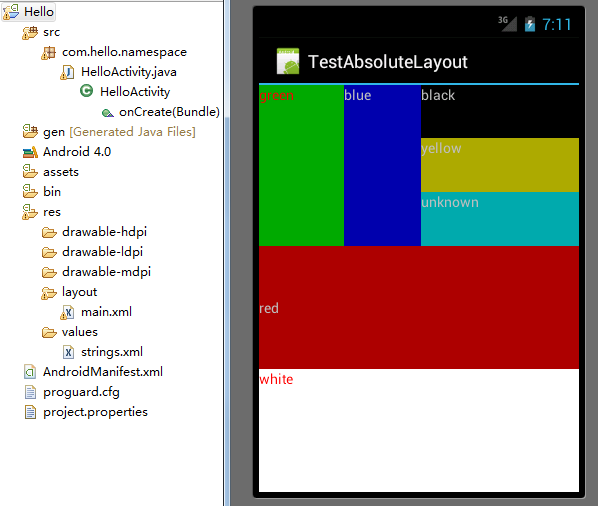
效果圖如下:
常用的屬性:
android:orientation:可以設置布局的方向
android:gravity:用來控制組件的對齊方式
layout_weight:控制各個組件在布局中的相對大小
更多關於Android編程布局相關內容可查看本站專題:《Android布局layout技巧總結》
希望本文所述對大家Android程序設計有所幫助。
 android 百度地圖離線地圖功能
最近做了一個百度地圖離線地圖的功能,雖然功能實現了,但過程中也碰到了一些問題。首先,看看效果圖吧。 1、離線地圖相關APIAPI地址:http://wiki.lbsyu
 Android的SQLite基本操作
涉及SQLite的增刪改查,結果用log顯示 package com.example.sqlconnecttest; import android.content.C
 小米手環怎麼接入微信 小米手環接入微信方法
小米手環是小米公司自主研發的電子智能輔助器,最近小米手環APP迎來了一次更新,多了幾個新功能,同時在微信接入位置也發生了改變,今天當下小編就小米手環如何接入
 android多線程-AsyncTask之工作原理深入解析(下)
上篇分析AsyncTask的一些基本用法以及不同android版本下的區別,接著本篇我們就來全面剖析一下AsyncTask的工作原理。在開始之前我們先來了解一個多線程的知