編輯:關於Android編程
備注:Scale應該比Translate先添加到Set裡面
Interpolator 時間插值類,定義動畫變換的速度。能夠實現alpha/scale/translate/rotate動畫的加速、減速和重復等。Interpolator類其實是一個空接口,繼承自TimeInterpolator,TimeInterpolator時間插值器允許動畫進行非線性運動變換,如加速和限速等,該接口中只有接口中有一個方法float getInterpolation(float input)這個方法。傳入的值是一個0.0~1.0的值,返回值可以小於0.0也可以大於1.0。
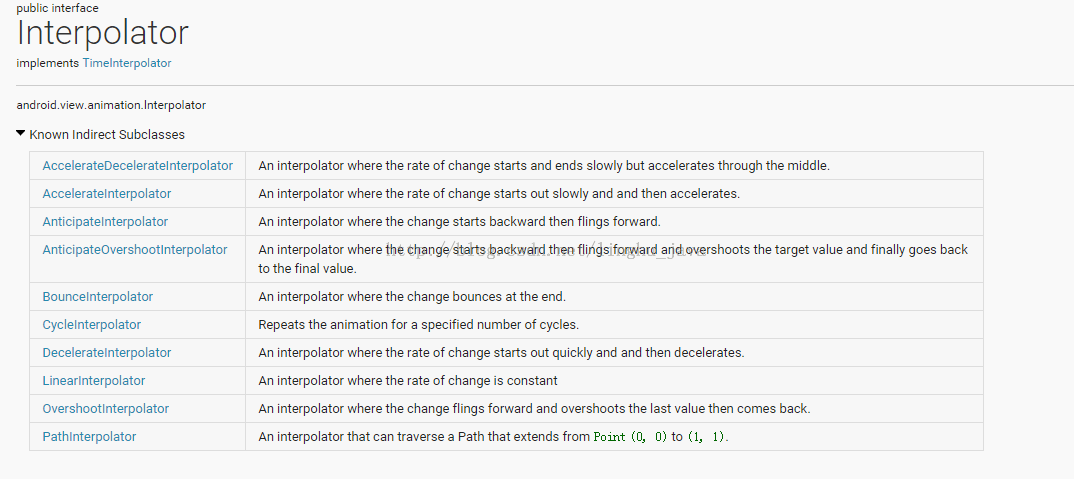
/**
 * An interpolator where the rate of change is constant
 *
 */
@HasNativeInterpolator
public class LinearInterpolator implements Interpolator, NativeInterpolatorFactory {

    public LinearInterpolator() {
    }

    public LinearInterpolator(Context context, AttributeSet attrs) {
    }

    public float getInterpolation(float input) {
        return input;
    }

    /** @hide */
    @Override
    public long createNativeInterpolator() {
        return NativeInterpolatorFactoryHelper.createLinearInterpolator();
    }
}
可以通過 XML 進行動畫屬性設置,通過 XML 可以設置其中的 mFactor 變量,其值默認是1.0;值越大其變化越快;得到的結果就是,開始的時候更加的快,其結果就是更加的慢。getInterpolation(float)描述的是一個初中學的拋物方程。
/**
 * An interpolator where the rate of change starts out quickly and
 * and then decelerates.
 *
 */
@HasNativeInterpolator
public class DecelerateInterpolator implements Interpolator, NativeInterpolatorFactory {
    public DecelerateInterpolator() {
    }

    /**
     * Constructor
     *
     * @param factor Degree to which the animation should be eased. Setting factor to 1.0f produces
     *        an upside-down y=x^2 parabola. Increasing factor above 1.0f makes exaggerates the
     *        ease-out effect (i.e., it starts even faster and ends evens slower)
     */
    public DecelerateInterpolator(float factor) {
        mFactor = factor;
    }

    public DecelerateInterpolator(Context context, AttributeSet attrs) {
        this(context.getResources(), context.getTheme(), attrs);
    }

    /** @hide */
    public DecelerateInterpolator(Resources res, Theme theme, AttributeSet attrs) {
        TypedArray a;
        if (theme != null) {
            a = theme.obtainStyledAttributes(attrs, R.styleable.DecelerateInterpolator, 0, 0);
        } else {
            a = res.obtainAttributes(attrs, R.styleable.DecelerateInterpolator);
        }

        mFactor = a.getFloat(R.styleable.DecelerateInterpolator_factor, 1.0f);

        a.recycle();
    }

    public float getInterpolation(float input) {
        float result;
        if (mFactor == 1.0f) {
            result = (float)(1.0f - (1.0f - input) * (1.0f - input));
        } else {
            result = (float)(1.0f - Math.pow((1.0f - input), 2 * mFactor));
        }
        return result;
    }

    private float mFactor = 1.0f;

    /** @hide */
    @Override
    public long createNativeInterpolator() {
        return NativeInterpolatorFactoryHelper.createDecelerateInterpolator(mFactor);
    }
}
public class Sine {

    public static float  easeIn(float t,float b , float c, float d) {
        return -c * (float)Math.cos(t/d * (Math.PI/2)) + c + b;
    }

    public static float  easeOut(float t,float b , float c, float d) {
        return c * (float)Math.sin(t/d * (Math.PI/2)) + b;
    }

    public static float  easeInOut(float t,float b , float c, float d) {
        return -c/2 * ((float)Math.cos(Math.PI*t/d) - 1) + b;
    }

}
一個簡單的方法:首先把 d 總時間設置為固定值 1.0 ,把 b 開始值設置為 0.0 把結束值設置為1.0,然後把 t 當作上面Interpolator 中的float getInterpolation(float input);傳入值,此時不就能用上了。
/**
 * Created by Qiujuer on 2015/1/5.
 */
public class InSineInterpolator implements Interpolator{
    public static float  easeIn(float t,float b , float c, float d) {
        return -c * (float)Math.cos(t/d * (Math.PI/2)) + c + b;
    }

    @Override
    public float getInterpolation(float input) {
        return easeIn(input, 0, 1, 1);
    }
}
//AnimatorSet
mAnimatorSet = new AnimatorSet();
mAnimatorSet.playTogether(aPaintX, aPaintY, aRadius, aBackground);
mAnimatorSet.setInterpolator(new InSineInterpolator());
mAnimatorSet.start();
可以看出使用與上面 Android 自帶的完全一樣,當然這個只是個 Case ,具體使用中你可以隨意封裝,前提是別改動了主要部分。
/**
 * An interpolator where the rate of change starts out quickly and
 * and then decelerates.
 *
 */
@HasNativeInterpolator
public class DecelerateInterpolator implements Interpolator, NativeInterpolatorFactory {
    public DecelerateInterpolator() {
    }

    /**
     * Constructor
     *
     * @param factor Degree to which the animation should be eased. Setting factor to 1.0f produces
     *        an upside-down y=x^2 parabola. Increasing factor above 1.0f makes exaggerates the
     *        ease-out effect (i.e., it starts even faster and ends evens slower)
     */
    public DecelerateInterpolator(float factor) {
        mFactor = factor;
    }

    public DecelerateInterpolator(Context context, AttributeSet attrs) {
        this(context.getResources(), context.getTheme(), attrs);
    }

    /** @hide */
    public DecelerateInterpolator(Resources res, Theme theme, AttributeSet attrs) {
        TypedArray a;
        if (theme != null) {
            a = theme.obtainStyledAttributes(attrs, R.styleable.DecelerateInterpolator, 0, 0);
        } else {
            a = res.obtainAttributes(attrs, R.styleable.DecelerateInterpolator);
        }

        mFactor = a.getFloat(R.styleable.DecelerateInterpolator_factor, 1.0f);

        a.recycle();
    }

    public float getInterpolation(float input) {
        float result;
        if (mFactor == 1.0f) {
            result = (float)(1.0f - (1.0f - input) * (1.0f - input));
        } else {
            result = (float)(1.0f - Math.pow((1.0f - input), 2 * mFactor));
        }
        return result;
    }

    private float mFactor = 1.0f;

    /** @hide */
    @Override
    public long createNativeInterpolator() {
        return NativeInterpolatorFactoryHelper.createDecelerateInterpolator(mFactor);
    }
}
 Android仿外賣購物車
效果圖知識點分析效果圖來看不復雜內容並沒多少,值得介紹一下的知識點也就下面幾個吧- 列表標題懸停- 左右列表滑動時聯動- 添加商品時的拋物線動畫- 底部彈出購物車清單-
 android meta-data的使用以及含義
 android NDK編程:使用posix多線程與mutex互斥同步
MainActivity.java 0) { startThreads(threads, iterations); } } }); }
 Android中解析Json數據
一、原理分析 package com.njupt.action; import java.io.IOException; import java.io.Pr