編輯:關於Android編程
本文實例講述了Android編程獲取手機後台運行服務的方法。分享給大家供大家參考,具體如下:
public static String getRunningServicesInfo(Context context) {
  StringBuffer serviceInfo = new StringBuffer();
  final ActivityManager activityManager = (ActivityManager) context
    .getSystemService(Context.ACTIVITY_SERVICE);
  List<RunningServiceInfo> services = activityManager.getRunningServices(100);
  Iterator<RunningServiceInfo> l = services.iterator();
  while (l.hasNext()) {
   RunningServiceInfo si = (RunningServiceInfo) l.next();
   serviceInfo.append("\npid: ").append(si.pid);
   serviceInfo.append("\n\nname:").append(si.service);
   serviceInfo.append("\n\nprocess: ").append(si.process);
   serviceInfo.append("\n\nservice: ").append(si.service);
   serviceInfo.append("\n\ncrashCount: ").append(si.crashCount);
   serviceInfo.append("\n\nclientCount: ").append(si.clientCount);
   /*serviceInfo.append("\nactiveSince: ").append(ToolHelper.formatData(si.activeSince));
   serviceInfo.append("\nlastActivityTime: ").append(ToolHelper.formatData(si.lastActivityTime));*/
   serviceInfo.append("\n============================");
   serviceInfo.append("\n\n\n");
  }
  return serviceInfo.toString();
}
希望本文所述對大家Android程序設計有所幫助。
 Android實現點擊Button產生水波紋效果
先上圖,看看接下來我要向大家介紹的是個什麼東西,如下圖: 接下來要介紹的就是如何實現上述圖中的波紋效果,這種效果如果大家沒有體驗過的話,可以看看百度手機衛士或者360手機
 Android編程單選項框RadioGroup綜合應用示例
本文實例講述了Android編程單選項框RadioGroup用法。分享給大家供大家參考,具體如下:今天介紹的是RadioGroup 的組事件.RadioGroup 可將各
 Android控件系列之相冊Gallery&Adapter適配器入門&控件縮放動畫入門
學習目的: 1、掌握在Android中如何建立Gallery 2、初步理解Android適配器的原理 3、實現簡單的控件縮放動畫 簡介: 1、Gallery是Androi
 Android學習筆記---Service及IntentService理解
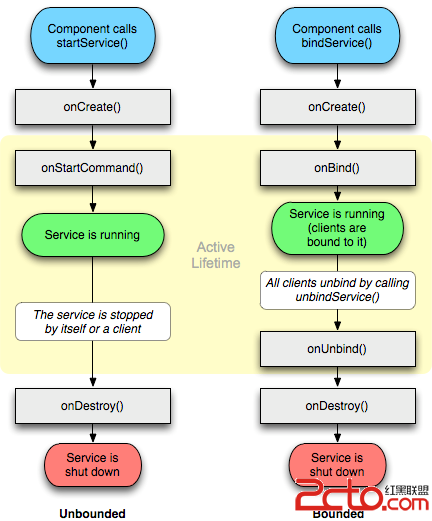
一.Android Service服務: Android中的服務是運行在後台的服務,他是不可見的沒有界面的東西。你可以