編輯:關於Android編程
本文實例講述了Android中Service實時向Activity傳遞數據的方法。分享給大家供大家參考。具體如下:
這裡演示一個案例,需求如下:
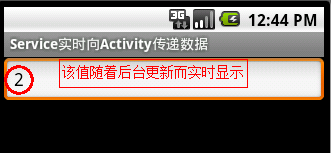
在Service組件中創建一個線程,該線程用來生產數值,每隔1秒數值自動加1,然後把更新後的數值在界面上實時顯示。
步驟如下:
1、新建一個android項目工程,取名為demo。
2、新建一個Service類,用來實時生產數值,供界面實時顯示。
package com.ljq.activity;
import android.app.Service;
import android.content.Intent;
import android.os.IBinder;
import android.util.Log;
public class CountService extends Service {
 private int count = 0;
 private boolean threadDisable=false;
 @Override
 public void onCreate() {
 super.onCreate();
 new Thread(new Runnable() {
  @Override
  public void run() {
  while (!threadDisable) {
   try {
   Thread.sleep(1000);
   } catch (InterruptedException e) {
   e.printStackTrace();
   }
   count++;
   Log.v("CountService", "Count is " + count);
   //發送廣播
   Intent intent=new Intent();
   intent.putExtra("count", count);
   intent.setAction("com.ljq.activity.CountService");
   sendBroadcast(intent);
  }
  }
 }).start();
 }
 @Override
 public IBinder onBind(Intent intent) {
 return null;
 }
 @Override
 public void onDestroy() {
 super.onDestroy();
 count=0;
 threadDisable = true;
 Log.v("CountService", "on destroy");
 }
}
3、新建一個Activity類,顯示數據。
package com.ljq.activity;
import android.app.Activity;
import android.content.BroadcastReceiver;
import android.content.Context;
import android.content.Intent;
import android.content.IntentFilter;
import android.os.Bundle;
import android.view.View;
import android.widget.Button;
import android.widget.EditText;
public class MainActivity extends Activity {
 private EditText editText=null;
 private MyReceiver receiver=null;
  @Override
  public void onCreate(Bundle savedInstanceState) {
    super.onCreate(savedInstanceState);
    setContentView(R.layout.main);
    editText=(EditText)findViewById(R.id.editText);
    //啟動服務
    startService(new Intent(MainActivity.this, CountService.class));
 //注冊廣播接收器
 receiver=new MyReceiver();
 IntentFilter filter=new IntentFilter();
 filter.addAction("com.ljq.activity.CountService");
 MainActivity.this.registerReceiver(receiver,filter);
  }
  @Override
 protected void onDestroy() {
   //結束服務
    stopService(new Intent(MainActivity.this, CountService.class));
 super.onDestroy();
 }
  /**
   * 獲取廣播數據
   *
   * @author jiqinlin
   *
   */
  public class MyReceiver extends BroadcastReceiver {
   @Override
   public void onReceive(Context context, Intent intent) {
   Bundle bundle=intent.getExtras();
   int count=bundle.getInt("count");
   editText.setText(count+"");
   }
  }
}
4、main.xml布局文件
<?xml version="1.0" encoding="utf-8"?>
<LinearLayout xmlns:android="http://schemas.android.com/apk/res/android"
 android:orientation="vertical"
 android:layout_width="fill_parent"
 android:layout_height="fill_parent">
  <EditText android:layout_width="fill_parent"
    android:layout_height="wrap_content"
    android:cursorVisible="false"
    android:editable="false"
    android:id="@+id/editText"/>
</LinearLayout>
5、清單文件
<?xml version="1.0" encoding="utf-8"?>
<manifest xmlns:android="http://schemas.android.com/apk/res/android"
   package="com.ljq.activity"
   android:versionCode="1"
   android:versionName="1.0">
  <application android:icon="@drawable/icon" android:label="@string/app_name">
    <activity android:name=".MainActivity"
         android:label="@string/app_name">
      <intent-filter>
        <action android:name="android.intent.action.MAIN" />
        <category android:name="android.intent.category.LAUNCHER" />
      </intent-filter>
    </activity>
 <service android:name =".CountService" />
  </application>
  <uses-sdk android:minSdkVersion="7" />
</manifest>
效果如下:
希望本文所述對大家的Android程序設計有所幫助。
 Android 使用XML做動畫UI的深入解析
效果: http://www.56.com/u82/v_OTM4MDk5MTk.html第一步: 創建anim文件夾放置動畫xml文件在res文件夾下,創建一個
 Android網絡分析和優化
目前針對公司Android端的SDK進行實際測試,反映出存在網絡加載資源緩慢的問題,在知曉目前CDN的可能存在不穩定的情況下,針對sdk本身的網絡模塊進行了相應的分析,整
 Android中Spinner(下拉框)控件的使用詳解
android給我們提供了一個spinner控件,這個控件主要就是一個列表,那麼我們就來說說這個控件吧,這個控件在以前的也看見過,但今天還是從新介紹一遍吧。Spinner
 Android實現把文件存放在SDCard的方法
本文實例講述了Android實現把文件存放在SDCard的方法。分享給大家供大家參考。具體如下:使用Activity的openFileOutput()方法保存文件,文件是