編輯:關於Android編程
本文實例講述了Android編程之SharedPreferences文件存儲操作的方法。分享給大家供大家參考。具體分析如下:
SharedPreferences類提供了一種簡單的文件存儲功能,像程序的配置文件可以通過它來實現。
源代碼:
package com.test.sharedpreferences;
import android.app.Activity;
import android.content.Context;
import android.content.SharedPreferences;
import android.os.Bundle;
import android.widget.TextView;
public class test_sharedpreferences extends Activity
{
 SharedPreferences file;
 SharedPreferences.Editor editor;
 TextView text;
 /** Called when the activity is first created. */
 @Override
 public void onCreate(Bundle savedInstanceState) {
  super.onCreate(savedInstanceState);
  setContentView(R.layout.main);
  //獲得配置文件
  file = getSharedPreferences("test_config", 0);
  editor = file.edit();
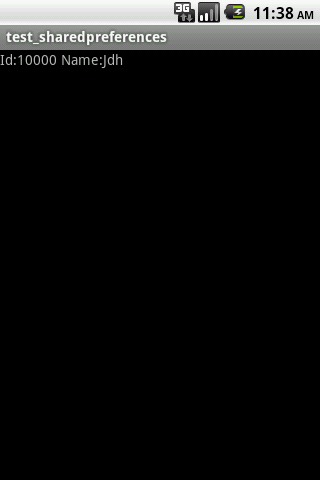
  //寫入配置:Id:10000 Name:Jdh
  editor.putInt("Id", 10000);
  editor.putString("Name", "Jdh");
  editor.commit();
  //讀取配置
  int id = 0;
  id = file.getInt("Id", 0);
  String str;
  str = file.getString("Name", null);
  text = (TextView)findViewById(R.id.textView1);
  text.setText("Id:" + id + " Name:" + str);
 }
}
效果圖如下:
希望本文所述對大家的Android程序設計有所幫助。
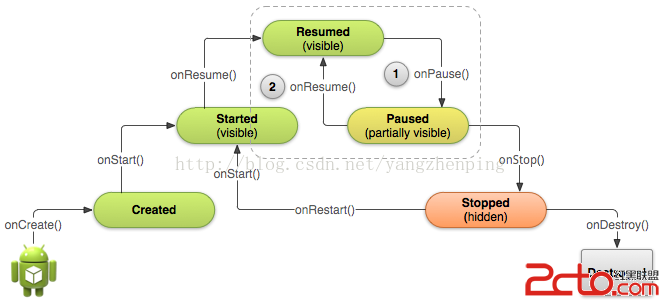 Android官方入門文檔[13]暫停和恢復一個Activity活動
Android官方入門文檔[13]暫停和恢復一個Activity活動 Pausing and Resuming an Activity 暫停和恢復一個Activity活
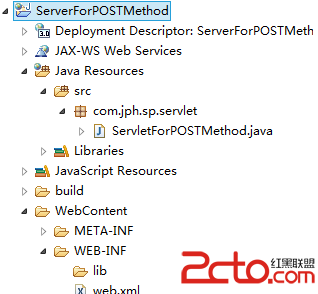 Android網絡編程之傳遞數據給服務器(二)
Android網絡編程之傳遞數據給服務器(二) 請尊重他人的勞動成果,轉載請注明出處:Android網絡編程之傳遞數據給服務器(二) 我曾在《Andr
 Android開發之淺談Service的基本概況和常見問題
Service(服務)是一個應用程序組件,可以在後台執行長時間運行的操作,不提供用戶界面。其他應用程序組件可以啟動一個Serivce,它將繼續在後台運行,即使用戶切換到另
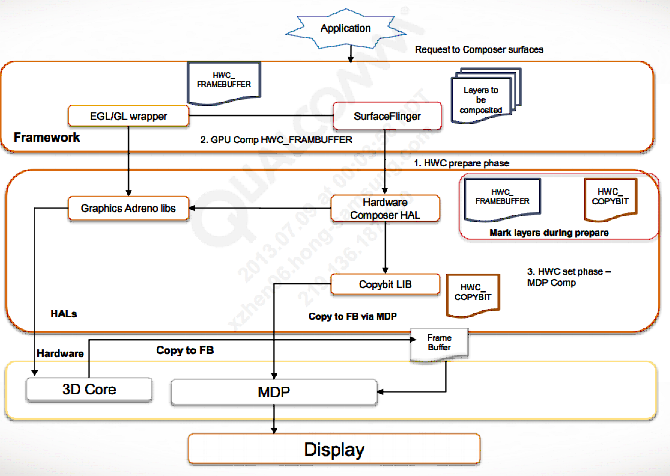 Android: 顯示系統模塊加載以及調用流程
打開/dev/graphics/fb0節點的過程:打開/dev/graphics/fb0這個設備的調用過程如下:1.在HWComposer中,加載moduleHWComp