編輯:關於Android編程
buildscript {
    repositories {
        jcenter()
    }
    dependencies {
        classpath 'com.android.tools.build:gradle:1.5.0'
        classpath 'com.neenbedankt.gradle.plugins:android-apt:1.8'
    }
}
allprojects {
    repositories {
        jcenter()
    }
}
task clean(type: Delete) {
    delete rootProject.buildDir
}
apply plugin: 'com.android.application'
apply plugin: 'android-apt'
def AAVersion = '4.0+'
repositories {
    jcenter()
    flatDir {
        dirs 'libs'
    }
}
android {
    compileSdkVersion 19
    buildToolsVersion "23.0.2"
    defaultConfig {
        applicationId "source.code.watch.film"
        minSdkVersion 14
        targetSdkVersion 14
        versionCode 1
        versionName "1.0"
    }
    buildTypes {
        release {
            minifyEnabled false
            proguardFiles getDefaultProguardFile('proguard-android.txt'), 'proguard-rules.pro'
        }
    }
    signingConfigs {
        debug {
            storeFile file("E:\\psd\\debug.keystore")
        }
    }
}
dependencies {
    compile fileTree(include: ['*.jar'], dir: 'libs')
    apt "org.androidannotations:androidannotations:$AAVersion"
    compile "org.androidannotations:androidannotations-api:$AAVersion"
}
apt {
    arguments {
        androidManifestFile variant.outputs[0].processResources.manifestFile
        resourcePackageName 'source.code.watch.film'
    }
}
今天和大家介紹下Android的懶人框架:annotation。
@EActivity(R.layout.main)
public class MyActivity extends Activity {
}
@EFragment(R.layout.my_fragment_layout)
public class MyFragment extends Fragment {
}
MyFragment fragment = new MyFragment_();
public class MyClass {
}
- 這個類必須僅僅只能有一個構造函數,參數最多有一個context
@EActivity(R.layout.main)
public class MyActivity extends Activity {
  @Bean
  MyClass myClass;
}
@EActivity(R.layout.main)
public class MyActivity extends Activity {
  @Bean(MyClass.class)
  MyClassInterface myClassInterface;
}
@EBean
public class MyClass {
  @RootContext
  Context context;
  @RootContext
  Activity activity;
  @RootContext
  Service service;
  @RootContext
  MyActivity myActivity;
}
@EActivity(R.layout.main)
public class MyActivity extends Activity {
  @AfterInject
  public void doSomethingAfterInjection() {
  }
}
- 如果想在類創建時期做一些操作可以這麼做
@EBean(scope = Scope.Singleton)
public class MySingleton {
}
- 單例類
- 在單例類裡面不可以注入view和事件綁定,因為單例的生命周期比Activity和Service的要長,以免發生內存溢出
@EView
public class CustomButton extends Button {
  @App
  MyApplication application;
  @StringRes
  String someStringResource;
  public CustomButton(Context context, AttributeSet attrs) {
    super(context, attrs);
  }
}
CustomButton button = CustomButton_.build(context);
@EViewGroup(R.layout.title_with_subtitle)
public class TitleWithSubtitle extends RelativeLayout {
  @ViewById
  protected TextView title, subtitle;
  public TitleWithSubtitle(Context context, AttributeSet attrs) {
    super(context, attrs);
  }
  public void setTexts(String titleText, String subTitleText) {
    title.setText(titleText);
    subtitle.setText(subTitleText);
  }
}
@EApplication
public class MyApplication extends Application {
}
@EActivity(R.layout.main)
public class MyActivity extends Activity {
  @App
  MyApplication application;
}
@EService
public class MyService extends Service {
}
MyService_.intent(getApplication()).start();
MyService_.intent(getApplication()).stop();
@EReceiver
public class MyReceiver extends BroadcastReceiver {
}
@EActivity(R.layout.main)
public class MyActivity extends Activity {
  @Receiver(actions = "org.androidannotations.ACTION_1")
  protected void onAction1() {
  }
}
@EProvider
public class MyContentProvider extends ContentProvider {
}
@EActivity(R.layout.main)
public class MyActivity extends Activity {
  @ViewById
  EditText myEditText;
  @ViewById(R.id.myTextView)
  TextView textView;
}
- 沒有括號裡定義的變量名稱必須和布局的id名稱一致
@EActivity(R.layout.main)
public class MyActivity extends Activity {
   @ViewById
   TextView myTextView;
   @AfterViews
   void updateTextWithDate() {
      myTextView.setText("Date: " + new Date());
   }
}
 一定要在這裡進行view的一些設置,不要在oncreate()中設置,因為oncreate()在執行時 view還沒有注入
@EActivity(R.layout.main)
public class MyActivity extends Activity {
   @StringRes(R.string.hello)
   String myHelloString;
   @StringRes
   String hello;
}
- 不能將變量設置成私有變量
@EActivity(R.layout.main)
public class MyActivity extends Activity {
  @ColorRes(R.color.backgroundColor)
  int someColor;
  @ColorRes
  int backgroundColor;
}
@EActivity(R.layout.main)
public class MyActivity extends Activity {
   @AnimationRes(R.anim.fadein)
   XmlResourceParser xmlResAnim;
   @AnimationRes
   Animation fadein;
}
@EActivity(R.layout.main)
public class MyActivity extends Activity {
  @DimensionRes(R.dimen.fontsize)
  float fontSizeDimension;
  @DimensionRes
  float fontsize;
}
@EActivity(R.layout.main)
public class MyActivity extends Activity {
  @DimensionPixelOffsetRes(R.string.fontsize)
  int fontSizeDimension;
  @DimensionPixelOffsetRes
  int fontsize;
}
@EActivity(R.layout.main)
public class MyActivity extends Activity {
  @DimensionPixelSizeRes(R.string.fontsize)
  int fontSizeDimension;
  @DimensionPixelSizeRes
  int fontsize;
}
@EActivity(R.layout.main)
public class MyActivity extends Activity {
  @Extra("myStringExtra")
  String myMessage;
  @Extra("myDateExtra")
  Date myDateExtraWithDefaultValue = new Date();
}
@EActivity(R.layout.main)
public class MyActivity extends Activity {
  @Extra
  String myMessage;
}
- The name of the extra will be "myMessage",名字必須一致
MyActivity_.intent().myMessage("hello").start() ;
MyActivity_.intent().myMessage("hello").startForResult() ;
@EActivity(R.layout.main)
public class MyActivity extends Activity {
  @SystemService
  NotificationManager notificationManager;
}
@EActivity(R.layout.main)
public class MyActivity extends Activity {
  @HtmlRes(R.string.hello_html)
  Spanned myHelloString;
  @HtmlRes
  CharSequence helloHtml;
}
@EActivity(R.layout.main)
public class MyActivity extends Activity {
  @ViewById(R.id.my_text_view)
  @FromHtml(R.string.hello_html)
  TextView textView;
  @ViewById
  @FromHtml
  TextView hello_html;
}
- 必須用在TextView
@EActivity(R.layout.main)
public class MyActivity extends Activity {
  @NonConfigurationInstance
  Bitmap someBitmap;
  @NonConfigurationInstance
  @Bean
  MyBackgroundTask myBackgroundTask;
}
- 等同於Activity.onRetainNonConfigurationInstance()
@Click(R.id.myButton)
void myButtonWasClicked() {
}
@Click
void anotherButton() {
}
@Click
void yetAnotherButton(View clickedView) {
}
- LongClick和這個類似
@SeekBarProgressChange(R.id.seekBar)
 void onProgressChangeOnSeekBar(SeekBar seekBar, int progress, boolean fromUser) {
 }
 @SeekBarProgressChange(R.id.seekBar)
 void onProgressChangeOnSeekBar(SeekBar seekBar, int progress) {
 }
 @SeekBarProgressChange({R.id.seekBar1, R.id.seekBar2})
 void onProgressChangeOnSeekBar(SeekBar seekBar) {
 }
 @SeekBarProgressChange({R.id.seekBar1, R.id.seekBar2})
 void onProgressChangeOnSeekBar() {
 }
- @SeekBarTouchStart 和 @SeekBarTouchStop 接受開始和結束事件的監聽
@TextChange(R.id.helloTextView)
 void onTextChangesOnHelloTextView(CharSequence text, TextView hello, int before, int start, int count) {
 }
 @TextChange
 void helloTextViewTextChanged(TextView hello) {
 }
 @TextChange({R.id.editText, R.id.helloTextView})
 void onTextChangesOnSomeTextViews(TextView tv, CharSequence text) {
 }
 @TextChange(R.id.helloTextView)
 void onTextChangesOnHelloTextView() {
 }
@BeforeTextChange(R.id.helloTextView)
 void beforeTextChangedOnHelloTextView(TextView hello, CharSequence text, int start, int count, int after) {
 }
 @BeforeTextChange
 void helloTextViewBeforeTextChanged(TextView hello) {
 }
 @BeforeTextChange({R.id.editText, R.id.helloTextView})
 void beforeTextChangedOnSomeTextViews(TextView tv, CharSequence text) {
 }
 @BeforeTextChange(R.id.helloTextView)
 void beforeTextChangedOnHelloTextView() {
 }
@AfterTextChange(R.id.helloTextView)
 void afterTextChangedOnHelloTextView(Editable text, TextView hello) {
 }
 @AfterTextChange
 void helloTextViewAfterTextChanged(TextView hello) {
 }
 @AfterTextChange({R.id.editText, R.id.helloTextView})
 void afterTextChangedOnSomeTextViews(TextView tv, Editable text) {
 }
 @AfterTextChange(R.id.helloTextView)
 void afterTextChangedOnHelloTextView() {
 }
void myMethod() {
    someBackgroundWork("hello", 42);
}
@Background
void someBackgroundWork(String aParam, long anotherParam) {
}
- 後台運行
void myMethod() {
    someCancellableBackground("hello", 42);
    boolean mayInterruptIfRunning = true;
    BackgroundExecutor.cancelAll("cancellable_task", mayInterruptIfRunning);
}
@Background(id="cancellable_task")
void someCancellableBackground(String aParam, long anotherParam) {
}
void myMethod() {
    for (int i = 0; i < 10; i++)
        someSequentialBackgroundMethod(i);
}
@Background(serial = "test")
void someSequentialBackgroundMethod(int i) {
    SystemClock.sleep(new Random().nextInt(2000)+1000);
    Log.d("AA", "value : " + i);
}
- 非並發執行
@Background(delay=2000)
void doInBackgroundAfterTwoSeconds() {
}
- 延遲執行
void myMethod() {
    doInUiThread("hello", 42);
}
@UiThread
void doInUiThread(String aParam, long anotherParam) {
}
- UI線程
@UiThread(delay=2000)
void doInUiThreadAfterTwoSeconds() {
}
- 延遲
@UiThread(propagation = Propagation.REUSE)
void runInSameThreadIfOnUiThread() {
}
- 優化UI線程
@EActivity(R.layout.main)
public class MyActivity extends Activity {
  @Background
  void doSomeStuffInBackground() {
    publishProgress(0);
    publishProgress(10);
    publishProgress(100);
  }
  @UiThread
  void publishProgress(int progress) {
  }
}
- 後台向UI線程傳值
@OnActivityResult(REQUEST_CODE)
void onResult(int resultCode, Intent data) {
}
@OnActivityResult(REQUEST_CODE)
void onResult(int resultCode) {
}
@OnActivityResult(ANOTHER_REQUEST_CODE)
void onResult(Intent data) {
}
@OnActivityResult(ANOTHER_REQUEST_CODE)
void onResult() {
}
好了。關於annotation的介就是這麼多。歡迎進群交流。還有,求工作啊!!!!
 圖文詳解Android Studio搭建Android集成開發環境的過程
有很長一段時間沒有更新博客了,最近實在是太忙了,沒有時間去總結,現在終於可以有時間去總結一些Android上面的東西了,很久以前寫過這篇關於使用Android Studi
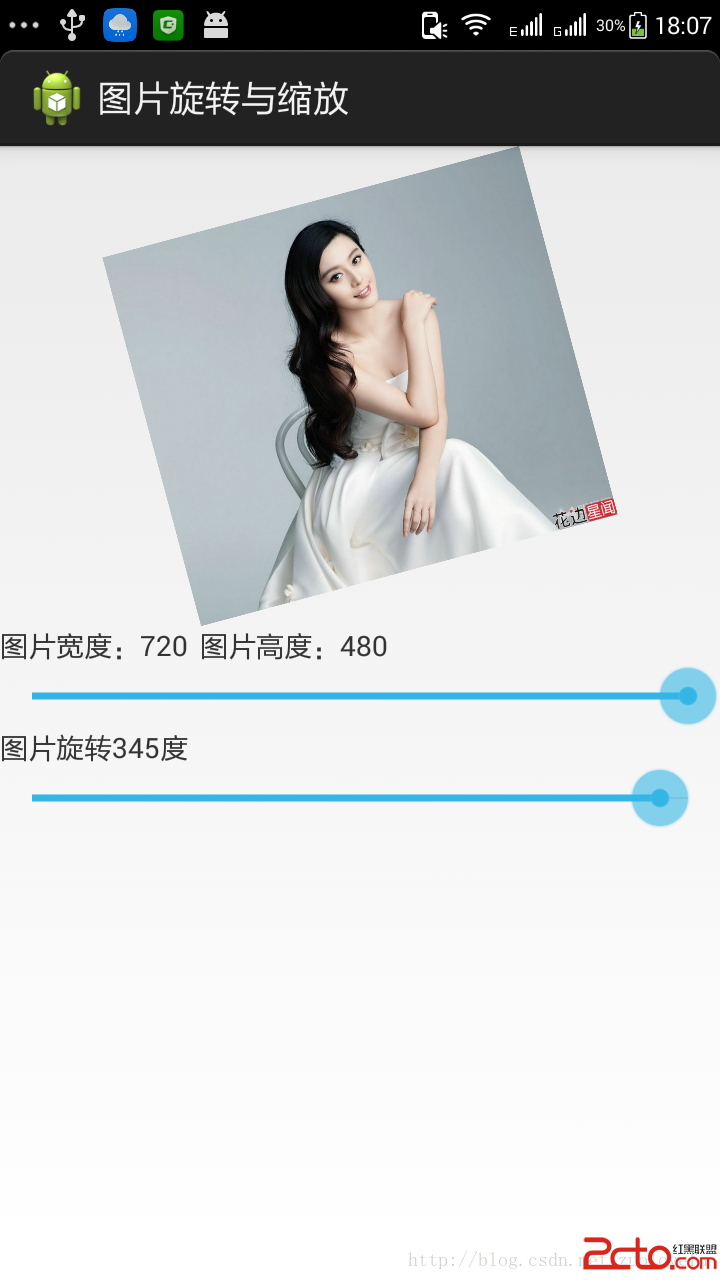 android學習記錄UI篇-----imageView實現圖片的旋轉和縮放
感覺在代碼中寫出解析會比較好看,我直接在程序代碼中解析所用的方法吧。 MainActivity: package com.example.imageview_demo
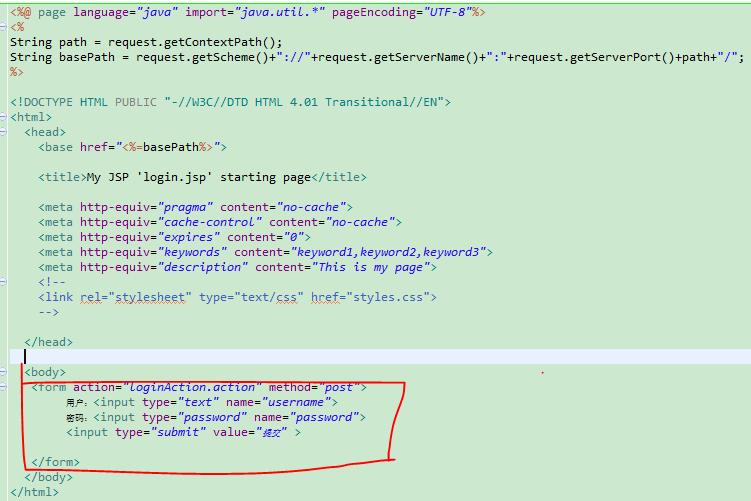 《struts2接受輸入參數的三種方式》
struts2 接收輸入參數的3種方式在我們的生活中,有很多的網頁都存在用戶登陸界面,當我們在登陸界面上輸入自己的用戶名和密碼後,這些數據都會傳入後台,供後台來驗證我們所
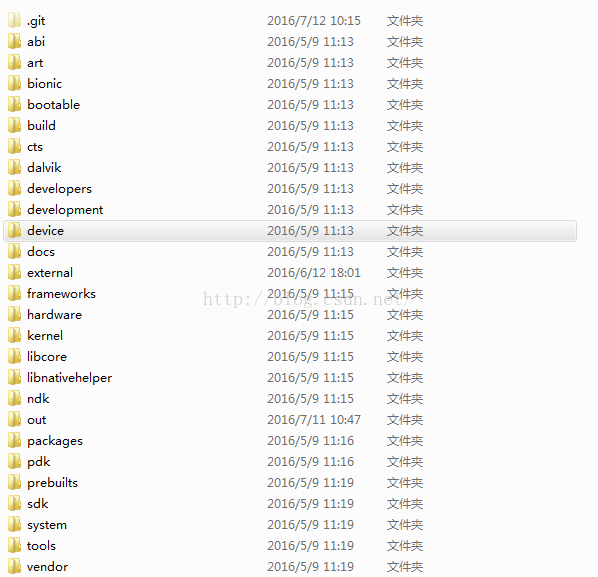 Android 5.1.1 源碼目錄結構
最近公司培訓新同事,我負責整理一點關於android的基礎知識,遙想當年,剛接觸android,也是一頭霧水,啥都不懂,就是靠看文檔和視頻,對andro