編輯:關於Android編程
Android與服務器之間的通訊方式主要有兩種。一種是Http通訊 , 一種是Socket通訊。兩者最大的差異在於,Http連接使用的是“請求---響應方式”,即在請求是建立連接通道,當客戶端向服務器發送請求後,服務器端才能向客戶端返回數據。而Socket則是在雙方建立連接後就直接進行數據傳輸,在連接時可實現信息的主動推送,而不需要每次由客戶端向服務端發送請求。
什麼是Socket?又稱套接字,是一種抽象層。在程序內部提供了與外界通訊的端口,即端口信息。通過建立Socket連接,可為通訊雙方的傳輸提供通道。Socket的主要特點有數據丟失率低,使用簡單且易於移植。
本案例是基於TCP協議的Socket。服務端首先聲明一個ServerSocket對象並且指定端口號。然後調用ServerSocket的accept()方法接收客戶端的數據。accept()方法在沒有數據進行接收的處於堵塞狀態。(Socketsocket=serversocket.accept()),一旦接收到數據,通過inputstream讀取接收的數據。
客戶端創建一個Socket對象,指定服務器端的ip地址和端口號(Socketsocket=newSocket("172.168.10.108",8080);),通過inputstream讀取數據,獲取服務器發出的數據(OutputStreamoutputstream=socket.getOutputStream()),最後將要發送的數據寫入到outputstream即可進行TCP協議的socket數據傳輸。
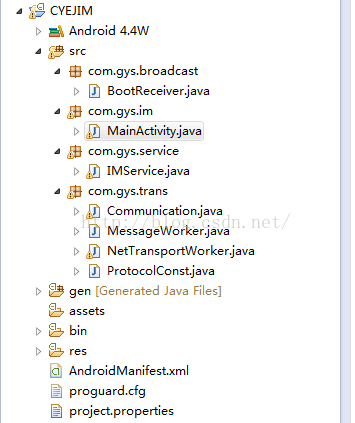
項目結構:
2. IMService.class
public class IMService extends Service {
	static Communication communication;
	public static String messageTag="com.gys.im.CYEJIMActivity";
	public static Notification notification;
	public static int messageId = 10000;
	private NotificationManager mNM;
	boolean isconnected;
	Timer timer=new Timer();
	@Override
	public void onCreate() {
		// TODO Auto-generated method stub
        communication=Communication.newInstance();
        communication.setReceiver(this);
        mNM = (NotificationManager) getSystemService(NOTIFICATION_SERVICE);
        notification=new Notification(R.drawable.ic_launcher, "", System.currentTimeMillis());
        notification.number=1;
        timer.schedule(timerTask, 1000, 2000);

	}

    public Handler handler= new Handler()
    {
    	public void handleMessage(Message msg) {
    		String message=msg.obj.toString();
    		if(message.equals("start\n"))
    		{
    			start_check_in();
    		}else
    		{
    			Intent intent = new Intent(messageTag);
    			intent.putExtra("message", message);
    			IMService.this.sendBroadcast(intent);
    		}
    	}
    };

    public TimerTask timerTask=new TimerTask()
    {
		@Override
		public void run() {
			// TODO Auto-generated method stub
			isconnected=checkNetwork();
			if(!isconnected)
			{
				showNotification("","");
			}
		}

    };

    /**
     * 添加內容到發送消息隊列
     * @param str
     */
    public static void addPacket(String str)
    {
    	communication.addPacket(str);
    }

    public static void wakeUp()
    {
    	communication.wakeUp();
    }

    /**
     * 開始發送心跳
     */
    protected void start_check_in()
    {
    	communication.start_check_in();
    }

	public  boolean checkNetwork() {
		boolean flag = false;
		ConnectivityManager cwjManager = (ConnectivityManager)getSystemService(Context.CONNECTIVITY_SERVICE);
		if (cwjManager.getActiveNetworkInfo() != null)
		{
			flag = cwjManager.getActiveNetworkInfo().isAvailable();
		}
		return flag;
	}

    private void showNotification(String statusInfo,String messageContent) {
        PendingIntent contentIntent = PendingIntent.getActivity(this,0,null,0);

        	notification.when=System.currentTimeMillis();
        	notification.tickerText=statusInfo;
            notification.setLatestEventInfo(this,"test",messageContent, null);
            notification.contentIntent=contentIntent;
            notification.vibrate = new long[] {100, 250, 100, 500};
            messageNotificationAdd(messageId, notification);
    }

    /*add a nonotification*/
    public void messageNotificationAdd(int notificationNo,Notification notification){
    	try
    	{
    		mNM.notify(notificationNo,notification);
    	}catch(Exception e)
    	{
    		e.printStackTrace();
    	}
    	notification.number++;//number 增加後,可以與以前的notification區分開來
    }

	@Override
	public void onDestroy() {
		// TODO Auto-generated method stub
		super.onDestroy();
		mNM.cancel(messageId);
	}

	@Override
	public void onLowMemory() {
		// TODO Auto-generated method stub
		super.onLowMemory();
	}

	@Override
	public void onStart(Intent intent, int startId) {
		// TODO Auto-generated method stub
		super.onStart(intent, startId);
	}

	@Override
	public boolean onUnbind(Intent intent) {
		// TODO Auto-generated method stub
		return super.onUnbind(intent);
	}

	@Override
	public IBinder onBind(Intent arg0) {
		// TODO Auto-generated method stub
		return null;
	}
}
public class Communication {

	private NetTransportWorker transportWorker;
	private MessageWorker messageWorker;
	private static Communication instance;

	private Communication() {
		transportWorker = new NetTransportWorker();
		transportWorker.start();
		messageWorker = new MessageWorker(transportWorker);
		messageWorker.start();

	}

	public static Communication newInstance() {
		if (instance == null)
			instance = new Communication();
		return instance;
	}

	public NetTransportWorker getTransportWorker() {
		return transportWorker;
	}

	public MessageWorker getMessageWorker() {
		return messageWorker;
	}

	public void setReceiver(IMService service)
	{
		transportWorker.setRecever(service);
	}

//	public void addReceiveInfoListener(ReceiveInfoListener listener) {
//		transportWorker.addReceiveInfoListener(listener);
//	}
//
//	public void removeReceiveInfoListener(ReceiveInfoListener listener) {
//		transportWorker.removeReceiveInfoListener(listener);
//	}

	public void reconnect() {
		transportWorker.notify();
	}

	private boolean sendDataToServer(String packet) {
		try {
			if (transportWorker.writeBuf(packet.getBytes("UTF8")))
				return true;
		} catch (IOException e) {
			// TODO Auto-generated catch block
			e.printStackTrace();
		}
		return false;
	}

	/** 如果從不活動界面切換到聊天界面,此方法返回所有隊列裡面的信息數據包 **/
	public Queue getReceivePackets() {
		return transportWorker.receiveQueue;
	}

	public void addPacket(String packet) {
		messageWorker.addPacket(packet);
	}

	public void wakeUp() {
		messageWorker.wakeUp();
	}

	public void start_check_in() {
		messageWorker.start_check_in();
	}

	public String newSessionID() {
		return String.valueOf(System.currentTimeMillis());
	}

}
4.MessageWorker.class:
public class MessageWorker extends Thread {

	protected NetTransportWorker worker;
	protected Queue sendQueue;
	protected Timer timer;
	protected TimerTask task;
	// 10S發送一個確認在線的報到
	protected final long delay = 30000;

	protected MessageWorker(final NetTransportWorker worker) {
		this.worker = worker;
		sendQueue = new ConcurrentLinkedQueue();

		task = new TimerTask() {
			@Override
			public void run() {
				// TODO Auto-generated method stub
					String packet = "hello\n";
					addPacket(packet);
					wakeUp();
			}
		};
	}


	public static String getLocalHostIp()
	   {
	    String ipaddress = "no_data";
	    try
	    {
	        Enumeration en = NetworkInterface
	                .getNetworkInterfaces();
	        // 遍歷所用的網絡接口
	        while (en.hasMoreElements())
	        {
	            NetworkInterface nif = en.nextElement();// 得到每一個網絡接口綁定的所有ip
	            Enumeration inet = nif.getInetAddresses();
	            // 遍歷每一個接口綁定的所有ip
	            while (inet.hasMoreElements())
	            {
	                InetAddress ip = inet.nextElement();
	                if (!ip.isLoopbackAddress()
	                        && InetAddressUtils.isIPv4Address(ip
	                                .getHostAddress()))
	                {
	                    return ipaddress =ip.getHostAddress();
	                }
	            }

	        }
	    }
	    catch (SocketException e)
	    {
	        System.out.print("獲取IP 失敗"+e.toString());
	        e.printStackTrace();
	    }
	    return ipaddress;
	}
	protected void start_check_in() {
		if(timer==null)
		{
			timer=new Timer();
			timer.schedule(task, delay, delay);
		}

	}

	public void addPacket(String packet) {
		sendQueue.add(packet);
		wakeUp();
	}

	public synchronized void wakeUp() {
		notify();
	}

	@Override
	public synchronized void run() {
		// TODO Auto-generated method stub
		while (true) {
			try {
				while (sendQueue.size() > 0) {
					String packet = sendQueue.peek();
					if (worker.writeBuf(packet.getBytes("UTF8")))
					{
						sendQueue.poll();
					}else
					{
						sendQueue.clear();
					}
				}
				wait();
			} catch (IOException e) {
				// TODO Auto-generated catch block
				e.printStackTrace();
			} catch (InterruptedException e) {
				// TODO Auto-generated catch block
				e.printStackTrace();
			}
		}
	}

}
public class NetTransportWorker extends Thread {
	protected Socket socket = null;
	protected static final int CONNECT_TIMEOUT = 10000;
	protected static final int READ_TIMEOUT = 60000;
	protected static final int RECONNECT_TIME = 30000;

	protected ByteArrayOutputStream readByte;
	protected DataOutputStream readData;
	static {
		java.lang.System.setProperty("java.net.preferIPv6Addresses", "true");

	};
	protected final byte connect = 1;
	protected final byte running = 2;
	protected byte state = connect;
	protected boolean onWork;// 是否工作狀態
	public static final String sysError = "與服務器連接斷開了,馬上重新連接!";
	protected IMService service;
	protected Queue receiveQueue;

	String packet;
	DataOutputStream output;
	DataInputStream input;
	protected NetTransportWorker() {
		onWork = true;
		readByte = new ByteArrayOutputStream();
		readData = new DataOutputStream(readByte);
		receiveQueue = new ConcurrentLinkedQueue();
	}

	protected void setRecever(IMService service)
	{
		this.service=service;
	}

	@Override
	public void run() {
		// TODO Auto-generated method stub
		while (onWork) {
			switch (state) {
			case connect:
				connect();
				break;
			case running:
				running();
				break;
			}
		}
	}

	private synchronized void running() {
		try {
				    byte[] buffer=new byte[1024];
				    ByteArrayOutputStream baos=new ByteArrayOutputStream();
				    byte[] reallyByte;
					 int number;
						 while((number=input.read(buffer, 0, buffer.length))>0)
						 {
					            baos.write(buffer, 0, number);
							    reallyByte=baos.toByteArray();
							    String info=new String(reallyByte);
								Message mess=new Message();
								mess.obj=info;
								service.handler.sendMessage(mess);
								baos.reset();
						 }
		} catch (Exception e) {
			// TODO Auto-generated catch block
			e.printStackTrace();
			sendInfoMessageToUI(sysError);
			close();
		}
	}

//	protected  void handleTimeout(Selector selector) {
//		  try{
//		   Iterator iter = selector.keys().iterator();
//		   while(iter.hasNext()){
//		    SelectionKey key = iter.next();
//		    System.out.println("clear:"+key);
//
//            if ( (key.interestOps() & SelectionKey.OP_READ) !=0 ) {
//	             key.cancel();
//	             key.attach(null);
//	             key.channel().close();
//	            }
//		   }
//		  }catch(Exception e2){
//		   e2.printStackTrace();
//		  }
//		    }


//	public final String readBuf(InputStream input)
//			throws IOException {
//	    byte[] buffer=new byte[1024];
//	    ByteArrayOutputStream baos=new ByteArrayOutputStream();
//		 int number;
//		 while((number=input.read(buffer, 0, buffer.length))>0)
//		 {
//			 baos.write(buffer, 0, number);
//		 }
//		byte[] reallyByte=baos.toByteArray();
//		String info=new String(reallyByte);
//		return info;
//	}

	protected final boolean writeBuf(byte[] data) throws IOException {
		if (socket != null && socket.isConnected()
			&&output!=null&&!socket.isOutputShutdown()
			&& state == running) {
			output.write(data);
			output.flush();

			return true;
		} else if (state != running) {
			return false;
		}
		return false;

	}

	private void sendInfoMessageToUI(String text) {
//		TuliaoBaseActivity.sendMessage(ProtocolConst.CMD_SYSTEM_ERROR, text);
////		self.setOnline(false);
//		Iterator keys = all_user.keySet().iterator();
//		while (keys.hasNext()) {
//			UserInfo info = all_user.get(keys.next());
//			info.setOnline(false);
//		}
//		Message msg = new Message();
//		msg.what = ProtocolConst.CMD_HAS_USER_OFFLINE;
//		msg.obj = all_user;
//		TuliaoBaseActivity.sendMessage(msg);
	}

	/**
	 * 喚起連接線程重新連接
	 */
	protected synchronized void reconnect() {
		close();
//		notify();
	}


	private synchronized void connect() {
		try {
			SocketAddress sa=new InetSocketAddress(ProtocolConst.ip,ProtocolConst.port);
			socket=new Socket();
			socket.setSoTimeout(READ_TIMEOUT);
			socket.setTcpNoDelay(true);
//			socket.setTrafficClass(0x04 | 0x10);
			socket.connect(sa, CONNECT_TIMEOUT);
			output=new DataOutputStream(socket.getOutputStream());
			input=new DataInputStream(socket.getInputStream());
			if (socket.isConnected()) {
				// 連接成功開始監聽服務端消息
				// 發送一個驗證數據包到服務器進行驗證
				state = running;
				writeBuf("start\n".getBytes("UTF8"));            //客戶端接收到start表示心跳的開始
			} else {
				// 關閉通道過30S重新開始連接
				sendInfoMessageToUI("服務器連接失敗" + (RECONNECT_TIME / 1000)
						+ "秒後再嘗試連接");
				wait(RECONNECT_TIME);
				reconnect();
			}
		} catch (Exception e) {
			// TODO Auto-generated catch block
			// 有異常關閉通道過60S重新開始連接
			e.printStackTrace();
			sendInfoMessageToUI((RECONNECT_TIME / 1000) + "秒後再嘗試連接");
			try {
				wait(RECONNECT_TIME);
				reconnect();
			} catch (InterruptedException e1) {
				// TODO Auto-generated catch block
				e1.printStackTrace();
			}
		}
	}

	private void close() {
		state = connect;
		try {
			if (socket != null) {
				socket.close();
				socket = null;
			}
			if(input!=null)
			{
			input.close();
			input=null;
			}
			if(output!=null)
			{
			 output.close();
			 output=null;
			}
		} catch (IOException e) {
			// TODO Auto-generated catch block
			e.printStackTrace();
		}
	}

}
public class ProtocolConst {

	 protected static final String ip = "192.168.1.167";
	protected static final int port = 4321;
}
public class BootReceiver extends BroadcastReceiver {

	@Override
	public void onReceive(Context context, Intent arg1) {
		// TODO Auto-generated method stub
        context.startService(new Intent(context, IMService.class));
	}
}
8.MainActivity.class:
public class MainActivity extends Activity implements OnClickListener{
    /** Called when the activity is first created. */

	EditText username;
	EditText socketAddress;
	EditText showContent;
	Button connectButton;
	Button  disconnectButton;
	Button quitButton;
	Button sendButton;
	EditText sendContent;
	String nameValue;
	String addressValue;


    public static final String reconnectTag="reconnect";
    SocketAddress address;
    ReceiverHandler rh;
    @Override
    public void onCreate(Bundle savedInstanceState) {
        super.onCreate(savedInstanceState);
        setContentView(R.layout.main);

        username=(EditText)this.findViewById(R.id.username);
        socketAddress=(EditText)this.findViewById(R.id.serveraddress);
        showContent=(EditText)this.findViewById(R.id.showcontent);
        sendContent=(EditText)this.findViewById(R.id.sendcontent);
        connectButton=(Button)this.findViewById(R.id.connect);
        disconnectButton=(Button)this.findViewById(R.id.disconnect);
        quitButton=(Button)this.findViewById(R.id.quit);
        sendButton=(Button)this.findViewById(R.id.send);

        sendContent.setOnClickListener(this);
        connectButton.setOnClickListener(this);
        disconnectButton.setOnClickListener(this);
        quitButton.setOnClickListener(this);
        sendButton.setOnClickListener(this);

        findViewById(R.id.send_code).setOnClickListener(this);
        findViewById(R.id.send_close_code).setOnClickListener(this);

        this.startService(new Intent(this, IMService.class));
    }

    public class ReceiverHandler extends BroadcastReceiver{
    	Context context=null;
    	public ReceiverHandler(Context context)
    	{
    		this.context=context;
    	}
        public void registerAction(String action){
            IntentFilter filter=new IntentFilter();
            filter.addAction(action);
            context.registerReceiver(this, filter);
        }

        @Override
        public void onReceive(Context context, Intent intent) {
        	if(intent.getAction().equals(IMService.messageTag))
        	{
        		String message=intent.getStringExtra("message");
        		Message mess=new Message();
        		mess.obj=message;
        		handler.sendMessage(mess);
        	}
        }
    }

    public Handler handler= new Handler()
    {
    	public void handleMessage(Message msg) {
    		String message=msg.obj.toString();
    		showContent.append(message);
    	}
    };

	@Override
	protected void onStart() {
		// TODO Auto-generated method stub
		super.onStart();
			rh=new ReceiverHandler(this);
			rh.registerAction(IMService.messageTag);
	}

	@Override
	protected void onDestroy() {
		// TODO Auto-generated method stub
		super.onDestroy();
		unregisterReceiver(rh);
	}

	public static final String FLAG_PLAYER_VIDEO="0";
	public static final String FLAG_CREATE_CODE="1";
	public static final String FLAG_CLOSE_CODE="2";

	public static String createPar(String productId)
     {
		  String ret="";
		  JSONObject menu = new JSONObject();
		  try {
			menu.put("flag", FLAG_PLAYER_VIDEO);
			menu.put("msg", "播放商品視頻");
			menu.put("productId", productId);
	 		ret=menu.toString();
		} catch (JSONException e) {
			// TODO Auto-generated catch block
			e.printStackTrace();
		}
		  return ret;
     }

	 public static String createCodePar(String productId){
		 String ret="";
		  JSONObject menu = new JSONObject();
		  try {
			menu.put("flag", FLAG_CREATE_CODE);
			menu.put("msg", "顯示商品二維碼");
			menu.put("productId", productId);
	 		ret=menu.toString();
		} catch (JSONException e) {
			// TODO Auto-generated catch block
			e.printStackTrace();
		}
		  return ret;
	 }


	 public static String closeCodePar(){
		 String ret="";
		  JSONObject menu = new JSONObject();
		  try {
			menu.put("flag", FLAG_CLOSE_CODE);
			menu.put("msg", "關閉商品二維碼");
			menu.put("productId", null);
	 		ret=menu.toString();
		} catch (JSONException e) {
			// TODO Auto-generated catch block
			e.printStackTrace();
		}
		  return ret;
	 }

	 public static String getProductID(String str){
		 String ret="";
		 if(str!=null&&!str.equals("")){
			 try {
					JSONObject obj=new JSONObject(str);
					ret=obj.getString("productId");
				} catch (JSONException e) {
					// TODO Auto-generated catch block
					e.printStackTrace();
				}
		 }
		 return ret;
	 }

	@Override
	public void onClick(View v) {
		// TODO Auto-generated method stub
		String text;
		switch(v.getId())
		{
		case R.id.send:
            text=sendContent.getText().toString();
			if(text!=null&&!text.equals("")){
				text=createPar(text)+"\n";
				Log.i("text", text);
				IMService.addPacket(text);
				IMService.wakeUp();
	            sendContent.setText("");
			}
			break;

		case R.id.send_code:
			    text=sendContent.getText().toString();
				if(text!=null&&!text.equals("")){
					text=createCodePar(text)+"\n";
					Log.i("text", text);
					IMService.addPacket(text);
					IMService.wakeUp();
		            sendContent.setText("");
				}
			break;

		case R.id.send_close_code:
			text=closeCodePar()+"\n";
			Log.i("text", text);
			IMService.addPacket(text);
			IMService.wakeUp();
			break;

		}

	}
}
以上就是我關於Android的Socket通訊客戶端的代碼,下一篇中我會講解服務端的代碼,並與客戶端對接。共勉.
 android之App Widget開發實例代碼解析
Android Widget開發案例實現是本文要介紹的內容,主要是來了解並學習Android Widget開發應用,今天我們要寫一下Android Widget的開發,由
 詳解Android中Activity的四大啟動模式實驗簡述
作為Android四大組件之一,Activity可以說是最基本也是最常見的組件,它提供了一個顯示界面,從而實現與用戶的交互,作為初學者,必須熟練掌握。今天我們就來通過實驗
 專為Android加載圖片Fresco:詳細圖解SimpleDraweeView加載圖片基礎
Fresco簡單的使用—SimpleDraweeView 百學須先立志—學前須知: &n
 Android4.4 SystemUI分析之DessertCase
在SystemUI中有一個Activity可以顯示所有的Logo這個Activity涉及到的圖標存放在SystemUI/res/drawable-nodpi目錄下在這裡我