編輯:關於Android編程
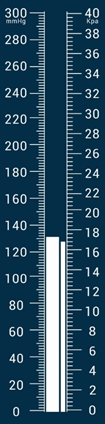
由於項目需要,所以用SurfaceView寫了一個自定義View,根據曉風飛雨的溫度計源碼做了一部分修改而來,效果是雙汞柱 不廢話了 先上源碼
package view;

import android.content.Context;
import android.graphics.Bitmap;
import android.graphics.Canvas;
import android.graphics.Color;
import android.graphics.Paint;
import android.graphics.RectF;
import android.util.AttributeSet;
import android.util.TypedValue;
import android.view.SurfaceHolder;
import android.view.SurfaceView;

import com.example.sc.bloodpressuremeter.R;

import java.text.DecimalFormat;

/**
 * TODO: document your custom view class.
 */
public class Thermometer extends SurfaceView implements SurfaceHolder.Callback, Runnable {
    private SurfaceHolder mHolder;
    private Canvas mCanvas;

    //定義左側范圍
    int left_temperatureRange = 15;
    //定義右側范圍
    int right_temperatureRange = 20;
    //定義一個盤快的范圍
    private RectF mRange = new RectF();
    //定義溫度計的寬度和中心寬度
    int mWith;
    int mHeight;
    int centerWith;
    int centerHeight;

    //定義溫度計刻度總長度
    int temperatureAllLong;

    //定義一下水銀的寬度
    int MercuryWith;
    //十的倍數的線長度
    int MaxLineLong;
    //五的倍數的線的長度
    int MidLineLong;
    //其他刻度線的長度
    int MinLineLong;
    //左側刻度間隔
    float left_scaleLong;
    //右側刻度間隔
    float right_scaleLong;

    //定義溫度計距離畫布的上寬度
    float abHeight;

    //繪制線條的畫筆
    private Paint LinePaint;
    //繪制文本的畫筆
    private Paint TextPaint1;
    //繪制單位的畫筆
    private Paint TextPaint;


    //設置溫度上升的速度
    private volatile float mSpeed = 0;
    //kpa上升的速度
    private volatile float mSpeed_kpa = 0;

    //設置背景圖
    private Bitmap mBitmap;

    /**
     * 定義初始溫度,當前顯示正在變化也就是顯示的溫度,還有目標溫度
     * 其中,初始溫度不變,
     * 當前溫度是有程序根據不同的速度和目標溫度計算出來的,
     * 目標溫度則是由儀器傳送過來的數據
     */
    private float BeginTenperature = (float) 0;
    private int left_EndTenperature = 300;
    private int right_EndTenperature = 40;
    private volatile float CurrentTemperature = (float) 0;
    private volatile float CurrentLow_hight = (float) 0;

    float TargetTemperature = 0;
    float Targetlow_hight = 0;

    /**
     * 定義每一秒繪制的次數
     */
    int everySecondTime = 100;

    //設置文字的大小
    private float mTextSize = TypedValue.applyDimension(TypedValue.COMPLEX_UNIT_SHIFT, 25, getResources().getDisplayMetrics());
    private float mTextSize_ten = TypedValue.applyDimension(TypedValue.COMPLEX_UNIT_SHIFT, 10, getResources().getDisplayMetrics());
    private float mSymbolTextSize = TypedValue.applyDimension(TypedValue.COMPLEX_UNIT_SHIFT, 35, getResources().getDisplayMetrics());
    private float mShowSymbolTextSize = TypedValue.applyDimension(TypedValue.COMPLEX_UNIT_SHIFT, 45, getResources().getDisplayMetrics());
    /**
     * 用戶繪制的線程
     */
    private Thread mThread;
    /**
     * 根據目標溫度改變要顯示的當前溫度的線程
     */
    private Thread mChangeTemperatureThread;

    /**
     * 設置一個標志位,用於線程的開啟還是關閉的標志
     *
     * @param context
     */
    private Boolean isRunning, isRunning_kpa;

    private DecimalFormat fomat;//格式化float

    public Thermometer(Context context) {
        this(context, null);
    }

    public Thermometer(Context context, AttributeSet attrs) {
        super(context, attrs);
        mHolder = getHolder();
        mHolder.addCallback(this);

    }

    @Override
    protected void onMeasure(int with, int height) {
        super.onMeasure(with, height);
        this.mWith = getMeasuredWidth() / 2;
        this.mHeight = getMeasuredHeight();
        //這裡先把中心設置在屏幕的中心
        this.centerWith = mWith / 2 + 100;
        this.centerHeight = mHeight / 2;
        //設置水銀的寬度
        MercuryWith = mWith / 6;
        MinLineLong = MercuryWith;
        MidLineLong = MinLineLong * 8 / 6;
        MaxLineLong = MidLineLong * 3 / 2;
        //temperatureAllLong表示溫度刻度總長度
        temperatureAllLong = mHeight * 9 / 10;
        //設置左側刻度間隔,包含了刻度線的長度
        left_scaleLong = temperatureAllLong / left_temperatureRange / 10.0f;//表示一個溫度十個刻度

        //設置右側刻度間隔,包含了刻度線的長度
        right_scaleLong = temperatureAllLong / right_temperatureRange / 5.0f;//表示一個溫度5個刻度

        abHeight = mHeight / 30.0f;
    }

    @Override
    public void surfaceCreated(SurfaceHolder surfaceHolder) {
        //初始化畫筆
        LinePaint = new Paint();
        //去鋸齒
        LinePaint.setAntiAlias(true);
        LinePaint.setColor(Color.WHITE);
        LinePaint.setStyle(Paint.Style.STROKE);
        LinePaint.setStrokeWidth(1);
        //初始化畫筆
        TextPaint1 = new Paint();
        TextPaint1.setColor(Color.WHITE);
        TextPaint1.setTextSize(mTextSize);
        TextPaint1.setShader(null);
        //初始化畫筆
        TextPaint = new Paint();
        TextPaint.setColor(Color.WHITE);
        TextPaint.setTextSize(mTextSize_ten);
        TextPaint.setShader(null);
        //初始化溫度計的范圍
        mRange = new RectF(0, 0, mWith, mHeight);
        isRunning = true;
        isRunning_kpa = true;
        mThread = new Thread(this);
        mThread.start();

    }

    @Override
    public void surfaceChanged(SurfaceHolder surfaceHolder, int i, int i1, int i2) {

    }

    @Override
    public void surfaceDestroyed(SurfaceHolder surfaceHolder) {

        isRunning = false;
        isRunning_kpa = false;

    }

    @Override
    public void run() {
        //不斷進行繪制
        while (isRunning) {
            long start = System.currentTimeMillis();
            draw();
            long end = System.currentTimeMillis();
            if (end - start < everySecondTime) {
                //這裡控制一下,一秒繪制二十次。也就是五十秒繪制一次
                try {
                    Thread.sleep(everySecondTime - (end - start));
                } catch (InterruptedException e) {
                    e.printStackTrace();
                }
            }
        }
    }

    private void draw() {

        try {
            mCanvas = mHolder.lockCanvas();
            //這裡要判斷是不是為空,之因為在用戶點擊了home以後,可能已經執行到這裡
            if (mCanvas != null) {
                //這裡是開始繪制自己要的東西
                //先繪制背景,
                drawBg();
                //繪制水銀的高度還有,顯示體溫
                drawShowHeightAndShow();
            }
        } catch (Exception e) {
            // e.printStackTrace();這裡的異常不處理,
        } finally {
            if (mCanvas != null) {
                mHolder.unlockCanvasAndPost(mCanvas);
            }
        }

    }


    private void drawShowHeightAndShow() {
        float kpa = Targetlow_hight;
        float CurrentKpa = CurrentLow_hight;
        //這裡控制水銀的上升速度
        float difference = Math.abs(TargetTemperature - CurrentTemperature);
        float difference_kpa = Math.abs(kpa - CurrentKpa);
        /**
         * //這裡定義一個boolean來控制是使用加法還是減法,其中true表示當前溫度小於
         * 目標溫度,要使用加法,false表示當前溫度大於目標溫度,要使用減法。
         */
        boolean addORsub = CurrentTemperature >= TargetTemperature ? false : true;
        boolean addOrsub_kpa = CurrentKpa >= kpa ? false : true;
        if (difference == 0 || difference <= 0.005) {
            mSpeed = 0;
            CurrentTemperature = TargetTemperature;
        } else {
            if (difference > 20) {
                mSpeed = (float) 0.5;
            } else {
                if (difference > 10) {
                    mSpeed = (float) 0.15;
                } else {
                    mSpeed = (float) 0.05;
                }
            }
        }
        if (difference_kpa == 0 || difference_kpa <= 0.005) {
            mSpeed_kpa = 0;
            CurrentKpa = kpa;
        } else {
            if (difference_kpa > 2) {
                mSpeed_kpa = (float) 0.6;
            } else {
                if (difference_kpa > 1) {
                    mSpeed_kpa = (float) 0.5;
                } else {
                    mSpeed_kpa = (float) 0.1;
                }
            }
        }
        if (addORsub) {
            CurrentTemperature += 20 * mSpeed;
        } else {
            CurrentTemperature -= 20 * mSpeed;
        }
        if (addOrsub_kpa) {
            CurrentKpa += 2 * mSpeed_kpa;
        } else {
            CurrentKpa -= 2 * mSpeed_kpa;
        }

        //

        Paint RightRectPaint = new Paint();
        RightRectPaint.setColor(Color.WHITE);
        RightRectPaint.setStyle(Paint.Style.FILL);
        Paint LeftRectPaint = new Paint();
        LeftRectPaint.setColor(Color.WHITE);
        LeftRectPaint.setStyle(Paint.Style.FILL);
        //這裡主要是對溫度的顯示,畫矩形的過程中,唯一改變的就是Top這一個值了
        //左側水銀柱
        if (Math.abs(CurrentTemperature - TargetTemperature) > 10) {
            float left = (temperatureAllLong / (left_temperatureRange * 1.0f)) * (int) (CurrentTemperature / 20) + (CurrentTemperature % 20) / 2 * (left_scaleLong);
            mCanvas.drawRect(centerWith - MercuryWith / 2, temperatureAllLong + abHeight * 2 - left, centerWith, temperatureAllLong + abHeight * 2, LeftRectPaint);
//            float right = (temperatureAllLong / (right_temperatureRange * 1.0f)) * (int) (CurrentKpa / 2) + (CurrentKpa % 2) / 2 * 4 * (right_scaleLong);
            float right = (temperatureAllLong / (left_temperatureRange * 1.0f)) * (int) (CurrentKpa / 20) + (CurrentKpa % 20) / 2 * (left_scaleLong);
            mCanvas.drawRect(centerWith + MercuryWith / 8, temperatureAllLong + abHeight * 2 - right, centerWith + MercuryWith / 2, temperatureAllLong + abHeight * 2, RightRectPaint);
            isRunning = true;
        } else {
            float left = (temperatureAllLong / (left_temperatureRange * 1.0f)) * (int) (TargetTemperature / 20) + (TargetTemperature % 20) / 2 * (left_scaleLong);
            mCanvas.drawRect(centerWith - MercuryWith / 2, temperatureAllLong + abHeight * 2 - left, centerWith, temperatureAllLong + abHeight * 2, LeftRectPaint);
//            float right = (temperatureAllLong / (right_temperatureRange * 1.0f)) * (int) (kpa / 2) + (kpa % 2) / 2 * 4 * (right_scaleLong);
            float right = (temperatureAllLong / (left_temperatureRange * 1.0f)) * (int) (kpa / 20) + (kpa % 20) / 2 * (left_scaleLong);
            mCanvas.drawRect(centerWith + MercuryWith / 8, temperatureAllLong + abHeight * 2 - right, centerWith + MercuryWith / 2, temperatureAllLong + abHeight * 2, RightRectPaint);
            isRunning = false;
        }
    }

    private void drawBg() {
        mCanvas.drawColor(getResources().getColor(R.color.class_blue));
        //畫右邊的刻度
        //定義每一個長刻度的高度
        float left_everyTemparaturHeight = temperatureAllLong / (left_temperatureRange * 1.0f);
        float right_everyTemparaturHeight = temperatureAllLong / (right_temperatureRange * 1.0f);
        mCanvas.drawLine(centerWith + MercuryWith / 2, abHeight * 2, centerWith + MercuryWith / 2, right_everyTemparaturHeight * 20 + abHeight * 2, LinePaint);
        for (int i = 0; i < right_temperatureRange; i++) {
            mCanvas.drawLine(centerWith + MercuryWith / 2, right_everyTemparaturHeight * i + abHeight * 2, centerWith + MercuryWith / 2 + MaxLineLong, right_everyTemparaturHeight * i + abHeight * 2, LinePaint);
            if (i == 0) {
                mCanvas.drawText(right_EndTenperature - i * 2 + "", centerWith + MercuryWith / 2 + MaxLineLong + MinLineLong / 3, right_everyTemparaturHeight * i + TextPaint1.getTextSize() / 2 + abHeight * 2, TextPaint1);
                mCanvas.drawText("Kpa", centerWith + MercuryWith / 2 + MaxLineLong + MinLineLong / 3 + 5, right_everyTemparaturHeight * i + TextPaint1.getTextSize() / 2 + abHeight * 2 + 15, TextPaint);
            } else {
                mCanvas.drawText(right_EndTenperature - i * 2 + "", centerWith + MercuryWith / 2 + MaxLineLong + MinLineLong / 3, right_everyTemparaturHeight * i + TextPaint1.getTextSize() / 2 + abHeight * 2, TextPaint1);
            }
            for (int j = 1; j < 5; j++) {
                mCanvas.drawLine(centerWith + MercuryWith / 2, right_everyTemparaturHeight * i + j * (right_scaleLong) + abHeight * 2, centerWith + MercuryWith / 2 + MinLineLong, right_everyTemparaturHeight * i + j * (right_scaleLong) + abHeight * 2, LinePaint);
            }
            //畫最後一個刻度
            if (i == right_temperatureRange - 1) {

                mCanvas.drawLine(centerWith + MercuryWith / 2,
                        right_everyTemparaturHeight * (i + 1) + abHeight * 2,//這裡加上兩倍的上距離
                        centerWith + MercuryWith / 2 + MaxLineLong,
                        right_everyTemparaturHeight * (i + 1) + abHeight * 2, LinePaint);
                mCanvas.drawText(right_EndTenperature - (i + 1) * 2 + "", centerWith + MercuryWith / 2 + MaxLineLong + MinLineLong / 3,
                        right_everyTemparaturHeight * (i + 1) + TextPaint1.getTextSize() / 2 + abHeight * 2, TextPaint1);
            }
        }
        //畫左邊的刻度
        mCanvas.drawLine(centerWith - MercuryWith / 2, abHeight * 2, centerWith - MercuryWith / 2, left_everyTemparaturHeight * left_temperatureRange + abHeight * 2, LinePaint);
        for (int i = 0; i < left_temperatureRange; i++) {
            mCanvas.drawLine(centerWith - MercuryWith / 2, left_everyTemparaturHeight * i + abHeight * 2, centerWith - MercuryWith / 2 - MaxLineLong, left_everyTemparaturHeight * i + abHeight * 2, LinePaint);
            if (i == 0) {
                mCanvas.drawText(left_EndTenperature - i * 20 + "", centerWith - (MercuryWith / 2 + MaxLineLong + MinLineLong) - TextPaint1.getTextSize(), left_everyTemparaturHeight * i + TextPaint1.getTextSize() / 2 + abHeight * 2, TextPaint1);
                mCanvas.drawText("mmHg", centerWith - (MercuryWith / 2 + MaxLineLong + MinLineLong) - TextPaint1.getTextSize() + 5, left_everyTemparaturHeight * i + TextPaint1.getTextSize() / 2 + abHeight * 2 + 20, TextPaint);
            } else {
                mCanvas.drawText(left_EndTenperature - i * 20 + "", centerWith - (MercuryWith / 2 + MaxLineLong + MinLineLong) - TextPaint1.getTextSize(), left_everyTemparaturHeight * i + TextPaint1.getTextSize() / 2 + abHeight * 2, TextPaint1);
            }
            for (int j = 1; j <= 9; j++) {
                if (j == 5) {
                    mCanvas.drawLine(centerWith - MercuryWith / 2, left_everyTemparaturHeight * i + j * (left_scaleLong) + abHeight * 2, centerWith - MercuryWith / 2 - MidLineLong, left_everyTemparaturHeight * i + j * (left_scaleLong) + abHeight * 2, LinePaint);
                } else {
                    mCanvas.drawLine(centerWith - MercuryWith / 2, left_everyTemparaturHeight * i + j * (left_scaleLong) + abHeight * 2, centerWith - MercuryWith / 2 - MinLineLong, left_everyTemparaturHeight * i + j * (left_scaleLong) + abHeight * 2, LinePaint);
                }

            }
            //畫最後一個刻度
            if (i == left_temperatureRange - 1) {
                mCanvas.drawLine(centerWith - MercuryWith / 2, left_everyTemparaturHeight * (i + 1) + abHeight * 2, centerWith - MercuryWith / 2 - MaxLineLong, left_everyTemparaturHeight * (i + 1) + abHeight * 2, LinePaint);
                mCanvas.drawText(left_EndTenperature - (i + 1) * 20 + "", centerWith - (MercuryWith / 2 + MaxLineLong + MinLineLong / 3) - TextPaint1.getTextSize(), left_everyTemparaturHeight * (i + 1) + TextPaint1.getTextSize() / 2 + abHeight * 2, TextPaint1);
            }
        }
    }

    private float trueTemperature = 0;

    public void setTargetTemperature(float targetTemperature, float low_hight) {
        trueTemperature = targetTemperature;
        if (targetTemperature < 0) {
            targetTemperature = 0;
        }
        if (targetTemperature > left_EndTenperature) {
            targetTemperature = left_EndTenperature;
        }
        if (low_hight > left_EndTenperature) {
            low_hight = left_EndTenperature;
        }
        if (low_hight - targetTemperature > 10 && false) {
            TargetTemperature = targetTemperature;
            Targetlow_hight = targetTemperature + 10;
        } else {
            TargetTemperature = targetTemperature;
            Targetlow_hight = low_hight;
        }

        isRunning = true;
        draw();
    }

    public void setTargetTemperatureToZero() {
        TargetTemperature = 0;
        Targetlow_hight = 0;
        isRunning = true;
        run();
    }
}
用法:
        thermometer = (Thermometer) view.findViewById(R.id.thermometer);
        thermometer.setZOrderOnTop(true);      // 這句不能少
        thermometer.setZOrderMediaOverlay(true);
        thermometer.getHolder().setFormat(PixelFormat.TRANSPARENT);
將控件放置頂部 如果不寫這個,Fragment上面放置控件的時候 切換屏幕可能會導致控件不隱藏
常用方法:
    //將汞柱歸零
    thermometer.setTargetTemperatureToZero();
這是單獨開啟的一個線程,會從當前溫度降至最低點
    //輸入數值 汞柱升高至對應數值 temp為左側汞柱 temp_low_hight為右側汞柱
    thermometer.setTargetTemperature(temp, temp_low_hight);
效果這個樣子:
 跟我學Android之六 布局
本章內容第1節 線性布局第2節 相對布局第3節 幀布局第4節 表格布局第5節 網格布局 線性布局線性布局使用標簽進行配置,對應代碼中的類是android.wid
 Android學習筆記之PopupMenu彈出菜單
(1)布局文件:用於彈出菜單的處罰button: (2)res-menu目錄下的main.xml文件: (3)類的文
 Android App優化
App的高性能應該是每個程序員追求的,當然也是用戶希望的。本篇文章來簡單介紹一下App優化的方式1、UI優化UI優化主要是提高UI的繪制效率,包括減少UI層次,提高初始化
 Windows下快速搭建安卓開發環境Android studio
一、Android Studio簡單介紹 2013年GoogleI/O大會首次發布了Android Studio IDE(Android平台集成開發環境)。它基於Inte
 [Android測試] Android Studio+Appium+Java+Windows 自動化測試之二:Appium環境安裝搭建
一、需要下載安裝的東西1. 文件下載網上也有挺多安裝教程的,這裡我提供我