編輯:關於Android編程
百度地圖的定位功能和基礎地圖功能是分開的,使用的是另外的jar包和so庫文件,詳情請關注官網:
百度定位SDK
下載對應的jar包和so庫,然後移動到lib目錄下
AS中注意事項
sourceSets {
     main {
       jniLibs.srcDirs = ['libs']
     }
}
在application標簽中聲明service組件,每個app擁有自己單獨的定位service
這個很重要 ,不要以為和基礎地圖的使用方式相同就忽略了對定位SDK配置官方說明的閱讀
聲明使用權限
注意事項:
在Android6.0也就是M版本的手機上實現Demo時,由於M版本Google引入了動態權限分配的機制,如果沒有在代碼中申請權限,默認權限是不會被打開的,作為調試的注意事項,你需要到設置中手動的為Demo程序打開權限,方便定位能夠正確的進行。
AK配置
參照基礎地圖使用的AK配置即可
布局文件
代碼實現
public class MainActivity extends AppCompatActivity {
    private MapView bmapView;
    private BitmapDescriptor bitmap = null;
    private BaiduMap mBaiduMap = null;
    private LocationClient mLocationClient = null;
    private BDLocationListener myListener = new MyLocationListener();

    private EditText editTextLocationResult;
    private Button doLocateButton;

    @Override
    protected void onCreate(Bundle savedInstanceState) {
        super.onCreate(savedInstanceState);

        SDKInitializer.initialize(getApplicationContext());
        setContentView(R.layout.activity_main);

        bmapView = (MapView) findViewById(R.id.bmapView);
        mBaiduMap = bmapView.getMap();
        //設置Marker的點擊事件監聽
        mBaiduMap.setOnMarkerClickListener(new BaiduMap.OnMarkerClickListener() {
            @Override
            public boolean onMarkerClick(Marker marker) {
                if (marker.getExtraInfo() != null) {
                    Bundle bundle = marker.getExtraInfo();//獲取傳遞過來的信息
                    LatLng latlng = bundle.getParcelable("LatLng");//拿到經緯度
                    String address = bundle.getString("ADDRESS");//拿到地址信息
                    TextView tv = new TextView(MainActivity.this);
                    tv.setBackgroundResource(R.drawable.marker_info_bg);
                    tv.setTextColor(Color.WHITE);
                    tv.setText(address);
                    InfoWindow info = new InfoWindow(tv, latlng, -47);//創建彈出窗覆蓋物
                    mBaiduMap.showInfoWindow(info);//展示
                }
                return false;
            }
        });

        doLocateButton = (Button) findViewById(R.id.bt_locate);
        doLocateButton.setOnClickListener(new View.OnClickListener() {
            @Override
            public void onClick(View view) {
                startLocate();//開始定位
            }
        });
        editTextLocationResult = (EditText) findViewById(R.id.et_locationresult);
        bitmap = BitmapDescriptorFactory
                .fromResource(R.drawable.icon_gcoding);
        mLocationClient = new LocationClient(getApplicationContext());     //聲明LocationClient類
        mLocationClient.registerLocationListener(myListener);    //注冊監聽函數
        initLocation();//初始化定位的一些配置
    }

    private void initLocation() {
        LocationClientOption option = new LocationClientOption();
        option.setLocationMode(LocationClientOption.LocationMode.Hight_Accuracy
        );//可選,默認高精度,設置定位模式,高精度,低功耗,僅設備
        option.setCoorType("bd09ll");//可選,默認gcj02,設置返回的定位結果坐標系
        int span = 1000;
        option.setScanSpan(span);//可選,默認0,即僅定位一次,設置發起定位請求的間隔需要大於等於1000ms才是有效的
        option.setIsNeedAddress(true);//可選,設置是否需要地址信息,默認不需要
        option.setOpenGps(true);//可選,默認false,設置是否使用gps
        option.setLocationNotify(true);//可選,默認false,設置是否當gps有效時按照1S1次頻率輸出GPS結果
        option.setIsNeedLocationDescribe(true);//可選,默認false,設置是否需要位置語義化結果,可以在BDLocation.getLocationDescribe裡得到,結果類似於“在北京天安門附近”
        option.setIsNeedLocationPoiList(true);//可選,默認false,設置是否需要POI結果,可以在BDLocation.getPoiList裡得到
        option.setIgnoreKillProcess(false);//可選,默認true,定位SDK內部是一個SERVICE,並放到了獨立進程,設置是否在stop的時候殺死這個進程,默認不殺死
        option.SetIgnoreCacheException(false);//可選,默認false,設置是否收集CRASH信息,默認收集
        option.setEnableSimulateGps(false);//可選,默認false,設置是否需要過濾gps仿真結果,默認需要
        mLocationClient.setLocOption(option);
    }

    private void startLocate() {
        if (mLocationClient != null) {
            mLocationClient.start();//啟動定位
        }
    }

    @Override
    protected void onResume() {
        if (bmapView != null) {
            bmapView.onResume();
        }
        super.onResume();
    }

    @Override
    protected void onPause() {
        if (bmapView != null) {
            bmapView.onPause();
        }
        super.onPause();
    }

    @Override
    protected void onDestroy() {
        if (bmapView != null) {
            bmapView.onDestroy();
        }
        if (bitmap != null) {
            bitmap.recycle();
        }
        super.onDestroy();
    }
    //這個是從Demo中拿過來的,我自己使用的時候可以不同這麼復雜,拿到對應的信息即可
    public class MyLocationListener implements BDLocationListener {
        @Override
        public void onReceiveLocation(BDLocation location) {
            //Receive Location
            StringBuffer sb = new StringBuffer(256);
            sb.append("time : ");
            sb.append(location.getTime());
            sb.append("\nerror code : ");
            sb.append(location.getLocType());
            sb.append("\nlatitude : ");
            sb.append(location.getLatitude());
            sb.append("\nlontitude : ");
            sb.append(location.getLongitude());
            sb.append("\nradius : ");
            sb.append(location.getRadius());
            if (location.getLocType() == BDLocation.TypeGpsLocation) {// GPS定位結果
                sb.append("\nspeed : ");
                sb.append(location.getSpeed());// 單位:公裡每小時
                sb.append("\nsatellite : ");
                sb.append(location.getSatelliteNumber());
                sb.append("\nheight : ");
                sb.append(location.getAltitude());// 單位:米
                sb.append("\ndirection : ");
                sb.append(location.getDirection());// 單位度
                sb.append("\naddr : ");
                sb.append(location.getAddrStr());
                sb.append("\ndescribe : ");
                sb.append("gps定位成功");

            } else if (location.getLocType() == BDLocation.TypeNetWorkLocation) {// 網絡定位結果
                sb.append("\naddr : ");
                sb.append(location.getAddrStr());
                //運營商信息
                sb.append("\noperationers : ");
                sb.append(location.getOperators());
                sb.append("\ndescribe : ");
                sb.append("網絡定位成功");
            } else if (location.getLocType() == BDLocation.TypeOffLineLocation) {// 離線定位結果
                sb.append("\ndescribe : ");
                sb.append("離線定位成功,離線定位結果也是有效的");
            } else if (location.getLocType() == BDLocation.TypeServerError) {
                sb.append("\ndescribe : ");
                sb.append("服務端網絡定位失敗,可以反饋IMEI號和大體定位時間到loc-bugs@baidu.com,會有人追查原因");
            } else if (location.getLocType() == BDLocation.TypeNetWorkException) {
                sb.append("\ndescribe : ");
                sb.append("網絡不同導致定位失敗,請檢查網絡是否通暢");
            } else if (location.getLocType() == BDLocation.TypeCriteriaException) {
                sb.append("\ndescribe : ");
                sb.append("無法獲取有效定位依據導致定位失敗,一般是由於手機的原因,處於飛行模式下一般會造成這種結果,可以試著重啟手機");
            }
            sb.append("\nlocationdescribe : ");
            sb.append(location.getLocationDescribe());// 位置語義化信息
            List list = location.getPoiList();// POI數據
            if (list != null) {
                sb.append("\npoilist size = : ");
                sb.append(list.size());
                for (Poi p : list) {
                    sb.append("\npoi= : ");
                    sb.append(p.getId() + " " + p.getName() + " " + p.getRank());
                }
            }
            Log.i("BaiduLocationApiDem", sb.toString());
            editTextLocationResult.setText(location.getAddrStr());//顯示查詢結果
            addMark(location.getLatitude(), location.getLongitude(), location.getAddrStr());//添加覆蓋物
            mLocationClient.stop();
        }
    }

    private void addMark(double latitude, double longitude, String address) {
        LatLng latlng = new LatLng(latitude, longitude);
        Bundle bundle = new Bundle();
        bundle.putString("ADDRESS", address);
        bundle.putParcelable("LatLng", latlng);//創建Bundle傳遞,用於在點擊的時候創建彈出窗
        OverlayOptions option = new MarkerOptions().icon(bitmap).extraInfo(bundle).position(latlng);
        if (mBaiduMap != null) {
            mBaiduMap.addOverlay(option);
            mBaiduMap.setMapStatus(MapStatusUpdateFactory.newLatLng(latlng));//移動到new marker
        }
    }
}
實際效果
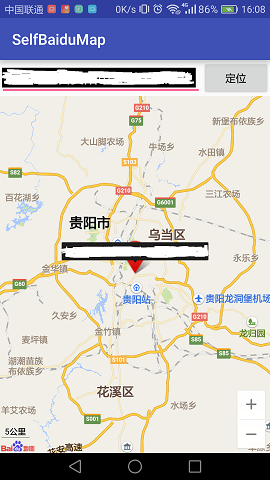
(個人地理位置信息被處理了,實際Demo以個人位置為准)
 Android中使用ShareSDK功能學習
前言:由於最近做了個項目用到了社會化分享的功能,之前從來沒有碰到過這類功能,然後自己就一邊查看資料,一邊在項目中加入,慢慢摸索,這邊文章算是自己對ShareSDK的學習筆
 Android-點擊事件分發機制驗證
簡介點擊事件的事件分發,其實就是對MotionEvent事件的分發過程,即當一個MotionEvent產生之後,系統需要這個事件傳遞給一個具體的View,而這個傳遞過程就
 Android 使用SharedPreferences進行數據存儲和讀取數據
很多時候我們開發的軟件需要向用戶提供軟件參數設置功能,例如我們常用的QQ,用戶可以設置是否允許陌生人添加自己為好友。對於軟件配置參數的保存,如果是window軟件通常我們
 Android5.0 旋轉菜單實例詳解
先給大家展示下效果圖:這個效果是安卓5.0推出 “材料設計” Ui效果 以前一直沒留意到,寫篇文章當成備忘錄上面的效果圖 用 DrawerLayout和Toolbar實現