編輯:關於Android編程
本人比較懶,不說廢話,直接貼代碼,代碼後附有完整項目
package test.com.opengles5_3;

import android.opengl.GLES20;

import java.nio.ByteBuffer;
import java.nio.ByteOrder;
import java.nio.FloatBuffer;

/**
 * Created by hbin on 2016/8/2.
 * 顏色立方體
 */
public class Cube {
    int mProgram;//自定義渲染管線著色器程序id
    int muMVPMatrixHandle;//總變換矩陣引用
    int maPositionHandle;//頂點位置屬性引用
    int maColorHandle;//頂點顏色屬性引用

    String mVertexShader;//頂點設色器代碼腳本
    String mFragmentShader;//片元著色器代碼腳本

    FloatBuffer mVertexBuffer;//頂點坐標數據緩沖
    FloatBuffer mColorBuffer;//頂點著色數據緩沖

    int vCount=0;

    public Cube(MySurfaceView mv){
            initVertexData();
            initShader(mv);
    }

    //初始化頂點坐標與著色數據的方法
    public void initVertexData()
    {
        //總頂點數
        vCount=12*6;//一共6個面,每個面12個頂點,每個面4個三角形
        float vertices[]=new float[]
                {
                    //opengles以三角形方式繪制多邊形,此處把一個平面分成4個三角形進行繪制
                    //以立方體的中心點作為三維坐標系的原點,z軸穿過前面,後面的中心點
                    //x軸穿過左右面的中心點
                    //y軸穿過上下面的中心點
                        //前面
                        0,0,Constant.UNIT_SIZE,//前面的中心點
                        Constant.UNIT_SIZE,Constant.UNIT_SIZE,Constant.UNIT_SIZE,// 右上
                        -Constant.UNIT_SIZE,Constant.UNIT_SIZE,Constant.UNIT_SIZE,//左上


                        0,0,Constant.UNIT_SIZE,//前面中心點
                        -Constant.UNIT_SIZE,Constant.UNIT_SIZE,Constant.UNIT_SIZE,//左上
                        -Constant.UNIT_SIZE,-Constant.UNIT_SIZE,Constant.UNIT_SIZE,//左下

                        0,0,Constant.UNIT_SIZE,//前面中心點
                        -Constant.UNIT_SIZE,-Constant.UNIT_SIZE,Constant.UNIT_SIZE,//左下
                        Constant.UNIT_SIZE,-Constant.UNIT_SIZE,Constant.UNIT_SIZE,//右下

                        0,0,Constant.UNIT_SIZE,//前面中心點
                        Constant.UNIT_SIZE,-Constant.UNIT_SIZE,Constant.UNIT_SIZE,//右下
                        Constant.UNIT_SIZE,Constant.UNIT_SIZE,Constant.UNIT_SIZE,//右上

                        //後面
                        0,0,-Constant.UNIT_SIZE,//後面中心點
                        Constant.UNIT_SIZE,Constant.UNIT_SIZE,-Constant.UNIT_SIZE,//右上
                        Constant.UNIT_SIZE,-Constant.UNIT_SIZE,-Constant.UNIT_SIZE,//右下

                        0,0,-Constant.UNIT_SIZE,//後面中心點
                        Constant.UNIT_SIZE,-Constant.UNIT_SIZE,-Constant.UNIT_SIZE,//右下
                        -Constant.UNIT_SIZE,-Constant.UNIT_SIZE,-Constant.UNIT_SIZE,//左下

                        0,0,-Constant.UNIT_SIZE,//後面中心點
                        -Constant.UNIT_SIZE,-Constant.UNIT_SIZE,-Constant.UNIT_SIZE,//左下
                        -Constant.UNIT_SIZE,Constant.UNIT_SIZE,-Constant.UNIT_SIZE,//左上

                        0,0,-Constant.UNIT_SIZE,//後面中心點
                        -Constant.UNIT_SIZE,Constant.UNIT_SIZE,-Constant.UNIT_SIZE,//左上
                        Constant.UNIT_SIZE,Constant.UNIT_SIZE,-Constant.UNIT_SIZE,//右上

                        //左面
                        -Constant.UNIT_SIZE,0,0,//左面中心點
                        -Constant.UNIT_SIZE,Constant.UNIT_SIZE,Constant.UNIT_SIZE,//左前
                        -Constant.UNIT_SIZE,Constant.UNIT_SIZE,-Constant.UNIT_SIZE,//左後

                        -Constant.UNIT_SIZE,0,0,//左面中心點
                        -Constant.UNIT_SIZE,Constant.UNIT_SIZE,-Constant.UNIT_SIZE,//左後
                        -Constant.UNIT_SIZE,-Constant.UNIT_SIZE,-Constant.UNIT_SIZE,//左下

                        -Constant.UNIT_SIZE,0,0,//左面中心點
                        -Constant.UNIT_SIZE,-Constant.UNIT_SIZE,-Constant.UNIT_SIZE,//左下
                        -Constant.UNIT_SIZE,-Constant.UNIT_SIZE,Constant.UNIT_SIZE,//右下

                        -Constant.UNIT_SIZE,0,0,//左面中心點
                        -Constant.UNIT_SIZE,-Constant.UNIT_SIZE,Constant.UNIT_SIZE,//右下
                        -Constant.UNIT_SIZE,Constant.UNIT_SIZE,Constant.UNIT_SIZE,// 左後

                        //右面
                        Constant.UNIT_SIZE,0,0,
                        Constant.UNIT_SIZE,Constant.UNIT_SIZE,Constant.UNIT_SIZE,
                        Constant.UNIT_SIZE,-Constant.UNIT_SIZE,Constant.UNIT_SIZE,

                        Constant.UNIT_SIZE,0,0,
                        Constant.UNIT_SIZE,-Constant.UNIT_SIZE,Constant.UNIT_SIZE,
                        Constant.UNIT_SIZE,-Constant.UNIT_SIZE,-Constant.UNIT_SIZE,

                        Constant.UNIT_SIZE,0,0,
                        Constant.UNIT_SIZE,-Constant.UNIT_SIZE,-Constant.UNIT_SIZE,
                        Constant.UNIT_SIZE,Constant.UNIT_SIZE,-Constant.UNIT_SIZE,

                        Constant.UNIT_SIZE,0,0,
                        Constant.UNIT_SIZE,Constant.UNIT_SIZE,-Constant.UNIT_SIZE,
                        Constant.UNIT_SIZE,Constant.UNIT_SIZE,Constant.UNIT_SIZE,
                        //上面
                        0,Constant.UNIT_SIZE,0,
                        Constant.UNIT_SIZE,Constant.UNIT_SIZE,Constant.UNIT_SIZE,
                        Constant.UNIT_SIZE,Constant.UNIT_SIZE,-Constant.UNIT_SIZE,

                        0,Constant.UNIT_SIZE,0,
                        Constant.UNIT_SIZE,Constant.UNIT_SIZE,-Constant.UNIT_SIZE,
                        -Constant.UNIT_SIZE,Constant.UNIT_SIZE,-Constant.UNIT_SIZE,

                        0,Constant.UNIT_SIZE,0,
                        -Constant.UNIT_SIZE,Constant.UNIT_SIZE,-Constant.UNIT_SIZE,
                        -Constant.UNIT_SIZE,Constant.UNIT_SIZE,Constant.UNIT_SIZE,

                        0,Constant.UNIT_SIZE,0,
                        -Constant.UNIT_SIZE,Constant.UNIT_SIZE,Constant.UNIT_SIZE,
                        Constant.UNIT_SIZE,Constant.UNIT_SIZE,Constant.UNIT_SIZE,
                        //下面
                        0,-Constant.UNIT_SIZE,0,
                        Constant.UNIT_SIZE,-Constant.UNIT_SIZE,Constant.UNIT_SIZE,
                        -Constant.UNIT_SIZE,-Constant.UNIT_SIZE,Constant.UNIT_SIZE,

                        0,-Constant.UNIT_SIZE,0,
                        -Constant.UNIT_SIZE,-Constant.UNIT_SIZE,Constant.UNIT_SIZE,
                        -Constant.UNIT_SIZE,-Constant.UNIT_SIZE,-Constant.UNIT_SIZE,

                        0,-Constant.UNIT_SIZE,0,
                        -Constant.UNIT_SIZE,-Constant.UNIT_SIZE,-Constant.UNIT_SIZE,
                        Constant.UNIT_SIZE,-Constant.UNIT_SIZE,-Constant.UNIT_SIZE,

                        0,-Constant.UNIT_SIZE,0,
                        Constant.UNIT_SIZE,-Constant.UNIT_SIZE,-Constant.UNIT_SIZE,
                        Constant.UNIT_SIZE,-Constant.UNIT_SIZE,Constant.UNIT_SIZE,
                };

            //創建頂點坐標數據緩沖
            ////vertices.length*4是因為一個float四個字節
        ByteBuffer vbb=ByteBuffer.allocateDirect(vertices.length*4);
        vbb.order(ByteOrder.nativeOrder());//設置字節順序
        mVertexBuffer=vbb.asFloatBuffer();//轉為Float型緩沖
        mVertexBuffer.put(vertices);//向緩沖區放入頂點坐標數據
        mVertexBuffer.position(0);//設置緩沖區起始位置

        //頂點顏色值數組,每個頂點4個色彩值  RGBA
        float colors[]=new float[]{
                //前面
                1,1,1,0,//中間為白色
                1,0,0,0,
                1,0,0,0,
                1,1,1,0,//中間為白色
                1,0,0,0,
                1,0,0,0,
                1,1,1,0,//中間為白色
                1,0,0,0,
                1,0,0,0,
                1,1,1,0,//中間為白色
                1,0,0,0,
                1,0,0,0,
                //後面
                1,1,1,0,//中間為白色
                0,0,1,0,
                0,0,1,0,
                1,1,1,0,//中間為白色
                0,0,1,0,
                0,0,1,0,
                1,1,1,0,//中間為白色
                0,0,1,0,
                0,0,1,0,
                1,1,1,0,//中間為白色
                0,0,1,0,
                0,0,1,0,
                //左面
                1,1,1,0,//中間為白色
                1,0,1,0,
                1,0,1,0,
                1,1,1,0,//中間為白色
                1,0,1,0,
                1,0,1,0,
                1,1,1,0,//中間為白色
                1,0,1,0,
                1,0,1,0,
                1,1,1,0,//中間為白色
                1,0,1,0,
                1,0,1,0,
                //右面
                1,1,1,0,//中間為白色
                1,1,0,0,
                1,1,0,0,
                1,1,1,0,//中間為白色
                1,1,0,0,
                1,1,0,0,
                1,1,1,0,//中間為白色
                1,1,0,0,
                1,1,0,0,
                1,1,1,0,//中間為白色
                1,1,0,0,
                1,1,0,0,
                //上面
                1,1,1,0,//中間為白色
                0,1,0,0,
                0,1,0,0,
                1,1,1,0,//中間為白色
                0,1,0,0,
                0,1,0,0,
                1,1,1,0,//中間為白色
                0,1,0,0,
                0,1,0,0,
                1,1,1,0,//中間為白色
                0,1,0,0,
                0,1,0,0,
                //下面
                1,1,1,0,//中間為白色
                0,1,1,0,
                0,1,1,0,
                1,1,1,0,//中間為白色
                0,1,1,0,
                0,1,1,0,
                1,1,1,0,//中間為白色
                0,1,1,0,
                0,1,1,0,
                1,1,1,0,//中間為白色
                0,1,1,0,
                0,1,1,0,
        };
        //創建頂點著色數據緩沖
        ByteBuffer cbb=ByteBuffer.allocateDirect(colors.length*4);
        cbb.order(ByteOrder.nativeOrder());//設置字節序
        mColorBuffer=cbb.asFloatBuffer();//轉換為Float型緩沖
        mColorBuffer.put(colors);//向緩沖區放入頂點著色數據
        mColorBuffer.position(0);//設置緩沖區起始位置
    }

    //初始化shader
    public void initShader(MySurfaceView mv)
    {
        //加載頂點著色器的腳本內容
        mVertexShader=ShaderUtil.loadFromAssetsFile("vertex.sh",mv.getResources());
        //加載片元著色器的腳本內容
        mFragmentShader=ShaderUtil.loadFromAssetsFile("frag.sh",mv.getResources());
        //基於頂點著色器與片元著色器創建程序
        mProgram=ShaderUtil.createProgram(mVertexShader,mFragmentShader);
        // 獲取程序中頂點位置屬性引用id
        maPositionHandle= GLES20.glGetAttribLocation(mProgram, "aPosition");
        //獲取程序中頂點顏色屬性引用id
        maColorHandle=GLES20.glGetAttribLocation(mProgram,"aColor");
        //獲取程序中總變換矩陣引用id
        muMVPMatrixHandle=GLES20.glGetUniformLocation(mProgram,"uMVPMatrix");
    }

    public void drawSelf()
    {
        //制定使用某套shader程序
        GLES20.glUseProgram(mProgram);
        //將最終變換矩陣傳入shader程序
        GLES20.glUniformMatrix4fv(muMVPMatrixHandle,1,false,MatrixState.getFinalMatrix(),0);
        //為畫筆指定頂點位置數據
        GLES20.glVertexAttribPointer
                (
                    maPositionHandle,
                        3,
                        GLES20.GL_FLOAT,
                        false,
                        3*4,
                        mVertexBuffer
                );
        //為畫筆指定頂點著色數據
        GLES20.glVertexAttribPointer
                (
                    maColorHandle,
                        4,
                        GLES20.GL_FLOAT,
                        false,
                        4*4,
                        mColorBuffer
                );
        //允許頂點位置數據數組
        GLES20.glEnableVertexAttribArray(maPositionHandle);
        GLES20.glEnableVertexAttribArray(maColorHandle);
        //繪制立方立方體
        GLES20.glDrawArrays(GLES20.GL_TRIANGLES,0,vCount);
    }
}
package test.com.opengles5_3;

import android.app.Activity;
import android.content.pm.ActivityInfo;
import android.os.Bundle;
import android.view.Window;
import android.view.WindowManager;

public class MainActivity extends Activity {

    private MySurfaceView mGLSurfaceView;
    @Override
    protected void onCreate(Bundle savedInstanceState) {
        super.onCreate(savedInstanceState);
        // 設置為全屏
        requestWindowFeature(Window.FEATURE_NO_TITLE);
        getWindow().setFlags(WindowManager.LayoutParams.FLAG_FULLSCREEN,
                WindowManager.LayoutParams.FLAG_FULLSCREEN);
        // 設置為橫屏模式
        setRequestedOrientation(ActivityInfo.SCREEN_ORIENTATION_LANDSCAPE);
        // 初始化GLSurfaceView
        mGLSurfaceView = new MySurfaceView(this);
        // 切換到主界面
        setContentView(mGLSurfaceView);
        mGLSurfaceView.requestFocus();// 獲取焦點
        mGLSurfaceView.setFocusableInTouchMode(true);// 設置為可觸控
    }

    @Override
    protected void onResume() {
        super.onResume();
        mGLSurfaceView.onResume();
    }

    @Override
    protected void onPause() {
        super.onPause();
        mGLSurfaceView.onPause();
    }
}
package test.com.opengles5_3;

import android.opengl.Matrix;

import java.nio.ByteBuffer;

/**
 * Created by hbin on 2016/8/2.
 * 存儲系統矩陣狀態的類
 */

public class MatrixState {
    private static float[] mProjMatrix=new float[16];//4x4矩陣,投影用
    private static float[] mVMatrix=new float[16];//攝像機位置朝向9參數矩陣
    private static float[] currMatrix;//當前變換矩陣

    //保護變換矩陣的棧
    static float[][] mStack=new float[10][16];
    static int stackTop=-1;

    public static void setInitStack()
    {
        currMatrix=new float[16];
        Matrix.setRotateM(currMatrix,0,0,1,0,0);
    }

    public static void pushMatrix(){//保護變換矩陣
        stackTop++;
        for (int i=0;i<16;i++){
            mStack[stackTop][i]=currMatrix[i];
        }
    }

    public static void popMatrix(){//恢復變換矩陣
        for (int i=0;i<16;i++){
            currMatrix[i]=mStack[stackTop][i];
        }
        stackTop--;
    }

    public static void translate(float x,float y,float z){//設置沿xyz軸移動
        Matrix.translateM(currMatrix,0,x,y,z);
    }

    //設置攝像機
    static ByteBuffer llbb=ByteBuffer.allocateDirect(3*4);
    static float[] cameraLocation=new float[3];//攝像機位置

    public static void setCamera
            (
                    float cx,//攝像機位置x
                    float cy,//攝像機位置y
                    float cz,//攝像機位置z
                    float tx,//攝像機目標點x
                    float ty,//攝像機目標點y
                    float tz,//攝像機目標點z
                    float upx,//攝像機UP向量x分量
                    float upy,//攝像機UP向量y分量
                    float upz//攝像機up向量z分量
            )
    {
        Matrix.setLookAtM
                (
                        mVMatrix,
                        0,
                        cx,
                        cy,
                        cz,
                        tx,
                        ty,
                        tz,
                        upx,
                        upy,
                        upz
                );
    }


    //設置透視投影參數
    public static void setProjectFrustum
    (
            float left,//near面的left
            float right,//near面的right
            float bottom,//near面的bottom
            float top,//near面的top
            float near,//near面的距離
            float far //far面的距離
    )
    {
        Matrix.frustumM(mProjMatrix, 0, left, right, bottom, top, near, far);
    }

    //設置正交投影參數
    public static void setProjectOrtho
    (
        float left,//near面的left
        float right,//near面的right
        float bottom,//near面的bottom
        float top,//near面的top
        float near,//near面距離
        float far //far面距離
    )
    {
        Matrix.orthoM(mProjMatrix,0,left,right,bottom,top,near,far);
    }

    //獲取具體物體的總變換矩陣
    static float[] mMVPMatrix=new float[16];
    public static float[] getFinalMatrix()
    {
        Matrix.multiplyMM(mMVPMatrix,0,mVMatrix,0,currMatrix,0);
        Matrix.multiplyMM(mMVPMatrix,0,mProjMatrix,0,mMVPMatrix,0);
        return mMVPMatrix;
    }

    //獲取具體物體的變換矩陣
    public static float[] getMMatrix()
    {
        return currMatrix;
    }
}
package test.com.opengles5_3;

import android.content.Context;
import android.opengl.GLES20;
import android.opengl.GLSurfaceView;
import android.util.Log;

import javax.microedition.khronos.egl.EGLConfig;
import javax.microedition.khronos.opengles.GL10;

/**
 * Created by hbin on 2016/8/2.
 */
public class MySurfaceView extends GLSurfaceView{

    private SceneRenderer mRenderer;//場景渲染器
    public MySurfaceView(Context context) {
        super(context);
        this.setEGLContextClientVersion(2);//設置使用opengl es2.0
        mRenderer=new SceneRenderer();//創建場景渲染器
        setRenderer(mRenderer); //設置渲染器
        setRenderMode(GLSurfaceView.RENDERMODE_CONTINUOUSLY);//設置渲染模式為主動渲染
        //setRenderMode(GLSurfaceView.RENDERMODE_WHEN_DIRTY);
    }

    private class SceneRenderer implements GLSurfaceView.Renderer
    {
        Cube cube;//立方體

        @Override
        public void onSurfaceCreated(GL10 gl, EGLConfig config) {
            //設置屏幕背景色RGBA
            GLES20.glClearColor(0.5f,0.5f,0.5f,1.0f);
            //創建立方體對象
            cube=new Cube(MySurfaceView.this);
            //打開深度檢測
            GLES20.glEnable(GLES20.GL_DEPTH_TEST);
            //打開背面剪裁
            GLES20.glEnable(GLES20.GL_CULL_FACE);
        }

        @Override
        public void onSurfaceChanged(GL10 gl, int width, int height) {
           //設置視窗大小及位置
            GLES20.glViewport(0,0,width,height);
            //計算GLSurfaceView的寬高比
            Constant.ratio=(float)width/height;
            //調用此方法計算產生透視投影矩陣
            MatrixState.setProjectFrustum(-Constant.ratio*0.8f, Constant.ratio*1.2f, -1, 1, 20, 100);
            //設置攝像機觀察矩陣
            MatrixState.setCamera(-16f,8f,45,0f,0f,0f,0f,1.0f,0.0f);
            //MatrixState.setCamera(-16f,8f,45,1f,0f,1f,0f,1.0f,0.0f);

            //初始化變換矩陣
            MatrixState.setInitStack();
        }

        @Override
        public void onDrawFrame(GL10 gl) {
           // Log.i("hb-2","onDrawFrame");
            //清除深度緩沖與顏色緩沖
            GLES20.glClear(GLES20.GL_DEPTH_BUFFER_BIT | GLES20.GL_COLOR_BUFFER_BIT);

            //繪制原立方體
            MatrixState.pushMatrix();
            cube.drawSelf();
            MatrixState.popMatrix();

            //繪制變換後的立方體
            MatrixState.pushMatrix();
            MatrixState.translate(3, 1, -1);
            cube.drawSelf();
            MatrixState.popMatrix();
        }
    }
}
package test.com.opengles5_3;

import java.io.ByteArrayOutputStream;
import java.io.InputStream;

import android.content.res.Resources;
import android.opengl.GLES20;
import android.util.Log;


//加載頂點Shader與片元Shader的工具類
public class ShaderUtil
{
    //加載制定shader的方法
    public static int loadShader
    (
            int shaderType, //shader的類型  GLES20.GL_VERTEX_SHADER   GLES20.GL_FRAGMENT_SHADER
            String source   //shader的腳本字符串
    )
    {
        //創建一個新shader
        int shader = GLES20.glCreateShader(shaderType);
        //若創建成功則加載shader
        if (shader != 0)
        {
            //加載shader的源代碼
            GLES20.glShaderSource(shader, source);
            //編譯shader
            GLES20.glCompileShader(shader);
            //存放編譯成功shader數量的數組
            int[] compiled = new int[1];
            //獲取Shader的編譯情況
            GLES20.glGetShaderiv(shader, GLES20.GL_COMPILE_STATUS, compiled, 0);
            if (compiled[0] == 0)
            {//若編譯失敗則顯示錯誤日志並刪除此shader
                Log.e("ES20_ERROR", "Could not compile shader " + shaderType + ":");
                Log.e("ES20_ERROR", GLES20.glGetShaderInfoLog(shader));
                GLES20.glDeleteShader(shader);
                shader = 0;
            }
        }
        return shader;
    }

    //創建shader程序的方法
    public static int createProgram(String vertexSource, String fragmentSource)
    {
        //加載頂點著色器
        int vertexShader = loadShader(GLES20.GL_VERTEX_SHADER, vertexSource);
        if (vertexShader == 0)
        {
            return 0;
        }

        //加載片元著色器
        int pixelShader = loadShader(GLES20.GL_FRAGMENT_SHADER, fragmentSource);
        if (pixelShader == 0)
        {
            return 0;
        }

        //創建程序
        int program = GLES20.glCreateProgram();
        //若程序創建成功則向程序中加入頂點著色器與片元著色器
        if (program != 0)
        {
            //向程序中加入頂點著色器
            GLES20.glAttachShader(program, vertexShader);
            checkGlError("glAttachShader");
            //向程序中加入片元著色器
            GLES20.glAttachShader(program, pixelShader);
            checkGlError("glAttachShader");
            //鏈接程序
            GLES20.glLinkProgram(program);
            //存放鏈接成功program數量的數組
            int[] linkStatus = new int[1];
            //獲取program的鏈接情況
            GLES20.glGetProgramiv(program, GLES20.GL_LINK_STATUS, linkStatus, 0);
            //若鏈接失敗則報錯並刪除程序
            if (linkStatus[0] != GLES20.GL_TRUE)
            {
                Log.e("ES20_ERROR", "Could not link program: ");
                Log.e("ES20_ERROR", GLES20.glGetProgramInfoLog(program));
                GLES20.glDeleteProgram(program);
                program = 0;
            }
        }
        return program;
    }

    //檢查每一步操作是否有錯誤的方法
    public static void checkGlError(String op)
    {
        int error;
        while ((error = GLES20.glGetError()) != GLES20.GL_NO_ERROR)
        {
            Log.e("ES20_ERROR", op + ": glError " + error);
            throw new RuntimeException(op + ": glError " + error);
        }
    }

    //從sh腳本中加載shader內容的方法
    public static String loadFromAssetsFile(String fname,Resources r)
    {
        String result=null;
        try
        {
            InputStream in=r.getAssets().open(fname);
            int ch=0;
            ByteArrayOutputStream baos = new ByteArrayOutputStream();
            while((ch=in.read())!=-1)
            {
                baos.write(ch);
            }
            byte[] buff=baos.toByteArray();
            baos.close();
            in.close();
            result=new String(buff,"UTF-8");
            result=result.replaceAll("\\r\\n","\n");
        }
        catch(Exception e)
        {
            e.printStackTrace();
        }
        return result;
    }
}
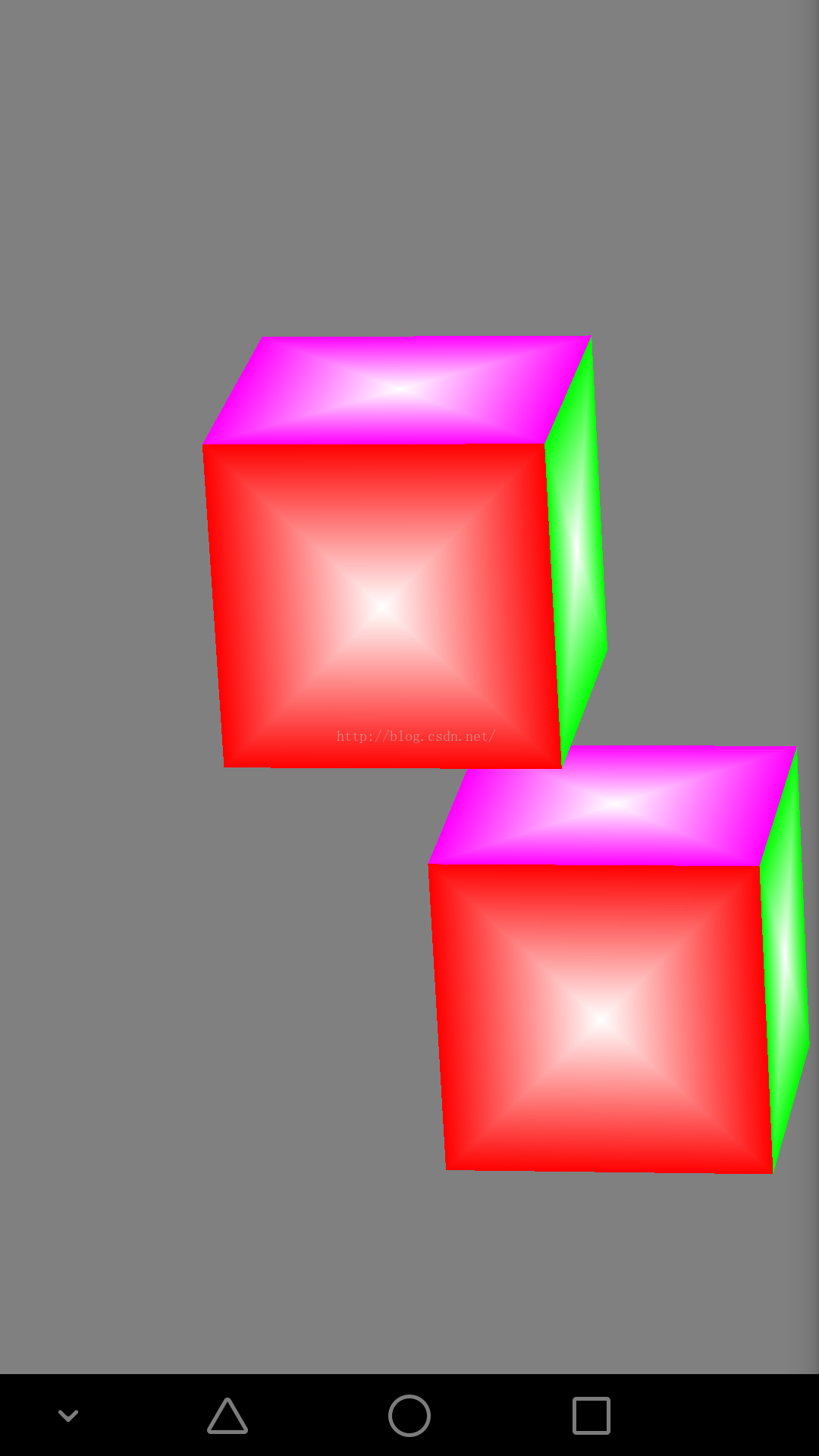
效果圖
 Android編程實現號碼歸屬地查詢的方法
本文實例講述了Android編程實現號碼歸屬地查詢的方法。分享給大家供大家參考,具體如下:我們通過發送XML訪問 WebService就可以實現號碼的歸屬地查詢,我們可以
 Android打造炫酷的電影票在線選座app在線選座功能
不知道大家有沒有用過,淘寶電影客戶端(淘票票)買過電影票,縱觀各類在線選座app的在線選座功能 淘寶在線選座功能用戶體驗最好,用起來最順手,誇張點說已經到了爐火純青的地步
 adb的常用命令淺析(android debud bridge)
android調試橋: adb命令使用需要在系統環境遍歷中path中追加adb.exe的完整路徑D:\IDE\adt-bundle-windows-x86-2013072
 Android使用Dialog風格彈出框的Activity
在Android中經常會遇到需要使用Dialog風格彈出框的activity,首先我們可能會首先想到的是在XML布局文件中設置android:layout_height=