編輯:關於Android編程
1、新建一個布局文件,輸入我們想要使用的線程的個數,包括一個主布局文件和一個progressBar
(1)一個包括三個控件的主布局
(2)一個只包含ProgressBar的子布局文件
2、找到三個控件,獲取該Button控件的點擊事件,點擊開始下載
(1)獲取用戶輸入線程的個數
(2)清空所有ProgressBar子控件
(3)根據線程數添加相應數量的ProgressBar
(4)在子線程中運行download()函數,因為主線程不能做時間太長的操作
3、進入download()函數,為每個線程設定下載的開始和結束為止
(1)根據url請求網絡資源
(2)獲取下載資源的大小,並在本地創建占位符
(3)要分配每個線程下載文件的開始位置和結束位置
(4)開啟線程去執行下載
4、開啟線程下載,需要定義一個線程下載類繼承並重寫run()方法
(1)通過map獲取當前線程對應ProgressBar
(2)建立一個SharedPreferences的操作類用來存取斷點信息
(3)設置分段下載的頭信息。Range信息:做分段數據請求用的,也就是設置從哪裡下載到哪裡
(4)請求部分資源成功,開始一邊從服務器讀取一邊寫入sdcard
(5)寫入過程中將下載進度保存的SharedPreferences中,設置ProgressBar的顯示情況
(1)一個包括三個控件的主布局
(3)初步的界面展示如下
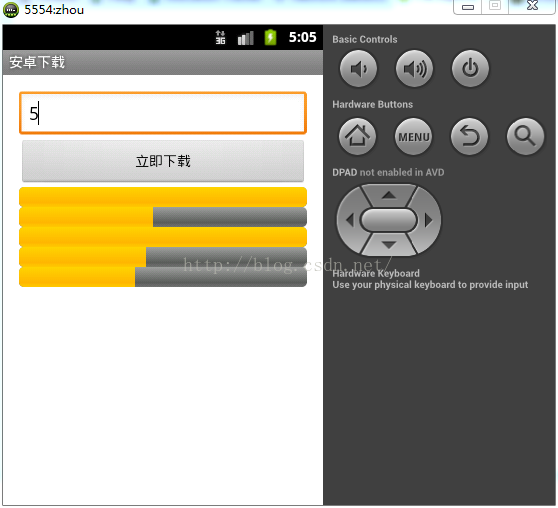
如下是一些全局變量的初始化,以及我們在點擊“開始下載”之後處理的內容:
(1)定義一些全局變量,這些我們在下面要使用到
public class MainActivity extends Activity implements OnClickListener{

	private EditText et_threadCount;
	private Context mContext;
	private LinearLayout ll_progress_layout;

	private  int threadCount = 0;		//開啟3個線程
	private  int blockSize = 0;			//每個線程下載的大小
	private  int runningTrheadCount = 0;//當前運行的線程數
	private  String path = "http://115.25.200.74:8080/itheima74/feiq.exe";

	private Map map = new HashMap();
protected void onCreate(Bundle savedInstanceState) {
    super.onCreate(savedInstanceState);
    setContentView(R.layout.activity_main);

    mContext = this;
    findViewById(R.id.bt_download).setOnClickListener(this);
    ll_progress_layout = (LinearLayout) findViewById(R.id.ll_progress_layout);
	et_threadCount = (EditText) findViewById(R.id.et_threadCount);

}
public void onClick(View v) {
	//獲取用戶輸入的線程數
	String trim = et_threadCount.getText().toString().trim();
	threadCount = Integer.parseInt(trim);

	// 清空所有的子空間
	ll_progress_layout.removeAllViews();

	//根據線程數添加相應數量的ProgressBar
	for(int i =0 ;i < threadCount;i++ ){
		ProgressBar progressbar = (ProgressBar)View.inflate(mContext, R.layout.child_progressbar_layout, null);

		map.put(i, progressbar);//將ProgressBar放到map中,方便在線程中獲取並設置進度
		//展示progressbar
		ll_progress_layout.addView(progressbar);
	}

	new Thread(new Runnable() {

		@Override
		public void run() {
			download();
		}
	}).start();
}
(1)根據url請求網絡資源
	//1.請求url地址獲取服務端資源的大小
	URL url = new URL(path);
	HttpURLConnection openConnection = (HttpURLConnection) url.openConnection();
	openConnection.setRequestMethod("GET");
	openConnection.setConnectTimeout(10*1000);
	int code = openConnection.getResponseCode();
	if(code == 200){
		//獲取資源的大小
		int filelength = openConnection.getContentLength();
		//2.在本地創建一個與服務端資源同樣大小的一個文件(占位)
		RandomAccessFile randomAccessFile = new RandomAccessFile(new File(getFileName(path)), "rw");
		randomAccessFile.setLength(filelength);//設置隨機訪問文件的大小
	//3.要分配每個線程下載文件的開始位置和結束位置。
	blockSize = filelength/threadCount;//計算出每個線程理論下載大小
	for(int threadId =0 ;threadId < threadCount;threadId++){
		int startIndex =  threadId * blockSize;//計算每個線程下載的開始位置
		int endIndex = (threadId+1)*blockSize -1;//計算每個線程下載的結束位置
		//如果是最後一個線程,結束位置需要單獨計算
		if(threadId == threadCount-1){
			endIndex = filelength -1;
		}

		//4.開啟線程去執行下載
		new DownloadThread(threadId, startIndex, endIndex).start();
(1)基本參數的定義和初始化
	private int threadId;
	private int startIndex;
	private int endIndex;
	private int lastPostion;
	private int currentThreadTotalProgress;
	public DownloadThread(int threadId,int startIndex,int endIndex){
		this.threadId = threadId;
		this.startIndex = startIndex;
		this.endIndex = endIndex;
		// 進度條的最大值
		this.currentThreadTotalProgress = endIndex -startIndex +1;
	}
package com.iigt.download;
import android.content.Context;
import android.content.SharedPreferences;
import android.preference.PreferenceManager;

public class SharedUtils {

	public static int getLastPosition(Context context,int threadId){

		SharedPreferences defaultSharedPreferences = PreferenceManager.getDefaultSharedPreferences(context);
		return defaultSharedPreferences.getInt("lastPostion"+threadId, -1);
	}

	public static void setLastPosition(Context context,int threadId,int position){
		SharedPreferences defaultSharedPreferences = PreferenceManager.getDefaultSharedPreferences(context);
		defaultSharedPreferences.edit().putInt("lastPostion"+threadId, position).commit();
	}
}
//分段請求網絡連接,分段保存文件到本地
try{
	URL url = new URL(path);
	HttpURLConnection openConnection = (HttpURLConnection) url.openConnection();
	openConnection.setRequestMethod("GET");
	openConnection.setConnectTimeout(10*1000);

	System.out.println("理論上下載:  線程:"+threadId+",開始位置:"+startIndex+";結束位置:"+endIndex);

	if(SharedUtils.getLastPosition(mContext, threadId) != -1){

		lastPostion =  SharedUtils.getLastPosition(mContext, threadId);

		//說明該線程已經下載完成
		if(lastPostion == endIndex+1){
			progressBar.setProgress(currentThreadTotalProgress);
			runningTrheadCount = runningTrheadCount -1;
		}

		//設置分段下載的頭信息。  Range:做分段數據請求用的。
		openConnection.setRequestProperty("Range", "bytes:"+lastPostion+"-"+endIndex);//bytes:0-500:請求服務器資源中0-500之間的字節信息  501-1000:
		System.out.println("實際下載:  線程:"+threadId+",開始位置:"+lastPostion+";結束位置:"+endIndex);
	}else{

		lastPostion = startIndex;
		//設置分段下載的頭信息。  Range:做分段數據請求用的。
		openConnection.setRequestProperty("Range", "bytes:"+lastPostion+"-"+endIndex);
		System.out.println("實際下載:  線程:"+threadId+",開始位置:"+lastPostion+";結束位置:"+endIndex);
	}
(4)請求部分資源成功,開始一邊從服務器讀取一邊寫入sdcard
if(openConnection.getResponseCode() == 206){//200:請求全部資源成功, 206代表部分資源請求成功
	InputStream inputStream = openConnection.getInputStream();
	//請求成功將流寫入本地文件中,已經創建的占位那個文件中

	RandomAccessFile randomAccessFile = new RandomAccessFile(new File(getFileName(path)), "rw");
	randomAccessFile.seek(lastPostion);//設置隨機文件從哪個位置開始寫。
	//將流中的數據寫入文件
	byte[] buffer = new byte[1024*100];
	int length = -1;
	int total = 0;//記錄本次線程下載的總大小

	while((length= inputStream.read(buffer)) !=-1){
		randomAccessFile.write(buffer, 0, length);
		total = total+ length;

		//去保存當前線程下載的位置,保存到文件中
		int currentThreadPostion = lastPostion + total;//計算出當前線程本次下載的位置
		SharedUtils.setLastPosition(mContext, threadId, currentThreadPostion);

		//計算線程下載的進度並設置進度
		int currentprogress = currentThreadPostion -startIndex;
		progressBar.setMax(currentThreadTotalProgress);//設置進度條的最大值
		progressBar.setProgress(currentprogress);//設置進度條當前進度


	}
	//關閉相關的流信息
	inputStream.close();
	randomAccessFile.close();

	System.out.println("線程:"+threadId+",下載完畢");
	public  String getFileName(String url){

		return  Environment.getExternalStorageDirectory() + "/"+ url.substring(url.lastIndexOf("/")+1);

	}

	public String getFilePath(){

		return Environment.getExternalStorageDirectory() + "/";
	}
-----------------------------------------------------------------文件上傳操作--------------------------------------------------------------------
1、客戶端上傳操作
(1)編寫布局文件,一個EditText一個Button
(2)獲取輸入的文件地址
(3)使用開源Utils做上傳操作
2、服務器端接收操作
(1)首先判斷上傳的數據是表單數據還是帶文件的數據
(2)如果是帶文件的數據,在本地創建文件目錄
(3)判斷文件的類型,表單打印,文件類型就上傳
二、---布局創建---
(1)編寫布局文件,一個EditText一個Button
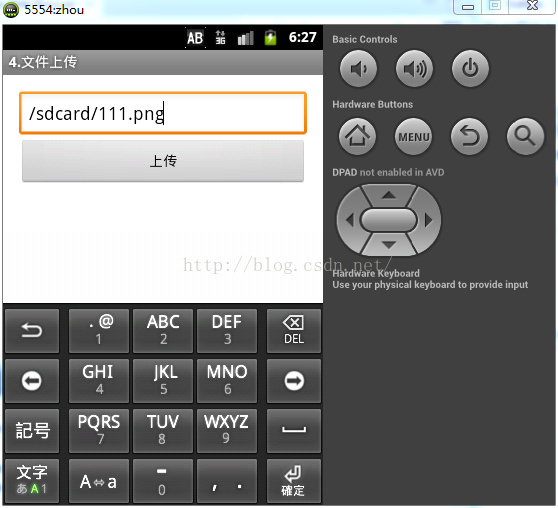
(1)獲取輸入的文件地址
public class MainActivity extends Activity {

	@Override
	protected void onCreate(Bundle savedInstanceState) {
		super.onCreate(savedInstanceState);
		setContentView(R.layout.activity_main);
	}


	public void fileupload(View v){
		try{
		EditText et_filepath = (EditText) findViewById(R.id.et_filepath);
		//獲取輸入的文件地址
		String filepath = et_filepath.getText().toString().trim();
	//使用開源Utils做上傳操作
	AsyncHttpClient asyncHttpClient = new AsyncHttpClient();

	RequestParams params = new RequestParams();
	params.put("filename", new File(filepath));
	//url : 請求服務器的url
	asyncHttpClient.post("http://115.25.200.74:8080/itheima74/servlet/UploaderServlet", params, new AsyncHttpResponseHandler() {

		@Override
		public void onSuccess(int statusCode, Header[] headers, byte[] responseBody) {
			if(statusCode == 200){
				Toast.makeText(MainActivity.this, "上傳成功", 0).show();
			}
		}
		@Override
		public void onFailure(int statusCode, Header[] headers,
				byte[] responseBody, Throwable error) {
		}
	});

	}catch (Exception e) {
		e.printStackTrace();
	}
先判斷數據類型,接著再判斷文件類型,如果是文件的話就上傳操作,是表單的話進行打印操作
	public void doGet(HttpServletRequest request, HttpServletResponse response)
	throws ServletException, IOException {

		//首先判斷上傳的數據是表單數組數據還是一個帶文件的數據
		boolean isMultipart = ServletFileUpload.isMultipartContent(request);
		if (isMultipart) {   //如果是true,說明是一個帶有文件的數據
			//拿到servlet的真實路徑
			String realpath = request.getSession().getServletContext().getRealPath("/files");
			//打印一下路徑
			System.out.println("realpath-"+realpath);
			File dir = new File(realpath);
			if (!dir.exists())
				dir.mkdirs(); //如果目標不在就把這個目錄給創建出來
			FileItemFactory factory = new DiskFileItemFactory();
			ServletFileUpload upload = new ServletFileUpload(factory); //獲得上傳文件的對象upload
			upload.setHeaderEncoding("UTF-8");
			try {
				//判斷一下上傳的數據類型
				List items = upload.parseRequest(request);
				for (FileItem item : items) {
					if (item.isFormField()) { //上傳的數據類型是一個表單類型
						String name1 = item.getFieldName();// 得到請求參數的名稱
						String value = item.getString("UTF-8");//得到參數值?
						System.out.println(name1 + "=" + value);
					} else {
						//說明這是一個文件類型,進行上傳
						item.write(new File(dir, System.currentTimeMillis()
								+ item.getName().substring(item.getName().lastIndexOf("."))));
					}
				}
			} catch (Exception e) {
				e.printStackTrace();
			}finally{
			}
		}
	}
1、文件的下載操作在安卓2.3上可以正常的使用,但是在安卓4.1上就不能正常運行,由於是剛剛學習,也不知道怎麼解決
2、下載中開始開啟3個線程,然後中斷,再填寫5個線程,這時只有最後兩個線程運行了
 Android存儲五大方式
Android存儲五大方式:1 使用SharedPreferences存儲數據2 文件存儲數據3 SQLite數據庫存儲數據4 使用ContentProvider存儲數據
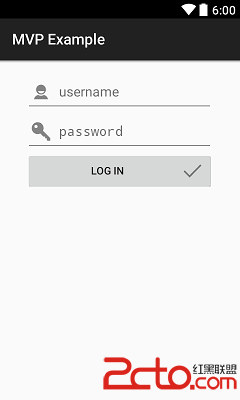 Android中MVP模式與MVC模式比較(含示例)
MVP介紹MVP模式(Model-View-Presenter)是MVC模式的一個衍生。主要目的是為了解耦,使項目易於維護。Model 依然是業務邏輯和實體模型 View
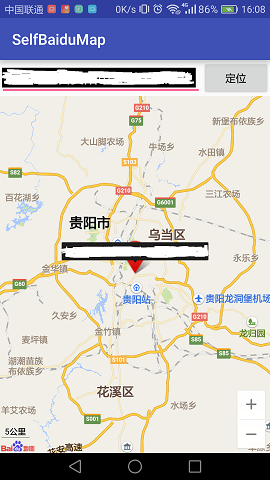 (Android 應用之路) 百度地圖API使用(4)
前言百度地圖的定位功能和基礎地圖功能是分開的,使用的是另外的jar包和so庫文件,詳情請關注官網:百度定位SDK配置下載對應的jar包和so庫,然後移動到lib目錄下AS
 代碼講解Android Scroller、VelocityTracker
在編寫自定義滑動控件時常常會用到Android觸摸機制和Scroller及VelocityTracker。Android Touch系統簡介(二):實例詳解onInte