編輯:關於Android編程
可能很多做JAVAWEB 或是C#的工程師。在項目尤其是OA項目中,會用到POI。。。也就是excel的導入導出。。。剛好今天在研究安卓APP中,把數據填入到EditText中,然後自動保存數據到excel裡面---------------用到了Sqlite及導出到Excel文件
1.首先裡面要導入一個包。叫做JXL
Jxl使用總結 Jxl是一個開源的Java Excel API項目,通過Jxl,Java可以很方便的操作微軟的Excel文檔。除了Jxl之外,還有Apache的一個POI項目,也可以操作Excel,兩者相比之下:Jxl使用方便,但功能相對POI比較弱。POI使用復雜,上手慢,除了這個沒啥說的了。
1.1API總結 1、創建或讀取一個工作薄 Workbook 創建一個工作薄,就是整個Excel文檔,
WritableWorkbook wwb = Workbook.createWorkbook(os);
其中os為一個文件輸出流。當然還有很多其他的入參,比如File等。
Workbook不但能用來創建工作薄,也可以讀取現有的工作薄,比如:
Workbook.getWorkbook(java.io.File file);Workbook是一個很重要工具類,裡面方法基本上都是static的,使用方便。
createSheet(java.lang.String name, int index),
兩個參數分別是工作表名字和插入位置,這個位置從0開始,比如:
WritableSheet sheet = wwb.createSheet("演員表", 0);
3、創建標簽 Label
實際上標簽這裡的意思就是工作表的單元格,這個單元格多種,分別對應不同的類,比如jxl.write.Boolean、jxl.write.Boolean等。
Label label = new Label(col, row, title);
三個參數分別表示col+1列,row+1行,標題內容是title。
將標簽加入到工作表中
sheet.addCell(label);4、填充數據 數據填充這塊稍微復雜點,涉及到數據單元格的格式問題。 a)、填充數字
 jxl.write.Number numb = new jxl.write.Number(1, 1, 250);
        sheet.addCell(numb);
b)、填充格式化的數字
 jxl.write.NumberFormat nf = new jxl.write.NumberFormat("#.##");
        jxl.write.WritableCellFormat wcf = new jxl.write.WritableCellFormat(nf);
        jxl.write.Number n = new jxl.write.Number(2, 1, 2.451, wcf);
        sheet.addCell(n);
c)、填充日期
 SimpleDateFormat sdf = new SimpleDateFormat("yyyy-MM-dd hh:mm:ss");
        String newdate = sdf.format(new Date());
        label = new Label(2, 2, newdate);
        sheet.addCell(label);
d)、填充文本
   label = new Label(3, 3, "周星馳");
        sheet.addCell(label);
e)、填充boolean值
   jxl.write.Boolean bool = new jxl.write.Boolean(4, 1, true);
        sheet.addCell(bool);
 sheet.mergeCells(0, 6, 3, 8);
        label = new Label(0, 6, "合並了12個單元格");
        sheet.addCell(label);
 WritableCellFormat wc = new WritableCellFormat();
        // 設置居中
        wc.setAlignment(Alignment.CENTRE);
        // 設置邊框線
        wc.setBorder(Border.ALL, BorderLineStyle.THIN);
        // 設置單元格的背景顏色
        wc.setBackground(jxl.format.Colour.RED);
        label = new Label(1, 5, "字體", wc);
        sheet.addCell(label);
  // 設置字體
        jxl.write.WritableFont wfont = new jxl.write.WritableFont(WritableFont.createFont("楷書"), 20);
        WritableCellFormat font = new WritableCellFormat(wfont);
        label = new Label(2, 6, "楷書", font);
        sheet.addCell(label);
   // 寫入數據
        wwb.write();
        // 關閉文件
        wwb.close();
9、行列的批量操作
     //獲取所有的工作表
        jxl.write.WritableSheet[] sheetList = wwb.getSheets();
        //獲取第1列所有的單元格
        jxl.Cell[] cellc = sheet.getColumn(0);
        //獲取第1行所有的單元格
        jxl.Cell[] cellr = sheet.getRow(0);
        //獲取第1行第1列的單元格
        Cell c = sheet.getCell(0, 0);
10、獲取單元格的值
 //獲取單元格的值,不管什麼單元格,返回都是字符串
        String value = c.getContents();
下面說說重點。。。拿代碼來說。。。。
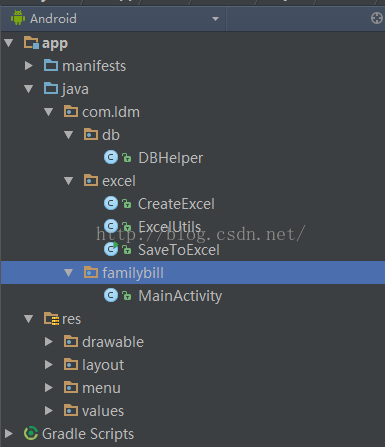
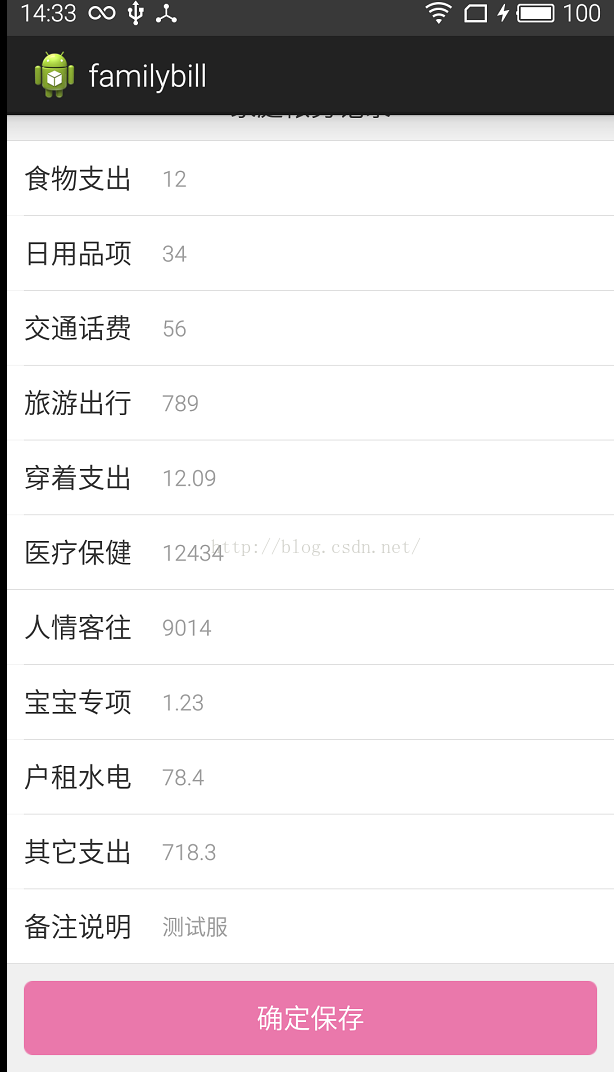
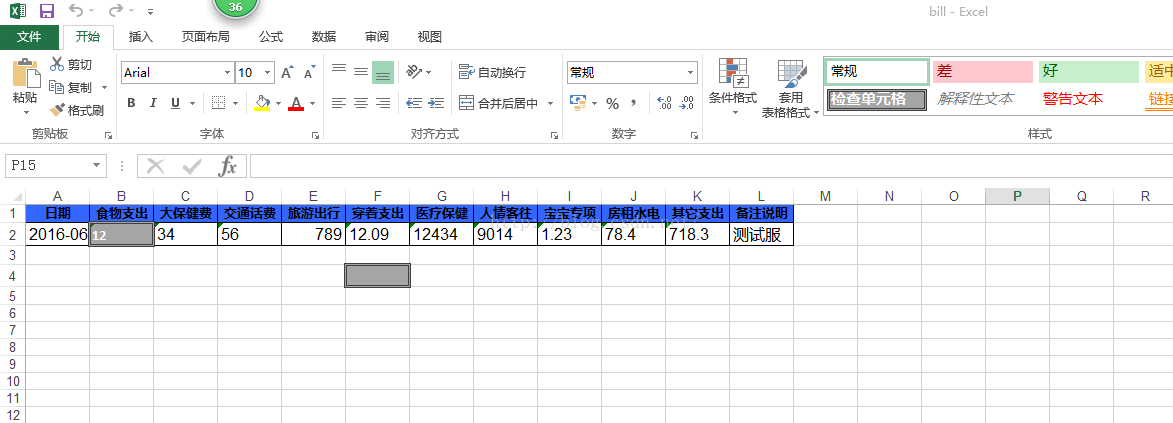
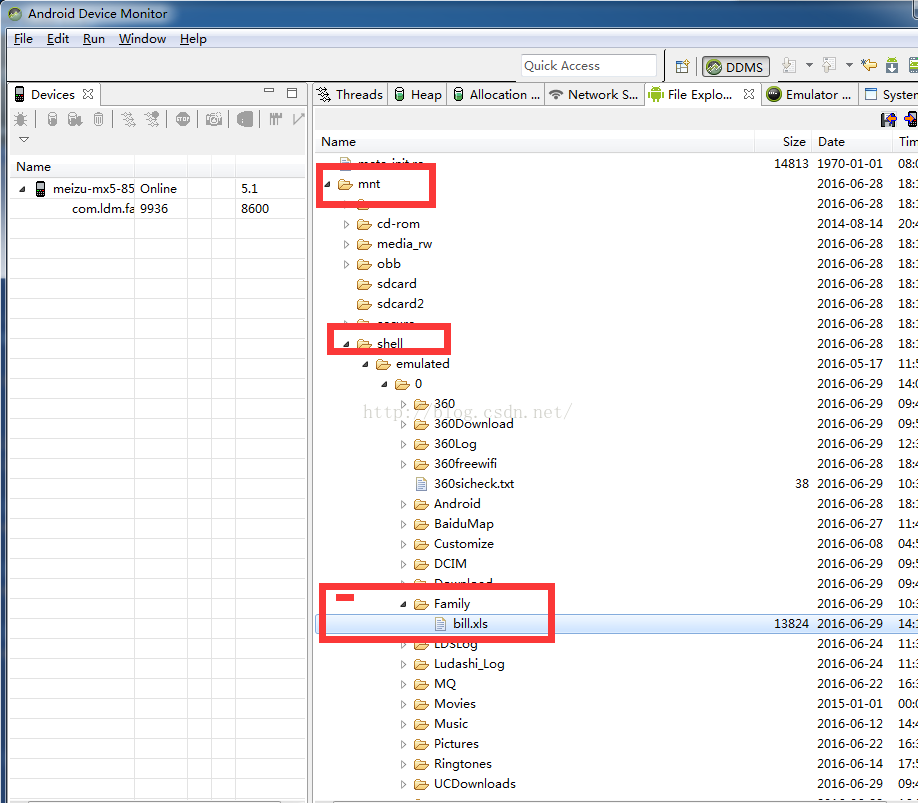
自己寫的一個小小的記帳工具,用到了Sqlite及導出到Excel文件
public class DBHelper extends SQLiteOpenHelper {

	public static final String DB_NAME = "ldm_family"; // DB name
	private Context mcontext;
	private DBHelper mDbHelper;
	private SQLiteDatabase db;

	public DBHelper(Context context) {
		super(context, DB_NAME, null, 11);
		this.mcontext = context;
	}

	public DBHelper(Context context, String name, CursorFactory factory, int version) {
		super(context, name, factory, version);

	}

	/**
	 * 用戶第一次使用軟件時調用的操作,用於獲取數據庫創建語句(SW),然後創建數據庫
	 */
	@Override
	public void onCreate(SQLiteDatabase db) {
		String sql = "create table if not exists family_bill(id integer primary key,time text,food text,use text,traffic text,travel text,clothes text,doctor text,laiwang text,baby text,live text,other text,remark text)";
		db.execSQL(sql);
	}

	@Override
	public void onUpgrade(SQLiteDatabase db, int oldVersion, int newVersion) {
	}

	/* 打開數據庫,如果已經打開就使用,否則創建 */
	public DBHelper open() {
		if (null == mDbHelper) {
			mDbHelper = new DBHelper(mcontext);
		}
		db = mDbHelper.getWritableDatabase();
		return this;
	}

	/* 關閉數據庫 */
	public void close() {
		db.close();
		mDbHelper.close();
	}

	/**添加數據 */
	public long insert(String tableName, ContentValues values) {
		return db.insert(tableName, null, values);
	}

	/**查詢數據*/
	public Cursor findList(String tableName, String[] columns, String selection, String[] selectionArgs, String groupBy, String having, String orderBy, String limit) {
		return db.query(tableName, columns, selection, selectionArgs, groupBy, having, orderBy, limit);
	}

	public Cursor exeSql(String sql) {
		return db.rawQuery(sql, null);
	}
}
public class MainActivity extends Activity implements OnClickListener {
   private EditText mFoodEdt;
   private EditText mArticlesEdt;
   private EditText mTrafficEdt;
   private EditText mTravelEdt;
   private EditText mClothesEdt;
   private EditText mDoctorEdt;
   private EditText mRenQingEdt;
   private EditText mBabyEdt;
   private EditText mLiveEdt;
   private EditText mOtherEdt;
   private EditText mRemarkEdt;
   private Button mSaveBtn;
   private File file;
   private String[] title = { "日期", "食物支出", "大保健費", "交通話費", "旅游出行", "穿著支出", "醫療保健", "人情客往", "寶寶專項", "房租水電", "其它支出", "備注說明" };
   private String[] saveData;
   private DBHelper mDbHelper;
   private ArrayList>bill2List;
   @Override
   protected void onCreate(Bundle savedInstanceState) {
      super.onCreate(savedInstanceState);
      setContentView(R.layout.activity_main);
      findViewsById();
      mDbHelper = new DBHelper(this);
      mDbHelper.open();
      bill2List=new ArrayList>();
   }


   /**
    * 聲明VIEW
    */
   private void findViewsById() {
      mFoodEdt = (EditText) findViewById(R.id.family_bill_food_edt);
      mArticlesEdt = (EditText) findViewById(R.id.family_bill_articles_edt);
      mTrafficEdt = (EditText) findViewById(R.id.family_bill_traffic_edt);
      mTravelEdt = (EditText) findViewById(R.id.family_bill_travel_edt);
      mClothesEdt = (EditText) findViewById(R.id.family_bill_clothes_edt);
      mDoctorEdt = (EditText) findViewById(R.id.family_bill_doctor_edt);
      mRenQingEdt = (EditText) findViewById(R.id.family_bill_laiwang_edt);
      mBabyEdt = (EditText) findViewById(R.id.family_bill_baby_edt);
      mLiveEdt = (EditText) findViewById(R.id.family_bill_live_edt);
      mOtherEdt = (EditText) findViewById(R.id.family_bill_other_edt);
      mRemarkEdt = (EditText) findViewById(R.id.family_bill_remark_edt);
      mSaveBtn = (Button) findViewById(R.id.family_bill_save);
      mSaveBtn.setOnClickListener(this);
   }


   /**
    * 點擊事件
     */
   @Override
   public void onClick(View v)
public class CreateExcel {
	// 准備設置excel工作表的標題
	private WritableSheet sheet;
	/**創建Excel工作薄*/
	private WritableWorkbook wwb;
	private String[] title = { "日期", "食物支出", "大保健費", "交通話費", "旅游出行", "穿著支出", "醫療保健", "人情客往", "寶寶專項", "房租水電", "其它支出", "備注說明" };

	public CreateExcel() {
		excelCreate();
	}

	public void excelCreate() {
		try {
			/**輸出的excel文件的路徑*/
			String filePath = Environment.getExternalStorageDirectory() + "/family_bill";
			File file = new File(filePath, "bill.xls");
			if (!file.exists()) {
				file.createNewFile();
			}
			wwb = Workbook.createWorkbook(file);
			/**添加第一個工作表並設置第一個Sheet的名字*/
			sheet = wwb.createSheet("家庭帳務表", 0);
		}
		catch (Exception e) {
			e.printStackTrace();
		}
	}

	public void saveDataToExcel(int index, String[] content) throws Exception {
		Label label;
		for (int i = 0; i < title.length; i++) {
			/**Label(x,y,z)其中x代表單元格的第x+1列,第y+1行, 單元格的內容是y
			 * 在Label對象的子對象中指明單元格的位置和內容
			 * */
			label = new Label(i, 0, title[i]);
			/**將定義好的單元格添加到工作表中*/
			sheet.addCell(label);
		}
		/*
		 * 把數據填充到單元格中
		 * 需要使用jxl.write.Number
		 * 路徑必須使用其完整路徑,否則會出現錯誤
		 */
		for (int i = 0; i < title.length; i++) {
			Label labeli = new Label(i, index, content[i]);
			sheet.addCell(labeli);
		}
		// 寫入數據
		wwb.write();
		// 關閉文件
		wwb.close();
	}

}
ExcelUtils
public class ExcelUtils {
	public static WritableFont arial14font = null;

	public static WritableCellFormat arial14format = null;
	public static WritableFont arial10font = null;
	public static WritableCellFormat arial10format = null;
	public static WritableFont arial12font = null;
	public static WritableCellFormat arial12format = null;

	public final static String UTF8_ENCODING = "UTF-8";
	public final static String GBK_ENCODING = "GBK";

	public static void format() {
		try {
			arial14font = new WritableFont(WritableFont.ARIAL, 14, WritableFont.BOLD);
			arial14font.setColour(jxl.format.Colour.LIGHT_BLUE);
			arial14format = new WritableCellFormat(arial14font);
			arial14format.setAlignment(jxl.format.Alignment.CENTRE);
			arial14format.setBorder(jxl.format.Border.ALL, jxl.format.BorderLineStyle.THIN);
			arial14format.setBackground(jxl.format.Colour.VERY_LIGHT_YELLOW);
			arial10font = new WritableFont(WritableFont.ARIAL, 10, WritableFont.BOLD);
			arial10format = new WritableCellFormat(arial10font);
			arial10format.setAlignment(jxl.format.Alignment.CENTRE);
			arial10format.setBorder(jxl.format.Border.ALL, jxl.format.BorderLineStyle.THIN);
			arial10format.setBackground(jxl.format.Colour.LIGHT_BLUE);
			arial12font = new WritableFont(WritableFont.ARIAL, 12);
			arial12format = new WritableCellFormat(arial12font);
			arial12format.setBorder(jxl.format.Border.ALL, jxl.format.BorderLineStyle.THIN);
		}
		catch (WriteException e) {

			e.printStackTrace();
		}
	}

	public static void initExcel(String fileName, String[] colName) {
		format();
		WritableWorkbook workbook = null;
		try {
			File file = new File(fileName);
			if (!file.exists()) {
				file.createNewFile();
			}
			workbook = Workbook.createWorkbook(file);
			WritableSheet sheet = workbook.createSheet("家庭帳務表", 0);
			sheet.addCell((WritableCell) new Label(0, 0, fileName, arial14format));
			for (int col = 0; col < colName.length; col++) {
				sheet.addCell(new Label(col, 0, colName[col], arial10format));
			}
			workbook.write();
		}
		catch (Exception e) {
			e.printStackTrace();
		}
		finally {
			if (workbook != null) {
				try {
					workbook.close();
				}
				catch (Exception e) {
					// TODO Auto-generated catch block
					e.printStackTrace();
				}
			}
		}

	}

	@SuppressWarnings("unchecked")
	public static  void writeObjListToExcel(List objList, String fileName, Context c) {
		if (objList != null && objList.size() > 0) {
			WritableWorkbook writebook = null;
			InputStream in = null;
			try {
				WorkbookSettings setEncode = new WorkbookSettings();
				setEncode.setEncoding(UTF8_ENCODING);
				in = new FileInputStream(new File(fileName));
				Workbook workbook = Workbook.getWorkbook(in);
				writebook = Workbook.createWorkbook(new File(fileName), workbook);
				WritableSheet sheet = writebook.getSheet(0);
				for (int j = 0; j < objList.size(); j++) {
					ArrayList list=(ArrayList) objList.get(j);
					for (int i = 0; i < list.size(); i++) {
						sheet.addCell(new Label(i, j+1, list.get(i), arial12format));
					}
				}
				writebook.write();
				Toast.makeText(c, "保存成功", Toast.LENGTH_SHORT).show();
			}
			catch (Exception e) {
				e.printStackTrace();
			}
			finally {
				if (writebook != null) {
					try {
						writebook.close();
					}
					catch (Exception e) {
						e.printStackTrace();
					}

				}
				if (in != null) {
					try {
						in.close();
					}
					catch (IOException e) {
						e.printStackTrace();
					}
				}
			}

		}
	}

	public static Object getValueByRef(Class cls, String fieldName) {
		Object value = null;
		fieldName = fieldName.replaceFirst(fieldName.substring(0, 1), fieldName.substring(0, 1).toUpperCase());
		String getMethodName = "get" + fieldName;
		try {
			Method method = cls.getMethod(getMethodName);
			value = method.invoke(cls);
		}
		catch (Exception e) {
			e.printStackTrace();
		}
		return value;
	}
}
SaveToExcel
public class SaveToExcel {
	static HashMap map = new HashMap();

	/*
	 * 這個更全
	 */
	public static void main(String[] args) {
		try {
			// copyDateFormat(new File("c:\\a.xls"), 0, "c:\\copy of a.xls");
			writeExcelUseFormat("c:\\format.xls", "test");

			// buildNewFormTemplete(new File("c:/templete.xls"),new File(
			// "c:/buildNewFormTemplete.xls"));
			// modifyDirectly1(new File("c:/templete.xls"));
			// modifyDirectly2(new File("c:/templete.xls"));
			// copyDateAndFormat(new File("c:/a.xls"), 0, "c:/a2.xls");
		}
		catch (Exception e) {
			// TODO 自動生成 catch 塊
			e.printStackTrace();
		}
	}

	public static void modifyDirectly2(File inputFile) throws Exception {
		Workbook w1 = Workbook.getWorkbook(inputFile);
		WritableWorkbook w2 = Workbook.createWorkbook(inputFile, w1);
		WritableSheet sheet = w2.getSheet(0);

		WritableCell cell = null;
		CellFormat cf = null;

		// 加粗
		cell = sheet.getWritableCell(0, 0);
		WritableFont bold = new WritableFont(WritableFont.ARIAL, WritableFont.DEFAULT_POINT_SIZE, WritableFont.BOLD);
		cf = new WritableCellFormat(bold);
		cell.setCellFormat(cf);

		// 設置下劃線
		cell = sheet.getWritableCell(0, 1);
		WritableFont underline = new WritableFont(WritableFont.ARIAL, WritableFont.DEFAULT_POINT_SIZE, WritableFont.NO_BOLD, false, UnderlineStyle.SINGLE);
		cf = new WritableCellFormat(underline);
		cell.setCellFormat(cf);

		// 直截添加可以覆蓋掉
		setCellValueDirectly(sheet, sheet.getCell(0, 2), new Double(4), CellType.NUMBER);

		w2.write();
		w2.close();
	}

	public static void modifyDirectly1(File file) {
		try {
			// Excel獲得文件
			Workbook wb = Workbook.getWorkbook(file);
			// 打開一個文件的副本,並且指定數據寫回到原文件
			WritableWorkbook book = Workbook.createWorkbook(file, wb);
			WritableSheet sheet0 = book.getSheet(0);
			sheet0.addCell(new Label(0, 1, "陳小穩"));

			// 添加一個工作表
			WritableSheet sheet = book.createSheet(" 第二頁 ", 1);
			sheet.addCell(new Label(0, 0, " 第二頁的測試數據 "));
			book.write();
			book.close();
		}
		catch (Exception e) {
			System.out.println(e);
		}
	}

	public static void buildNewFormTemplete(File inputFile, File outputFile) {
		try {
			// Excel獲得文件
			Workbook wb = Workbook.getWorkbook(inputFile);
			// 打開一個文件的副本,並且指定數據寫回到原文件
			WritableWorkbook book = Workbook.createWorkbook(outputFile, wb);
			WritableSheet sheet0 = book.getSheet(0);
			sheet0.addCell(new Label(0, 1, "陳小穩"));

			// 添加一個工作表
			WritableSheet sheet = book.createSheet(" 第二頁 ", 1);
			sheet.addCell(new Label(0, 0, " 第二頁的測試數據 "));

			book.write();
			book.close();
		}
		catch (Exception e) {
			System.out.println(e);
		}
	}

	public static void copyDateAndFormat(File inputFile, int inputFileSheetIndex, String outputFilePath) throws Exception {
		Workbook book = null;
		Cell cell = null;
		// 1.避免亂碼的設置
		WorkbookSettings setting = new WorkbookSettings();
		java.util.Locale locale = new java.util.Locale("zh", "CN");
		setting.setLocale(locale);
		setting.setEncoding("ISO-8859-1");
		book = Workbook.getWorkbook(inputFile, setting);
		Sheet readonlySheet = book.getSheet(inputFileSheetIndex);

		OutputStream os = new FileOutputStream(outputFilePath);// 輸出的Excel文件URL
		WritableWorkbook wwb = Workbook.createWorkbook(os);// 創建可寫工作薄
		WritableSheet writableSheet = wwb.createSheet(readonlySheet.getName(), 0);// 創建可寫工作表

		// 2.謄寫不同數據格式的數據
		for (int rowIndex = 0; rowIndex < readonlySheet.getRows(); rowIndex++) {
			for (int colIndex = 0; colIndex < readonlySheet.getColumns(); colIndex++) {
				cell = readonlySheet.getCell(colIndex, rowIndex);
				// A2B2為合並的單元格,A2有內容,B2為空
				// if(colIndex == 0 && rowIndex == 1){
				// System.out.println(colIndex + "," + rowIndex + " type:" +
				// cell.getType() +" :" + cell.getContents());
				// }

				// 【有各種設置格式】
				if (cell.getType() == CellType.DATE || cell.getType() == CellType.DATE_FORMULA) {
					writableSheet.addCell(new jxl.write.DateTime(colIndex, rowIndex, ((DateCell) cell).getDate(), new jxl.write.WritableCellFormat(cell.getCellFormat())));
				}
				else if (cell.getType() == CellType.NUMBER || cell.getType() == CellType.NUMBER_FORMULA) {
					writableSheet.addCell(new jxl.write.Number(colIndex, rowIndex, ((jxl.NumberCell) cell).getValue(), new jxl.write.WritableCellFormat(cell.getCellFormat())));
				}
				else if (cell.getType() == CellType.EMPTY) {
					// 空的以及合並單元格中第一列外的
					// System.out.println("EMPTY:"+cell.getContents());
					// System.err.println("空單元格 at " + colIndex + "," + rowIndex
					// +" content:" + cell.getContents());
				}
				else if (cell.getType() == CellType.LABEL || cell.getType() == CellType.STRING_FORMULA) {
					writableSheet.addCell(new Label(colIndex, rowIndex, cell.getContents(), new jxl.write.WritableCellFormat(cell.getCellFormat())));
				}
				else {
					System.err.println("其它單元格類型:" + cell.getType() + " at " + colIndex + "," + rowIndex + " content:" + cell.getContents());
				}

				// if(cell.getType() == CellType.STRING_FORMULA){
				// System.err.println(colIndex + "," + rowIndex +":" +
				// cell.getContents() +" type:" + cell.getType());
				// }
			}
		}

		// 3.處理合並單元格的事情(復制合並單元格格式)
		Range[] range = readonlySheet.getMergedCells();
		for (int i = 0; i < range.length; i++) {
			// System.out.println("第"+i+"處合並的單元格:"
			// +",getTopLeft="+range[i].getTopLeft().getColumn()
			// +","+range[i].getTopLeft().getRow()
			// +",getBottomRight="+range[i].getBottomRight().getColumn()
			// +","+range[i].getBottomRight().getRow()
			// );
			// topleftXIndex, topleftYIndex, bottomRightXIndex,
			// bottomRightYIndex
			writableSheet.mergeCells(range[i].getTopLeft().getColumn(), range[i].getTopLeft().getRow(), range[i].getBottomRight().getColumn(), range[i].getBottomRight().getRow());
		}

		// 4.設置行列高寬
		for (int colIndex = 0; colIndex < readonlySheet.getColumns(); colIndex++) {
			writableSheet.setColumnView(colIndex, readonlySheet.getColumnView(colIndex));
		}
		for (int rowIndex = 0; rowIndex < readonlySheet.getRows(); rowIndex++) {
			writableSheet.setRowView(rowIndex, readonlySheet.getRowView(rowIndex));
		}

		wwb.write();
		wwb.close();
		os.close();
	}

	public static void writeExcelUseFormat(String outputFilePath, String outputFileSheetName) throws Exception {
		OutputStream os = new FileOutputStream(outputFilePath);// 輸出的Excel文件URL
		WritableWorkbook wwb = Workbook.createWorkbook(os);// 創建可寫工作薄
		WritableSheet sheet = wwb.createSheet(outputFileSheetName, 0);// 創建可寫工作表

		sheet.addCell(new Label(0, 0, "號碼"));
		sheet.addCell(new Label(1, 0, "有效期"));

		// 1.寫入時間的數據格式
		jxl.write.DateFormat df = new jxl.write.DateFormat("yyyy-MM-dd");
		jxl.write.WritableCellFormat wcfDF = new jxl.write.WritableCellFormat(df);
		jxl.write.DateTime labelDTF = new jxl.write.DateTime(1, 1, new Date(), wcfDF); // 自定義格式
		sheet.addCell(labelDTF);

		// 2.字體樣式
		// WritableFont()方法裡參數說明:
		// 這個方法算是一個容器,可以放進去好多屬性
		// 第一個: TIMES是字體大小,他寫的是18
		// 第二個: BOLD是判斷是否為斜體,選擇true時為斜體
		// 第三個: ARIAL
		// 第四個: UnderlineStyle.NO_UNDERLINE 下劃線
		// 第五個: jxl.format.Colour.RED 字體顏色是紅色的
		jxl.write.WritableFont wf = new jxl.write.WritableFont(WritableFont.TIMES, 18, WritableFont.BOLD, true);
		jxl.write.WritableCellFormat wcfF = new jxl.write.WritableCellFormat(wf);
		wcfF.setWrap(true);// 自動換行
		wcfF.setAlignment(jxl.format.Alignment.CENTRE);// 把水平對齊方式指定為居中
		wcfF.setVerticalAlignment(jxl.format.VerticalAlignment.CENTRE);// 把垂直對齊方式指定為居中
		jxl.write.Label labelC = new jxl.write.Label(0, 1, "This is a Label cell", wcfF);
		sheet.addCell(labelC);

		// 3.添加帶有formatting的Number對象
		jxl.write.NumberFormat nf = new jxl.write.NumberFormat("#.##");
		jxl.write.WritableCellFormat wcfN = new jxl.write.WritableCellFormat(nf);
		jxl.write.Number labelNF = new jxl.write.Number(0, 2, 3.1415926, wcfN);
		sheet.addCell(labelNF);

		// 4.添加Boolean對象
		jxl.write.Boolean labelB = new jxl.write.Boolean(0, 3, false);
		sheet.addCell(labelB);

		// 5.設置一個注解
		WritableCellFeatures cellFeatures = new WritableCellFeatures();
		cellFeatures.setComment("添加Boolean對象");
		labelB.setCellFeatures(cellFeatures);

		// 6.單元格內換行
		WritableCellFormat wrappedText = new WritableCellFormat(WritableWorkbook.ARIAL_10_PT);
		wrappedText.setWrap(true);// 可換行的label樣式
		Label label = new Label(4, 0, "測試,\012測試。。。", wrappedText); // "\012"強制換行
		sheet.addCell(label);

		// 7.數字的公式計算
		jxl.write.Number n = new jxl.write.Number(0, 9, 4.5);// A10
		sheet.addCell(n);
		n = new jxl.write.Number(1, 9, 8);// B10
		sheet.addCell(n);
		NumberFormat dp3 = new NumberFormat("#.###"); // 設置單元格裡面的數字格式
		WritableCellFormat dp3cell = new WritableCellFormat(dp3);
		dp3cell.setWrap(true);
		Formula f = new Formula(2, 9, "(a10+b10)/2", dp3cell); // 設置C10公式
		sheet.addCell(f);
		f = new Formula(3, 9, "SUM(A10:B10)", dp3cell);// 設置D10公式
		sheet.addCell(f);

		// 8.設置sheet的樣式
		sheet.getSettings().setProtected(true); // 設置xls的保護,單元格為只讀的
		sheet.getSettings().setPassword("123"); // 設置xls的密碼
		sheet.getSettings().setDefaultColumnWidth(10); // 設置列的默認寬度,2cm左右
		sheet.setRowView(3, 200);// 設置第4行高度
		sheet.setRowView(2, false);// 這樣可以自動把行高擴展
		sheet.setColumnView(0, 300);// 設置第1列寬度,6cm左右
		sheet.mergeCells(0, 5, 1, 7);// 合並單元格:合並A6B8也就是1列6行 與 2列7行之間的矩形

		// 9.設置邊框
		drawRect(sheet, 5, 6, 7, 6, BorderLineStyle.THICK, Colour.BLACK, null);

		sheet.mergeCells(1, 2, 3, 3);

		wwb.write();
		wwb.close();
		os.close();
	}

	public static void drawRect(WritableSheet sheet, int x, int y, int width, int height, BorderLineStyle style, Colour BorderColor, Colour bgColor) throws WriteException {
		for (int w = 0; w < width; w++) {
			for (int h = 0; h < height; h++) {
				WritableCellFormat alignStyle = new WritableCellFormat(); // 單元格樣式
				alignStyle.setAlignment(Alignment.CENTRE); // 設置對齊方式
				alignStyle.setVerticalAlignment(VerticalAlignment.CENTRE);// 設置對齊方式
				if (h == 0) // 畫上
					alignStyle.setBorder(Border.TOP, style, BorderColor);// 設置邊框的顏色和樣式

				if (w == 0) // 畫左
					alignStyle.setBorder(Border.LEFT, style, BorderColor);// 設置邊框的顏色和樣式

				if (w == width - 1) // 畫右
					alignStyle.setBorder(Border.RIGHT, style, BorderColor);// 設置邊框的顏色和樣式

				if (h == height - 1) // 畫下
					alignStyle.setBorder(Border.BOTTOM, style, BorderColor);// 設置邊框的顏色和樣式
				// drawLine(sheet, x, y, Border.BOTTOM);
				if (bgColor != null) alignStyle.setBackground(bgColor); // 背靜色
				Label mergelabel = new Label(x, y, "", alignStyle);
				// topleftXIndex, topleftYIndex, bottomRightXIndex,
				// bottomRightYIndex
				// sheet.mergeCells(2, 5, 10, 10);
				sheet.addCell(mergelabel);
				y++;
			}
			y -= height;
			x++;
		}
	}

	public static ArrayList sampleReadExcel(File inputFile, int inputFileSheetIndex) throws Exception {
		ArrayList list = new ArrayList();
		Workbook book = null;
		Cell cell = null;
		// 避免亂碼的設置
		WorkbookSettings setting = new WorkbookSettings();
		java.util.Locale locale = new java.util.Locale("zh", "CN");
		setting.setLocale(locale);
		setting.setEncoding("ISO-8859-1");
		book = Workbook.getWorkbook(inputFile, setting);

		Sheet sheet = book.getSheet(inputFileSheetIndex);
		for (int rowIndex = 0; rowIndex < sheet.getRows(); rowIndex++) {// Excel第一行為表頭,因此J初值設為1
			for (int colIndex = 0; colIndex < sheet.getColumns(); colIndex++) {// 只需從Excel中取出2列
				cell = sheet.getCell(colIndex, rowIndex);
				list.add(cell.getContents());
			}
		}

		// 【問題:如果在實際部署的時候沒有寫下面這句是否會導致不斷消耗掉服務器的內存?jxl裡面有個ReadWrite.java沒有關閉讀的,只關閉了寫的】
		book.close();

		return list;
	}

	public static void setCellValueDirectly(WritableSheet sheet, Cell cell, Object newValue, CellType type) throws Exception {
		if (type == CellType.DATE || type == CellType.DATE_FORMULA) {
			sheet.addCell(new jxl.write.DateTime(cell.getColumn(), cell.getRow(), (Date) newValue, new jxl.write.WritableCellFormat(cell.getCellFormat())));
		}
		else if (type == CellType.NUMBER || type == CellType.NUMBER_FORMULA) {
			sheet.addCell(new jxl.write.Number(cell.getColumn(), cell.getRow(), ((Double) newValue).doubleValue(), new jxl.write.WritableCellFormat(cell.getCellFormat())));
		}
		else if (type == CellType.LABEL || type == CellType.STRING_FORMULA) {
			sheet.addCell(new Label(cell.getColumn(), cell.getRow(), (String) newValue, new jxl.write.WritableCellFormat(cell.getCellFormat())));
		}
		else {
			throw new Exception("不支持的其它單元格類型:" + type);
			// System.err.println("不支持的其它單元格類型:" + cell.getType() + " at " +
			// cell.getColumn() + "," + cell.getRow() +" current content:" +
			// cell.getContents());
		}
	}

}
 安卓 SDK升級後模擬器閃退的問題分析
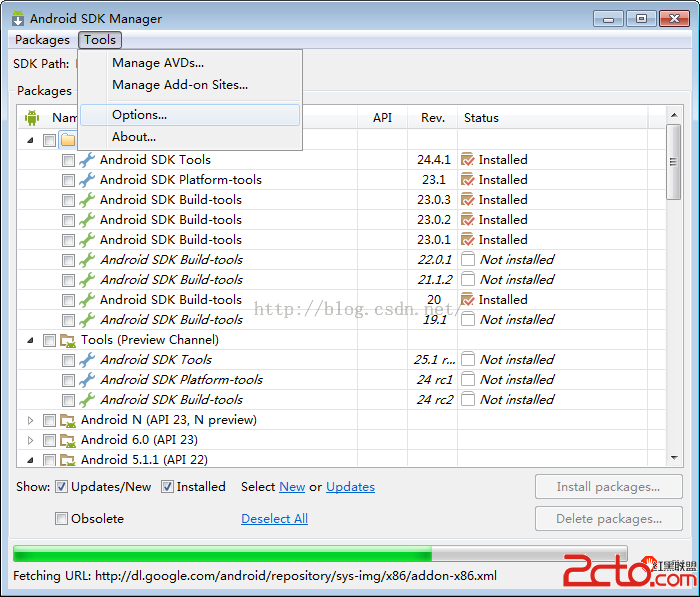
我們使用的是intel加速模擬器,但sdk更新後卻不能使用,因為intel的HAXM虛擬程序沒有更新,雖然在線更新包說已經Installed,但自己要親自到根目錄找到安裝
 android任務和返回棧
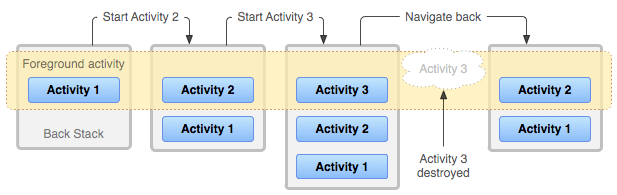
原文來自官方文檔:https://developer.android.com/guide/components/tasks-and-back-stack.html 應用
 如何設置Android的AVD模擬器可以輸入中文
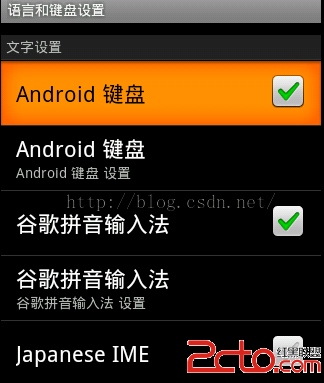
Android開發中,我們可以使用Android開發軟件如:Eclipse、Android Studio自帶的模擬器或者genymotion,進行測試,可是我們在調試中,
 android:descendantFocusability用法簡析
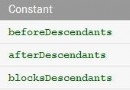
開發中很常見的一個問題,項目中的listview不僅僅是簡單的文字,常常需要自己定義listview,自己的Adapter去繼承BaseAdapter,在adapter