編輯:關於Android編程
先來說說我遇到的問題,這次測試使用的布局文件是:
也就是說布局圖是醬紫的:
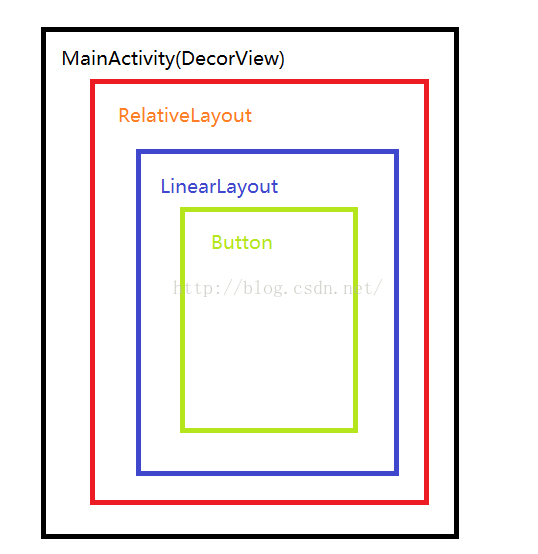
具體就是我在MyRelativeLayout中攔截了MOVE事件,在MyLinearLayout中攔截並且消費了DOWN事件,也就是說我僅僅修改了MyRelativeLayout$onInterceptTouchEvent中case條件為MOVE的部分以及MyLinearLayout$onInterceptTouchEvent中case條件為DOWN的部分和MyLinearLayout$onTouchEvent中case條件為DOWN的部分;
最後查看Logcat輸出:
06-28 09:09:25.237: I/System.out(1643): MainActivity--->dispatchTouchEvent--->ACTION_DOWN
06-28 09:09:25.237: I/System.out(1643): MyRelativeLayout--->dispatchTouchEvent--->ACTION_DOWN
06-28 09:09:25.237: I/System.out(1643): MyRelativeLayout--->onInterceptTouchEvent--->ACTION_DOWN
06-28 09:09:25.237: I/System.out(1643): MyRelativeLayout--->onInterceptTouchEvent--->ACTION_DOWN--->false
06-28 09:09:25.237: I/System.out(1643): MyLinearLayout--->dispatchTouchEvent--->ACTION_DOWN
06-28 09:09:25.237: I/System.out(1643): MyLinearLayout--->onInterceptTouchEvent--->ACTION_DOWN
06-28 09:09:25.237: I/System.out(1643): MyLinearLayout--->onInterceptTouchEvent--->ACTION_DOWN--->true
06-28 09:09:25.246: I/System.out(1643): MyLinearLayout--->onTouchEvent--->ACTION_DOWN
06-28 09:09:25.246: I/System.out(1643): MyLinearLayout--->onTouchEvent--->ACTION_DOWN--->true
06-28 09:09:25.246: I/System.out(1643): MyLinearLayout--->dispatchTouchEvent--->ACTION_DOWN--->true
06-28 09:09:25.246: I/System.out(1643): MyRelativeLayout--->dispatchTouchEvent--->ACTION_DOWN--->true
06-28 09:09:25.246: I/System.out(1643): MainActivity--->dispatchTouchEvent--->ACTION_DOWN--->true
06-28 09:09:25.326: I/System.out(1643): MainActivity--->dispatchTouchEvent--->ACTION_MOVE
06-28 09:09:25.326: I/System.out(1643): MyRelativeLayout--->dispatchTouchEvent--->ACTION_MOVE
06-28 09:09:25.326: I/System.out(1643): MyRelativeLayout--->onInterceptTouchEvent--->ACTION_MOVE
06-28 09:09:25.326: I/System.out(1643): MyRelativeLayout--->onInterceptTouchEvent--->ACTION_MOVE--->true
06-28 09:09:25.326: I/System.out(1643): MyLinearLayout--->dispatchTouchEvent--->ACTION_CANCEL
06-28 09:09:25.326: I/System.out(1643): MyLinearLayout--->dispatchTouchEvent--->ACTION_CANCEL--->false
06-28 09:09:25.326: I/System.out(1643): MyRelativeLayout--->dispatchTouchEvent--->ACTION_MOVE--->false
06-28 09:09:25.326: I/System.out(1643): MainActivity--->onTouchEvent--->ACTION_MOVE
06-28 09:09:25.326: I/System.out(1643): MainActivity--->onTouchEvent--->ACTION_MOVE--->false
06-28 09:09:25.326: I/System.out(1643): MainActivity--->dispatchTouchEvent--->ACTION_MOVE--->false
06-28 09:09:25.336: I/System.out(1643): MainActivity--->dispatchTouchEvent--->ACTION_MOVE
06-28 09:09:25.336: I/System.out(1643): MyRelativeLayout--->dispatchTouchEvent--->ACTION_MOVE
06-28 09:09:25.336: I/System.out(1643): MyRelativeLayout--->onTouchEvent--->ACTION_MOVE
06-28 09:09:25.336: I/System.out(1643): MyRelativeLayout--->onTouchEvent--->ACTION_MOVE--->false
06-28 09:09:25.336: I/System.out(1643): MyRelativeLayout--->dispatchTouchEvent--->ACTION_MOVE--->false
06-28 09:09:25.336: I/System.out(1643): MainActivity--->onTouchEvent--->ACTION_MOVE
06-28 09:09:25.336: I/System.out(1643): MainActivity--->onTouchEvent--->ACTION_MOVE--->false
06-28 09:09:25.336: I/System.out(1643): MainActivity--->dispatchTouchEvent--->ACTION_MOVE--->false
06-28 09:09:25.412: I/System.out(1643): MainActivity--->dispatchTouchEvent--->ACTION_UP
06-28 09:09:25.416: I/System.out(1643): MyRelativeLayout--->dispatchTouchEvent--->ACTION_UP
06-28 09:09:25.416: I/System.out(1643): MyRelativeLayout--->onTouchEvent--->ACTION_UP
06-28 09:09:25.416: I/System.out(1643): MyRelativeLayout--->onTouchEvent--->ACTION_UP--->false
06-28 09:09:25.416: I/System.out(1643): MyRelativeLayout--->dispatchTouchEvent--->ACTION_UP--->false
06-28 09:09:25.416: I/System.out(1643): MainActivity--->onTouchEvent--->ACTION_UP
06-28 09:09:25.416: I/System.out(1643): MainActivity--->onTouchEvent--->ACTION_UP--->false
06-28 09:09:25.416: I/System.out(1643): MainActivity--->dispatchTouchEvent--->ACTION_UP--->false
下面我們來分析下具體的輸出過程
為了便於分析,先來貼出此測試過程中用到的部分源碼:
ViewGroup$dispatchTouchEvent
 @Override
    public boolean dispatchTouchEvent(MotionEvent ev) {
        if (mInputEventConsistencyVerifier != null) {
            mInputEventConsistencyVerifier.onTouchEvent(ev, 1);
        }

        boolean handled = false;
        if (onFilterTouchEventForSecurity(ev)) {
            final int action = ev.getAction();
            final int actionMasked = action & MotionEvent.ACTION_MASK;

            // Handle an initial down.
            if (actionMasked == MotionEvent.ACTION_DOWN) {
                // Throw away all previous state when starting a new touch gesture.
                // The framework may have dropped the up or cancel event for the previous gesture
                // due to an app switch, ANR, or some other state change.
                cancelAndClearTouchTargets(ev);
                resetTouchState();
            }

            // Check for interception.
            final boolean intercepted;
            if (actionMasked == MotionEvent.ACTION_DOWN
                    || mFirstTouchTarget != null) {
                final boolean disallowIntercept = (mGroupFlags & FLAG_DISALLOW_INTERCEPT) != 0;
                if (!disallowIntercept) {
                    intercepted = onInterceptTouchEvent(ev);
                    ev.setAction(action); // restore action in case it was changed
                } else {
                    intercepted = false;
                }
            } else {
                // There are no touch targets and this action is not an initial down
                // so this view group continues to intercept touches.
                intercepted = true;
            }

            // Check for cancelation.
            final boolean canceled = resetCancelNextUpFlag(this)
                    || actionMasked == MotionEvent.ACTION_CANCEL;

            // Update list of touch targets for pointer down, if needed.
            final boolean split = (mGroupFlags & FLAG_SPLIT_MOTION_EVENTS) != 0;
            TouchTarget newTouchTarget = null;
            boolean alreadyDispatchedToNewTouchTarget = false;
            if (!canceled && !intercepted) {
                if (actionMasked == MotionEvent.ACTION_DOWN
                        || (split && actionMasked == MotionEvent.ACTION_POINTER_DOWN)
                        || actionMasked == MotionEvent.ACTION_HOVER_MOVE) {
                    final int actionIndex = ev.getActionIndex(); // always 0 for down
                    final int idBitsToAssign = split ? 1 << ev.getPointerId(actionIndex)
                            : TouchTarget.ALL_POINTER_IDS;

                    // Clean up earlier touch targets for this pointer id in case they
                    // have become out of sync.
                    removePointersFromTouchTargets(idBitsToAssign);

                    final int childrenCount = mChildrenCount;
                    if (newTouchTarget == null && childrenCount != 0) {
                        final float x = ev.getX(actionIndex);
                        final float y = ev.getY(actionIndex);
                        // Find a child that can receive the event.
                        // Scan children from front to back.
                        final View[] children = mChildren;

                        final boolean customOrder = isChildrenDrawingOrderEnabled();
                        for (int i = childrenCount - 1; i >= 0; i--) {
                            final int childIndex = customOrder ?
                                    getChildDrawingOrder(childrenCount, i) : i;
                            final View child = children[childIndex];
                            if (!canViewReceivePointerEvents(child)
                                    || !isTransformedTouchPointInView(x, y, child, null)) {
                                continue;
                            }

                            newTouchTarget = getTouchTarget(child);
                            if (newTouchTarget != null) {
                                // Child is already receiving touch within its bounds.
                                // Give it the new pointer in addition to the ones it is handling.
                                newTouchTarget.pointerIdBits |= idBitsToAssign;
                                break;
                            }

                            resetCancelNextUpFlag(child);
                            if (dispatchTransformedTouchEvent(ev, false, child, idBitsToAssign)) {
                                // Child wants to receive touch within its bounds.
                                mLastTouchDownTime = ev.getDownTime();
                                mLastTouchDownIndex = childIndex;
                                mLastTouchDownX = ev.getX();
                                mLastTouchDownY = ev.getY();
                                newTouchTarget = addTouchTarget(child, idBitsToAssign);
                                alreadyDispatchedToNewTouchTarget = true;
                                break;
                            }
                        }
                    }

                    if (newTouchTarget == null && mFirstTouchTarget != null) {
                        // Did not find a child to receive the event.
                        // Assign the pointer to the least recently added target.
                        newTouchTarget = mFirstTouchTarget;
                        while (newTouchTarget.next != null) {
                            newTouchTarget = newTouchTarget.next;
                        }
                        newTouchTarget.pointerIdBits |= idBitsToAssign;
                    }
                }
            }

            // Dispatch to touch targets.
            if (mFirstTouchTarget == null) {
                // No touch targets so treat this as an ordinary view.
                handled = dispatchTransformedTouchEvent(ev, canceled, null,
                        TouchTarget.ALL_POINTER_IDS);
            } else {
                // Dispatch to touch targets, excluding the new touch target if we already
                // dispatched to it.  Cancel touch targets if necessary.
                TouchTarget predecessor = null;
                TouchTarget target = mFirstTouchTarget;
                while (target != null) {
                    final TouchTarget next = target.next;
                    if (alreadyDispatchedToNewTouchTarget && target == newTouchTarget) {
                        handled = true;
                    } else {
                        final boolean cancelChild = resetCancelNextUpFlag(target.child)
                                || intercepted;
                        if (dispatchTransformedTouchEvent(ev, cancelChild,
                                target.child, target.pointerIdBits)) {
                            handled = true;
                        }
                        if (cancelChild) {
                            if (predecessor == null) {
                                mFirstTouchTarget = next;
                            } else {
                                predecessor.next = next;
                            }
                            target.recycle();
                            target = next;
                            continue;
                        }
                    }
                    predecessor = target;
                    target = next;
                }
            }

            // Update list of touch targets for pointer up or cancel, if needed.
            if (canceled
                    || actionMasked == MotionEvent.ACTION_UP
                    || actionMasked == MotionEvent.ACTION_HOVER_MOVE) {
                resetTouchState();
            } else if (split && actionMasked == MotionEvent.ACTION_POINTER_UP) {
                final int actionIndex = ev.getActionIndex();
                final int idBitsToRemove = 1 << ev.getPointerId(actionIndex);
                removePointersFromTouchTargets(idBitsToRemove);
            }
        }

        if (!handled && mInputEventConsistencyVerifier != null) {
            mInputEventConsistencyVerifier.onUnhandledEvent(ev, 1);
        }
        return handled;
    }
ViewGroup$dispatchTransformedTouchEvent
 private boolean dispatchTransformedTouchEvent(MotionEvent event, boolean cancel,
            View child, int desiredPointerIdBits) {
        final boolean handled;

        // Canceling motions is a special case.  We don't need to perform any transformations
        // or filtering.  The important part is the action, not the contents.
        final int oldAction = event.getAction();
        if (cancel || oldAction == MotionEvent.ACTION_CANCEL) {
            event.setAction(MotionEvent.ACTION_CANCEL);
            if (child == null) {
                handled = super.dispatchTouchEvent(event);
            } else {
                handled = child.dispatchTouchEvent(event);
            }
            event.setAction(oldAction);
            return handled;
        }

        // Calculate the number of pointers to deliver.
        final int oldPointerIdBits = event.getPointerIdBits();
        final int newPointerIdBits = oldPointerIdBits & desiredPointerIdBits;

        // If for some reason we ended up in an inconsistent state where it looks like we
        // might produce a motion event with no pointers in it, then drop the event.
        if (newPointerIdBits == 0) {
            return false;
        }

        // If the number of pointers is the same and we don't need to perform any fancy
        // irreversible transformations, then we can reuse the motion event for this
        // dispatch as long as we are careful to revert any changes we make.
        // Otherwise we need to make a copy.
        final MotionEvent transformedEvent;
        if (newPointerIdBits == oldPointerIdBits) {
            if (child == null || child.hasIdentityMatrix()) {
                if (child == null) {
                    handled = super.dispatchTouchEvent(event);
                } else {
                    final float offsetX = mScrollX - child.mLeft;
                    final float offsetY = mScrollY - child.mTop;
                    event.offsetLocation(offsetX, offsetY);

                    handled = child.dispatchTouchEvent(event);

                    event.offsetLocation(-offsetX, -offsetY);
                }
                return handled;
            }
            transformedEvent = MotionEvent.obtain(event);
        } else {
            transformedEvent = event.split(newPointerIdBits);
        }

        // Perform any necessary transformations and dispatch.
        if (child == null) {
            handled = super.dispatchTouchEvent(transformedEvent);
        } else {
            final float offsetX = mScrollX - child.mLeft;
            final float offsetY = mScrollY - child.mTop;
            transformedEvent.offsetLocation(offsetX, offsetY);
            if (! child.hasIdentityMatrix()) {
                transformedEvent.transform(child.getInverseMatrix());
            }

            handled = child.dispatchTouchEvent(transformedEvent);
        }

        // Done.
        transformedEvent.recycle();
        return handled;
    }
具體分析過程:
注意:分發順序是:Activity----->ViewGroup----->View
消費順序是:View------>ViewGroup----->Activity
View中的事件方法執行流程是:dispatchTouchEvent----->onTouchEvent
ViewGroup中的事件方法執行流程是:dispatchTouchEvent----->onInterceptTouchEvent----->onTouchEvent
(1)先來看DOWN事件部分:
事件首先傳遞到MainActivity,調用它的dispatchTouchEvent分發到他的子View(MyRelativeLayout上),因為是DOWN事件,滿足ViewGroup$dispatchTouchEvent源碼的第23行if語句的第一個條件,進入if語句塊中,因為我們並沒有調用requestDisallowInterceptTouchEvent來干預事件的分發過程,所以會執行第27行的onInterceptTouchEvent方法,我們的測試中MyRelativeLayout沒有攔截DOWN事件,因而該方法默認返回值是false賦給intercepted,所以你有了Logcat第4行的輸出,接著執行第46行,滿足if語句條件,進入if語句塊中,這個裡面比較關鍵的代碼是第85行的dispatchTransformedTouchEvent方法,這個方法會遞歸的處理當前View的子View,所以你會發現Logcat第11行MyRelativeLayout的dispatchTouchEvent方法才算真正結束,這裡只需要知道第91行會調用addTouchTarget方法,該方法會在其子View的分發事件(dispatchTouchEvent)返回true的情況下執行,在它裡面會給mFirstTouchTarget賦值即可,因為MyRelativeLayout子View是MyLinearLayout,所以執行MyLinearLayout的dispatchTouchEvent方法,接著執行MyLinearLayout的onInterceptTouchEvent方法,因為MyLinearLayout攔截了DOWN事件,因而onInterceptTouchEvent返回true,那麼這時候ViewGroup$dispatchTouchEvent的第46---108行代碼將不再執行,因為此時mFirstTouchTarget還是null的,所以會執行第111行的if語句塊,調用dispatchTransformedTouchEvent方法,傳入的第三個參數是null,查看ViewGroup$dispatchTransformedTouchEvent源碼的第11行,發現他會執行super的dispatchTouchEvent方法,因為我們沒有為MyLinearLayout設置onTouch監聽事件,所以他直接執行了onTouchEvent方法,並且我們消費了這個DOWN事件,所以有了Logcat第9行的輸出,接下來就是遞歸返回過程了,即Logcat第10--12行的輸出部分;
(2)接下來分析第一次MOVE事件
和上面一樣,事件首先到了MainActivity,調用他的dispatchTouchEvent方法進行分發,接著事件分發到了MyRelativeLayout上面,調用他的dispatchTouchEvent方法,因為第一次DOWN事件中,我們已經將mFirstTouchTarget的值設置為非null,所以ViewGroup$dispatchTouchEvent方法走到第23行的時候仍然滿足if判斷條件,執行第27行的onInterceptTouchEvent方法,所以有了第15行的Logcat輸出,因為我們在MyRelativeLayout中攔截了MOVE事件,所以intercepted的值將會被賦值為true,因而ViewGroup$dispatchTouchEvent的第46--108行的代碼將不會執行,到了第111行判斷mFirstTouchTarget不為null,執行else語句部分,這裡比較關鍵的在於第125行,因為此時的intercepted值為true,所以cancelChild值將為true,在執行第127行dispatchTransformedTouchEvent的時候將cancelChild值傳入,查看ViewGroup$dispatchTransformedTouchEvent的源碼第9行,你會發現他執行了ACTION_CANCEL,所以出現了我們Logcat輸出的第17/18行,因而第127行的if條件內容將為false,所以handled的值此時仍然是false,因為cancelChild值是true,所以執行第131行,並且此時的predecessor等於null,因而修改mFirstTouchTarget的值為next,這裡就比較重要了,此處的next是null,為什麼呢?因為之前mFirstTouchTarget的值是MyLinearLayout,雖然MyLinearLayout有子View(MyButton),但是MyLinearLayout把DOWN時間消費了,所以MyButton根本就沒有加入到事件處理的鏈表中,所以對mFirstTouchTarget的值進行了修改,ViewGroup$dispatchTouchEvent的第148--161行不再會修改handled的值,那麼我們可以認為MyRelativeLayout的dispatchTouchEvent方法執行結束,因為此時事件還沒有被消費,那麼只能由MainActivity來進行處理了,所以有了Logcat第20--22行的輸出;
(3)接下來分析第二次以後的MOVE事件
同樣事件首先由MainActivity的dispatchTouchEvent分發到MyRelativeLayout上,執行他的dispatchTouchEvent方法,這時候判斷ViewGroup$dispatchTouchEvent第23行的if語句部分,發現部門組條件,那麼會執行第35行的else語句部分,設置intercepted的值為true,同樣的不會執行第46--108行部分,在判斷第111行的mFirstTouchTarget是否為null時,滿足條件,執行dispatchTransformedTouchEvent方法,傳入的第3個參數是null,那麼會執行super的dispatchTouchEvent方法,這屬於View的事件分發過程,同樣我們沒有為MyRelativeLayout設置onTouch方法,所以他會直接執行onTouchEvent方法,所以有了Logcat第25行的輸出,接下來在onTouchEvent執行結束之後返回false,因為我們沒有在MyRelativeLayout中消費MOVE事件,因為該事件沒有處理完,因而會回傳給MainActivity來進行處理;
(4)接下來就是UP事件了:
UP事件的分析和第二次以後的MOVE事件過程一致,就不再贅述了;
從上面的分析中,我們可以得出結論:
某一個View一旦決定攔截,那麼這個事件序列以後的部分只能由他來處理,前提條件是以後的事件是可以到達該View的,就像上面的例子,DOWN事件是由MyLinearLayout來攔截消費的,但是MOVE事件卻不是他處理的,原因在於MyRelativeLayout對MOVE事件進行了攔截,事件根本就不會到達MyLinearLayout;
 Eclipse中查看Android模擬器SD卡目錄
有時候用到Android模擬器來模擬SD卡相關操作,在Eclipse中可以直接查看SD卡目錄; 首先,新建模擬器的時候要創建SD卡,存儲的大小根據需要創建; 啟動模擬
 如何去除ListView中Header View、Footer View中的分割線
最近的項目中給ListView 加入了一個Header View之後,發現Header View的下方也有了分割線,很難看,UI要求將Header View的分割器去掉
 Android 開發 之 Fragment 詳解
作者 : 韓曙亮轉載請著名出處 : http://blog.csdn.net/shulianghan/article/details/38064191本博客代碼地址 :
 Android開發筆記之:在ImageView上繪制圓環的實現方法
繪制圓環其實很簡單,有大概以下三種思路. 這裡先說網上提到的一種方法。思路是先繪制內圓,然後繪制圓環(圓環的寬度就是paint設置的paint.setStrokeWidt