編輯:關於Android編程
想使用藍牙呢,首先得看手機是否支持,有些低配手機,可能就沒有內置藍牙模塊。當然,一般都會有,我們可以得到唯一的藍牙適配器,進行其他操作。
bluetoothAdapter = BluetoothAdapter.getDefaultAdapter();
/**
     * 開啟藍牙
     *
     * @param activity 上下文
     * @return 是否開啟成功
     */
    public static boolean openBluetooth(Activity activity) {
        //確認開啟藍牙
        if (!getInstance().isEnabled()) {
            //=默認120秒==============================================================
            //使藍牙設備可見,方便配對
            //Intent in = new Intent(BluetoothAdapter.ACTION_REQUEST_DISCOVERABLE);
            //in.putExtra(BluetoothAdapter.EXTRA_DISCOVERABLE_DURATION, 300);
            //activity.startActivityForResult(in,Activity.RESULT_OK);
            //=1=============================================================
            //請求用戶開啟,需要提示
            //Intent intent = new Intent(BluetoothAdapter.ACTION_REQUEST_ENABLE);
            //startActivityForResult(intent, RESULT_FIRST_USER);
            //=2=============================================================
            //程序直接開啟,不經過提示
            getInstance().enable();
        }
        //T.showLong(context, "已經開啟藍牙");
        return getInstance().isEnabled();
    }

    //關閉藍牙
    public static boolean closeBluetooth() {
        return getInstance().disable();
    }

    /**
     * 掃描已經配對的設備
     *
     * @return
     */
    public static ArrayList scanPairs() {
        ArrayList list = null;
        Set deviceSet = getInstance().getBondedDevices();
        if (deviceSet.size() > 0) {
            //存在已經配對過的藍牙設備
            list = new ArrayList<>();
            list.addAll(deviceSet);
        }
        return list;
    }

    //開始掃描
    public static void scan() {
        getInstance().startDiscovery();
    }

    //取消掃描
    public static void cancelScan() {
        if (getInstance().isDiscovering())
            getInstance().cancelDiscovery();

    }

    //藍牙配對
    @TargetApi(Build.VERSION_CODES.KITKAT)
    public static boolean createBond(BluetoothDevice device) {
        return bond(device, "createBond");
        /*if (device.createBond()) {
            return device.setPairingConfirmation(true);
        }
        return false;*/
    }

    //解除配對
    public static boolean removeBond(BluetoothDevice device) {
        return bond(device, "removeBond");
    }

    @TargetApi(Build.VERSION_CODES.KITKAT)
    private static boolean bond(BluetoothDevice device, String methodName) {
        Boolean returnValue = false;
        if (device != null && device.getBondState() == BluetoothDevice.BOND_NONE) {
            try {
                device.setPairingConfirmation(false);
                cancelPairingUserInput(device);
                Method removeBondMethod = BluetoothDevice.class.getMethod(methodName);
                returnValue = (Boolean) removeBondMethod.invoke(device);
            } catch (Exception e) {
                e.printStackTrace();
            }
        }
        return returnValue;
    }

    //取消配對
    public static boolean cancelBondProcess(BluetoothDevice device) {
        try {
            Method cancelBondMethod = BluetoothDevice.class.getMethod("cancelBondProcess");
            Boolean returnValue = (Boolean) cancelBondMethod.invoke(device);
            return returnValue.booleanValue();
        } catch (Exception e) {
            e.printStackTrace();
        }
        return false;
    }

    //取消用戶輸入
    public static boolean cancelPairingUserInput(BluetoothDevice device) {
        try {
            Method cancelPairingUserInputMethod = BluetoothDevice.class.getMethod("cancelPairingUserInput");
            Boolean returnValue = (Boolean) cancelPairingUserInputMethod.invoke(device);
            return returnValue.booleanValue();
        } catch (Exception e) {
            e.printStackTrace();
        }
        return false;
    }
//注冊藍牙接收廣播
        if (!hasRegister) {
            hasRegister = true;
            //掃描結束廣播
            IntentFilter filter = new IntentFilter(BluetoothAdapter.ACTION_DISCOVERY_FINISHED);
            //找到設備廣播
            filter.addAction(BluetoothDevice.ACTION_FOUND);
            filter.addAction(BluetoothDevice.ACTION_BOND_STATE_CHANGED);
            filter.addAction(BluetoothAdapter.ACTION_SCAN_MODE_CHANGED);
            filter.addAction(BluetoothAdapter.ACTION_STATE_CHANGED);
            filter.addAction(BluetoothDevice.ACTION_PAIRING_REQUEST);
            registerReceiver(mMyReceiver, filter);
        }
private class MyReceiver extends BroadcastReceiver {

        @Override
        public void onReceive(Context context, Intent intent) {
            String action = intent.getAction();
            if (BluetoothDevice.ACTION_FOUND.equals(action)) {
                //搜索到新設備
                BluetoothDevice device = intent.getParcelableExtra(BluetoothDevice.EXTRA_DEVICE);
                //搜索沒有配過對的藍牙設備
                if (device.getBondState() != BluetoothDevice.BOND_BONDED) {
                    mListData.add(device);
                    dataAdapter.refreshData(mListData);
                } else {
                    T.showLong(TwoActivity.this, device.getName() + '\n' + device.getAddress() + " > 已發現");
                }
            } else if (BluetoothAdapter.ACTION_DISCOVERY_FINISHED.equals(action)) {   //搜索結束
                if (mListData.size() == 0) {
                    T.showLong(TwoActivity.this, "沒有發現任何藍牙設備");
                }
                progressDialog.dismiss();
                scan.setText("重新掃描");
            } else if (BluetoothDevice.ACTION_PAIRING_REQUEST.equals(action)) {
                if (TwoActivity.this.position != -1) {
                    final BluetoothDevice device = mListData.get(TwoActivity.this.position);
                    com.dk.bluetooth.tools.T.showLong(TwoActivity.this, device + "  配對成功");
                    EventBus.getDefault().post(new com.dk.bluetooth.tools.MyEvent());
                }
            }
        }
    }
通訊需要建立信道,BluetoothServerSocket需要先啟動,監聽當前設備上的某UUID位置上的設備(阻塞到在此處),就跟windows的端口意思是一樣的。然後BluetoothSocket再啟動,根據對方的mac地址和對方監聽的UUID位置,啟動連接(也阻塞了),直到連上服務器了,就返回。服務器也一樣,直到有人來連接了,就返回。都會返回一個BluetoothSocket,然後從這個socket裡面獲取input和output流。服務器端了input流是客戶端的output流,另外一半也一樣。剩下的收發消息就是流的讀寫了,簡單吧。
下面貼出我的代碼,應為服務器端和客戶端啟動的方法不一樣,我分成了兩個線程,由於讀寫的功能一樣,我就共用了一套讀寫線程。根據這個思路看我的代碼。
/**
     * 初始化及啟動藍牙socket
     *
     * @param handler         UI消息傳遞對象
     * @param securityType    連接的安全模式
     * @param serverOrClient  客戶端或服務端
     * @param bluetoothDevice 服務器端設備
     */
    public BluetoothChatService(Handler handler, SecurityType securityType, ServerOrClient serverOrClient,
                                BluetoothDevice bluetoothDevice) {
        if (securityType != null)
            this.mSecurityType = securityType;
        if (serverOrClient != null)
            this.mServerOrClient = serverOrClient;
        if (bluetoothDevice != null)
            this.mBluetoothDevice = bluetoothDevice;
        mAdapter = BluetoothAdapter.getDefaultAdapter();
        mHandler = handler;
        start();
    }

    /**
     * 多線程同步修改狀態標識
     *
     * @param state
     */
    private synchronized void setState(int state) {
        mState = state;
        mHandler.obtainMessage(MESSAGE_TOAST_STATE_CHANGE, state, -1, null).sendToTarget();
    }

    /**
     * 多線程同步讀取狀態標識
     */
    public synchronized int getState() {
        return mState;
    }

    /**
     * 啟動服務
     */
    public void start() {
        start(null, null, null);
    }

    /**
     * 啟動服務
     *
     * @param securityType    連接的安全模式
     * @param serverOrClient  客戶端或服務端
     * @param bluetoothDevice 服務器端設備
     */
    public void start(SecurityType securityType, ServerOrClient serverOrClient, BluetoothDevice bluetoothDevice) {
        if (securityType != null)
            this.mSecurityType = securityType;
        if (this.mSecurityType == null) {
            if (DEBUG)
                Log.e(TAG, "mSecurityType cannot be null");
            mHandler.obtainMessage(MESSAGE_TOAST_ERROR, -1, -1, "mSecurityType cannot be null").sendToTarget();
            return;
        }
        if (serverOrClient != null)
            this.mServerOrClient = serverOrClient;
        if (this.mServerOrClient == null) {
            if (DEBUG)
                Log.e(TAG, "mServerOrClient cannot be null");
            mHandler.obtainMessage(MESSAGE_TOAST_ERROR, -1, -1, "mServerOrClient cannot be null").sendToTarget();
            return;
        }
        if (bluetoothDevice != null)
            this.mBluetoothDevice = bluetoothDevice;
        if (this.mBluetoothDevice == null) {
            if (DEBUG)
                Log.e(TAG, "mBluetoothDevice cannot be null");
            mHandler.obtainMessage(MESSAGE_TOAST_ERROR, -1, -1, "mBluetoothDevice cannot be null").sendToTarget();
            return;
        }
        if (mState == STATE_NONE) {
            stop();
            if (this.mServerOrClient == ServerOrClient.SERVER) {
                if (mServerConnectThread == null) {
                    mServerConnectThread = new ServerConnectThread(this.mSecurityType);
                    mServerConnectThread.start();
                }
            } else if (this.mServerOrClient == ServerOrClient.CLIENT) {
                if (mClientConnectThread == null) {
                    mClientConnectThread = new ClientConnectThread(this.mSecurityType);
                    mClientConnectThread.start();
                }
            }
            setState(STATE_LISTEN);
        }
    }

    /**
     * 停止服務
     */
    public synchronized void stop() {
        try {
            if (mReadWriteThread != null) {
                mReadWriteThread.cancel();
                mReadWriteThread = null;
            }
            if (mServerConnectThread != null) {
                mServerConnectThread.cancel();
                mServerConnectThread = null;
            }
            if (mClientConnectThread != null) {
                mClientConnectThread.cancel();
                mClientConnectThread = null;
            }
        } catch (Exception e) {
            e.printStackTrace();
            if (DEBUG)
                Log.e(TAG, "BluetoothChatService -> stop() -> :failed " + e.getMessage());
            mHandler.obtainMessage(MESSAGE_TOAST_ERROR, -1, -1, "BluetoothChatService -> stop() -> :failed").sendToTarget();
            mReadWriteThread = null;
            mServerConnectThread = null;
            mClientConnectThread = null;
        } finally {
            setState(STATE_NONE);
            System.gc();
        }
    }

    /**
     * 發送消息
     *
     * @param out 數據參數
     */
    public void write(String out) {
        if (TextUtils.isEmpty(out)) {
            if (DEBUG)
                Log.e(TAG, "please write something now");
            mHandler.obtainMessage(MESSAGE_TOAST_ERROR, -1, -1, "BluetoothChatService -> write() -> :failed").sendToTarget();
            return;
        }
        ReadWriteThread r;
        synchronized (this) {
            if (mState != STATE_CONNECTED)
                return;
            r = mReadWriteThread;
        }
        r.write(out);
    }

    /**
     * 服務器端連接線程
     */
    @SuppressLint("NewApi")
    private class ServerConnectThread extends Thread {
        private BluetoothServerSocket mmServerSocket;
        private BluetoothSocket mmSocket = null;

        public ServerConnectThread(SecurityType securityType) {
            setName("ServerConnectionThread:" + securityType.getValue());
            BluetoothServerSocket tmp = null;
            try {
                if (securityType == SecurityType.SECURE) {
                    tmp = mAdapter.listenUsingRfcommWithServiceRecord(SecurityType.SECURE.getValue(), MY_UUID_SECURE);
                } else if (securityType == SecurityType.INSECURE) {
                    tmp = mAdapter.listenUsingInsecureRfcommWithServiceRecord(SecurityType.INSECURE.getValue(),
                            MY_UUID_INSECURE);
                }
                if (tmp != null)
                    mmServerSocket = tmp;
            } catch (IOException e) {
                e.printStackTrace();
                if (DEBUG)
                    Log.e(TAG, "ServerConnectThread -> ServerConnectThread() -> :failed " + e.getMessage());
                mHandler.obtainMessage(MESSAGE_TOAST_ERROR, -1, -1, "ServerConnectThread -> ServerConnectThread() -> :failed").sendToTarget();
                mmServerSocket = null;
                BluetoothChatService.this.stop();
            }
        }

        public void run() {
            try {
                // 正在連接
                setState(STATE_CONNECTING);
                //accept() 阻塞式的方法,群聊時,需要循環accept接收客戶端
                mmSocket = mmServerSocket.accept();
                connected(mmSocket);
            } catch (Exception e) {
                e.printStackTrace();
                if (DEBUG)
                    Log.e(TAG, "ServerConnectThread -> run() -> :failed " + e.getMessage());
                mHandler.obtainMessage(MESSAGE_TOAST_ERROR, -1, -1, "ServerConnectThread -> run() -> :failed").sendToTarget();
                BluetoothChatService.this.stop();
            }
        }

        public void cancel() {
            try {
                if (mmSocket != null) {
                    mmSocket.close();
                    mmSocket = null;
                }
                if (mmServerSocket != null) {
                    mmServerSocket.close();
                    mmServerSocket = null;
                }
            } catch (IOException e) {
                e.printStackTrace();
                if (DEBUG)
                    Log.e(TAG, "ServerConnectThread -> cancel() -> :failed " + e.getMessage());
                mHandler.obtainMessage(MESSAGE_TOAST_ERROR, -1, -1, "ServerConnectThread -> cancel() -> :failed").sendToTarget();
                mmSocket = null;
                mmServerSocket = null;
                BluetoothChatService.this.stop();
            }
        }
    }

    // 客戶端連接線程
    private class ClientConnectThread extends Thread {
        private BluetoothSocket mmSocket;

        public ClientConnectThread(SecurityType securityType) {
            setName("ClientConnectThread:" + securityType.getValue());
            BluetoothSocket tmp = null;
            try {
                if (securityType == SecurityType.SECURE) {
                    tmp = mBluetoothDevice.createRfcommSocketToServiceRecord(MY_UUID_SECURE);
                    //Method m = mBluetoothDevice.getClass().getMethod("createRfcommSocket", int.class);
                    //tmp = (BluetoothSocket) m.invoke(mBluetoothDevice, 1);
                } else if (securityType == SecurityType.INSECURE) {
                    tmp = mBluetoothDevice.createInsecureRfcommSocketToServiceRecord(MY_UUID_INSECURE);
                    //Method m = mBluetoothDevice.getClass().getMethod("createRfcommSocket", int.class);
                    //tmp = (BluetoothSocket) m.invoke(mBluetoothDevice, 1);
                }
                if (tmp != null)
                    mmSocket = tmp;
            } catch (Exception e) {
                e.printStackTrace();
                if (DEBUG)
                    Log.e(TAG, "ClientConnectThread -> ClientConnectThread() -> :failed " + e.getMessage());
                mHandler.obtainMessage(MESSAGE_TOAST_ERROR, -1, -1, "ClientConnectThread -> ClientConnectThread() -> :failed").sendToTarget();
                mmSocket = null;
                BluetoothChatService.this.stop();
            }
        }

        public void run() {
            try {
                setState(STATE_CONNECTING);
                mmSocket.connect();
                connected(mmSocket);
            } catch (IOException e) {
                e.printStackTrace();
                if (DEBUG)
                    Log.e(TAG, "ClientConnectThread -> run() -> :failed " + e.getMessage());
                mHandler.obtainMessage(MESSAGE_TOAST_ERROR, -1, -1, "ClientConnectThread -> run() -> :failed").sendToTarget();
                BluetoothChatService.this.stop();
            }
        }

        public void cancel() {
            try {
                if (mmSocket != null && mmSocket.isConnected()) {
                    mmSocket.close();
                }
                mmSocket = null;
            } catch (IOException e) {
                e.printStackTrace();
                if (DEBUG)
                    Log.e(TAG, "ClientConnectThread -> cancel() -> :failed " + e.getMessage());
                mHandler.obtainMessage(MESSAGE_TOAST_ERROR, -1, -1, "ClientConnectThread -> cancel() -> :failed").sendToTarget();
                mmSocket = null;
                BluetoothChatService.this.stop();
            }
        }
    }

    /**
     * 以獲取socket,建立數據流線程
     *
     * @param socket
     */
    private synchronized void connected(BluetoothSocket socket) {
        if (mReadWriteThread != null) {
            mReadWriteThread.cancel();
            mReadWriteThread = null;
        }
        mReadWriteThread = new ReadWriteThread(socket);
        mReadWriteThread.start();
    }

    /**
     * 連接成功線程,可進行讀寫操作
     */
    private class ReadWriteThread extends Thread {
        private BluetoothSocket mmSocket;
        private DataInputStream mmInStream;
        private DataOutputStream mmOutStream;
        private boolean isRunning = true;

        public ReadWriteThread(BluetoothSocket socket) {
            mmSocket = socket;
            try {
                mmInStream = new DataInputStream(mmSocket.getInputStream());
                mmOutStream = new DataOutputStream(mmSocket.getOutputStream());
                // 連接建立成功
                setState(STATE_CONNECTED);
            } catch (IOException e) {
                e.printStackTrace();
                if (DEBUG)
                    Log.e(TAG, "ReadWriteThread -> ReadWriteThread() -> :failed " + e.getMessage());
                mHandler.obtainMessage(MESSAGE_TOAST_ERROR, -1, -1, "ReadWriteThread -> ReadWriteThread() -> :failed").sendToTarget();
                mmOutStream = null;
                mmInStream = null;
                BluetoothChatService.this.stop();
            }
        }

        public void run() {
            byte[] buffer = new byte[1024];
            int len;
            while (isRunning) {
                try {
                    //readUTF(),read(buffer) 都是阻塞式的方法
                    //如果這兒用readUTF,那麼寫的地方得用writeUTF。對應
                    String receive_str = mmInStream.readUTF();
                    if (!TextUtils.isEmpty(receive_str))
                        mHandler.obtainMessage(MESSAGE_RECEIVE, -1, -1, receive_str).sendToTarget();
//                    len = mmInStream.read(buffer);
//                    if(len > 0){
//                        String receive_str = new String(buffer,0,len);
//                        if (!TextUtils.isEmpty(receive_str))
//                            mHandler.obtainMessage(MESSAGE_RECEIVE, -1, -1, receive_str).sendToTarget();
//                    }
                } catch (IOException e) {
                    e.printStackTrace();
                    if (DEBUG)
                        Log.e(TAG, "ReadWriteThread -> run() -> :failed " + e.getMessage());
                    mHandler.obtainMessage(MESSAGE_TOAST_ERROR, -1, -1, "ReadWriteThread -> run() -> :failed").sendToTarget();
                    BluetoothChatService.this.stop();
                }
            }
        }

        public void write(String str) {
            try {
                mmOutStream.writeUTF(str);
                mmOutStream.flush();
                mHandler.obtainMessage(MESSAGE_TOAST_SEND, -1, -1, str).sendToTarget();
            } catch (IOException e) {
                e.printStackTrace();
                if (DEBUG)
                    Log.e(TAG, "ReadWriteThread -> write() -> :failed " + e.getMessage());
                mHandler.obtainMessage(MESSAGE_TOAST_ERROR, -1, -1, "ReadWriteThread -> write() -> :failed").sendToTarget();
                BluetoothChatService.this.stop();
            }
        }

        public void cancel() {
            try {
                isRunning = false;
                if (mmInStream != null) {
                    mmInStream.close();
                    mmInStream = null;
                }
                if (mmOutStream != null) {
                    mmOutStream.close();
                    mmOutStream = null;
                }
            } catch (IOException e) {
                e.printStackTrace();
                if (DEBUG)
                    Log.e(TAG, "ReadWriteThread -> cancel() -> :failed " + e.getMessage());
                mHandler.obtainMessage(MESSAGE_TOAST_ERROR, -1, -1, "ReadWriteThread -> cancel() -> :failed").sendToTarget();
                mmInStream = null;
                mmOutStream = null;
                BluetoothChatService.this.stop();
            }
        }
    }
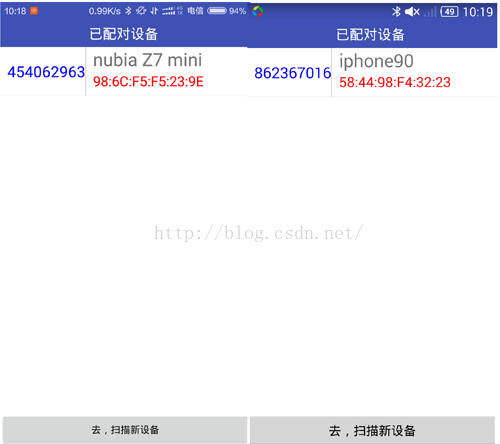
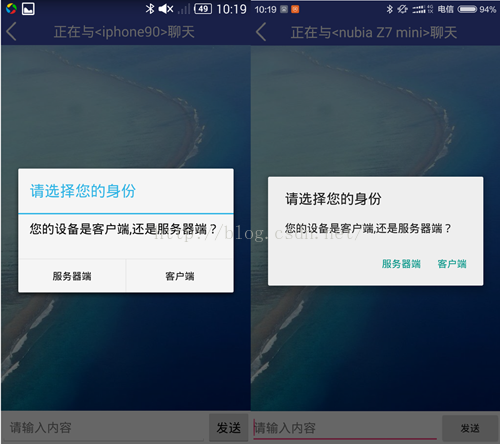
下面貼出我的項目功能,是一個聊天程序,只能單聊。我不明太網上有很多demo聲稱能群聊怎麼實現的,據目前分析,服務器端和客戶端的管道流是一一對應的,不是廣播模式。如果能群聊,會在服務器端創建一個輸入輸出流管理的集合吧,服務器端沒收到一條消息,在=再循環輸出流集合,往各個客戶端都發送消息。這樣一來,我上面的這段代碼不夠用了。懶得改,故沒有做群聊。
先貼圖:
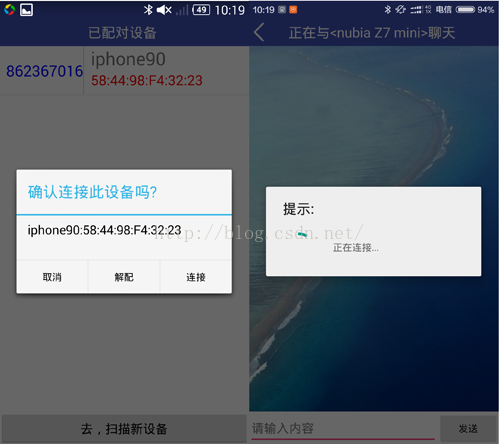
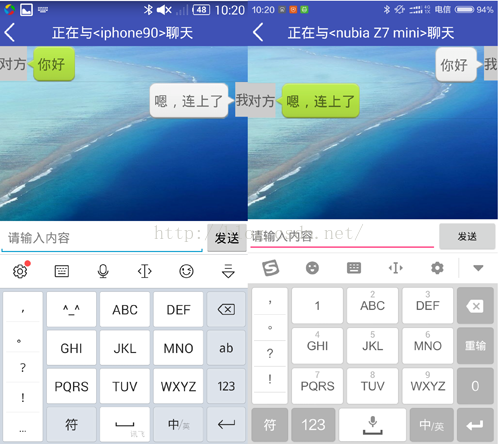
程序中,socket的連接方式有安全連接和不安全連接,我一直沒有搞懂區別
在兩個手機都連接了wifi的情況加,再使用我這種藍牙通訊方式通訊時,io流連接上後會自動斷開,很奇怪。查資料說藍牙通訊的波段頻率與路由器的沖突了。沒轍,故在啟動程序的時候關閉了wifi,下下策,望大家提供思路。
 Android仿微信清理內存圖表動畫(解決surfaceView屏幕閃爍問題)demo實例詳解
最近接了一個項目其中有功能要實現一個清理內存,要求和微信的效果一樣。於是想到用surfaceView而不是繼承view。下面小編給大家解析下實現思路。surfaceVie
 android數據傳遞(三)之Activity傳遞到Fragment
其實Activity和fragment之間傳遞數據有很多方法,我這裡說一個用的比較多的一個方法——接口回調,後面有運行效果接口回調有幾個步驟:1,
 局部加權回歸、欠擬合、過擬合 - Andrew Ng機器學習公開課筆記1.3
本文主要講解局部加權(線性)回歸。在講解局部加權線性回歸之前,先講解兩個概念:欠擬合、過擬合,由此引出局部加權線性回歸算法。 欠擬合、過擬合如下圖中三個擬合模型
 Android動畫完全解析(一)
一、View動畫1、常見的4中View動畫:AlphaAnimation、ScaleAnimation、TranslateAnimation、RotateAnimatio