編輯:關於Android編程
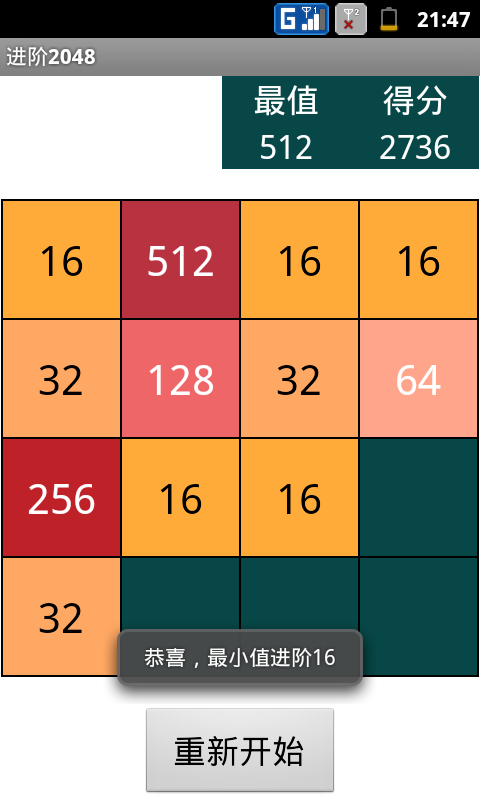
http://git.oschina.net/scimence/sci_2048/wikis/home
package com.example.sci_2048;

import java.util.Random;

import android.app.Activity;
import android.app.AlertDialog;
import android.content.DialogInterface;
import android.graphics.Color;
import android.os.Bundle;
import android.view.Gravity;
import android.view.Menu;
import android.view.MotionEvent;
import android.view.View;
import android.view.View.OnTouchListener;
import android.view.WindowManager;
import android.view.animation.Animation;
import android.view.animation.AnimationSet;
import android.view.animation.ScaleAnimation;
import android.widget.Button;
import android.widget.RelativeLayout;
import android.widget.TextView;


public class MainActivity extends Activity  implements OnTouchListener, android.view.View.OnClickListener
{
	TextView maxView, scoreView;					//當前最大數值, 累積得分值 顯示文本框
	int maxInt=0, scoreInt=0;						//最大數值, 累積得分 數值形式

	TextView cell[][] = new TextView[4][4];			//以文本框的形式創建游戲的16個單元格
	int num[][] = new int[4][4];					//存儲16個單元格對應的數值
	int count = 0;									//統計當前16個單元格中大於0的數值數目

	Button again;									//重新開始

	public enum Direction { LEFT, RIGHT, UP, DOWN; }//方向
	Direction direction = null;						//標記屏幕的滑動方向

	float x1=-1, y1=-1, x2=-1, y2=-1;				//標志觸摸按下和觸摸釋放時的坐標

	int cellWidth;									//設置游戲中方格的大小


    @Override
    protected void onCreate(Bundle savedInstanceState)
    {
        super.onCreate(savedInstanceState);

        View main = creatMainView();					//創建游戲主視圖
        setContentView(main);							//設置為游戲視圖
        main.setOnTouchListener(this);					//添加觸摸事件監聽,用於響應觸摸滑動事件

        again.setOnClickListener(this);					//重新開始按鈕添加事件響應,響應按鈕的點擊

        RandomSite();									//隨機在空位置處生成數值2
        RandomSite();

        refresh();										//刷新界面顯示值
    }

    //創建游戲的主視圖,包含3部分:頂部信息、中部4*4方格、底部按鈕
    @SuppressWarnings("deprecation")
	public View creatMainView()
    {
    	//獲取屏幕的寬度和高度
        WindowManager wm = this.getWindowManager();
        int screenWidth = wm.getDefaultDisplay().getWidth();
        int screenHeight = wm.getDefaultDisplay().getHeight();

        //根據屏幕寬度設置游戲中方格的大小,在屏幕寬度大於高度時,按寬高比重新分配比例,使得高大於寬
        cellWidth = screenWidth <= screenHeight ? (screenWidth-10)/4 : (screenHeight*screenHeight/screenWidth-10)/4;

        float rat = screenWidth <= screenHeight ? screenWidth / 480 : screenWidth / 480 * screenHeight/screenWidth;		//相對於480屏幕大小比例值
        int size1 = (int)(28*rat), size2 = (int)(42*rat), size3 = (int)(22*rat);

    	RelativeLayout main = new RelativeLayout(this);

    	//游戲信息顯示部分
    	RelativeLayout  info = new RelativeLayout(this);
    	info.setBackgroundColor(0xff074747);

    	//最值和得分的顯示信息,前兩個為標簽後兩個部分用於顯示數值
    	TextView label[] = new TextView[4];
    	String LText[] = new String[]{"最值", "得分", "0", "0" };

    	RelativeLayout.LayoutParams paramsL[] = new RelativeLayout.LayoutParams[4];
    	int ParamsNum[][] = new int[][]					//四個文本框的布局參數
    	{
    			{RelativeLayout.ALIGN_PARENT_TOP, RelativeLayout.ALIGN_PARENT_LEFT}, {RelativeLayout.ALIGN_PARENT_TOP, RelativeLayout.ALIGN_PARENT_RIGHT},
    			{RelativeLayout.ALIGN_PARENT_BOTTOM, RelativeLayout.ALIGN_PARENT_LEFT}, {RelativeLayout.ALIGN_PARENT_BOTTOM, RelativeLayout.ALIGN_PARENT_RIGHT}
    	};

    	//設置顯示信息的布局
    	for(int i=0; i<4; i++)
    	{
    		label[i] = new TextView(this);

	    	label[i].setText(LText[i]);
	    	label[i].setTextSize(size1);
	    	label[i].setTextColor(Color.WHITE);
	    	label[i].setGravity(Gravity.CENTER);

	    	paramsL[i] = new RelativeLayout.LayoutParams((int)(cellWidth*1.1), (int)(cellWidth*0.4));
	    	paramsL[i].addRule(ParamsNum[i][0]);
	    	paramsL[i].addRule(ParamsNum[i][1], RelativeLayout.TRUE);

	        info.addView(label[i], paramsL[i]);
    	}
    	maxView = label[2]; 	//映射最值到全局變量,便於下次訪問
    	scoreView = label[3];


        //游戲主體4*4方格部分
        RelativeLayout body = new RelativeLayout(this);	//創建一個相對布局的視圖
        body.setBackgroundColor(Color.BLACK);			//為其設置背景色

        for(int i=0; i<4; i++)
        	for(int j=0; j<4; j++)
        	{
        		cell[i][j] = new TextView(this);		//創建
        		num[i][j] = 0;							//初始時,每個方格中的數值均為0

        		RelativeLayout.LayoutParams params = new RelativeLayout.LayoutParams(cellWidth, cellWidth);
        		int left = 2 + j * (2 + cellWidth), top = 2 + i * (2 + cellWidth), right = left + cellWidth, bottom = top + cellWidth;	//top屬性值由行位置i決定,left由列位置j決定
        		params.setMargins(left, top, right, bottom);						//設置各個方格的布局位置

        		body.addView(cell[i][j], params);									//將表示方格的文本框添加到窗體

        		cell[i][j].setTextSize(size2);										//設置字體大小
        		cell[i][j].setGravity(Gravity.CENTER);								//設置文本布局方式
        	}

        //添加信息顯示部分到主界面
        RelativeLayout.LayoutParams paramsInfo = new RelativeLayout.LayoutParams((int)(cellWidth*2.2), (int)(cellWidth*0.8));
        int right = (int)(screenWidth/2 + (cellWidth*4+10)/2), left = right-(int)(cellWidth*2.2), top = 0, bottom = (int)(cellWidth*0.8);
        paramsInfo.setMargins(left, top, right, bottom);
//        paramsInfo.addRule(RelativeLayout.ALIGN_PARENT_TOP);
//        paramsInfo.addRule(RelativeLayout.ALIGN_PARENT_RIGHT, RelativeLayout.TRUE);

        main.addView(info, paramsInfo);

        //添加游戲主體部分到主界面
        RelativeLayout.LayoutParams paramsBody = new RelativeLayout.LayoutParams(cellWidth*4+10, cellWidth*4+10);
        paramsBody.addRule(RelativeLayout.CENTER_IN_PARENT, RelativeLayout.TRUE);
        main.addView(body, paramsBody);

        //添加重新開始按鈕到主界面
        RelativeLayout.LayoutParams paramsAgain = new RelativeLayout.LayoutParams((int)(cellWidth * 1.2), (int)(cellWidth * 0.6));
        paramsAgain.addRule(RelativeLayout.ALIGN_PARENT_BOTTOM);
        paramsAgain.addRule(RelativeLayout.CENTER_HORIZONTAL, RelativeLayout.TRUE);
        Button btnAgain = new Button(this);				//重新開始
        btnAgain.setText("重新開始");
        btnAgain.setTextSize(size3);					//設置字體大小
        main.addView(btnAgain, paramsAgain);

        again = btnAgain;								//映射該按鈕到全局變量

    	return main;
    }

    //在游戲的空格位置處,隨機生成數值2
    public void RandomSite()
    {
    	if(count<16)									//當16個方格未被數值填滿時
    	{
	    	Random rnd = new Random();
	        int n = rnd.nextInt(16-count), cN=0;		//根據空位置數隨機生成一個 數值

	        for(int i=0; i<4; i++)						//將隨機數位置轉換為在4*4方格中的對應位置
	        	for(int j=0; j<4; j++)
	        	{
	        		if(num[i][j] == 0)
	        		{
	        			if(cN == n)
	        			{
	        				num[i][j] = 2;
	        		        count++;					//4*4方格中大於0的數目統計

	        		        aniScale(cell[i][j]);	//設置動畫效果
	        		        return;
	        			}
	        			else cN++;
	        		}
	        	}
    	}
    }

    //消息框
    public void messageBox(String str)
    {
    	new AlertDialog.Builder(this)
		.setMessage(str)
		.setPositiveButton("確定", null)
		.show();
    }

    //當游戲界面被數值填滿時,判斷是否可以朝某方向合並
  	public boolean canBeAdd()
  	{	//分別判定垂直的兩個方向是否有相鄰數值可以合並即可
  		if(canBeAdd(Direction.RIGHT))return true;
  		else return canBeAdd(Direction.DOWN);
  	}

	//當游戲界面被數值填滿時,判斷是否可以朝指定方向合並,若不可以則游戲結束
	public boolean canBeAdd(Direction direction)
	{
		if(count<16)return true;			//未被填滿時,可以繼續操作

		int startN=0, addX=0, addY=0;		//起始值、結束值、步增值, x、y方向增量

		if(direction == Direction.RIGHT){ startN=3; addX=0; addY=1; }
		else if(direction == Direction.LEFT){ startN=0; addX=0; addY=-1; }
		else if(direction == Direction.DOWN){ startN=3; addX=1; addY=0; }
		else if(direction == Direction.UP){ startN=0; addX=-1; addY=0; }

		for(int x=0; x<=3; x++)				//對每一行或每一列執行
		{
			int y=startN;
			int i=0, j=0;

			if(direction == Direction.RIGHT || direction == Direction.LEFT){ i=x; j=y; }
			else { i=y; j=x; }

			for(int k = 0; k<3; k++)		//4個位置,從某個方向開始對每兩個連續位置進行比對,相同則合並,合並順序為direction的逆序
			{
				int i1 = i-k*addX, j1 = j-k*addY, i2 = i1-addX, j2 = j1-addY;
				if(num[i1][j1]==num[i2][j2] && num[i1][j1]!=0)
				{
					return true;
				}
			}
		}

		return false;
	}

    @Override
    public boolean onCreateOptionsMenu(Menu menu) {
        // Inflate the menu; this adds items to the action bar if it is present.
        getMenuInflater().inflate(R.menu.main, menu);
        return true;
    }


	@Override
	public boolean onTouch(View v, MotionEvent event)
	{
		//獲取觸摸拖動起點和終點的坐標,以便於判斷觸摸移動方向
		switch (event.getAction())
		{
			case MotionEvent.ACTION_DOWN:	//觸摸屏幕後記錄坐標
				x1 = event.getX();			//按下點坐標
				y1 = event.getY();
				break;

			case MotionEvent.ACTION_MOVE:	//觸摸移動
				break;

			case MotionEvent.ACTION_UP:
				x2 = event.getX();			//移動點坐標
				y2 = event.getY();
				break;

			case MotionEvent.ACTION_CANCEL:
		}

		//進行觸摸處理,要求觸摸按下和釋放點的坐標都存在,且不同,另外我們要求觸摸移動的距離大於等於一個方格寬度
		if((x1!=-1 && x2!=-1) && (x1!=x2|| y1!=y2)&& (Math.abs(x1 - x2) >= cellWidth || Math.abs(y1 - y2) >= cellWidth))
		{
			if (x2 - x1 > Math.abs(y2 - y1)) direction = Direction.RIGHT;
			else if (x1 - x2 > Math.abs(y2 - y1)) direction = Direction.LEFT;
			else if (y2 - y1 > Math.abs(x2 - x1)) direction = Direction.DOWN;
			else if (y1 - y2 > Math.abs(x2 - x1)) direction = Direction.UP;

			gameProcess(direction);			//游戲內部數值處理
			refresh();						//根據數組中的數據,刷新顯示到界面中

			x2 = x1 = -1 ; y2 = y1 = -1;	//此句保證每次觸摸移動僅處理一次
		}

		return true;
	}

	//游戲內部數值處理過程實現,分為3步:朝一個方向疊加、相同數值合並、再次朝該方向疊加
	public void gameProcess(Direction direction)
	{
		boolean flag = false;				//標志是否有數值可以下落,或者可以合並

		if(Gravaty(direction))flag = true;	//控制4*4方格中的數值朝一個方向墜落,疊加
		if(add(direction))
		{
			flag = true;
			Gravaty(direction);				//數值合並後, 如果有數值合並了,邏輯上方的數值下落
		}

		if(flag)RandomSite();				//如果有數值下落了或合並了,則隨機在一個空位置處生成2

		if(count==16 && !canBeAdd()) messageBox("抱歉,此次未能通關");//16個方格都被填滿時,判斷是否可以朝某個方向合並數值,不能則給出提示信息
	}

	//控制游戲中數值的墜落方向,該函數實現數值的墜落與疊起,相同數值不合並
	public boolean Gravaty(Direction direction)
	{
		int startN=0, endN=0, step=0, addX=0, addY=0;	//起始值、結束值、步增值, x、y方向增量
		boolean haveDroped = false;						//標志是否有數值下落

		if(direction == Direction.RIGHT){ startN=3; endN=0; step=-1; addX=0; addY=1; }
		else if(direction == Direction.LEFT){ startN=0; endN=3; step=1; addX=0; addY=-1; }
		else if(direction == Direction.DOWN){ startN=3; endN=0; step=-1; addX=1; addY=0; }
		else if(direction == Direction.UP){ startN=0; endN=3; step=1; addX=-1; addY=0; }

		for(int x=0; x<=3; x++)							//對每一行或每一列執行
		{
			for(int y=startN; (step<0 && y>=endN) || (step>0 && y<=endN); y+=step)
			{
				int i=0, j=0, i2=-1, j2=-1;

				if(direction == Direction.RIGHT || direction == Direction.LEFT){ i=x; j=y; }
				else { i=y; j=x; }

				i2=i;
				j2=j;
				//當前方格中的數值不為0,其移動方向一側的空位置在區域內,其數值為0
				while(num[i][j] != 0 && inArea(i2+addX, j2+addY) && num[i2+addX][j2+addY] == 0)
				{										//計算該坐標方向的最後一個可用數值為0的位置
					i2 += addX;
					j2 += addY;
				}

				if(inArea(i2, j2) && (i!=i2 || j!=j2))	//將坐標處的數值落到最後的空位置
				{

					num[i2][j2] = num[i][j];
					num[i][j] = 0;
					haveDroped = true;					//有數值下落
				}
			}
		}

		return haveDroped;
	}


	//為視圖v添加動畫效果,尺寸變化
	public void aniScale(View v)
	{
		v.bringToFront();				//前端顯示
		AnimationSet aniSet = new AnimationSet(true);
		//設置尺寸從0.5倍變化到1.1倍
		ScaleAnimation scaleAni = new ScaleAnimation(0.89f, 1.15f, 0.89f, 1.15f, Animation.RELATIVE_TO_SELF, 0.5f, Animation.RELATIVE_TO_SELF, 0.5f);
		scaleAni.setDuration(400);		//設置動畫效果時間
		aniSet.addAnimation(scaleAni);	//將動畫效果添加到動畫集中

		v.startAnimation(aniSet);		//視圖v開始動畫效果
	}

	//在Gravaty()處理的基礎上,控制相同數值朝指定方向合並
	public boolean add(Direction direction)
	{
		int startN=0, addX=0, addY=0;		//起始值、結束值、步增值, x、y方向增量
		boolean combined = false;			//標記是否有數值合並了

		if(direction == Direction.RIGHT){ startN=3; addX=0; addY=1; }
		else if(direction == Direction.LEFT){ startN=0; addX=0; addY=-1; }
		else if(direction == Direction.DOWN){ startN=3; addX=1; addY=0; }
		else if(direction == Direction.UP){ startN=0; addX=-1; addY=0; }

		for(int x=0; x<=3; x++)				//對每一行或每一列執行
		{
			int y=startN;
			int i=0, j=0;

			if(direction == Direction.RIGHT || direction == Direction.LEFT){ i=x; j=y; }
			else { i=y; j=x; }

			for(int k = 0; k<3; k++)		//4個位置,從某個方向開始對每兩個連續位置進行比對,相同則合並,合並順序為direction的逆序
			{
				int i1 = i-k*addX, j1 = j-k*addY, i2 = i1-addX, j2 = j1-addY;
				if(num[i1][j1]==num[i2][j2] && num[i1][j1]!=0)
				{
					scoreInt += num[i2][j2];//累積分值

					num[i1][j1] *= 2;
					num[i2][j2] = 0;
					combined = true;

					count--;				//數值合並後,大於0的數值減1
					aniScale(cell[i1][j1]);	//設置動畫效果

					if(num[i1][j1] == 2048) messageBox("恭喜,你贏了!");
//					if(num[i1][j1] == 2048) Toast.makeText(this, "恭喜,你贏了!", Toast.LENGTH_SHORT).show();
				}
			}
		}

		return combined;
	}


	//判斷n1和n2是否均在0到3之間,保證坐標n1,n2在4*4方格范圍
	public boolean inArea(int n1, int n2)
	{
		return 0 <= n1 && n1<=3 && 0 <= n2 && n2<=3 ;
	}


	//刷新游戲方格中的顯示值,將4*4數組中的值顯示到cell中
	public void refresh()
	{
		for(int i=0; i<4; i++)
        	for(int j=0; j<4; j++)
        	{
        		if( num[i][j]==0 )cell[i][j].setText("");							//數值為0時,清空顯示
        		else cell[i][j].setText(String.valueOf(num[i][j]));					//大於0時在方格中顯示對應的數值

        		cell[i][j].setBackgroundColor(getBacColor(num[i][j]));				//設置背景色

        		if( num[i][j]==2 || num[i][j]==4) cell[i][j].setTextColor(0xff776E65);
        		else cell[i][j].setTextColor(0xfff9f6f2);							//設置字體顏色

        		if(maxInt < num[i][j]) maxInt = num[i][j];							//記錄最大數值
        	}

		maxView.setText(String.valueOf(maxInt));									//顯示最大值
		scoreView.setText(String.valueOf(scoreInt));								//顯示分值

	}

	//獲取各數值對應的背景顏色
	public int getBacColor(int num)
	{
		int color[] = new int[]{0xff074747, 0xff999999, 0xffede0c8, 0xfff2b179, 0xfff59563, 0xfff67c5f, 0xfff65e3b, 0xffedcf72, 0xffedcc61, 0xffedc850, 0xffedc53f, 0xffedc22e};
		int i=0;			//標記顏色數組的下標位置,分別對應數值0、2、4、8、16……
		while(num>1)
		{
			i++;
			num/=2;
		}
		return color[i];	//返回對應顏色值
	}

	@Override
	public void onClick(View v) //重新開始按鈕的事件響應
	{
		new AlertDialog.Builder(this)
//		.setTitle("")
		.setMessage("確定要重新開始本局嗎?")
		.setPositiveButton("確定", new DialogInterface.OnClickListener()
		{
		    public void onClick(DialogInterface dialoginterface, int i)
		    {
		    	rePlay();
		    }
		})
		.setNegativeButton("取消", null)
		.show();
	}

	//重玩游戲,清空游戲數據信息
	public void rePlay()
	{
		//清空數據
		maxInt = 0;
		scoreInt = 0;
		count = 0;
		for(int i=0; i<4; i++)
        	for(int j=0; j<4; j++)
        	{
        		num[i][j] = 0;
        	}

		//生成兩個隨機位置
		RandomSite();
        RandomSite();

        refresh();	//刷新顯示
	}
}
 Android游戲開發實踐之人物移動地圖的平滑滾動處理
如圖所示為程序效果動畫圖地圖滾動的原理在本人之前博客的文章中介紹過人物在屏幕中的移動方式,因為之前拼的游戲地圖是完全填充整個手機屏幕的,所以無需處理地圖的平滑滾動。這篇文
 PhotoView 源碼解讀
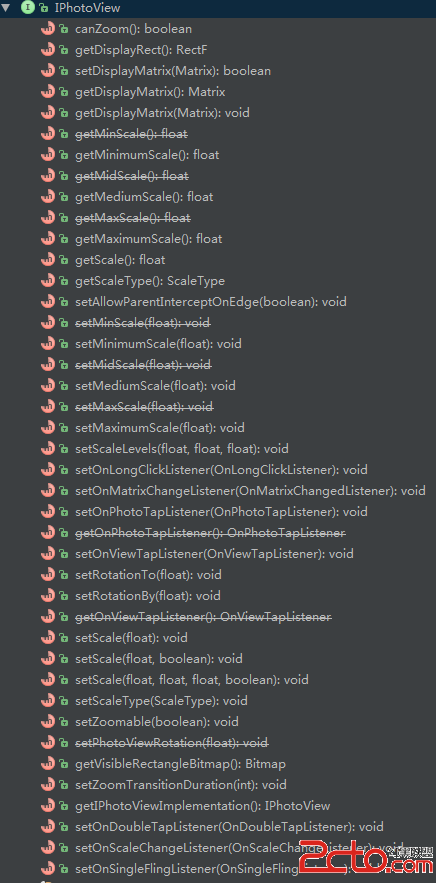
開源庫地址:https://github.com/chrisbanes/PhotoViewPhotoView是一個用來幫助開發者輕松實現ImageView縮放的庫。開發者
 Media Data之多媒體掃描過程分析(二)
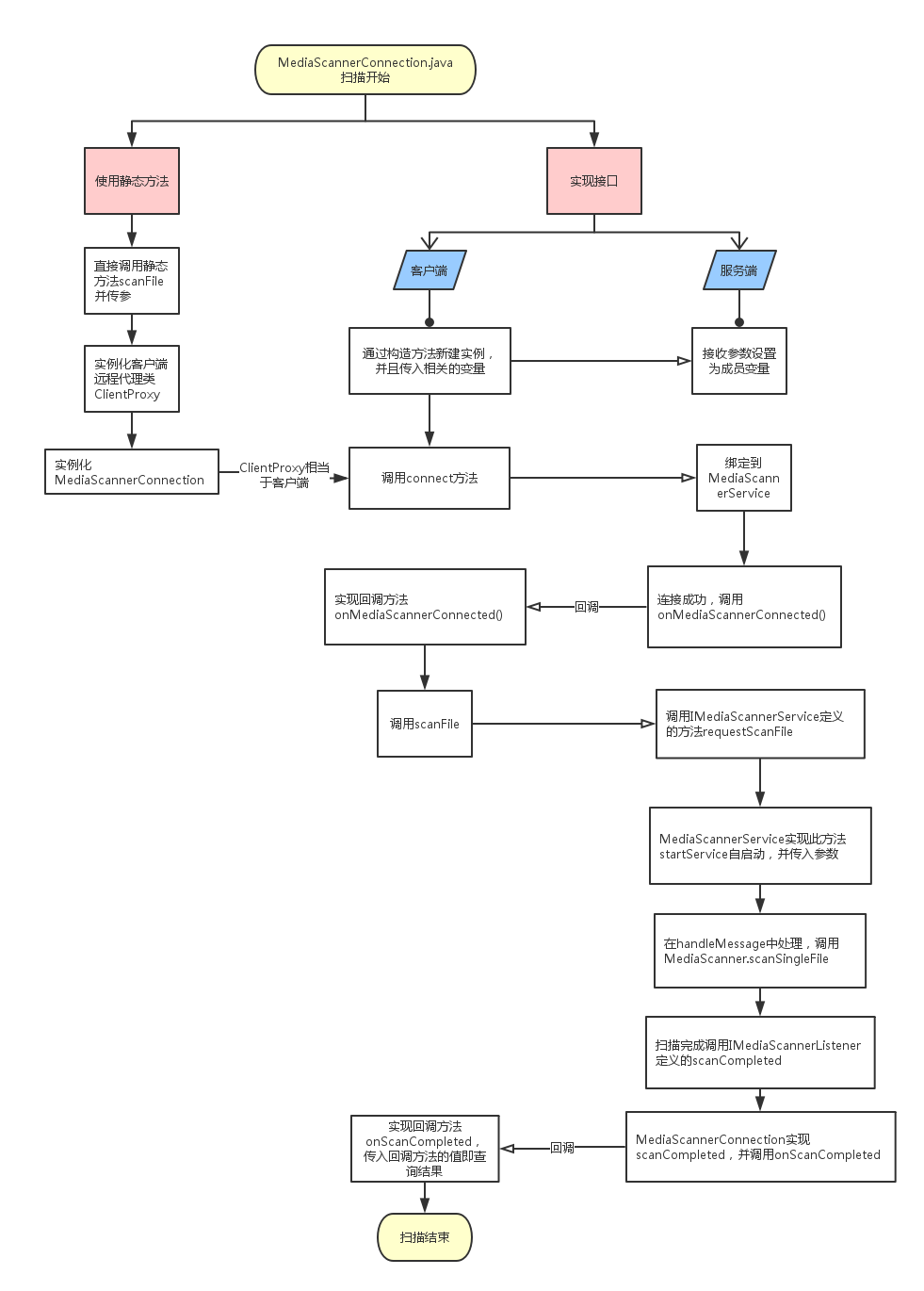
2.1.5 android_media_MediaScanner.cpp對於android_media_MediaScanner.cpp來說,主要分析三個函數native
 Android-ListView兩種適配器以及事件監聽
Android-ListView兩種適配器ListView在安卓App中非常常見,幾乎每一個App都會有涉及,比如QQ消息列表,或者是通訊錄還有就是酷我音樂的歌曲列表都是