編輯:關於Android編程
Handler是開發人員在面試過程中最常見的問題之一了,這篇文章將較為全面地對Handler進行解讀,包括源碼層,以及使用方法。
如果看完文章有疑問,歡迎在評論中一起探討
基本內容包括:
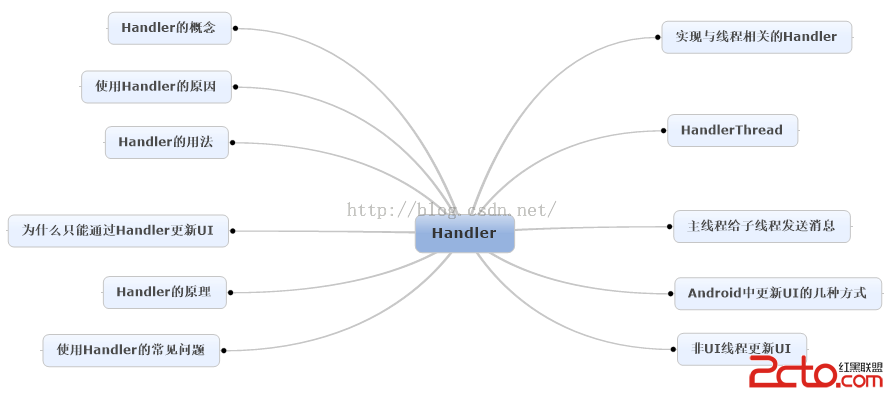
看完文章之後,可以用這個圖片進行復習。
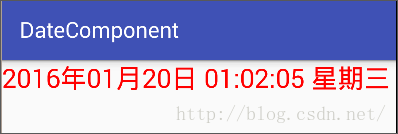
一、什麼是Handler Handler是Android提供用來更新UI的一套機制,也是一套消息處理機制,可以用它來發送消息,也可以用它來接收消息。 二、為什麼使用Handler Android在設計之時,就封裝了一套消息的創建、傳遞、處理機制,若不遵循這樣的處理機制,就沒辦法更新UI信息,並且會拋出異常 三、Handler用法 1、postdelayed()延時發送執行子線程 文字輪詢Demo(實現每隔一秒鐘更新一次Textview的功能)
public class MainActivity extends AppCompatActivity {


    private TextView mTextView;

    private Handler mHandler = new Handler(){
        @Override
        public void handleMessage(Message msg) {
            super.handleMessage(msg);
        }
    };

    private String[] str = new String[]{"傲慢","偏見","僵屍"};
    private int index = 0;
    MyRunnable myRunnable = new MyRunnable();

    private class MyRunnable implements Runnable{

        @Override
        public void run() {
            index = index % 3;
            mTextView.setText(str[index]);
            index ++;
            mHandler.postDelayed(myRunnable,1000);
        }
    }

    @Override
    protected void onCreate(Bundle savedInstanceState) {
        super.onCreate(savedInstanceState);
        setContentView(R.layout.activity_main);

        mTextView = (TextView) findViewById(R.id.tv);


        mHandler.postDelayed(myRunnable,1000);
    }
}
public class MainActivity extends AppCompatActivity {


    private TextView mTextView;

    Handler mHandler = new Handler(){
        @Override
        public void handleMessage(Message msg) {
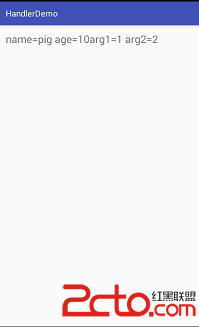
            mTextView.setText(msg.obj+""+ "arg1="+msg.arg1 + " arg2="+msg.arg2);
            super.handleMessage(msg);
        }
    };

    private  class Person{
        String name;
        int age;

        @Override
        public String toString() {
            return "name="+name+" age="+age;
        }
    }

    @Override
    protected void onCreate(Bundle savedInstanceState) {
        super.onCreate(savedInstanceState);
        setContentView(R.layout.activity_main);

        mTextView = (TextView) findViewById(R.id.tv);

        new Thread(){
            @Override
            public void run() {
                Message msg = new Message();
                msg.arg1 = 1;
                msg.arg2 = 2;
                Person person = new Person();
                person.name = "pig";
                person.age = 10;
                msg.obj = person;
                mHandler.sendMessage(msg);
            }
        }.start();

    }
}
public class MainActivity extends AppCompatActivity {


    private TextView mTextView;

    Handler mHandler = new Handler(){
        @Override
        public void handleMessage(Message msg) {
            mTextView.setText(msg.obj+""+ "arg1="+msg.arg1 + " arg2="+msg.arg2);
            super.handleMessage(msg);
        }
    };

    private  class Person{
        String name;
        int age;

        @Override
        public String toString() {
            return "name="+name+" age="+age;
        }
    }

    @Override
    protected void onCreate(Bundle savedInstanceState) {
        super.onCreate(savedInstanceState);
        setContentView(R.layout.activity_main);

        mTextView = (TextView) findViewById(R.id.tv);

        new Thread(){
            @Override
            public void run() {
                Message msg = mHandler.obtainMessage();//同樣可以獲取Message對象
                msg.arg1 = 1;
                msg.arg2 = 2;
                Person person = new Person();
                person.name = "pig";
                person.age = 10;
                msg.obj = person;
                msg.sendToTarget();
            }
        }.start();

    }
}
public class MainActivity extends AppCompatActivity {


    private TextView mTextView;

    Handler mHandler = new Handler(new Handler.Callback() {
        //傳入CallBack對象,對於重載的返回值為bollean的handleMessage()
        //返回值為false,將先執行這個方法,再執行返回值為void的handleMessage()方法
        //返回值為true,只執行這個方法
        @Override
        public boolean handleMessage(Message msg) {
            Toast.makeText(MainActivity.this, "截獲消息", Toast.LENGTH_SHORT).show();
            return false;
        }
    }){
        public void handleMessage(Message msg) {
            Toast.makeText(MainActivity.this, "發出消息", Toast.LENGTH_SHORT).show();
        }
    };

    private  class Person{
        String name;
        int age;

        @Override
        public String toString() {
            return "name="+name+" age="+age;
        }
    }

    @Override
    protected void onCreate(Bundle savedInstanceState) {
        super.onCreate(savedInstanceState);
        setContentView(R.layout.activity_main);

        mTextView = (TextView) findViewById(R.id.tv);
        Button btn = (Button) findViewById(R.id.btn);
        btn.setOnClickListener(new View.OnClickListener() {
            @Override
            public void onClick(View v) {
                mHandler.sendEmptyMessage(0);
            }
        });


    }
}
public static void loop() {
    final Looper me = myLooper();
    if (me == null) {
        throw new RuntimeException("No Looper; Looper.prepare() wasn't called on this thread.");
    }
    final MessageQueue queue = me.mQueue;

    // Make sure the identity of this thread is that of the local process,
    // and keep track of what that identity token actually is.
    Binder.clearCallingIdentity();
    final long ident = Binder.clearCallingIdentity();

    for (;;) {
        Message msg = queue.next(); // might block
        if (msg == null) {
            // No message indicates that the message queue is quitting.
            return;
        }

        // This must be in a local variable, in case a UI event sets the logger
        Printer logging = me.mLogging;
        if (logging != null) {
            logging.println(">>>>> Dispatching to " + msg.target + " " +
                    msg.callback + ": " + msg.what);
        }

        msg.target.dispatchMessage(msg);

        if (logging != null) {
            logging.println("<<<<< Finished to " + msg.target + " " + msg.callback);
        }

        // Make sure that during the course of dispatching the
        // identity of the thread wasn't corrupted.
        final long newIdent = Binder.clearCallingIdentity();
        if (ident != newIdent) {
            Log.wtf(TAG, "Thread identity changed from 0x"
                    + Long.toHexString(ident) + " to 0x"
                    + Long.toHexString(newIdent) + " while dispatching to "
                    + msg.target.getClass().getName() + " "
                    + msg.callback + " what=" + msg.what);
        }

        msg.recycleUnchecked();
    }
}
public void dispatchMessage(Message msg) {
    if (msg.callback != null) {
        handleCallback(msg);
    } else {
        if (mCallback != null) {
            if (mCallback.handleMessage(msg)) {
                return;
            }
        }
        handleMessage(msg);
    }
}
從源碼看出,當有CallBack的時候,會截獲消息,沒有的話會回調handleMessage()來處理消息
而對於SendMessage()系列的方法,這裡不再做過多解析,但從其源碼可以看出,確實是最終把消息傳入了消息隊列中。
六、創建與線程相關的Handler
在子線程中創建Handler,需要通過Looper.prepare()獲取Looper,且調用Looper.loop()方法對消息隊列中的Message進行輪詢
public class MainActivity extends AppCompatActivity {


    private TextView mTextView;

    public Handler mHandler = new Handler(){//主線程中的Handler
        @Override
        public void handleMessage(Message msg) {
            Log.d("CurrentThread",Thread.currentThread()+"");//打印Thread 的ID
        }
    };

    class MyThread extends Thread{
        private Handler handler;//子線程中的Handler
        @Override
        public void run() {
            Looper.prepare();//獲取Looper
            handler = new Handler(){
                @Override
                public void handleMessage(Message msg) {
                    Log.d("CurrentThread",Thread.currentThread()+"");
                }
            };
            Looper.loop();//輪詢消息隊列
        }
    }


    @Override
    protected void onCreate(Bundle savedInstanceState) {
        super.onCreate(savedInstanceState);
        setContentView(R.layout.activity_main);

        MyThread thread= new MyThread();
        thread.start();
        try {
            thread.sleep(500);
        } catch (InterruptedException e) {
            e.printStackTrace();
        }
        thread.handler.sendEmptyMessage(1);
        mHandler.sendEmptyMessage(1);
    }
}
輸出的結果
03-31 20:56:06.498 1804-1816/? D/CurrentThread: Thread[Thread-113,5,main]
03-31 20:56:06.578 1804-1804/com.lian.handlerdemo D/CurrentThread: Thread[main,5,main]
七、HandlerThread
HandlerThread本質是一個Thread,區別在於他在run()之後創建了一個含有消息隊列的Looper,這樣我們在子線程中創建Handler時候只需指定使用HandlerThread中的Looper,不用再調用Looper.prepare(),looper.loop()等,簡化了操作。
Android系統提供的Handler使用的Looper默認綁定了UI線程的消息隊列,所以我們在Handler中不能進行耗時操作,而對於非UI線程,若想使用消息機制,HandlerThread內部的Looper是最合適的,他不會阻塞UI線程。
public class MainActivity extends AppCompatActivity {


    private TextView mTextView;

    public HandlerThread mHandlerThread;


    @Override
    protected void onCreate(Bundle savedInstanceState) {
        super.onCreate(savedInstanceState);
        setContentView(R.layout.activity_main);

        mHandlerThread = new HandlerThread("handler thread");
        mHandlerThread.start();
        Handler handler = new Handler(mHandlerThread.getLooper()){//通過getLooper()獲取Looper
            @Override
            public void handleMessage(Message msg) {
                Log.d("current thread","" + Thread.currentThread());
            }
        };
        handler.sendEmptyMessage(1);
    }
}
public class MainActivity extends AppCompatActivity {


    public Handler mHandler = new Handler(){
        @Override
        public void handleMessage(Message msg) {
            Log.d("current thread", "" + Thread.currentThread());
            Message message = new Message();
            message.what = 1;
            handler.sendMessageDelayed(message,1000);//向子線程的Handler發送消息
        }
    };

    public HandlerThread mHandlerThread;
    public Handler handler;
    private Button btn1,btn2;


    @Override
    protected void onCreate(Bundle savedInstanceState) {
        super.onCreate(savedInstanceState);
        setContentView(R.layout.activity_main);

        btn1 = (Button) findViewById(R.id.btn);
        btn2 = (Button) findViewById(R.id.btn2);

        mHandlerThread = new HandlerThread("handler thread");//指定HandlerThread的名字
        mHandlerThread.start();
        handler = new Handler(mHandlerThread.getLooper()){//通過getLooper()獲取Looper
            @Override
            public void handleMessage(Message msg) {
                Log.d("current thread", "" + Thread.currentThread());
                Message message = new Message();
                mHandler.sendMessageDelayed(message,1000);//向主線程中的Handler發送消息
            }
        };

        btn1.setOnClickListener(new View.OnClickListener() {
            @Override
            public void onClick(View v) {
                handler.sendEmptyMessage(1);//開始發送消息
            }
        });

        btn2.setOnClickListener(new View.OnClickListener() {
            @Override
            public void onClick(View v) {
                handler.removeMessages(1);//停止發送消息
            }
        });

    }
}
結果:
03-31 22:21:11.422 16748-16760/com.lian.handlerdemo D/currentthread: Thread[handler thread,5,main]
03-31 22:21:12.422 16748-16748/com.lian.handlerdemo D/currentthread: Thread[main,5,main]
03-31 22:21:13.422 16748-16760/com.lian.handlerdemo D/currentthread: Thread[handler thread,5,main]
03-31 22:21:14.422 16748-16748/com.lian.handlerdemo D/currentthread: Thread[main,5,main]
03-31 22:21:15.426 16748-16760/com.lian.handlerdemo D/currentthread: Thread[handler thread,5,main]
03-31 22:21:16.426 16748-16748/com.lian.handlerdemo D/currentthread: Thread[main,5,main]
03-31 22:21:20.414 16748-16760/com.lian.handlerdemo D/currentthread: Thread[handler thread,5,main]
03-31 22:21:21.414 16748-16748/com.lian.handlerdemo D/currentthread: Thread[main,5,main]
03-31 22:21:22.414 16748-16760/com.lian.handlerdemo D/currentthread: Thread[handler thread,5,main]
03-31 22:21:23.418 16748-16748/com.lian.handlerdemo D/currentthread: Thread[main,5,main]
九、四種更新UI的方法 1、Handler.post(); 2、Handler.sendMessage(); 第一二種方法事實上沒有本質的區別,都是通過發送消息,在UI線程中更新UI,前面已經做過演示,不再贅述 3、runOnUIThread() 使用方法:
public class MainActivity extends AppCompatActivity {
    TextView mTextView;

    @Override
    protected void onCreate(Bundle savedInstanceState) {
        super.onCreate(savedInstanceState);
        setContentView(R.layout.activity_main);

        mTextView = (TextView) findViewById(R.id.tv);

        new Thread(){

            @Override
            public void run() {

                try {
                    Thread.sleep(1000);
                } catch (InterruptedException e) {
                    e.printStackTrace();
                }
                runOnUiThread(new Runnable() {
                    @Override
                    public void run() {
                        mTextView.setText("更新UI");
                    }
                });
            }
        }.start();

    }
}
public final void runOnUiThread(Runnable action) {
    if (Thread.currentThread() != mUiThread) {
        mHandler.post(action);
    } else {
        action.run();
    }
}
可以發現,其本質上仍然是通過Handler.post()方法再UI線程中更新UI
4、View.post()
使用方法
public class MainActivity extends AppCompatActivity {
    TextView mTextView;

    @Override
    protected void onCreate(Bundle savedInstanceState) {
        super.onCreate(savedInstanceState);
        setContentView(R.layout.activity_main);

        mTextView = (TextView) findViewById(R.id.tv);

        new Thread(){
            @Override
            public void run() {
                try {
                    Thread.sleep(1000);
                } catch (InterruptedException e) {
                    e.printStackTrace();
                }
                mTextView.post(new Runnable() {
                    @Override
                    public void run() {
                        mTextView.setText("更新UI");
                    }
                });
            }
        }.start();

    }
}
public boolean post(Runnable action) {
    final AttachInfo attachInfo = mAttachInfo;
    if (attachInfo != null) {
        return attachInfo.mHandler.post(action);
    }
    // Assume that post will succeed later
    ViewRootImpl.getRunQueue().post(action);
    return true;
}
十、在非UI線程中更新UI的方法
先看一個Demo
public class MainActivity extends AppCompatActivity {
    TextView mTextView;

    @Override
    protected void onCreate(Bundle savedInstanceState) {
        super.onCreate(savedInstanceState);
        setContentView(R.layout.activity_main);

        mTextView = (TextView) findViewById(R.id.tv);

        new Thread(){
            @Override
            public void run() {
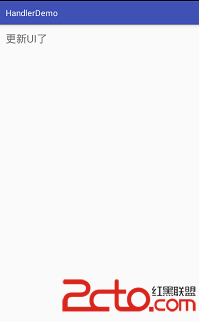
                mTextView.setText("更新UI了");
            }
        }.start();

    }
}
結果:
public class MainActivity extends AppCompatActivity {
    TextView mTextView;

    @Override
    protected void onCreate(Bundle savedInstanceState) {
        super.onCreate(savedInstanceState);
        setContentView(R.layout.activity_main);

        mTextView = (TextView) findViewById(R.id.tv);

        new Thread(){
            @Override
            public void run() {

                try {
                    Thread.sleep(2000);
                } catch (InterruptedException e) {
                    e.printStackTrace();
                }

                mTextView.setText("更新UI了");
            }
        }.start();

    }
}
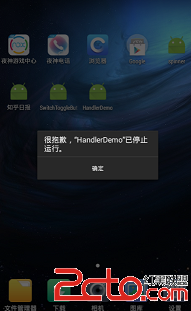
更新失敗,拋出異常
mLooper = Looper.myLooper();
    if (mLooper == null) {
        throw new RuntimeException(
            "Can't create handler inside thread that has not called Looper.prepare()");
    }
    mQueue = mLooper.mQueue;
    mCallback = callback;
    mAsynchronous = async;
}
 [Android測試] AS+Appium+Java+Win 自動化測試之九:PO模式的實例與ReportNg測試報告
一、介紹准備之前在這篇文章有寫過一個例子,但是這個例子只實現了登錄功能,封裝還是不好的,也不能多個用例執行,現在來用上一篇文章封裝之後的方法來寫實例。封裝和例子代碼已打包
 源碼提供!Android即時通訊和sns開源項目匯總
這是一個整理即時通訊(IM)和社交系統(SNS)優秀開源項目的文檔,項目上傳github歡迎提交更新。github地址:https://github.com/Camelo
 Android開發登陸案例
layout<?xml version=1.0?>-<LinearLayout android:paddingTop=@dimen/ac
 [React Native]獲取網絡狀態
使用React Native,可以使用NetInfo API獲取手機當前的各個網絡狀態。 componentWillMount() { NetInfo